
1. Introduction
Thank you for choosing the triangle Borea BR10 Tower Speaker. This 3-way floorstanding loudspeaker is designed to deliver high-fidelity audio with deep bass and a wide soundstage, suitable for home theater systems, music listening, and dedicated audio setups. This manual provides essential information for the proper setup, operation, and maintenance of your new speakers to ensure optimal performance and longevity.
2. Safety Instructions
- Placement: Ensure the speakers are placed on a stable, level surface to prevent tipping. Use the provided steel spikes or rubber tips for stability and vibration isolation.
- Ventilation: Do not block any ventilation openings. Allow adequate space around the speakers for proper airflow.
- Moisture: Do not expose the speakers to water, moisture, or excessive humidity. Avoid placing liquids near the speakers.
- Heat: Keep speakers away from heat sources such as radiators, heat registers, stoves, or other heat-producing apparatus.
- Power: Always disconnect power from your amplifier before making any connections to the speakers.
- Cleaning: Use only a dry, soft cloth for cleaning. Avoid abrasive cleaners or solvents.
- Servicing: Do not attempt to service the speakers yourself. Refer all servicing to qualified service personnel.
3. What's in the Box
Upon unpacking your triangle Borea BR10 Tower Speaker, please ensure all the following components are present:
- triangle Borea BR10 Tower Speaker (1 unit)
- Magnetic Grills
- Steel Spikes (for carpeted floors)
- Rubber Tips (for hard floors)
4. Setup
4.1 Speaker Placement
The BR10 speakers are designed for floor standing placement. For optimal stereo imaging and soundstage, position the speakers equidistant from your primary listening position and away from walls to minimize reflections. Experiment with toe-in (angling the speakers slightly towards the listening position) to find the best sound balance for your room.

Image: Front view of the BR10 Tower Speaker, showcasing its design and placement in a typical home audio environment.
4.2 Connecting to Your Amplifier
The BR10 features a dual terminal design, allowing for bi-wiring or bi-amping if your amplifier supports it. For standard connections, ensure the metal jumpers connecting the upper and lower terminals are in place. Use high-quality speaker cables with a cross-section of 4mm² or standard banana plugs for secure connections.
- Turn off your amplifier: Before making any connections, ensure your amplifier is powered off and unplugged from the mains.
- Identify terminals: Locate the dual terminal posts on the rear of each BR10 speaker. These are typically color-coded (red for positive +, black for negative -).
- Connect speaker cables: Connect the positive (+) terminal of the speaker to the positive (+) terminal of the corresponding amplifier channel. Similarly, connect the negative (-) terminal of the speaker to the negative (-) terminal of the amplifier. Ensure correct polarity for both speakers.
- Secure connections: Tighten the binding posts firmly but do not overtighten. If using banana plugs, insert them fully into the posts.
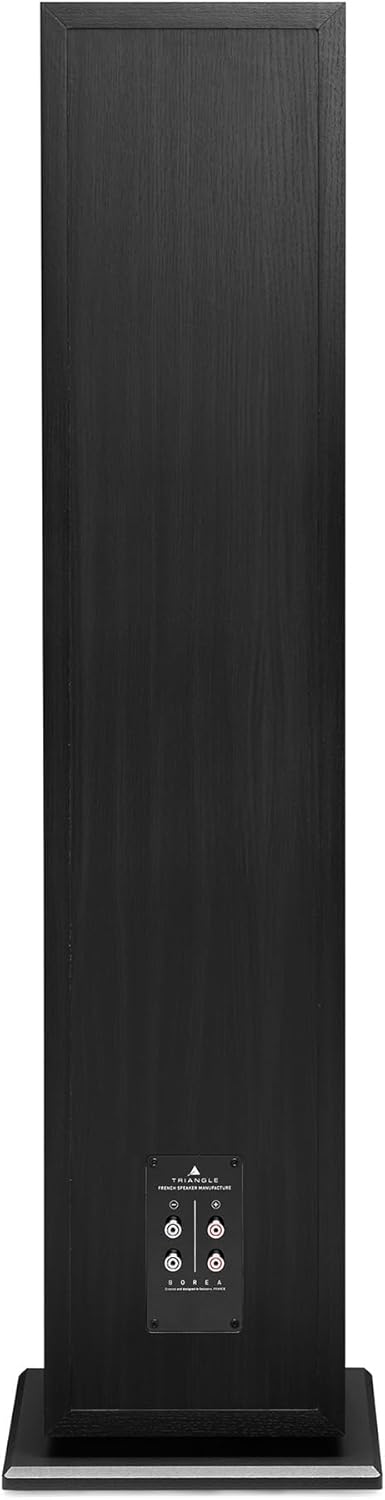
Image: Rear view of the BR10 speaker, highlighting the dual terminal binding posts for amplifier connections.
4.3 Amplifier Recommendations
The BR10 speakers are designed to work with amplifiers providing 75W to 350W of power at 8 ohms. Ensure your amplifier's output impedance matches the speaker's impedance for optimal performance and to prevent damage.
5. Operating Instructions
Once your BR10 speakers are correctly connected to your amplifier, operating them is straightforward:
- Power on: Turn on your amplifier and any connected audio sources (e.g., television, laptop, gaming console, home theater receiver).
- Select input: Select the appropriate input on your amplifier for the audio source you wish to play.
- Adjust volume: Start with a low volume level and gradually increase it to your desired listening level. Avoid excessively high volumes that can cause distortion or damage to the speakers.
- Audio Output Mode: The BR10 speakers are suitable for surround sound setups, offering a versatile audio experience.
Control of the audio playback (volume, source selection) will typically be managed through your connected amplifier or audio source's remote control.
6. Maintenance
Proper maintenance will help preserve the appearance and performance of your BR10 speakers:
- Cleaning the Cabinet: Use a soft, dry, lint-free cloth to wipe down the speaker cabinets. For stubborn marks, a slightly damp cloth can be used, followed immediately by a dry cloth. Avoid using chemical cleaners, polishes, or abrasive materials, as these can damage the MDF finish.
- Cleaning Drivers: The tweeter (silk dome), midrange (natural cellulose pulp), and woofers (fiberglass membrane) should be cleaned with extreme care. Use a soft brush or compressed air to gently remove dust. Do not touch the driver cones directly.
- Grills: The magnetic grills can be removed for cleaning. Gently wipe them with a soft, dry cloth.
- Environment: Avoid placing speakers in direct sunlight or near strong heat sources, which can cause discoloration or damage to the cabinet materials. Maintain a stable room temperature and humidity.
7. Troubleshooting
If you encounter issues with your BR10 speakers, refer to the following common troubleshooting steps:
- No Sound:
- Check all cable connections between the speakers and the amplifier. Ensure they are secure and correctly connected (positive to positive, negative to negative).
- Verify the amplifier is powered on and the correct input source is selected.
- Check the volume level on your amplifier and audio source.
- Ensure the metal jumpers on the speaker terminals are in place if not bi-wiring/bi-amping.
- Distorted Sound:
- Reduce the volume level. Distortion often occurs when the amplifier or speakers are overdriven.
- Check speaker cable connections for any loose strands or short circuits.
- Inspect speaker drivers for any visible damage.
- Ensure your amplifier's power output is within the recommended range for the BR10 speakers.
- Uneven Sound (one speaker louder/quieter):
- Check individual speaker cable connections for the affected speaker.
- Verify balance settings on your amplifier or audio source.
- Ensure both speakers are placed symmetrically in the room.
If these steps do not resolve the issue, please contact triangle customer support or your authorized dealer.
8. Specifications
| Feature | Specification |
|---|---|
| Speaker Type | 3-Way Floorstanding Tower Speaker |
| Power Handling | 200W |
| Recommended Amplifier Power | 75W - 350W @ 8 ohms |
| Frequency Response (+/-3dB Hz) | 30Hz - 22,000kHz |
| Tweeter | 1 x 25mm silk dome tweeter (EFS) |
| Midrange | 1 x 16cm midrange with natural cellulose pulp membrane |
| Woofer | 2 x 21cm woofer with fiberglass membrane |
| Connectivity Technology | Speaker Binding Posts (Dual Terminal) |
| Audio Output Mode | Surround |
| Mounting Type | Floor Standing |
| Enclosure Material | MDF, Silk, Cellulose, Fiberglass |
| Item Dimensions (D x W x H) | 17.3"D x 11.84"W x 45.08"H |
| Item Weight | 27.7 Kilograms |
| Model Number | BR10-WAL |
| Color | Black (as per current product) |
| Built-In Media | Magnetic Grills, Rubber Tips, Steel Spikes |
| Number of Audio Channels | 3.0 |
| Connectivity Protocol | RCA, XLR (via amplifier) |
Key Technologies
- New Generation of 8" Drivers: The BR10 features advanced 8-inch woofers designed for powerful and precise bass reproduction.
- Dual Terminal: Equipped with a dual terminal for flexible wiring options, including bi-wiring or bi-amping.
- Optimized Crossover: Features an optimized crossover network for seamless integration between the drivers, ensuring a coherent sound.
- DVAS System: Incorporates the DVAS (Driver Vibration Absorption System) to reduce unwanted cabinet vibrations, enhancing sound clarity.

Image: Detailed view of the 8-inch woofer driver.

Image: The dual terminal plate, showing connection points.

Image: The internal crossover board, responsible for directing frequencies to the correct drivers.

Image: Internal view of the speaker cabinet, illustrating the DVAS bracing system.
9. Warranty and Support
9.1 Warranty Information
The triangle Borea BR10 Tower Speaker comes with a 2-year limited warranty. Additionally, an extended warranty of up to 3 years is available for passive speakers. Please retain your proof of purchase for warranty claims. The warranty covers manufacturing defects under normal use.
9.2 Customer Support
For technical assistance, troubleshooting beyond this manual, or warranty inquiries, please contact triangle customer support or your authorized dealer. You can find more information and contact details on the official triangle website or through the triangle Store on Amazon.


