
1. Introduction
The KSUN CT58 is a versatile 4G POC (Push-to-Talk Over Cellular) and UHF dual-mode handheld radio designed for reliable communication across various environments. It supports nationwide communication via 4G networks and short-range analog communication via UHF. This manual provides essential information for the proper setup, operation, and maintenance of your device.
2. Safety Information
- Do not operate the radio in explosive atmospheres (e.g., flammable gases, dust particles, metallic powders).
- Do not disassemble or modify the radio. Repairs should only be performed by authorized personnel.
- Use only KSUN-approved batteries and chargers. Improper use may lead to fire, explosion, or injury.
- Keep the radio away from strong magnetic fields and direct sunlight.
- Avoid exposing the radio to extreme temperatures or humidity.
- Ensure the antenna is properly attached before operation to prevent damage to the radio.
3. Package Contents
Verify that all items are present in your package:
- 2 x KSUN CT58 Dual Mode Radios
- 2 x Batteries (8800 mAh)
- 2 x Charging Docks
- 2 x Power Adapters
- 2 x USB Charging Cables
- 2 x Antennas (Public Network Antenna)
- 2 x Antennas (Analog Antenna)
- 2 x Belt Clips
- 2 x Lanyards
- 1 x User Manual (this document)
Note: SIM cards are NOT included and must be purchased separately.
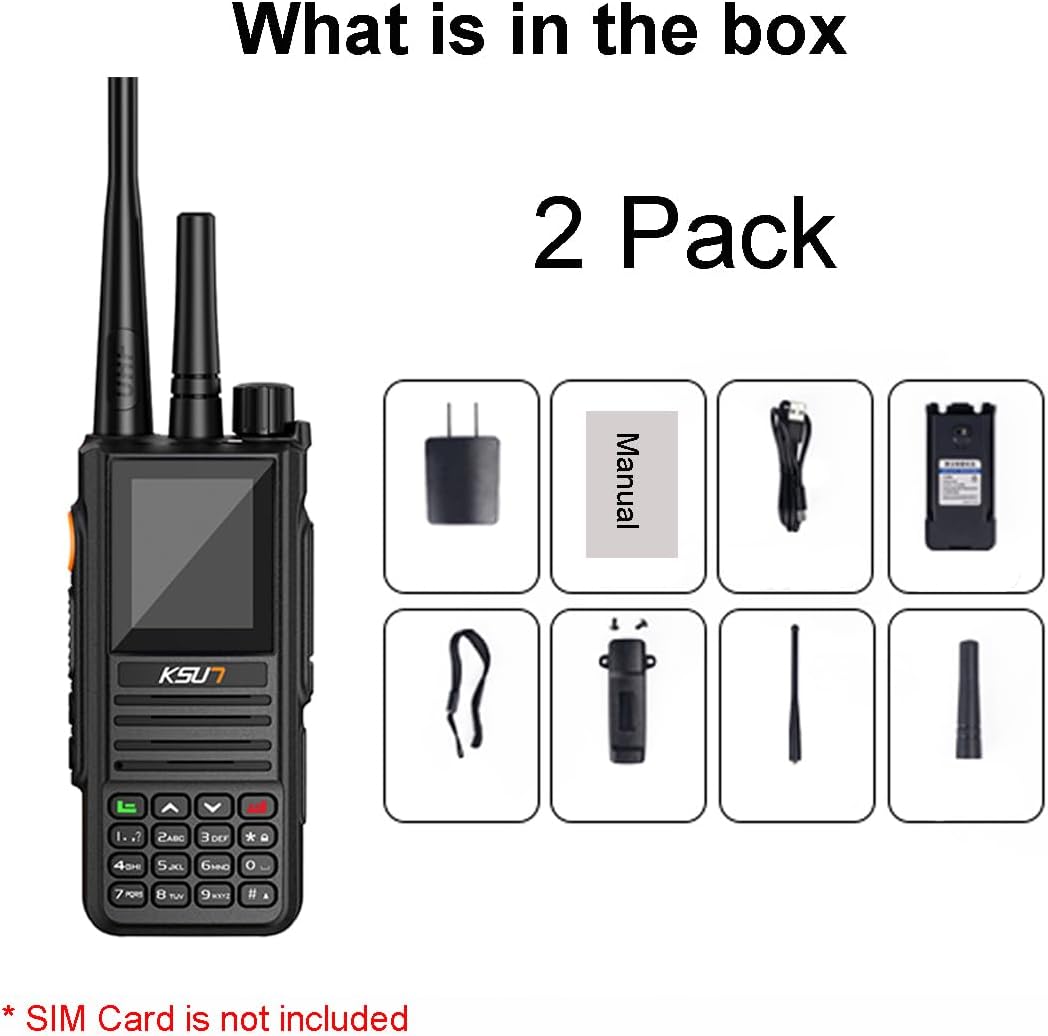
Image: Contents of the KSUN CT58 package, including two radios, batteries, chargers, cables, antennas, belt clips, and lanyards. A manual is also shown.
4. Product Overview
4.1 Radio Components
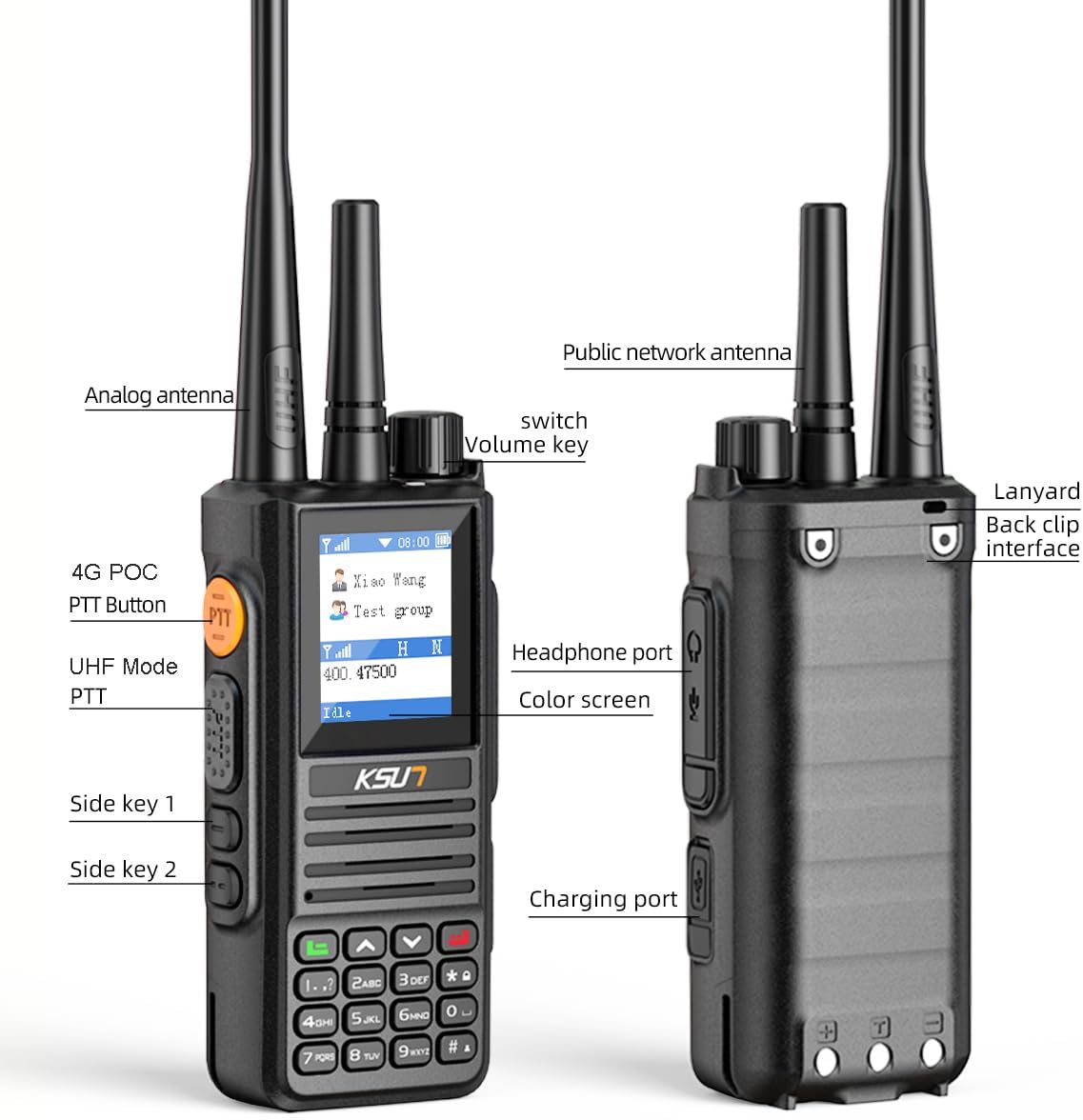
Image: Front and side view diagram of the KSUN CT58 radio, labeling key components such as the Public Network Antenna, Analog Antenna, Volume Key, 4G POC PTT Button, UHF Mode PTT, Side Keys, Headphone Port, Color Screen, Charging Port, Lanyard, and Back Clip Interface.
- Public Network Antenna: For 4G POC network communication.
- Analog Antenna: For UHF short-range communication.
- Volume Key: Rotate to adjust speaker volume.
- 4G POC PTT Button: Press to transmit in 4G POC mode.
- UHF Mode PTT: Press to transmit in UHF analog mode.
- Side Keys (1 & 2): Programmable function keys.
- Color Screen: Displays status, menu, and contact information.
- Headphone Port: For connecting external audio accessories.
- Charging Port: For connecting the USB charging cable.
- Lanyard/Back Clip Interface: Attachment points for accessories.
5. Setup
5.1 Battery Installation
- Ensure the radio is powered off.
- Align the battery with the battery compartment on the back of the radio.
- Press the battery firmly until it clicks into place.
- To remove, slide the battery release latch and lift the battery.

Image: A KSUN CT58 radio with its 8800 mAh battery pack shown partially inserted, indicating the battery capacity.
5.2 SIM Card Installation
The 4G POC function requires a SIM card (not included). Please purchase a compatible SIM card from your local provider.
- Power off the radio and remove the battery.
- Locate the SIM card slot, usually beneath the battery compartment.
- Insert the SIM card according to the diagram next to the slot, ensuring correct orientation.
- Reinstall the battery.
5.3 Antenna Attachment
The KSUN CT58 uses two antennas: one for 4G POC and one for UHF analog. Ensure both are securely attached.
- Screw the Public Network Antenna onto the designated connector on top of the radio.
- Screw the Analog Antenna onto its designated connector.
- Do not overtighten.
5.4 Initial Charging
Before first use, fully charge the battery.
- Connect the USB charging cable to the radio's charging port or place the radio in the charging dock.
- Connect the other end of the cable to the power adapter and plug it into a wall outlet.
- The charging indicator light will show charging status (e.g., red for charging, green for fully charged).
6. Operating Instructions
6.1 Power On/Off and Volume Adjustment
- Power On: Rotate the Volume Key clockwise until you hear a click and the screen illuminates.
- Power Off: Rotate the Volume Key counter-clockwise until you hear a click and the screen turns off.
- Volume Adjustment: Rotate the Volume Key clockwise to increase volume, counter-clockwise to decrease.
6.2 Dual Mode Operation (POC & UHF)
The KSUN CT58 supports four working modes: POC, Analog, Mixed, and Repeater.

Image: Illustrates the four working modes: POC Mode (4G network, group call), Analog Mode (short distance, UHF signal, 16 channels), Mixed Mode (default, both POC and analog), and Repeater Mode (signal relay for analog radios to receive POC intercom).
- POC Mode (4G Network):
- Requires an active SIM card and 4G network coverage.
- Enables nationwide communication and group calls.
- Press the 4G POC PTT Button (typically orange) to transmit.
- Analog Mode (UHF Short Range):
- Operates on UHF analog signals, providing 1-2 miles of coverage in outdoor environments without network signal.
- Features 16 channels.
- Press the UHF Mode PTT (typically black) to transmit.
- Mixed Mode: Default mode where both POC and Analog functions are active. The radio automatically uses the appropriate mode based on signal availability or user selection.
- Repeater Mode: Functions as a signal relay. In this mode, the radio can extend the range of UHF transmissions by relaying them over the POC network, allowing analog radios to communicate over longer distances.
6.3 Dual PTT Functionality
The KSUN CT58 features separate PTT buttons for 4G POC and UHF modes, allowing for seamless switching without manual configuration.
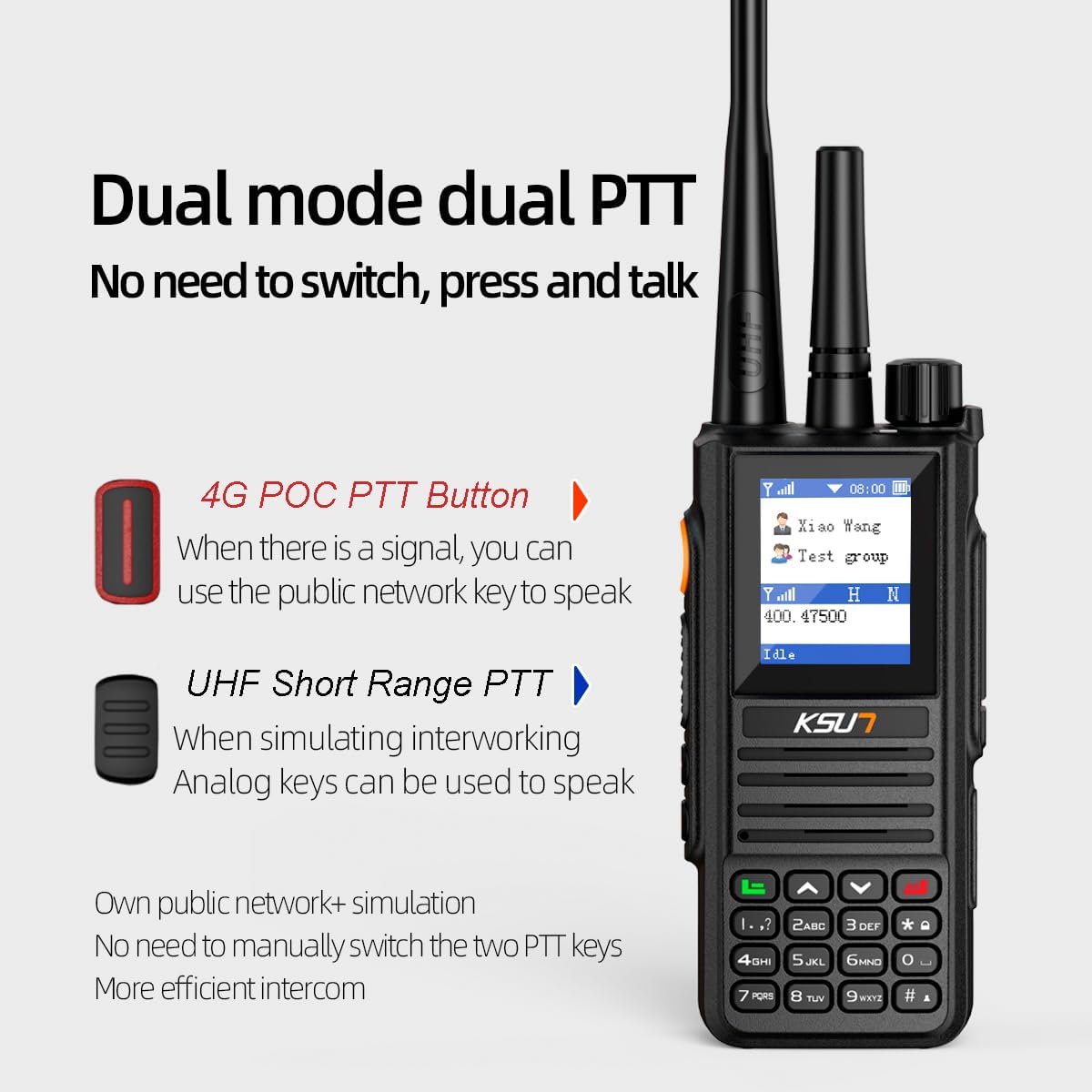
Image: Shows the KSUN CT58 radio highlighting the 4G POC PTT Button (red) and the UHF Short Range PTT (black), explaining that no manual switching is needed between modes.
- When a 4G signal is available, press the 4G POC PTT Button to use the public network for communication.
- When simulating interworking or in areas without 4G signal, press the UHF Short Range PTT for analog communication.
6.4 Group Communication
For group communication with multiple units, especially when purchasing more than two, you may need to contact the seller to arrange grouping. Provide a group name (e.g., "amzct012") via message to facilitate this setup.
7. Maintenance
7.1 Battery Care
- Charge the battery fully before first use.
- Avoid overcharging or completely draining the battery to prolong its lifespan.
- Store batteries in a cool, dry place when not in use.
- If the battery is not used for an extended period, charge it periodically (e.g., every 3 months) to maintain its capacity.
7.2 Cleaning
- Wipe the radio's surface with a soft, damp cloth.
- Do not use harsh chemicals, solvents, or abrasive cleaners.
- Ensure all ports are dry before charging or operating.
7.3 Storage
- Store the radio in a dry, dust-free environment.
- Remove the battery if storing for long periods.
- Keep out of reach of children.
8. Troubleshooting
| Problem | Possible Cause | Solution |
|---|---|---|
| Radio does not power on. | Battery is low or not installed correctly. | Charge the battery. Ensure the battery is securely installed. |
| No 4G POC communication. | No SIM card, inactive SIM card, or no 4G network coverage. | Install a working SIM card. Check for 4G network availability. Contact your SIM card provider. |
| Poor UHF analog communication range. | Obstructions (buildings, terrain), low battery, or incorrect antenna. | Move to an open area. Ensure battery is charged. Verify Analog Antenna is correctly attached. |
| Cannot communicate with other radios in a group. | Radios are not properly grouped or on different channels/networks. | Ensure all radios are configured for the same group/channel. Contact the seller for group setup assistance if needed. |
| Battery not charging. | Charger/cable faulty, poor connection, or battery issue. | Check charger and cable connections. Try a different outlet. Ensure battery is properly seated in the dock. |
9. Specifications
| Feature | Detail |
|---|---|
| Model Number | CT58 |
| Brand | KSUN |
| Communication Modes | 4G POC Network, UHF Analog |
| UHF Frequency Range | 450-470 MHz |
| Number of UHF Channels | 16 |
| Talking Range (POC) | Unlimited (Nationwide via 4G) |
| Talking Range (UHF Analog) | 1-2 miles (outdoor environments) |
| Battery Capacity | 8800 mAh Lithium Polymer (included) |
| Battery Life | 3 to 5 days (normal use) |
| Item Weight | 1.2 pounds |
| Product Dimensions | 4.52"D x 1.3"W x 2.2"H (11.48 x 3.3 x 5.59 cm) |
| Water Resistance Level | Water Resistant |
| Voltage | 3.7 Volts (DC) |
10. Warranty and Support
For warranty information, technical support, or assistance with product grouping, please contact your retailer or the manufacturer directly. Refer to the product packaging or the seller's information for specific contact details.
When contacting support, please have your product model (CT58) and purchase information readily available.

