

1. Introduction
The Beeitzie B103 is a versatile 2-in-1 Bluetooth 5.4 audio adapter designed to enhance your audio experience. It functions as both a transmitter (TX) and a receiver (RX), allowing you to wirelessly stream audio to and from various devices. This manual provides detailed instructions for setup, operation, and maintenance to ensure optimal performance of your B103.

This diagram illustrates the dual functionality of the Beeitzie B103, showcasing its use in Transmitter (TX) mode for devices like gaming consoles, airplanes, and TVs, and Receiver (RX) mode for wired headphones, car stereos, and wired speakers.
2. Package Contents
Please verify that all items are present in your package:
- Wireless Audio Receiver/Transmitter (Beeitzie B103)
- Dual 3.5mm Male to Female Adapter (for airplane use)
- 3.5mm Audio Female Plug
- RCA Audio Cable
- USB Type-C Charging Cable
- User Manual

An overview of the Beeitzie B103 packaging accessories, including the main unit, various audio cables, and the user manual.
3. Product Diagram
Familiarize yourself with the components and controls of your Beeitzie B103:
| Component | Description |
|---|---|
| P/R Pairing Button | Press to initiate pairing mode. |
| Mode / Power Switch | Toggle between TX (Transmitter) and RX (Receiver) modes, and power on/off. |
| Status Indicator Light | Indicates device status (e.g., pairing, connected). |
| Device Connection Indicator Light | Shows connection status for paired devices. |
| Next Track / Volume - | Controls next track and decreases volume. |
| Previous Track / Volume + | Controls previous track and increases volume. |
| MFB Button | Multi-Function Button for various controls. |
| Microphone | Built-in microphone for calls (RX mode). |
| Charging Port | USB Type-C port for charging. |
| 3.5mm Audio Jack | Main audio input/output port. |

A comprehensive diagram highlighting the various parts and functions of the Beeitzie B103 Bluetooth adapter.
4. Features
- 2-in-1 Transmitter Receiver: Supports both transmitting (TX) and receiving (RX) modes for versatile audio streaming.
- Wide Compatibility: Connects to TVs, computers, airplane entertainment systems, gym equipment, car stereos, and wired speakers. Includes a dual 3.5mm adapter for aircraft audio jacks.
- Advanced Bluetooth Technology: Features Bluetooth 5.4 and a Qualcomm Chip for stable, reliable connections.
- High-Quality Audio: Supports aptX-Adaptive and aptX-Low Latency codecs for superior audio quality with minimal delay.
- Safety and Long Battery Life: Compliant with global safety standards (FCC, CE, RoHS, BQB). Offers over 24 hours of battery life on a single charge, with full charge in 2 hours via Type-C cable. Includes voltage endurance, overcurrent, and short-circuit protection.
- Simple Setup and Quick Pairing: Features a "RESET" button for easy reconnection and intuitive controls for quick pairing.

This chart demonstrates the low latency capabilities of the Beeitzie B103, comparing various audio codecs and their delay performance.

The Beeitzie B103 utilizes advanced Bluetooth 5.4 technology and Qualcomm chips for superior performance and connectivity.
5. Setup
5.1 Charging the Device
Before first use, fully charge your Beeitzie B103. Connect the included USB Type-C cable to the charging port on the device and plug the other end into a USB power source (e.g., wall adapter, computer USB port). The battery indicator lights will show charging progress. A full charge takes approximately 2 hours and provides over 24 hours of use.
5.2 Mode Selection
The Beeitzie B103 has a physical switch to select between Transmitter (TX) and Receiver (RX) modes. Ensure the switch is set to the desired mode before connecting to audio sources or devices.
6. Operating Instructions
6.1 Transmitter (TX) Mode
In TX mode, the B103 transmits audio from non-Bluetooth devices (e.g., TV, airplane entertainment, gym equipment) to your Bluetooth headphones or speakers.
6.1.1 Pairing Your First Bluetooth Headphone/Earbud
- Set the mode switch on the B103 to TX.
- Ensure your Bluetooth headphones/earbuds are in pairing mode. For AirPods, open the lid and hold the button on the back of the case for 5 seconds.
- Double-click the P/R (Pairing/Reset) button on the B103. The "TX" light will rapidly flash, indicating it's searching for devices.
- Once paired, the corresponding indicator light (1 or 2) on the B103 will illuminate steadily.

Visual guide for pairing your first Bluetooth device, such as AirPods, with the Beeitzie B103 in Transmitter mode.
Video demonstrating how to pair AirPods and a second set of headphones with the Beeitzie B103.
6.1.2 Pairing a Second Bluetooth Headphone/Earbud (Dual Pairing)
- Ensure your first device is already paired and connected.
- Place your second Bluetooth headphones/earbuds into pairing mode.
- Double-click the P/R button on the B103 again. The second indicator light will flash.
- Once paired, both indicator lights (1 and 2) will be steadily illuminated.

Visual guide for pairing a second Bluetooth device with the Beeitzie B103 in Transmitter mode.
6.1.3 TX Mode Usage Scenarios
- Airplane Entertainment: Plug the B103 into the airplane's audio jack using the dual 3.5mm adapter. Enjoy movies and music wirelessly with your Bluetooth headphones.

The Beeitzie B103 allows you to connect your Bluetooth headphones to in-flight entertainment systems.
- TV Audio: Connect the B103 to your TV's audio output (3.5mm or RCA using the included cable). Stream TV audio to your Bluetooth headphones for private listening or shared viewing with two headphones.

Share audio from your TV with family or friends using dual pairing in TX mode.
Video demonstrating how to use the Beeitzie B103 with a TV.
- Gym Equipment: Plug the B103 into the audio jack of gym equipment (e.g., treadmill, elliptical) to stream audio to your Bluetooth headphones.

Stream audio wirelessly from gym equipment to your headphones.
- Tablets/PCs: Connect the B103 to the 3.5mm audio output of your tablet or PC to enable wireless audio streaming to your Bluetooth headphones.
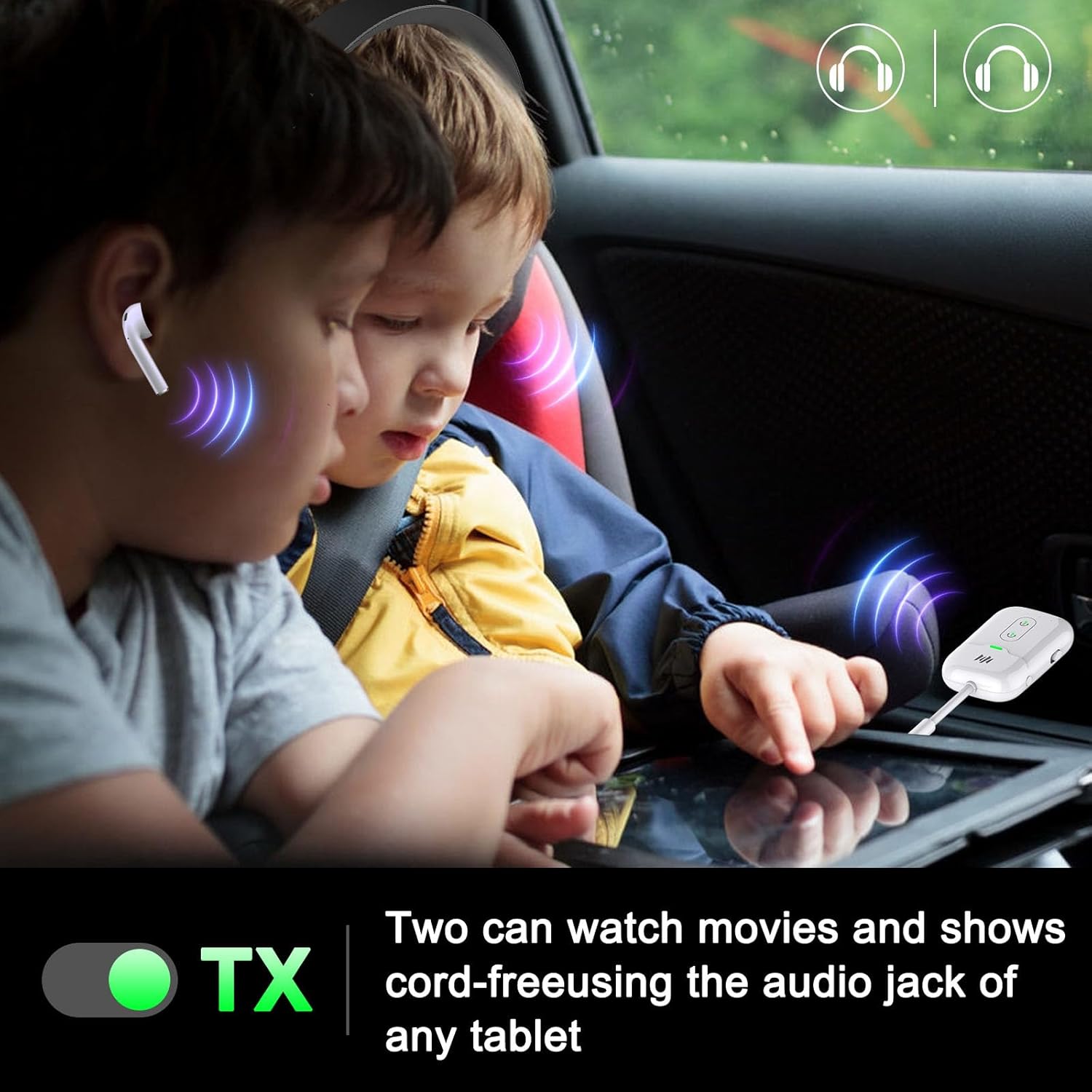
Two people can watch movies and shows cord-free using the audio jack of any tablet.
6.2 Receiver (RX) Mode
In RX mode, the B103 receives Bluetooth audio from your smartphone or other Bluetooth-enabled devices and outputs it to non-Bluetooth audio systems (e.g., car stereo, wired speakers, wired headphones).
6.2.1 Pairing Your First Bluetooth Device (Smartphone)
- Set the mode switch on the B103 to RX.
- Double-click the P/R button on the B103. The "RX" light will rapidly flash, indicating it's searching for devices.
- On your smartphone or Bluetooth-enabled device, search for "B103" in the Bluetooth settings and select it to pair.
- Once paired, the corresponding indicator light (1 or 2) on the B103 will illuminate steadily.

Visual guide for pairing your smartphone with the Beeitzie B103 in Receiver mode.
Video demonstrating how to pair the Beeitzie B103 with a smartphone and audio system.
6.2.2 Pairing a Second Bluetooth Device (Dual Pairing)
- Ensure your first device is already paired and connected.
- On your second smartphone or Bluetooth-enabled device, search for "B103" in the Bluetooth settings and select it to pair.
- Once paired, both indicator lights (1 and 2) will be steadily illuminated.

Visual guide for pairing a second smartphone with the Beeitzie B103 in Receiver mode.
6.2.3 RX Mode Usage Scenarios
- Car Stereo: Plug the B103 into your car's AUX input. Connect your smartphone via Bluetooth to the B103 to stream music wirelessly through your car's speakers.

Connect your phone to your car audio system to enjoy music wirelessly.
- Wired Speakers/Stereo Systems: Connect the B103 to your wired speakers or home stereo system's audio input. Use your smartphone to stream music wirelessly to these non-Bluetooth systems.
7. Maintenance
- Keep the device clean and dry. Avoid exposure to extreme temperatures or humidity.
- Do not attempt to disassemble or repair the device yourself. This will void the warranty.
- Store the device in a cool, dry place when not in use.
- Use only the provided charging cable to prevent damage to the battery and device.
8. Troubleshooting
| Problem | Possible Solution |
|---|---|
| Device won't power on. | Ensure the device is charged. Connect to a power source using the Type-C cable. |
| Cannot pair with a Bluetooth device. |
|
| Low audio quality or static. |
|
| Audio delay (latency). | Ensure both the B103 and your connected Bluetooth device support aptX Low Latency. If only one device supports it, the latency reduction will not be fully effective. |
| Device disconnects frequently. |
|
9. Specifications
| Feature | Detail |
|---|---|
| Model Number | B103 |
| Bluetooth Version | 5.4 |
| Supported Codecs | aptX-Adaptive, aptX-Low Latency, SBC, AAC |
| Operating Modes | Transmitter (TX), Receiver (RX) |
| Battery Life | Over 24 hours (single charge) |
| Charging Time | Approx. 2 hours |
| Charging Port | USB Type-C |
| Connectivity Technology | RCA, Bluetooth, AUX (3.5mm) |
| Material | Acrylonitrile Butadiene Styrene (ABS) |
| Item Weight | 2.56 ounces (approx. 72.5 grams) |
| Dimensions | 5.39 x 4.57 x 0.71 inches |

The Beeitzie B103 offers extended battery life for all-day use.
10. Warranty and Support
Beeitzie products are designed for reliability and performance. This product comes with a standard manufacturer's warranty covering defects in materials and workmanship. For specific warranty details, please refer to the warranty card included in your product packaging or visit the official Beeitzie website.
If you encounter any issues or have questions regarding your Beeitzie B103, please contact our customer support team. Our dedicated support staff is available to assist you with troubleshooting, product information, and any other inquiries you may have.
Customer Support: Please refer to the contact information provided on the Beeitzie website or your product packaging.

