
AVID POWER B0D8W63ZM9
AVID POWER 3.5-Amp Oscillating Multi Tool User Manual
Model: B0D8W63ZM9
1. Introduction
Thank you for choosing the AVID POWER 3.5-Amp Oscillating Multi Tool. This versatile tool is designed for a wide range of applications, including cutting, sanding, scraping, and grinding, making it an essential addition to any workshop or home improvement project. Its powerful motor and quick-change accessory system ensure efficient and convenient operation. Please read this manual thoroughly before operating the tool to ensure safe and effective use.

Image: The AVID POWER 3.5-Amp Oscillating Multi Tool, showcasing its compact design and included accessories.
2. Safety Instructions
Always follow basic safety precautions when using electric tools to reduce the risk of fire, electric shock, and personal injury.
General Power Tool Safety Warnings:
- Work Area Safety: Keep work area clean and well lit. Cluttered or dark areas invite accidents. Do not operate power tools in explosive atmospheres, such as in the presence of flammable liquids, gases or dust.
- Electrical Safety: Power tool plugs must match the outlet. Never modify the plug in any way. Do not expose power tools to rain or wet conditions.
- Personal Safety: Stay alert, watch what you are doing and use common sense when operating a power tool. Always wear eye protection, dust mask, non-skid safety shoes, hard hat, or hearing protection for appropriate conditions.
- Tool Use and Care: Do not force the power tool. Use the correct power tool for your application. Disconnect the plug from the power source before making any adjustments, changing accessories, or storing power tools.
- Service: Have your power tool serviced by a qualified repair person using only identical replacement parts.
3. Package Contents
Upon opening the package, please verify that all items listed below are present and undamaged:
- 1x AVID POWER 3.5-Amp Oscillating Tool
- Various types of oscillating saw blades
- Two sized sandpaper and sanding pads
- 2x C-clips
- 1x User Manual

Image: The complete bundle including the oscillating multi tool, a carrying bag, and a wide assortment of accessories.
4. Components Identification
Familiarize yourself with the different parts of your AVID POWER Oscillating Multi Tool:

Image: A detailed diagram highlighting key components of the oscillating tool, including the locking lever, ON/OFF switch, powerful motor, 6-speed adjustment dial, comfortable rubber handle, auxiliary handle position, and quick-change accessory system.
- Locking Lever: Used for quick accessory changes.
- ON/OFF Switch: Powers the tool on and off.
- Powerful Motor: Drives the oscillation for various tasks.
- Auxiliary Handle Position: Point for attaching the auxiliary handle for better control.
- Quick Change Accessory System: Allows for tool-free blade and accessory changes.
- 6-Speed Adjustment / Variable Speed Dial: Controls the oscillation speed for different materials and applications.
- Comfortable Rubber Handle: Provides a secure and ergonomic grip.
5. Setup and Accessory Installation
Attaching the Auxiliary Handle:
Screw the auxiliary handle into the designated auxiliary handle position on the tool. Ensure it is tightened securely for stable operation.
Installing Oscillating Blades and Accessories:
The AVID POWER Oscillating Multi Tool features a quick-change accessory system for easy and tool-free blade installation.
- Ensure the tool is unplugged from the power source.
- Locate the locking lever on the tool head.
- Push the locking lever to release the accessory mounting system.
- Align the accessory (blade, sanding pad, etc.) with the mounting interface on the tool head. Ensure the accessory fits snugly and the teeth/holes align with the tool's mechanism.
- Push the locking lever back into its original position to secure the accessory. Verify that the accessory is firmly attached and does not wobble.
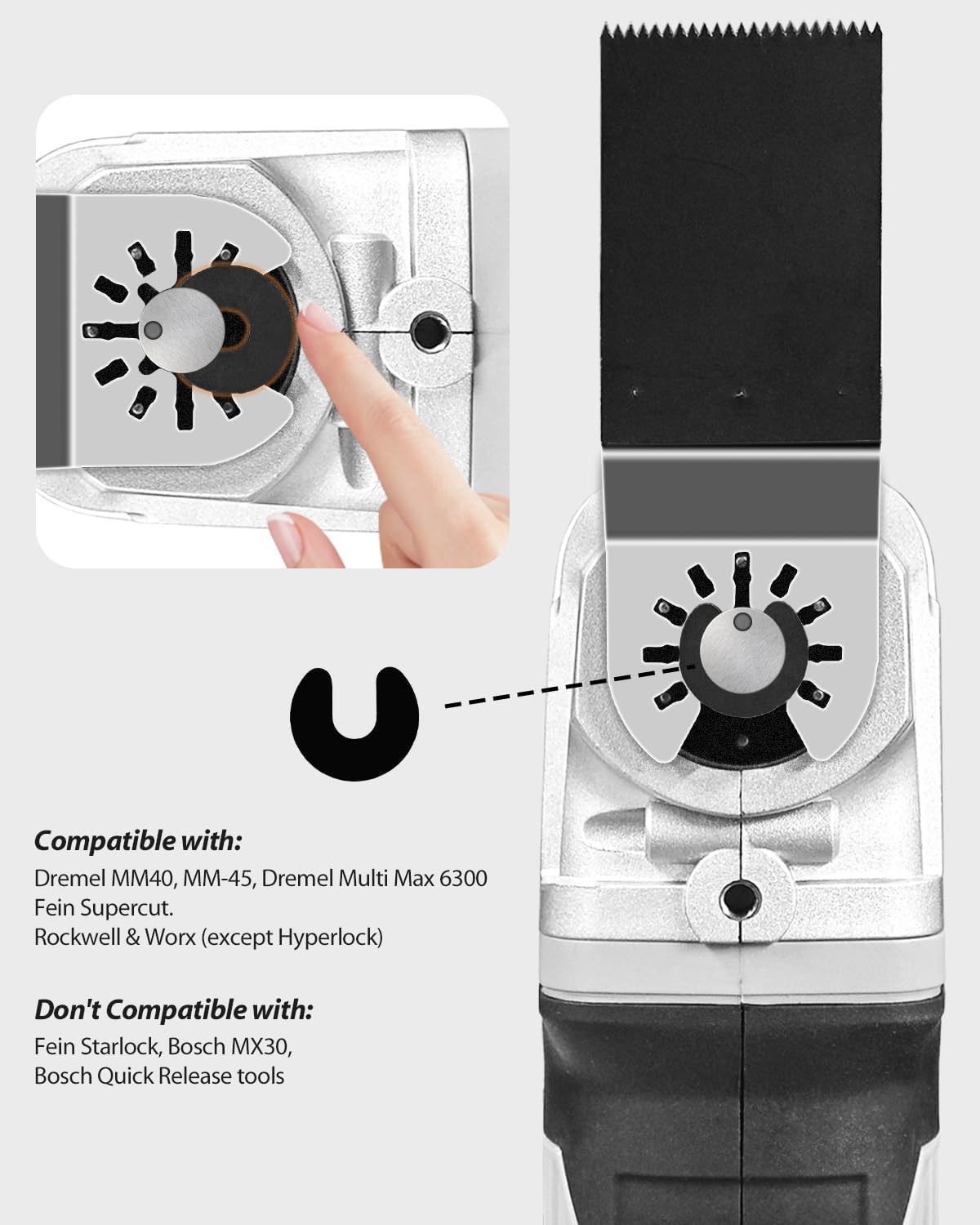
Image: A close-up view demonstrating the process of installing an oscillating blade onto the tool using the quick-change accessory system and C-clip.
Blade Compatibility:
The tool is compatible with a wide range of universal oscillating tool blades. Refer to the compatibility chart for common brands.

Image: A chart illustrating the compatibility of the AVID POWER Oscillating Multi Tool with various blade interfaces from different brands, along with a list of incompatible models.
6. Operating Instructions
Powering On/Off:
To turn the tool on, slide the ON/OFF switch to the 'ON' position. To turn it off, slide the switch to the 'OFF' position.
Adjusting Speed:
The tool features a 6-speed adjustment dial. Rotate the dial to select the desired oscillation speed (OPM - Oscillations Per Minute) suitable for your material and application. Lower speeds are generally for softer materials or more delicate work, while higher speeds are for harder materials and faster cutting.

Image: An illustration demonstrating the 4.5-degree oscillation angle of the tool and its operational range of 15,000-21,000 Oscillations Per Minute (OPM).
Working with the Tool:
Hold the tool firmly with both hands, utilizing the auxiliary handle for added control. Apply gentle, consistent pressure. Allow the tool to do the work; do not force it. For precise cuts, some blades feature measurement scales.

Image: A close-up view of an oscillating blade, showing integrated inch and centimeter measurement scales for precise cutting depth.
Applications:
- Cutting: Use appropriate blades for wood, metal, plastic, or drywall.
- Sanding: Attach a sanding pad and sandpaper for surface preparation or finishing.
- Scraping: Use a scraping blade to remove old paint, adhesive, or caulk.

Image: The AVID POWER Oscillating Multi Tool in action, demonstrating its use for scraping material from a wooden floor surface.
7. Maintenance
Cleaning:
After each use, unplug the tool and clean it with a soft, damp cloth. Do not use harsh chemicals or abrasive cleaners. Ensure ventilation openings are clear of dust and debris.
Blade Care:
Inspect blades regularly for wear and damage. Replace dull or damaged blades immediately to ensure optimal performance and safety. Store blades in a dry place to prevent rust.

Image: A comprehensive kit of 112 pieces of AVID POWER oscillating saw blades and sanding pads, designed for various cutting and sanding applications.
Storage:
Store the tool and its accessories in a dry, secure place, out of reach of children. The included carrying bag is ideal for storage and transport.
8. Troubleshooting
If you encounter issues with your AVID POWER Oscillating Multi Tool, refer to the following common problems and solutions:
- Tool does not start:
- Check if the power cord is securely plugged into a working outlet.
- Ensure the ON/OFF switch is fully in the 'ON' position.
- Check for tripped circuit breakers or blown fuses.
- Poor cutting/sanding performance:
- Ensure the correct accessory is installed for the material being worked on.
- Check if the blade/sanding pad is dull or worn and replace if necessary.
- Adjust the speed setting to a higher OPM for harder materials.
- Avoid applying excessive pressure, which can bog down the motor.
- Excessive vibration or noise:
- Ensure the accessory is securely attached and not loose.
- Check for any foreign objects obstructing the oscillation mechanism.
- If the issue persists, discontinue use and contact customer support.
If these steps do not resolve the issue, please contact AVID POWER customer support for further assistance.
9. Specifications
| Brand | AVID POWER |
| Model | B0D8W63ZM9 |
| Wattage | 42 watts |
| Cutting Angle | 4.5 Degrees |
| Blade Material | High Carbon Steel |
| Surface Recommendation | Metal, Plastic, Wood |
| Special Feature | Quick-Change Accessory System |
| Item Weight | 1 Tons (Note: This value may be a typo in source data, typically power tools weigh a few pounds/kilograms) |
| Included Components | Oscillating saw blades, sandpaper and sanding pads, C-clips, User Manual |
10. Warranty and Support
This product comes with a user manual that contains important information regarding its operation and care. For any questions, technical support, or warranty claims, please refer to the contact information provided within your product's packaging or visit the official AVID POWER website. Please retain your proof of purchase for warranty purposes.
For additional resources and product information, you may visit the AVID POWER Store on Amazon.
Ask a question about this manual
Ask about setup, troubleshooting, compatibility, parts, safety, or missing instructions. Manuals+ will review the question and use this page’s manual context to help answer it.