
Kitstorack NS-1
Kitstorack NS-1 Night Stand with Charger Station and LED Light - Instruction Manual
Brand: Kitstorack | Model: NS-1
1. Introduction
Thank you for choosing the Kitstorack NS-1 Night Stand. This versatile bedside table is designed to enhance your living space with convenient features and ample storage. It includes a built-in charger station with AC outlets and USB ports, adjustable LED lighting, and four spacious fabric drawers. This manual provides essential information for safe assembly, operation, and maintenance of your new nightstand.
2. Safety Information
- Read all instructions carefully before assembly and use.
- Keep small parts and packaging materials away from children.
- Ensure all screws and fasteners are securely tightened before use. Periodically check and re-tighten as necessary.
- Do not overload shelves or drawers. Refer to specifications for weight limits.
- Use the included anti-tip device to secure the nightstand to a wall, especially if children are present.
- Avoid placing hot items directly on the surface. Use coasters or protective pads.
- Do not expose the charging station to liquids.
- Unplug the nightstand from the power outlet before cleaning or if not in use for extended periods.
3. Package Contents
Please verify that all components listed below are present before beginning assembly. If any parts are missing or damaged, please contact customer support.
- Metal Frame Components (various sizes)
- Wooden Shelves (top, middle, bottom)
- Fabric Drawers (4 units)
- Drawer Handles
- Charging Station (with 2 AC outlets, 2 USB ports, power cord)
- LED Light Strip (with remote control)
- Adjustable Feet
- Assembly Hardware (screws, nuts, washers, Allen wrench)
- Anti-Tip Device
- Instruction Manual
4. Assembly Instructions
Follow these steps carefully to assemble your Kitstorack Night Stand. An assembly video for a similar product is provided below for visual guidance.
Assembly guide for a similar 4-drawer nightstand with charger station and LED light.
- Prepare Components: Unpack all parts and lay them out on a clean, soft surface. Identify each component using the provided labels and the parts list.
- Assemble Side Frames: Attach the horizontal bars to the vertical side frames using the specified screws and the Allen wrench. Ensure all connections are secure but do not overtighten initially.
- Attach Bottom Shelf: Secure the bottom wooden shelf to the assembled side frames using the designated screws.
- Install Middle Shelf: Attach the middle wooden shelf to the frame, ensuring the charging station cutout is facing the desired direction (front or back).
- Install Charging Station: Carefully place the charging station into its designated slot on the middle shelf. Secure it with the provided screws.
- Attach Top Shelf: Secure the top wooden shelf to the upper part of the frame.
- Install Adjustable Feet: Screw the adjustable feet into the bottom of the nightstand frame. Adjust them to ensure stability on uneven surfaces.
- Assemble Fabric Drawers: Expand each fabric drawer and insert the hard bottom panel. Attach the handles to the front of each drawer using the small screws.
- Insert Drawers: Slide the assembled fabric drawers into their respective slots in the nightstand frame.
- Install LED Light Strip: Peel the adhesive backing from the LED light strip and carefully attach it to the underside of the top shelf or the middle shelf, depending on your preference for illumination. Connect the LED strip to the charging station's USB port.
- Final Tightening: Once all components are in place, go back and securely tighten all screws.
5. Operating Instructions
Product overview video showcasing the Kitstorack Night Stand's features.
5.1 Charging Station
- Plug the nightstand's main power cord into a wall outlet.
- Use the 2 AC outlets to power lamps, laptops, or other electronic devices.
- Use the 2 USB ports to charge smartphones, tablets, or other USB-powered devices.
5.2 LED Lighting
- Ensure the LED light strip is properly connected to a USB port on the charging station.
- Use the included remote control to turn the lights ON/OFF, change colors, adjust brightness, and select various lighting modes (e.g., flash, strobe, fade, smooth).
- Alternatively, download the compatible app (refer to LED strip packaging for details) to control the lights via your smartphone.
6. Maintenance
- Cleaning: Wipe the wooden and metal surfaces with a dry, soft cloth. For stubborn stains, use a slightly damp cloth and mild soap, then dry immediately. Do not use harsh chemicals or abrasive cleaners.
- Fabric Drawers: Spot clean fabric drawers with a damp cloth and mild detergent. Allow to air dry completely. Do not machine wash.
- Electrical Components: Keep the charging station and LED lights dry. Do not immerse in water.
- Regular Checks: Periodically inspect all screws and connections to ensure they remain tight.
7. Troubleshooting
- LED Lights Not Working:
- Check if the nightstand is plugged into a working power outlet.
- Ensure the LED strip is securely connected to a USB port on the charging station.
- Verify the remote control battery is functional.
- Charging Station Not Providing Power:
- Confirm the nightstand's main power cord is firmly plugged into a live wall outlet.
- Test the outlet with another device to ensure it's working.
- Check if the device you are trying to charge is functioning correctly.
- Drawers Sticking or Not Sliding Smoothly:
- Ensure the nightstand is assembled correctly and all screws are tightened.
- Check for any obstructions in the drawer slots.
- Verify the nightstand is on a level surface; adjust the feet if necessary.
8. Specifications
| Feature | Detail |
|---|---|
| Brand | Kitstorack |
| Model Number | NS-1 |
| Product Dimensions (D x W x H) | 11.4"D x 15.8"W x 33"H |
| Item Weight | 6.62 Kilograms |
| Maximum Weight Recommendation | 40 Pounds |
| Frame Material | Metal |
| Top Material Type | Engineered Wood |
| Number of Drawers | 4 |
| Charging Ports | 2 AC Outlets (120V/12A), 2 USB Ports (5V/2A) |
| LED Light | Adjustable, APP Control, Multiple Colors, Music Sync |
| Color | Black Oak |
| Product Care Instructions | Wipe with Dry Cloth |
9. Warranty and Support
For warranty information or customer support, please refer to the contact details provided with your purchase or visit the official Kitstorack website. Keep your purchase receipt for any warranty claims.
10. Product Images

Overall view of the Kitstorack Night Stand, showcasing its 4 fabric drawers and integrated LED lighting.

Close-up of the integrated charging station featuring 2 AC outlets and 2 USB ports for convenient device charging.

The nightstand illuminated with various LED light colors, demonstrating the customizable ambiance.
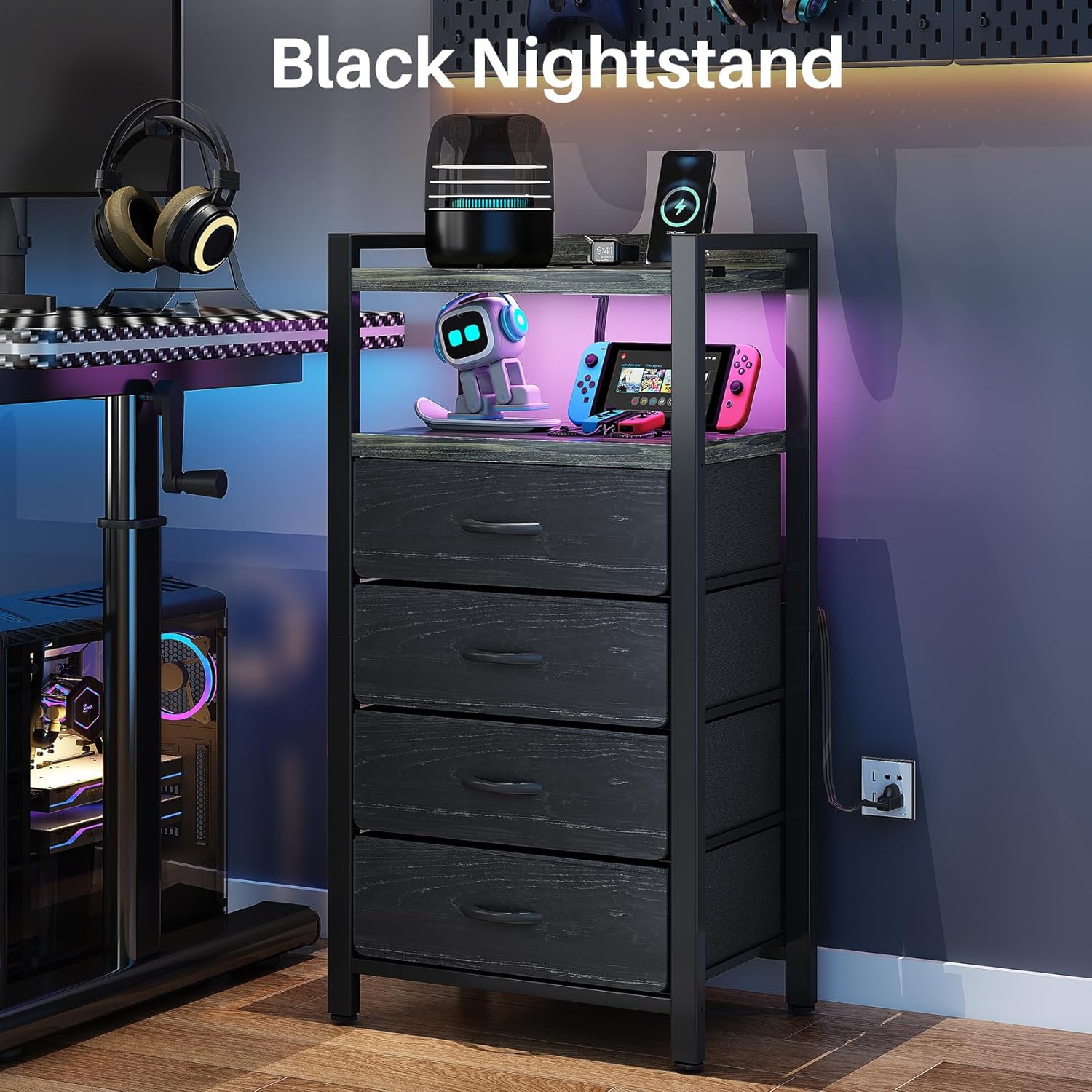
The black oak nightstand complementing a modern bedroom decor.

Detailed view of the four thick fabric drawers, highlighting their ample storage capacity.

The bright LED light feature, emphasizing its app control and dynamic music sync capabilities.
Ask a question about this manual
Ask about setup, troubleshooting, compatibility, parts, safety, or missing instructions. Manuals+ will review the question and use this page’s manual context to help answer it.