
Introduction
This manual provides instructions for the safe and effective operation of the NHJLFKSA MS2015A AutoRange Digital AC 1000A Current Clamp Meter Multimeter. Please read this manual thoroughly before use and retain it for future reference. This device is designed for measuring AC current, AC/DC voltage, resistance, capacitance, frequency, and duty cycle, and includes a non-contact voltage detector.
Safety Information
Always observe the following safety precautions to prevent electric shock, injury, or damage to the meter.
- Read and understand all instructions and warnings in this manual before operating the meter.
- Do not use the meter if it appears damaged or if the insulation on the test leads is compromised.
- Ensure the function switch is set to the correct range before making any measurements.
- Do not exceed the maximum input values for any range. The meter is rated for CAT III 1000V.
- Disconnect the test leads from the circuit and the meter before opening the battery compartment.
- Use caution when working with voltages above 30V AC RMS, 42V peak, or 60V DC, as these pose a shock hazard.
- Always use appropriate personal protective equipment (PPE), such as safety glasses and insulated gloves, when working with electrical circuits.
- Do not operate the meter in explosive gas, vapor, or dust environments.
Product Overview
Features:
- 6000 Counts Digital Display
- Auto and Manual Ranging Capabilities
- Non-Contact Voltage (NCV) Detection
- AC Current Measurement up to 1000A
- DC and AC Voltage Measurement
- Resistance Measurement
- Capacitance Measurement
- Frequency Measurement
- Duty Cycle Measurement
Components:
The NHJLFKSA MS2015A clamp meter features a robust design for various electrical measurements. Key components include the clamp jaw for non-contact current measurement, a rotary dial for function selection, a digital display, and input jacks for test leads.


Accessories:
The product package includes the following items:
- MS2015A Clamp Meter
- Test Leads (one red, one black)
- Carry Bag
- User's Manual

Setup
Battery Installation:
The MS2015A requires one 9V 6F22 battery (not included) for operation. Follow these steps to install or replace the battery:
- Ensure the meter is turned OFF and disconnect all test leads from the meter and any circuits.
- Locate the battery compartment cover on the back of the meter.
- Use a screwdriver to loosen the screw securing the battery cover.
- Remove the battery cover.
- Insert a new 9V 6F22 battery, observing the correct polarity (+ and -).
- Replace the battery cover and tighten the screw securely.
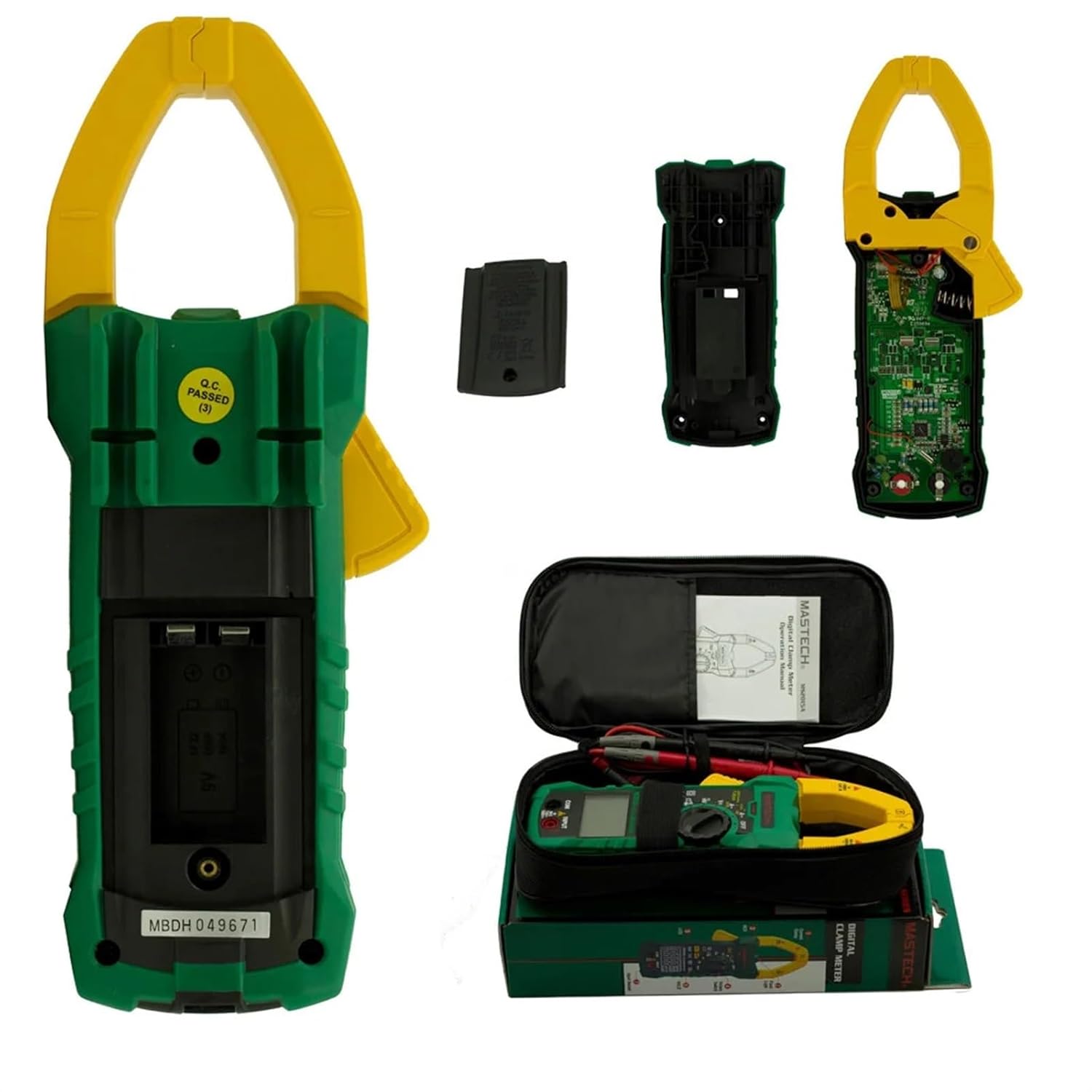
Connecting Test Leads:
To perform voltage, resistance, capacitance, and frequency measurements using test leads:
- Insert the red test lead into the INPUT jack.
- Insert the black test lead into the COM (Common) jack.
- Ensure connections are firm before proceeding with measurements.
Operating Instructions
Function Selection:
Turn the rotary switch to the desired measurement function. For functions with multiple modes (e.g., AC/DC voltage, Hz/Duty), press the FUNC button to toggle between modes.
DC Voltage Measurement:
- Connect the test leads as described in the 'Connecting Test Leads' section.
- Turn the rotary switch to the V– position.
- Connect the test leads in parallel to the circuit or component under test.
- Read the DC voltage value on the display.
AC Voltage Measurement:
- Connect the test leads as described in the 'Connecting Test Leads' section.
- Turn the rotary switch to the V– position. Press FUNC if necessary to select AC voltage (indicated by AC on the display).
- Connect the test leads in parallel to the circuit or component under test.
- Read the AC voltage value on the display.
AC Current Measurement (Clamp):
- Turn the rotary switch to the A– position.
- Press the trigger to open the clamp jaw.
- Enclose only one conductor of the circuit with the clamp jaw. Ensure the jaw is fully closed.
- Read the AC current value on the display.
Resistance Measurement:
- Connect the test leads as described.
- Turn the rotary switch to the Ω position.
- Ensure the circuit or component under test is de-energized.
- Connect the test leads across the component to measure its resistance.
- Read the resistance value on the display.
Capacitance Measurement:
- Connect the test leads as described.
- Turn the rotary switch to the –– (Capacitance) position.
- Ensure the capacitor is fully discharged before connecting the test leads.
- Connect the test leads across the capacitor.
- Read the capacitance value on the display.
Frequency Measurement:
The meter can measure frequency via test leads or for AC current.
- Via Test Leads: Connect leads, turn rotary switch to Hz/Duty. Connect leads to the signal source.
- For AC Current: Turn rotary switch to A–, clamp around the conductor, then press Hz/Duty button.
Read the frequency value on the display.
Duty Cycle Measurement:
- Connect the test leads as described.
- Turn the rotary switch to the Hz/Duty position.
- Press the FUNC button to cycle until 'Duty' or '%' is indicated on the display.
- Connect the test leads to the signal source.
- Read the duty cycle percentage on the display.
Non-Contact Voltage (NCV) Detection:
- Turn the rotary switch to the NCV position.
- Bring the NCV sensor (located at the top of the clamp jaw) close to an AC voltage source or live conductor.
- The meter will emit an audible beep and the NCV indicator light will illuminate if AC voltage is detected.
Maintenance
Cleaning:
To clean the meter, wipe the case with a damp cloth and a mild detergent. Do not use abrasives or solvents. Ensure the meter is completely dry before use.
Battery Replacement:
When the battery low indicator appears on the display, replace the 9V battery by following the 'Battery Installation' steps in the Setup section.
Troubleshooting
- No Display: Check if the battery is installed correctly and has sufficient charge. Replace the battery if necessary.
- Incorrect Readings: Ensure the test leads are properly connected and the function switch is set to the correct measurement range. Check the battery level.
- "OL" on Display: This indicates an overload or out-of-range measurement. Select a higher range or ensure the input is within the meter's specifications.
- Meter Does Not Respond: Turn the meter off, then on again. If the issue persists, remove and reinsert the battery.
Specifications
| Measurement Type | Range | Resolution |
|---|---|---|
| DC Voltage | 60mV / 600mV / 6V / 60V / 600V / 1000V | 0.01mV / 0.1mV / 0.001V / 0.01V / 0.1V / 1V |
| AC Voltage | 60mV / 600mV / 6V / 60V / 600V / 750V | 0.01mV / 0.1mV / 0.001V / 0.01V / 0.1V / 1V |
| AC Current | 60A / 600A / 1000A | 0.01A / 0.1A / 1A |
| Resistance | 600Ω / 6kΩ / 60kΩ / 600kΩ / 6MΩ / 60MΩ | 0.1Ω / 0.001kΩ / 0.01kΩ / 0.1kΩ / 0.001MΩ / 0.01MΩ |
| Capacitance | 10nF / 100nF / 1000nF / 10µF / 100µF / 1000µF / 10mF / 100mF | 0.001nF / 0.01nF / 0.1nF / 0.001µF / 0.01µF / 0.1µF / 0.001mF / 0.01mF |
| Frequency (A) | 100Hz / 1000Hz | 0.01Hz / 0.1Hz |
| Frequency (Hz/Duty) | 10Hz / 100Hz / 1000Hz / 10kHz / 100kHz / 1000kHz / 10MHz | 0.001Hz / 0.01Hz / 0.1Hz / 0.001kHz / 0.01kHz / 0.01kHz / 0.1kHz / 0.001MHz |
| Duty Cycle | 5% ~ 95% | 3% |
General Specifications:
- Power Supply: 1 x 9V 6F22 Battery (not included)
- Product Size: 238mm x 92mm x 50mm (9.37" x 3.6" x 1.9")
- Product Weight: 390g (0.861lb)

Warranty and Support
For warranty information or technical support regarding your NHJLFKSA MS2015A AutoRange Digital AC 1000A Current Clamp Meter Multimeter, please contact the manufacturer, NHJLFKSA, or your point of purchase. Retain your purchase receipt as proof of purchase for any warranty claims.