
Introduction
This manual provides essential instructions for the safe and effective operation and maintenance of your MJWW 3-in-1 Folding Treadmill, Model CT05. Please read this manual thoroughly before initial use and retain it for future reference.
The MJWW 3-in-1 Folding Treadmill offers flexible workout options, allowing users to switch between walking (0.6-3.8 MPH), jogging (2.5-5 MPH), and running (0.6-7.5 MPH) modes. It features smart controls via a remote and the PitPat app, an LED display for tracking performance, and a robust design with a 300 lb capacity and a 5-layer anti-skid running belt for comfort and safety. The 3.0HP motor ensures quiet operation, making it suitable for home and office environments.
Package Contents
Verify that all items listed below are included in your package:
- Treadmill Unit x1
- Phone Stand x1
- User Manual x1
- Remote Controller x1
- L-Shaped Wrench x1
- Battery x1
- Safety Rope x1
- Power Cord x1
- Screwdriver x1
- Lubricating Oil x1

Image: All components included in the MJWW 3-in-1 Folding Treadmill package, including the treadmill unit, phone stand, user manual, remote controller, L-shaped wrench, battery, safety rope, power cord, screwdriver, and lubricating oil.
Setup
The MJWW 3-in-1 Folding Treadmill requires no assembly. Simply remove it from the packaging and place it on a flat, stable surface. The handle can be easily raised for jogging/running mode or folded down for walking pad mode.
Folding and Storage
The treadmill features a quick-folding design and flexible wheels for easy movement and storage. It can be stored upright or flat under furniture, making it ideal for small spaces.

Image: The MJWW CT05 treadmill shown in its folded state for compact storage under a sofa and in an upright position against a wall, highlighting its space-saving design and flexible wheels for easy maneuverability.
Operating Modes
The treadmill offers three distinct modes to suit various fitness levels and preferences:
- Work Mode (0.6-2 MPH): Ideal for use under a standing desk, allowing for light activity while working.
- Walking Mode (0.6-3.8 MPH): Suitable for brisk walking and light exercise.
- Running Mode (3.8-7.5 MPH): For more intense cardio workouts, with the handle bar raised for stability.

Image: A visual representation of the three operating modes of the MJWW CT05 treadmill: a user running with the handle raised, a user walking with the handle raised, and a user walking on the pad with the handle folded down under a standing desk.
Operating Controls
Your treadmill can be controlled via the integrated LED touch screen, the included remote control, or the PitPat mobile application.
Remote Control
The remote control allows for convenient adjustment of speed, start/pause, and stop functions. It is lightweight and agile for easy handling during your workout.

Image: A close-up of the compact remote control for the MJWW CT05 treadmill, positioned next to the treadmill's display panel.
LED Touch Screen
The integrated LED touch screen provides direct control over speed, start/pause, and stop functions. It also displays key workout metrics.
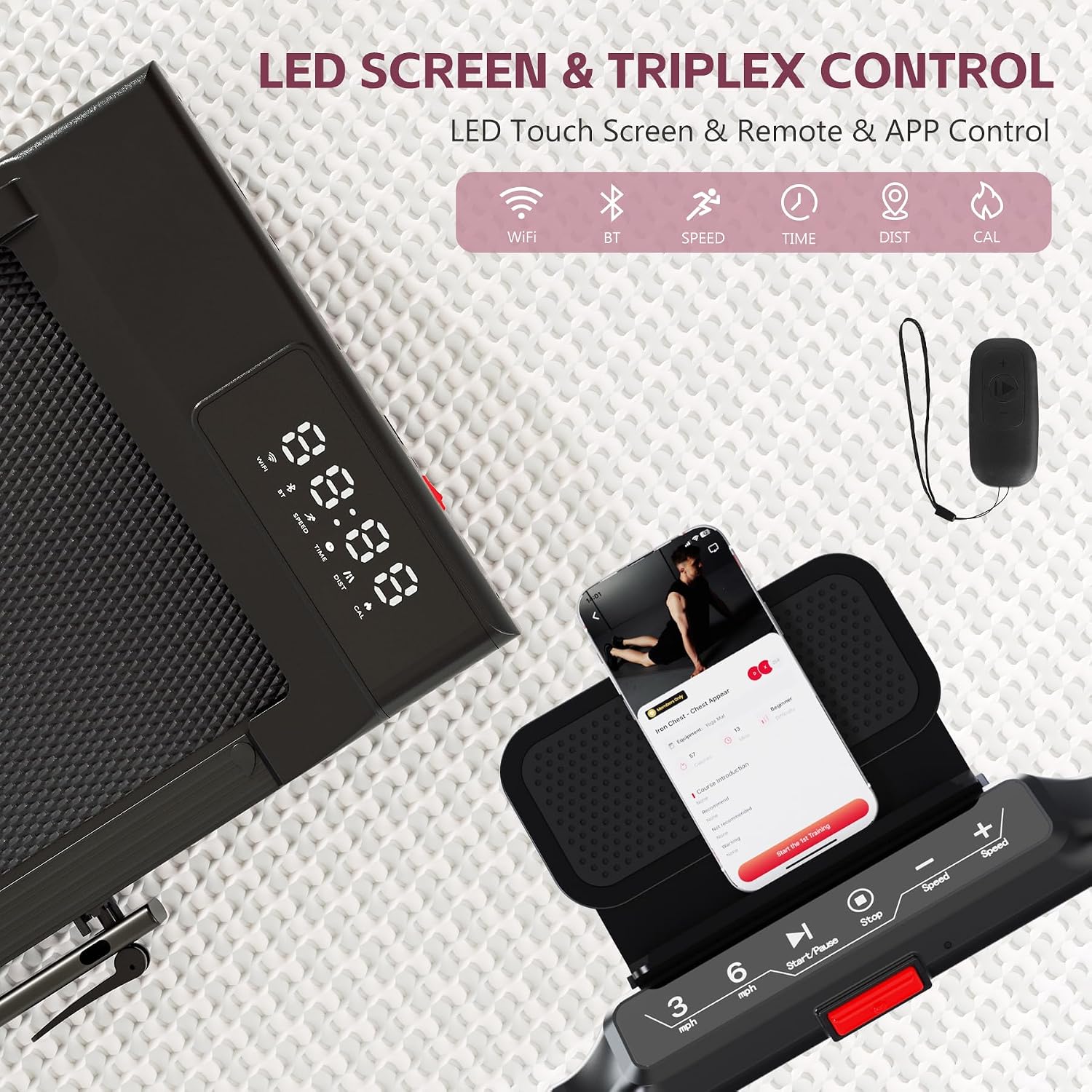
Image: A detailed view of the MJWW CT05 treadmill's LED touch screen and control panel, showing buttons for speed adjustment, start/pause, and stop, along with the remote control and a smartphone displaying the PitPat app.
PitPat App Control
Connect your treadmill to the PitPat app via Bluetooth or Wi-Fi for advanced tracking, personalized training guides, and interactive exercise experiences. The app allows you to monitor your progress and participate in virtual running courses.

Image: Screenshots of the PitPat app interface, showing various training options, data analysis, and competitive features, integrated with the MJWW CT05 treadmill.
LED Display Metrics
The high-definition LED display on your treadmill provides real-time feedback on your workout:
- Speed: Current speed in MPH.
- Time: Duration of your workout.
- Distance: Total distance covered in miles.
- Calories: Estimated calories burned.

Image: A close-up of the MJWW CT05 treadmill's LED display, clearly showing indicators for WiFi, Bluetooth, Speed, Time, Distance, and Calories.
Important Safety Instructions
- Always attach the safety key clip to your clothing before starting the treadmill. If you fall or move too far from the console, the safety key will disengage, stopping the treadmill immediately.
- Ensure the treadmill is placed on a flat, stable surface.
- Keep children and pets away from the treadmill during operation.
- Do not operate the treadmill if it is damaged or malfunctioning.
- Consult a physician before starting any new exercise program.
Video: A user demonstrates the safety key feature of a walking pad, showing how to attach it to clothing and how it stops the machine if disengaged. The video also highlights the compact size and remote control functionality.
Maintenance
Belt Lubrication
Regular lubrication of the running belt is crucial for optimal performance and longevity. Use the provided lubricating oil as instructed in the manual. Typically, apply about half a bottle of oil every 6 months, depending on usage frequency.
Belt Adjustment
If the running belt feels loose or jerky, it may need adjustment. Use the included L-shaped wrench to adjust the screws on the rear covers. Rotate clockwise to tighten the belt until it runs smoothly. Ensure the belt is centered and stable after adjustment.
Video: This video demonstrates how to fix a loose treadmill belt issue. It shows how to check the belt's tension by inserting fingers under it and then how to use an Allen key to adjust the screws on the rear covers to tighten the belt until it runs smoothly and is centered.
Troubleshooting
Loose Treadmill Belt
If the treadmill belt feels too loose, causing it to slip or run improperly, refer to the 'Belt Adjustment' section under Maintenance. Ensure the machine is powered off before making any adjustments. If the issue persists after adjustment, contact customer support.
Specifications
| Feature | Detail |
|---|---|
| Brand | MJWW |
| Model Name | CT05 |
| Color | BLACK |
| Product Dimensions | 54.17"D x 25.51"W x 5"H |
| Material | Alloy Steel |
| Maximum Speed | 7.5 Miles per Hour |
| Minimum Speed | 0.6 Miles per Hour |
| Special Feature | Compact Design, Foldable, Lightweight, Portable |
| Recommended Uses | Indoor walking, running, jogging |
| Target Audience | Unisex |
| Maximum Horsepower | 3 Horsepower |
| Maximum Incline Percentage | 15 (Note: Product description states 3-in-1 design, but specifications list 15% incline. This manual focuses on the 3-in-1 functionality as described in feature bullets.) |
| Assembly Required | No |
| Display Type | LED |
| Power Source | Corded Electric |
| Connectivity Technology | Bluetooth, Wi-Fi |
| Metrics Measured | Calories Burned, Distance, Speed, Time |
| Maximum Weight Recommendation | 300 Pounds |
| Deck Length | 43.3 Inches |
| Deck Width | 16 Inches |
| Folded Size | 54.17 x 25.51 x 5 inches |
| Input Power | 2237 Watts |
| UPC | 717352497135 |
Warranty and Support
The MJWW 3-in-1 Folding Treadmill comes with a 2-year protection plan. For any questions, concerns, or to claim warranty service, please contact our dedicated customer support team. You can find contact information on the official MJWW website or through your purchase platform.
For additional assistance, visit the MJWW Store on Amazon.