
1. Introduction
Thank you for purchasing the EMB Home PKL5000 Rechargeable PA Speaker. This powerful and versatile speaker system is designed to deliver high-quality audio for various events, including parties, karaoke, and public announcements. Featuring a 15-inch woofer, Bluetooth connectivity, USB/SD card playback, and a wireless microphone, the PKL5000 offers a comprehensive audio solution. Please read this manual thoroughly before operating the device to ensure proper use and to maximize its performance and longevity.
2. Important Safety Instructions
- Read all instructions before using the product.
- Keep this manual for future reference.
- Do not expose the speaker to water, moisture, or extreme temperatures.
- Do not block any ventilation openings.
- Use only attachments/accessories specified by the manufacturer.
- Unplug the speaker during lightning storms or when unused for long periods.
- Refer all servicing to qualified service personnel. Do not attempt to repair the unit yourself.
- Ensure the power source matches the voltage requirements of the speaker.
- Keep the speaker away from heat sources such as radiators, heat registers, stoves, or other apparatus that produce heat.
3. Package Contents
Verify that all items are present in the package:
- EMB Home PKL5000 PA Speaker
- UHF Wireless Microphone
- Tripod Speaker Stand
- Remote Control
- Power Adapter/Charging Cable
- User Manual
4. Product Overview: Rear Control Panel
Familiarize yourself with the various controls and ports located on the rear panel of your PKL5000 speaker.

Image: Detailed view of the EMB Home PKL5000 speaker's rear control panel, showing inputs, outputs, and adjustment knobs.
- Control Panel: Main interface for settings and adjustments.
- Mic in Vol: Adjusts the volume for microphone inputs.
- Mic in 6.5mm Jack: Input for wired microphones.
- Mic/Guitar 6.5mm Jack: Dual-purpose input for microphones or guitars.
- Mic/Guitar Switch: Toggles between microphone and guitar input modes.
- XLR Cable Connector: Professional audio input for balanced signals.
- DC12V Battery Input: Port for external 12V DC power source.
- Power: Main power switch for the unit.
- AC Power: Input for the AC power cable to power and charge the speaker.
- Line in Vol: Adjusts the volume for line-level inputs.
- Echo: Controls the echo effect for microphone inputs.
- AUX Input: 3.5mm auxiliary input for external audio devices.
- RCA Line Input: Stereo RCA inputs for external audio sources.
- Line Out: Audio output to connect to another speaker or audio system.
5. Setup Guide
5.1 Unpacking and Placement
- Carefully remove all components from the packaging.
- Place the speaker on a stable, flat surface. For optimal sound projection and stability, use the included tripod stand. Ensure the stand is fully extended and locked before placing the speaker.
5.2 Powering On and Charging
The PKL5000 speaker can operate on AC power or its internal rechargeable battery.
- AC Power: Connect the supplied power cable to the AC Power input on the rear panel and then to a standard wall outlet.
- Charging: When connected to AC power, the internal battery will automatically begin charging. A full charge takes approximately 4.5 hours.
- Battery Life: A fully charged battery provides approximately 5 hours of playback time, depending on volume and usage.

Image: The EMB Home PKL5000 speaker with indicators for a charging time of 4.5 hours and a play time of 5 hours.
6. Operating Instructions
6.1 Basic Operation
- Turn on the speaker using the 'Power' switch on the rear panel.
- Adjust the main volume knob to a low level before playing audio.
6.2 Bluetooth Connection
To connect your device via Bluetooth:
- Ensure the speaker is powered on.
- Press the 'Mode' button on the control panel or remote until 'Bluetooth' mode is selected. The display will show 'BLUE' and a pairing indicator will flash.
- On your mobile device, enable Bluetooth and search for available devices.
- Select 'EMB PKL5000' from the list. Once connected, the speaker will emit a confirmation tone, and the pairing indicator will stop flashing.
- You can now play audio from your device through the speaker.

Image: A smartphone displaying the Bluetooth icon, indicating a wireless connection to the EMB Home PKL5000 speaker, with a range of up to 30 feet.
6.3 USB/SD Card Playback
To play audio from a USB drive or SD card:
- Insert a USB drive or SD card into the corresponding slot on the control panel.
- The speaker will automatically switch to USB/SD mode and begin playing compatible audio files. If not, press the 'Mode' button to select USB/SD.
- Use the playback controls (Play/Pause, Next, Previous) on the control panel or remote to manage your music.
6.4 Wireless Microphone Usage
The included UHF wireless microphone is pre-paired with the speaker.
- Insert batteries into the wireless microphone.
- Turn on the microphone.
- Adjust the 'Mic in Vol' knob on the speaker's control panel to control the microphone's volume.
- Use the 'Echo' knob to add an echo effect to the microphone's sound.
6.5 True Wireless Stereo (TWS) Mode
To connect two PKL5000 speakers for a stereo sound experience:
- Ensure both PKL5000 speakers are powered on and in Bluetooth mode.
- On one speaker (this will be your primary speaker), press and hold the 'TWS' button (or a similar pairing button, refer to the speaker's display for 'BT Mode ON' confirmation).
- The primary speaker will search for the secondary speaker. Once connected, both speakers will emit a confirmation tone.
- Now, connect your mobile device to the primary speaker via Bluetooth as described in section 6.2. Audio will play in stereo through both speakers.

Image: Two EMB Home PKL5000 speakers positioned apart, illustrating their ability to wirelessly connect up to 30 feet for a stereo sound experience.
6.6 EQ Modes and Party Lights
The PKL5000 features multiple EQ modes to optimize sound for different genres and integrated party lights.
- EQ Modes: Use the 'EQ' button on the control panel or remote to cycle through preset equalization settings (e.g., Pop, Rock, Jazz, Classic, Flat).
- Party Lights: The speaker features translucent cabinet lighting and 360-degree motion lights. These lights automatically activate when the speaker is powered on. Use the dedicated 'Light' button (if available) or refer to the remote control for light mode adjustments. Note that the LED light mode may reset to flash-color mode upon power cycling.

Image: The EMB Home PKL5000 speaker highlighting its 360-degree surround cabinet party lights, designed to enhance the party atmosphere.

Image: The EMB Home PKL5000 speaker showcasing its dynamic 360-degree motion lights, creating a vibrant visual effect.
7. Maintenance
7.1 Cleaning
- Always unplug the speaker from the power source before cleaning.
- Use a soft, dry cloth to wipe the exterior surfaces of the speaker.
- Do not use abrasive cleaners, waxes, or solvents as they may damage the finish.
- Keep the speaker grille free of dust and debris for optimal sound quality.
7.2 Storage
- Store the speaker in a cool, dry place away from direct sunlight and extreme temperatures.
- If storing for an extended period, ensure the battery is partially charged (around 50%) to prolong its lifespan. Recharge the battery every few months to prevent deep discharge.
8. Troubleshooting
| Problem | Possible Cause | Solution |
|---|---|---|
| No power | Power cable not connected; Battery drained; Power switch off | Ensure power cable is securely connected and plugged in. Charge the battery. Turn the power switch ON. |
| No sound | Volume too low; Incorrect input mode; Device not connected | Increase master volume and input volume. Select the correct input mode (Bluetooth, USB, AUX). Ensure your device is properly connected. |
| Bluetooth not pairing | Speaker not in pairing mode; Device too far; Interference | Ensure speaker is in Bluetooth pairing mode. Move device closer to speaker. Turn off other Bluetooth devices. |
| Microphone not working | Microphone off; Batteries low/dead; Mic volume low | Turn on the microphone. Replace batteries. Increase 'Mic in Vol' knob. |
| TWS mode not connecting | Incorrect TWS pairing procedure; Speakers too far apart | Ensure both speakers are in Bluetooth mode. Follow TWS pairing steps carefully (Section 6.5). Keep speakers within 30 feet. |
9. Specifications
| Feature | Detail |
|---|---|
| Model | PKL5000 |
| Power Output | 5000W (Peak) |
| Woofer Size | 15-inch Steel Frame |
| Driver | 1-inch Titanium Diaphragm |
| Connectivity | Bluetooth, USB, SD Card, AUX (3.5mm), RCA, XLR |
| Wireless Microphone | UHF |
| Power Source | AC Power, Rechargeable Battery |
| Charging Time | Approx. 4.5 hours |
| Play Time | Approx. 5 hours (battery) |
| Dimensions (Approx.) | 72.7cm (Width) x 439cm (Height) x 47.3cm (Depth) - Note: Height value seems unusually large, please verify actual product dimensions. |
| Mounting Type | Pole Mount (with included tripod stand) |
| UPC | 783501154877 |
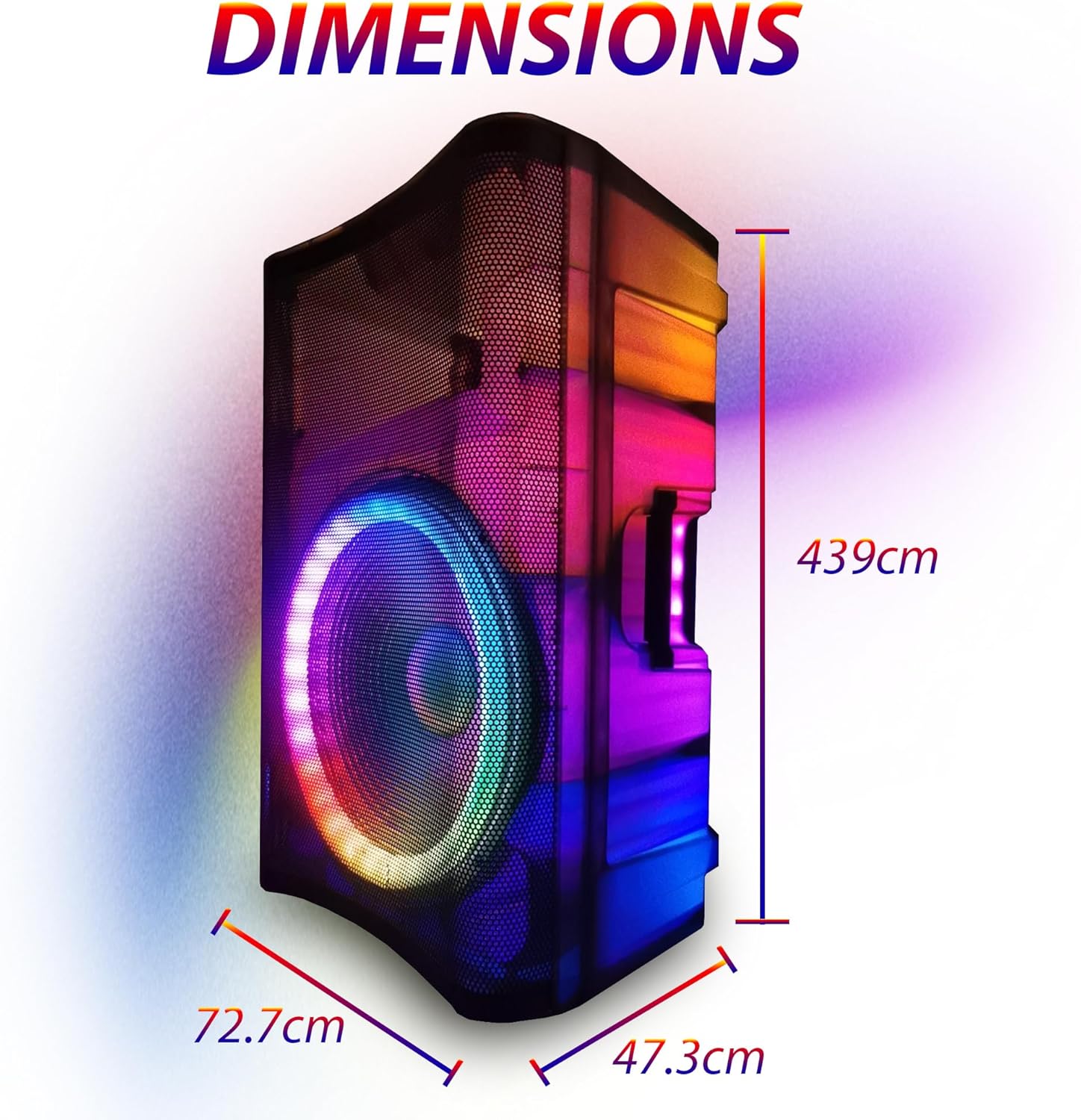
Image: Diagram showing the approximate dimensions of the EMB Home PKL5000 speaker: 72.7cm width, 439cm height, and 47.3cm depth.
10. Warranty and Support
EMB products are designed for reliability and performance. For warranty information, technical support, or service inquiries, please refer to the warranty card included with your product or contact EMB customer support through their official website or the retailer where the product was purchased. Please have your model number (PKL5000) and proof of purchase ready when contacting support.
