
1. Important Safety Information
Please read all instructions carefully before using this appliance to ensure safe and efficient operation. Keep this manual for future reference.
- Electrical Safety: This appliance requires a 240 Volt electrical supply. Ensure proper grounding and installation by a qualified electrician.
- Burn Hazard: Cooktop surfaces and oven interior can remain hot after use. Exercise caution and avoid touching hot surfaces.
- Child Safety: Do not allow children to operate or play near the appliance. Keep oven doors closed and locked when not in use, if applicable.
- Flammable Materials: Keep flammable materials (e.g., paper, plastic, cloth) away from the appliance.
- Proper Ventilation: Ensure adequate ventilation in the kitchen area during operation.
2. Product Overview
The Verona VPRFSEE365SS Prima Series Freestanding Electric Range is designed for modern kitchens, offering a 36-inch width, 5 electric elements, and a 5 cu. ft. oven with dual convection fans. It features a stainless steel finish, brushed aluminum handle, and a digital clock and timer.

Figure 1: Front view of the Verona VPRFSEE365SS Electric Range.
3. Setup and Installation
This appliance must be installed by a qualified technician in accordance with all local codes and regulations. Refer to the separate installation guide for detailed instructions.
3.1 Unpacking
- Carefully remove all packaging materials, including any protective films or tapes.
- Inspect the range for any shipping damage. Report any damage immediately to the retailer.
3.2 Electrical Connection
- The range requires a dedicated 240V, 50A electrical circuit.
- Ensure the electrical supply matches the requirements specified on the product's rating plate.
3.3 Leveling
The range is equipped with adjustable leveling legs. Use a level to ensure the appliance is stable and level on all sides to prevent spills and ensure proper cooking performance.
4. Operating Instructions
4.1 Cooktop Operation
The ceramic glass cooktop features 5 electric elements. Each element is controlled by a dedicated round soft-touch knob on the front panel.
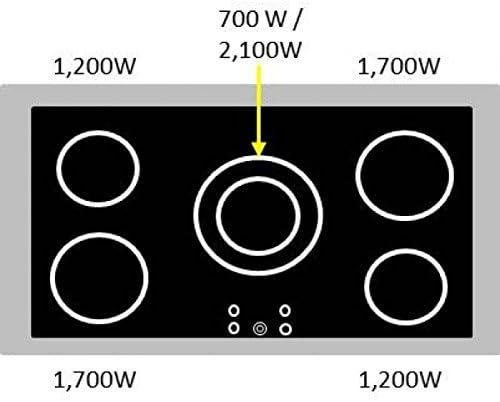
Figure 2: Cooktop element power levels. The center element is a dual-zone element (700W / 2100W).
- Place appropriate cookware on the desired element.
- Turn the corresponding knob to the desired heat setting. The indicator light will illuminate.
- For dual-zone elements, select the inner or outer ring as needed.
- After cooking, turn the knob to the 'OFF' position. The residual heat indicator will remain lit until the surface is cool.
4.2 Oven Operation
The 5.0 cu. ft. oven is equipped with European convection and dual convection fans for even heat distribution. It also features a digital clock and timer for precise cooking control.

Figure 3: Oven interior showing adjustable racks and dual convection fans.
- Setting Temperature: Use the oven temperature knob to select the desired temperature.
- Selecting Function: Use the multifunction knob to select the desired cooking mode (e.g., Bake, Convection Bake, Broil).
- Digital Clock/Timer: Use the touch control clock to set the time, cooking duration, or delay start. Refer to the detailed instructions in the full manual for specific timer functions.
- Oven Racks: The oven includes 2 standard, position-adjustable racks. Adjust their height before preheating for optimal cooking.
- Dual Convection Fans: These fans activate automatically in convection modes to circulate hot air, ensuring consistent results.
4.3 Full-Width Storage Compartment
The range includes a full-width storage compartment located beneath the oven, providing convenient space for storing cookware.
5. Maintenance and Cleaning
Regular cleaning and maintenance will prolong the life and performance of your Verona electric range.
5.1 Cooktop Cleaning
- Allow the cooktop to cool completely before cleaning.
- Use a ceramic cooktop cleaner and a non-abrasive cloth or sponge to remove spills and stains.
- Avoid using abrasive cleaners, scouring pads, or sharp objects that can scratch the glass surface.
5.2 Oven Cleaning
The oven features an Easy Clean Enamel interior for quick and hassle-free cleaning.
- Remove oven racks before cleaning.
- Wipe down the interior with a damp cloth and mild detergent. For stubborn stains, use an oven cleaner specifically designed for enamel surfaces, following the product instructions.
- Do not use abrasive cleaners or steel wool on the enamel.
5.3 Exterior Cleaning
Clean the stainless steel exterior with a soft cloth and a stainless steel cleaner. Wipe in the direction of the grain to prevent streaks.
6. Troubleshooting
Before contacting customer service, review the following common issues and solutions:
- Appliance Not Turning On: Check the circuit breaker or fuse box. Ensure the range is properly plugged into a grounded outlet.
- Cooktop Element Not Heating: Verify the control knob is set correctly and the element is not damaged.
- Oven Not Heating: Ensure the oven temperature and function are set correctly. Check if the oven door is fully closed.
- Uneven Cooking: Ensure the oven is level. Avoid overcrowding the oven, which can restrict air circulation. Utilize convection modes for more even results.
For issues not resolved by these steps, please contact Verona customer support.
7. Specifications
| Feature | Specification |
|---|---|
| Brand | Verona |
| Model Number | VPRFSEE365SS |
| Dimensions (Package) | 38.5 x 38 x 28 inches |
| Item Weight | 265 pounds |
| Oven Capacity | 5.0 Cubic Feet |
| Installation Type | Freestanding |
| Cooktop Elements | 5 Electric Elements |
| Oven Features | European Convection with Dual Fans, Easy Clean Enamel |
| Control Type | Knob, Touch Control Clock |
| Voltage | 240 Volts |
| Oven Racks | 2 Standard, Position Adjustable |
| Storage | Full-Width Storage Drawer |
| Material | Stainless Steel |
| Certification | CSA |
8. Warranty and Support
8.1 Manufacturer Warranty
This Verona appliance comes with a 2-year parts & labor limited warranty. Please retain your proof of purchase for warranty claims.
8.2 Customer Support
For technical assistance, service requests, or questions regarding your warranty, please contact Verona customer support. Refer to the contact information provided in your warranty documentation or on the official Verona website.


