
1. Introduction
Thank you for choosing the STF Power Block Pro 12 Inch Speaker. This portable wireless speaker is designed to deliver powerful, immersive sound with its 12-inch woofer and 2.5-inch tweeter. Featuring a karaoke function with an included wired microphone, vibrant RGB LED disco lights, and multiple connectivity options, it's perfect for any event. This manual provides essential information for safe operation, setup, and maintenance of your speaker.
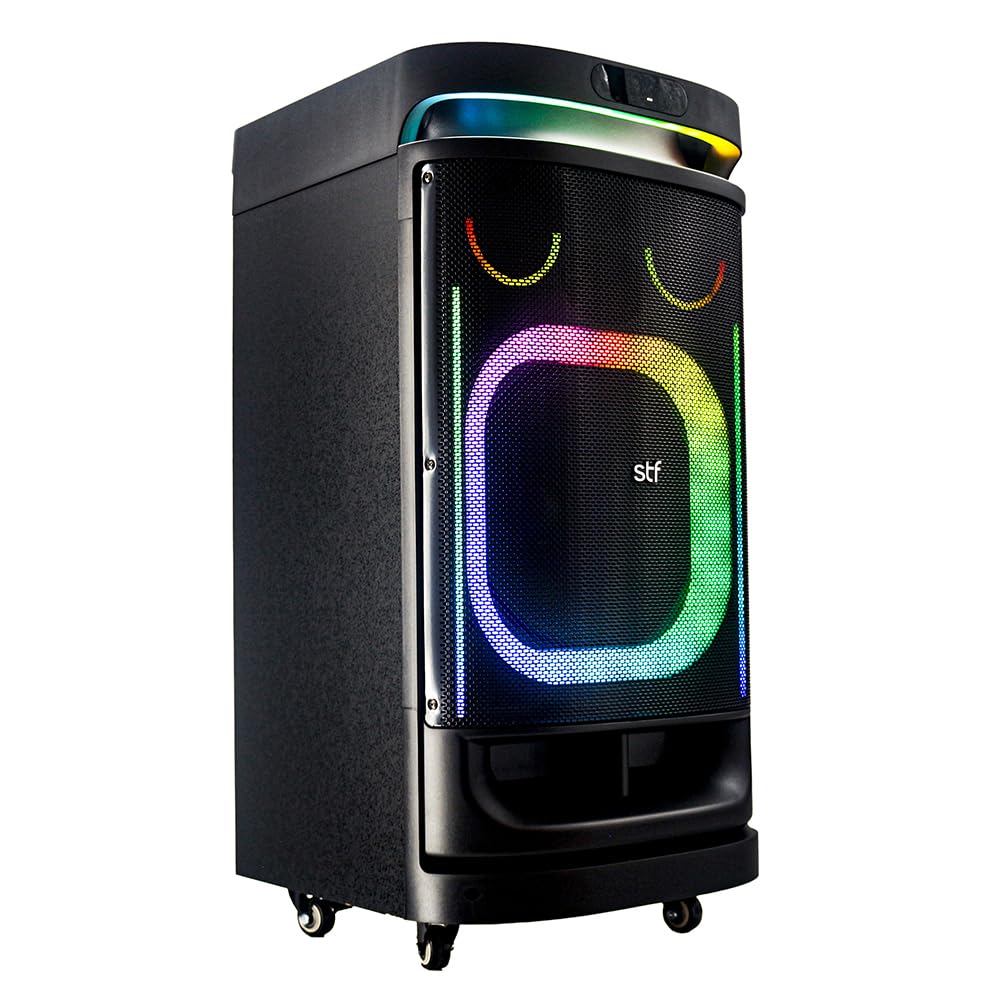
Figure 1: The STF Power Block Pro 12 Inch Speaker in use, highlighting its portable design and integrated lighting.
2. Important Safety Information
- Read all instructions before using the product.
- Do not open the speaker casing. There are no user-serviceable parts inside. Refer all servicing to qualified personnel.
- Keep the speaker away from water, moisture, and extreme temperatures.
- Use only the provided power cable for charging.
- Ensure proper ventilation around the speaker during use.
- Do not block any ventilation openings.
- Avoid placing the speaker on unstable surfaces.
- Unplug the speaker during lightning storms or when unused for long periods.
- Do not expose batteries to excessive heat such as sunshine, fire or the like.
3. Package Contents
Please check that all items listed below are included in your package:
- STF Power Block Pro 12 Inch Speaker
- Wired Microphone
- Remote Control
- Power Cable
- Instruction Manual (this document)
4. Product Overview
4.1 Front Panel

Figure 2: Front view of the STF Power Block Pro 12 Inch Speaker, showcasing the speaker grille and illuminated RGB LED disco lights.
The front panel features the main speaker grille, behind which are the 12-inch woofer and 2.5-inch tweeter. The integrated RGB LED disco lights provide a dynamic visual experience, illuminating the speaker's front.
4.2 Top Control Panel

Figure 3: Top control panel with inputs for microphone, guitar, AUX, USB, and Micro SD, along with playback and light control buttons.
The top panel houses all the primary controls and input ports for the speaker.
- MIC IN: 6.3mm input for the wired microphone.
- GT IN: 6.3mm input for a guitar.
- AUX IN: 3.5mm audio input for external devices.
- USB Port: For USB flash drives.
- TF CARD (Micro SD) Slot: For Micro SD cards.
- Display Screen: Shows current mode, track number, etc.
- Control Buttons:
- 💡 (Light Button): Controls LED light modes.
- ☰ (Mode Button): Switches between Bluetooth, USB, Micro SD, FM, and AUX modes.
- ▶️/❚❚ (Play/Pause Button): Plays or pauses audio.
- ◀️◀️ (Previous Track/Volume Down): Skips to the previous track or decreases volume.
- ▶️▶️ (Next Track/Volume Up): Skips to the next track or increases volume.
4.3 Rear Panel

Figure 4: Rear panel with AC power input, external DC 12V input, power switch, and audio output.
- AC INPUT: Power input for charging and operating the speaker via the included power cable (100-240V AC, 50/60Hz).
- POWER Switch: Turns the speaker ON or OFF.
- EXT DC 12V INPUT: For external 12V DC power source.
- AUDIO OUTPUT (L/R): RCA audio output for connecting to other audio systems.
5. Setup
5.1 Charging the Speaker
- Before first use, fully charge the speaker.
- Connect the provided power cable to the AC INPUT on the rear panel of the speaker.
- Plug the other end of the power cable into a standard wall outlet (100-240V AC, 50/60Hz).
- The charging indicator (if available, refer to display) will show charging status.
- A full charge provides up to 5 hours of playback time.
5.2 Powering On/Off
- To turn ON the speaker, flip the POWER switch on the rear panel to the "ON" position.
- To turn OFF the speaker, flip the POWER switch to the "OFF" position.
5.3 Speaker Placement
The STF Power Block Pro is equipped with transport wheels for easy mobility. Place the speaker on a stable, flat surface. For optimal sound, position it in an open area, avoiding obstructions.
6. Operating Instructions
6.1 Bluetooth Connection
- Turn on the speaker. It will automatically enter Bluetooth pairing mode, indicated by a flashing "BLUE" on the display.
- On your mobile device (phone, tablet, etc.), enable Bluetooth and search for available devices.
- Select "STF Power Block Pro" from the list of devices.
- Once connected, the speaker will emit a confirmation sound, and "BLUE" on the display will stop flashing.
- You can now play audio from your device through the speaker. The wireless range is approximately 10 meters (33 feet).
6.2 USB / Micro SD Playback
- Insert a USB flash drive or Micro SD card into the respective port on the top panel.
- The speaker will automatically switch to USB or Micro SD mode and begin playing audio files. If not, press the ☰ (Mode) button to select the correct mode.
- Use the ▶️/❚❚, ◀️◀️, and ▶️▶️ buttons to control playback.
6.3 FM Radio
- Press the ☰ (Mode) button repeatedly until "FM" appears on the display.
- Press and hold the ▶️/❚❚ button to automatically scan and save available FM stations.
- Use the ◀️◀️ and ▶️▶️ buttons to navigate between saved stations.
6.4 AUX Input
- Connect an external audio device (e.g., MP3 player, laptop) to the AUX IN port using a 3.5mm audio cable (not included).
- Press the ☰ (Mode) button until "AUX" appears on the display.
- Control playback and volume from your connected device.
6.5 Microphone and Guitar Input (Karaoke Function)
- Connect the included wired microphone to the MIC IN port.
- Connect a guitar to the GT IN port (optional).
- Adjust the microphone and guitar volume using the dedicated knobs or controls on the top panel (if available, otherwise use source volume).
- Play music through any of the available input modes (Bluetooth, USB, AUX) and sing along.
6.6 LED Light Control
- Press the 💡 (Light) button on the top panel to cycle through different RGB LED light modes.
- Press and hold the 💡 button to turn the lights ON or OFF.
6.7 Using the Remote Control
The included remote control allows you to conveniently manage playback, volume, mode selection, and LED lights from a distance. Refer to the remote control's button layout for specific functions.
7. Maintenance
- Cleaning: Use a soft, dry cloth to clean the exterior of the speaker. Do not use abrasive cleaners or solvents.
- Storage: Store the speaker in a cool, dry place when not in use.
- Battery Care: To prolong battery life, avoid fully discharging the battery frequently. Charge the speaker regularly, even if not in use, to maintain battery health.
8. Troubleshooting
| Problem | Possible Cause | Solution |
|---|---|---|
| Speaker does not turn on. | Battery is depleted. Power cable is not connected properly. | Connect the speaker to a power source and charge it. Ensure the power cable is securely connected to both the speaker and the wall outlet. |
| No sound. | Volume is too low. Incorrect input mode selected. Device not properly connected. | Increase the volume on the speaker and the connected device. Press the Mode button to select the correct input (Bluetooth, USB, AUX, FM). Re-establish Bluetooth connection or re-insert USB/Micro SD/AUX cable. |
| Bluetooth connection fails. | Speaker is not in pairing mode. Device is too far from the speaker. Interference from other devices. | Ensure the speaker is in Bluetooth mode and "BLUE" is flashing. Move your device closer to the speaker (within 10 meters). Turn off other Bluetooth devices nearby. |
| Microphone not working. | Microphone not properly connected. Microphone volume is too low. | Ensure the microphone is securely plugged into the MIC IN port. Adjust the microphone volume. |
9. Specifications
| Feature | Detail |
|---|---|
| Brand | STF |
| Model | ST-S10616 |
| Dimensions (L x W x H) | 95 x 40 x 90 cm |
| Connectivity Technology | Bluetooth 5.0, USB, Micro SD, FM Radio, 3.5 mm (Aux), 6.3 mm (Guitar) |
| Color | Black |
| Compatible Devices | Mobile phones, tablets, laptops, MP3 players, electric guitars, other audio devices with 3.5 mm output |
| Power Source | Battery / AC Power (100-240V, 50/60Hz) |
| Output Wattage | 40,000 P.M.P.O. (150 W RMS) |
| Wireless Range | Up to 10 meters (33 feet) |
| Speaker Configuration | 12-inch Woofer, 2.5-inch Tweeter |
| Impedance | 4 ohm |
| Battery Life | Up to 5 hours |
| Light Type | Multicolor RGB LED Disco Lights |
10. Warranty and Support
This STF Power Block Pro 12 Inch Speaker comes with a 1-year warranty from the date of purchase. This warranty covers manufacturing defects and workmanship under normal use. It does not cover damage caused by misuse, accidents, unauthorized modifications, or normal wear and tear.
For warranty claims or technical support, please contact STF customer service through their official website or the retailer where the product was purchased. Please have your proof of purchase and product model number (ST-S10616) ready.