
Introduction
The Stylophone Theremin is a unique portable analog instrument that combines the classic pitch theremin antenna with the retro design of the Stylophone. This device allows for expressive musical performance through touch-sensitive controls and offers built-in effects for sound shaping.
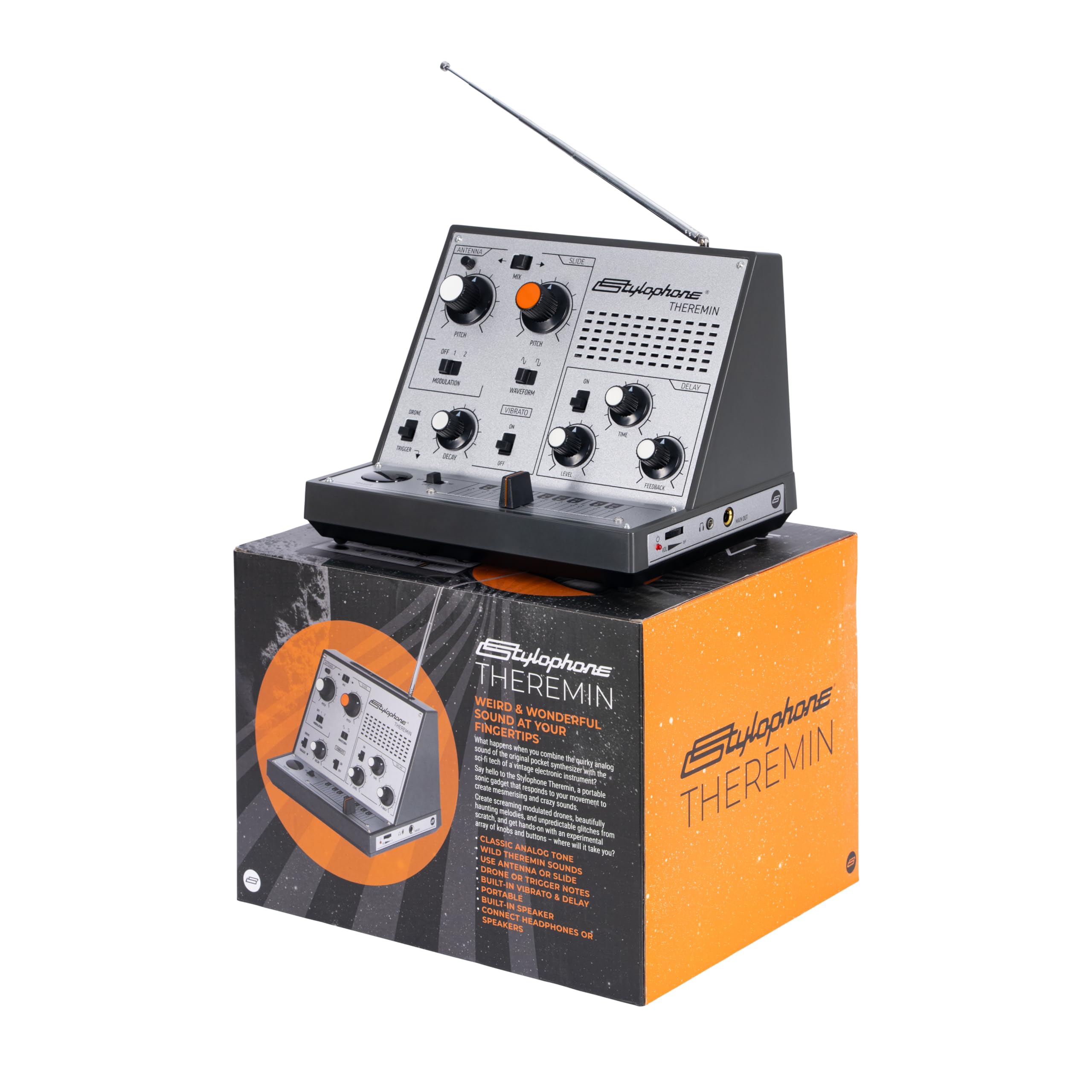
Image: The Stylophone Theremin, showcasing its compact design and extended antenna.
Product Overview Video
Video: An introductory overview of the Stylophone Theremin, demonstrating its basic functions and design.
Front Panel Explanation Video
Video: A detailed explanation of the Stylophone Theremin's metal front panel controls and features.
What's in the Box
Upon unboxing your Stylophone Theremin, please ensure all components are present:
- Stylophone Theremin Unit
- Headphones

Image: The Stylophone Theremin alongside its retail packaging.
Setup
Powering the Device
The Stylophone Theremin is battery-powered. It requires 6x AA batteries (not included). Locate the battery compartment on the underside of the unit, insert the batteries according to the polarity indicators, and close the compartment securely.
Audio Connections
- Built-in Speaker: The unit features an integrated speaker for direct sound output.
- Headphone Output: Connect the included headphones or any standard 3.5mm (1/8") jack headphones to the headphone port for private listening.
- Main Output: Use a 3.5mm (1/8") jack cable to connect the "MAIN OUT" port to an amplifier, mixer, audio interface, or other external audio equipment.

Image: Detail of the Stylophone Theremin's headphone and main output jacks.
Placement
The Stylophone Theremin can be placed on a flat surface like a table or mounted on a microphone stand for performance. Ensure the antenna has clear space around it for optimal operation.

Image: The Stylophone Theremin positioned on a microphone stand, demonstrating a setup option.
Speaker, Batteries, Side Panel, Microphone Mount Video
Video: A tutorial covering the speaker, battery installation, side panel features, and microphone mount options.
Operating Instructions
Familiarize yourself with the controls to fully utilize the Stylophone Theremin's capabilities.

Image: A clear view of the Stylophone Theremin's control panel, showing knobs and switches.
Antenna Use (Pitch Control)
The antenna controls the pitch of the sound. Move your hand closer to the antenna to increase the pitch, and further away to decrease it. Experiment with hand movements for expressive glides and vibrato.

Image: A hand positioned near the antenna, illustrating how to control pitch.
Antenna Use Tutorial Video
Video: A tutorial demonstrating proper technique for using the antenna to control pitch.
Slider Control
The touch slider provides precise control over notes, allowing for accurate melodies and smooth glides. Slide your finger along the metal strip to change the pitch.

Image: Hands interacting with the touch slider for pitch control.
Slider Use Tutorial Video
Video: A tutorial demonstrating how to use the slide control for musical expression.
Slider Features Tutorial Video
Video: A tutorial detailing the various features and capabilities of the slide control.
Delay Effect
Activate the built-in delay effect to add an echoing, spatial quality to your sound. Adjust the "TIME" knob to control the delay duration and the "F-BACK" (Feedback) knob to control the number of repeats.
Delay Feature Tutorial Video
Video: A tutorial explaining how to use and adjust the delay effect on the Stylophone Theremin.
Vibrato Effect
Engage the vibrato effect for a wobbly, pulsating sound. This adds character and movement, suitable for drones and cinematic textures.
Modulation Control
The modulation control allows for experimental sound exploration, pushing the sonic boundaries of the instrument. Experiment with the modulation settings to discover unique textures and tones.
Modulation Tutorial Video
Video: A tutorial demonstrating how to use the modulation feature for sound shaping.
Trigger Button & Drone Mode
The trigger button can be used to initiate notes or effects. Engage the drone mode for sustained tones, allowing for continuous sound generation without constant interaction with the antenna or slider.
Trigger Button Tutorial Video
Video: A tutorial explaining the function and use of the trigger button.
Mode Selection (Waveform & Octave)
Select different waveforms to alter the fundamental timbre of the sound. The octave switch allows you to shift the pitch range of the instrument up or down, providing access to lower or higher frequencies.
Mode Selection Tutorial Video
Video: A tutorial demonstrating how to select different modes and waveforms.
Maintenance
- Cleaning: Use a soft, dry cloth to clean the exterior of the unit. Avoid abrasive cleaners or solvents.
- Battery Replacement: Replace batteries when the sound becomes weak or distorted. Always use fresh AA batteries and dispose of old batteries responsibly.
- Storage: Store the Stylophone Theremin in a cool, dry place away from direct sunlight and extreme temperatures. Retract the antenna when not in use to prevent damage.
Troubleshooting
| Problem | Possible Cause | Solution |
|---|---|---|
| No sound output |
|
|
| Distorted or weak sound |
|
|
| Antenna or slider not responding |
|
|
Specifications
- Brand: Stylophone
- Model Name: THEREMIN
- Color: Silver
- Material: Plastic
- Item Dimensions (L x W x H): 8.5 x 6.5 x 6.25 inches
- Item Weight: 896 g
- Power Source: 6x AA Batteries (not included)
- Connector Type: 3.5mm (1/8") jack (Headphone Out, Main Out)
- Sound Profile: Warm, Distorted, Experimental, Lower Frequencies
Warranty and Support
The Stylophone Theremin comes with a 1-year warranty from the date of purchase, covering manufacturing defects. For warranty claims, technical support, or further assistance, please contact Stylophone customer service through their official website or the retailer where the product was purchased.
For additional resources and tutorials, visit the Stylophone Store on Amazon.