1. Product Overview
The ZEEGII 2088 Pressure Transmitter is a robust and reliable device designed for accurate pressure measurement in various industrial applications. It features a stainless steel probe, digital display, and provides a standard 4-20mA output signal. This manual provides essential information for the safe and effective installation, operation, and maintenance of your pressure transmitter.
Key Features:
- Advanced pressure sensors with highly sensitive, stable, and reliable components.
- Available in a variety of pressure ranges to meet diverse application needs.
- Lightweight, compact design for easy installation and operation.
- Suitable for a wide range of variable pressure conditions.
- Stainless steel material for the probe part, cast aluminum junction box.
- Digital display for clear pressure readings.
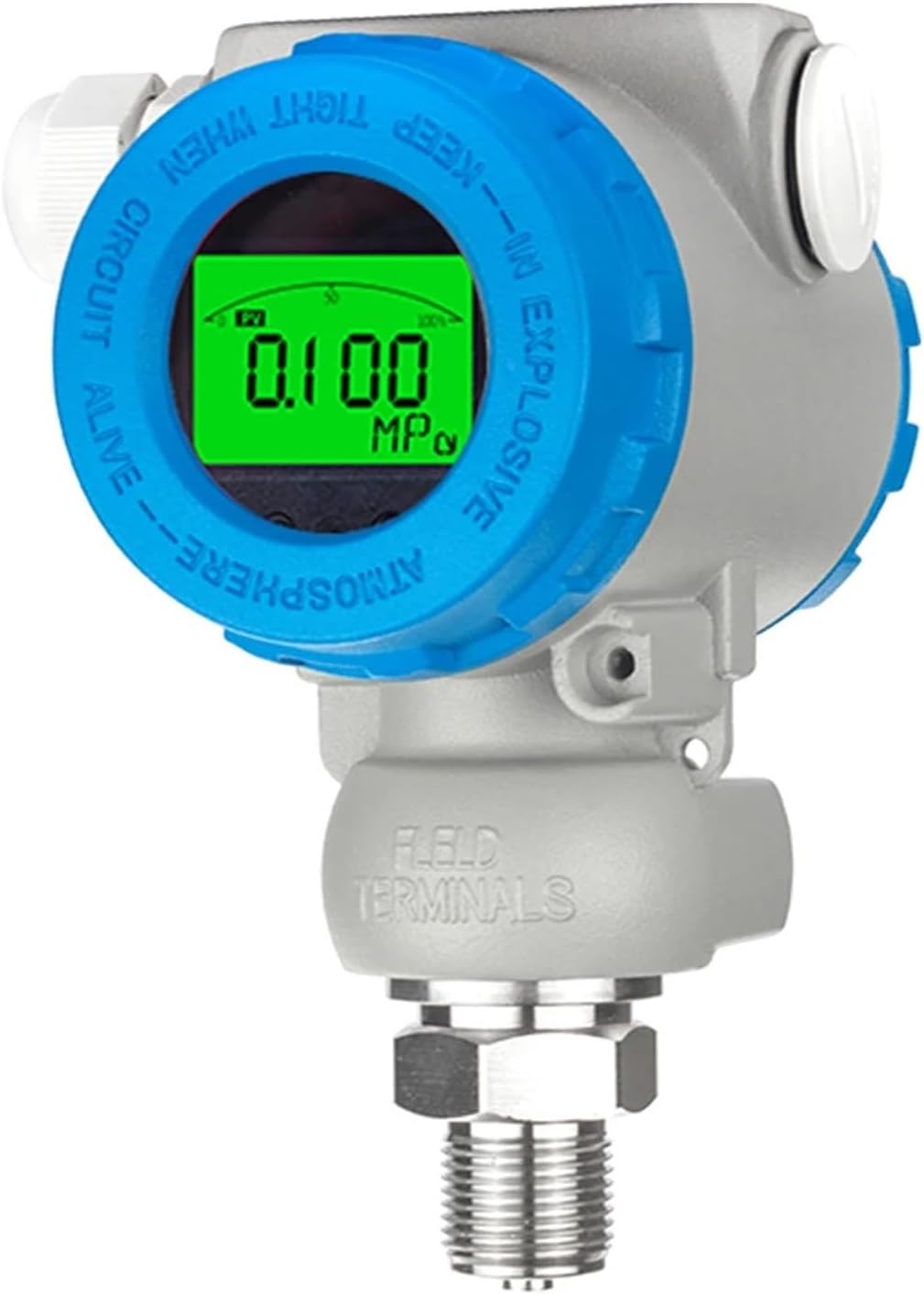
Figure 1: Main view of the ZEEGII 2088 Pressure Transmitter, showing the digital display and overall construction.
2. Safety Information
Read all instructions carefully before installing or operating the device. Failure to follow these instructions may result in equipment damage, personal injury, or death.
- Ensure the power supply is disconnected before any installation or maintenance work.
- Verify that the pressure range of the transmitter matches the application requirements to prevent overload.
- Do not exceed the specified overload pressure (2 times full scale).
- Ensure proper grounding to prevent electrical hazards.
- Use appropriate personal protective equipment (PPE) during installation and maintenance.
- Avoid exposing the device to corrosive media unless explicitly stated as compatible.
3. Setup and Installation
Proper installation is crucial for the accurate and reliable operation of the pressure transmitter.
3.1 Electrical Connection
The transmitter requires a DC power supply. The default power supply is 24VDC, with an operating range of 12-36VDC. The output signal is 4-20mA.

Figure 2: Internal wiring terminals of the ZEEGII 2088 Pressure Transmitter. Connect +24V to the positive terminal and I (current output) to the signal terminal for 4-20mA output.
- Connect the positive lead of the 24VDC power supply to the "+24V" terminal.
- Connect the signal lead (for 4-20mA output) to the "I" terminal.
- Ensure all connections are secure and properly insulated.
3.2 Mechanical Connection
The pressure port is available in various thread types. Ensure the chosen thread type matches your system's connection point. Common options include M20×1.5, G1/2, G1/4, G3/8, and NPT1/4.

Figure 3: Side view of the ZEEGII 2088 Pressure Transmitter, highlighting the robust housing and the threaded pressure port at the bottom.
- Apply appropriate thread sealant to the pressure port threads if necessary.
- Carefully screw the transmitter into the process connection.
- Tighten the connection securely, but do not overtighten to avoid damaging the threads or the sensor.
- Ensure the measuring medium is compatible with 316L stainless steel.
4. Operating Instructions
Once installed and powered, the ZEEGII 2088 Pressure Transmitter will begin measuring pressure and outputting a 4-20mA signal proportional to the measured pressure.
- Power On: Apply the specified DC power (12-36VDC, default 24VDC) to the transmitter.
- Pressure Measurement: The digital display will show the current pressure reading.
- Signal Output: The 4-20mA current output will correspond to the measured pressure within the specified range (e.g., 4mA for 0 bar, 20mA for 0.6 bar for the 0-0.6bar model).
- Response Time: The device has a fast response time of 1ms.
5. Maintenance
Regular maintenance helps ensure the longevity and accuracy of your pressure transmitter.
- Cleaning: Periodically clean the exterior of the transmitter with a soft, damp cloth. Do not use abrasive cleaners or solvents.
- Inspection: Regularly inspect the electrical connections and pressure port for any signs of corrosion, damage, or leaks.
- Calibration: While the device offers long-term stability (±0.2%F.S/year), periodic calibration by qualified personnel is recommended to maintain optimal accuracy, especially in critical applications.
- Environmental Conditions: Ensure the operating environment remains within the specified temperature ranges (Compensation temperature: -10°C to +70°C; Medium temperature: -20°C to +85°C).
6. Troubleshooting
If you encounter issues with your pressure transmitter, refer to the following common troubleshooting steps:
- No Display/No Output:
- Check the power supply voltage (12-36VDC).
- Verify electrical connections are secure and correct.
- Ensure no short circuits or open circuits in the wiring.
- Inaccurate Readings:
- Confirm the pressure range of the transmitter matches the application.
- Check for blockages in the pressure port or sensing element.
- Ensure the medium temperature is within the specified range.
- Consider professional calibration if accuracy issues persist.
- Intermittent Output:
- Inspect wiring for loose connections or damage.
- Check for electromagnetic interference (EMI) in the environment.
If the problem cannot be resolved using these steps, contact ZEEGII customer support or a qualified technician.
7. Specifications
| Parameter | Value |
|---|---|
| Model | 2088 |
| Probe Material | Stainless Steel (316L compatible) |
| Junction Box Material | Cast Aluminum |
| Overload Pressure | 2 times full scale |
| Measuring Medium | Air and liquid compatible with 316L stainless steel |
| Output Signal | 4-20mA |
| Power Supply Voltage | 24VDC default (12-36VDC) |
| Accuracy | ±0.5%F.S |
| Long-term Stability | ±0.2%F.S/year |
| Compensation Temperature | -10°C to +70°C |
| Medium Temperature | -20°C to +85°C |
| Storage Temperature | -40°C to +125°C |
| Response Time | 1ms |
| Pressure Port Options | M20×1.5, G1/2, G1/4, G3/8, NPT1/4 |
| Protection Level | IP65 |
| Item Weight | 2.2 pounds (approx. 1 kg) |
| Package Dimensions | 1.18 x 0.79 x 0.39 inches (approx. 3 x 2 x 1 cm) |
8. Warranty and Support
For warranty information or technical support, please refer to the documentation provided with your purchase or contact ZEEGII customer service directly. Specific warranty terms may vary by region and retailer.
For further assistance, please visit the official ZEEGII website or contact your local distributor.


