1. Product Overview
The Grandstream WP816 is a high-performance, cordless Wi-Fi IP phone engineered for seamless communication in diverse professional settings such as offices, retail, logistics, and healthcare. It integrates advanced features like dual-band Wi-Fi 6, an efficient antenna design, and robust roaming support to ensure reliable connectivity. The device supports 3-way voice conferencing and utilizes the Opus HD voice codec for superior audio quality. With a 1500mAh battery, it offers extended talk time and standby duration, providing users with enhanced mobility and flexibility.
2. Package Contents
Verify that all items are present in your package:
- Grandstream WP816 Wi-Fi Phone
- Rechargeable Battery
- Power Adapter (USB Type-C)
- Charging Cradle (optional, may vary by region)
- Quick Installation Guide
3. Product Layout

Figure 3.1: Front view of the WP816 phone, displaying its screen, navigation buttons, numeric keypad, and call control keys. The screen shows time, date, and network status.

Figure 3.2: Side profile of the WP816, illustrating its compact design and the placement of volume or programmable buttons on the side.

Figure 3.3: The WP816 phone docked in its charging cradle, showing how it sits upright for convenient charging and display.
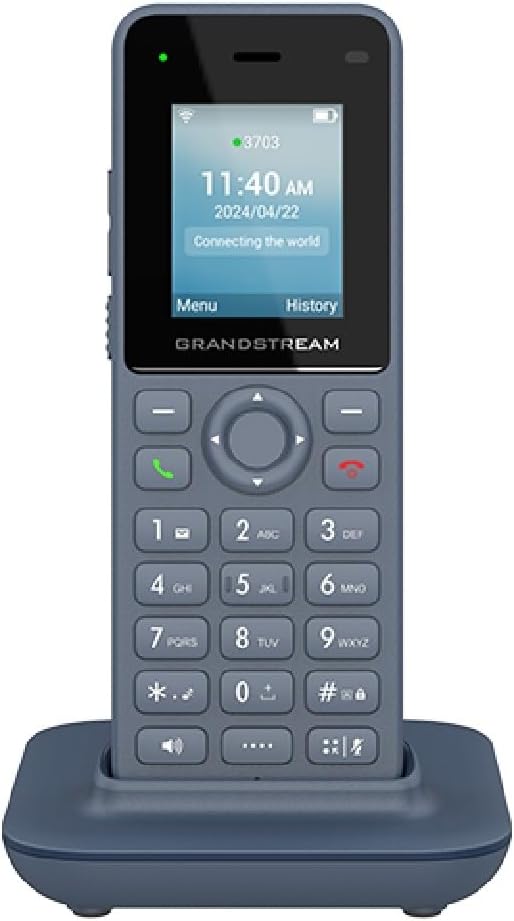
Figure 3.4: Front view of the WP816 phone securely placed in its charging cradle, ready for use or charging.
4. Setup Guide
4.1. Installing the Battery
- Remove the battery cover on the back of the phone.
- Insert the 1500mAh Lithium-Ion battery, ensuring the contacts align correctly.
- Replace the battery cover until it clicks into place.
4.2. Charging the Phone
- Connect the USB Type-C cable to the phone's charging port or place the phone in its charging cradle.
- Connect the other end of the cable to the power adapter, then plug the adapter into a power outlet.
- Allow the phone to charge fully before first use. A full charge provides approximately 6 hours of talk time and 120 hours of standby time.
4.3. Powering On/Off
- To Power On: Press and hold the Power/End Call button until the screen illuminates.
- To Power Off: Press and hold the Power/End Call button, then select 'Power Off' from the options on the screen.
4.4. Connecting to Wi-Fi
- From the main menu, navigate to Settings > Wi-Fi.
- Turn Wi-Fi On. The phone will scan for available networks.
- Select your desired Wi-Fi network from the list.
- Enter the Wi-Fi password if prompted, then select Connect.
4.5. Configuring SIP Accounts
The WP816 supports 2 SIP accounts. Configuration details are typically provided by your VoIP service provider or network administrator.
- From the main menu, navigate to Settings > Account.
- Select an available account (e.g., Account 1).
- Enter the required information: Account Name, SIP Server, SIP User ID, SIP Authenticate ID, SIP Password.
- Save the settings. The account status icon should indicate successful registration.
5. Operating Instructions
5.1. Making Calls
- Dialing Directly: Enter the phone number using the keypad and press the Call button (green handset icon).
- From Call History: Press the History soft key, navigate to the desired entry, and press the Call button.
- From Contacts: Navigate to Contacts, select a contact, and press the Call button.
5.2. Receiving Calls
- When the phone rings, press the Call button (green handset icon) to answer.
- To reject a call, press the End Call button (red handset icon).
5.3. Using Bluetooth
The WP816 features integrated Bluetooth for connecting headsets.
- From the main menu, navigate to Settings > Bluetooth.
- Turn Bluetooth On.
- Ensure your Bluetooth headset is in pairing mode.
- Select your headset from the list of available devices and follow the on-screen prompts to pair.
5.4. Voice Conferencing
The phone supports 3-way voice conferencing.
- During an active call, press the Conference soft key. The active call will be put on hold.
- Dial the number of the third party and press the Call button.
- Once the third party answers, press the Conference soft key again to join all parties.
5.5. Push-to-Talk (PTT)
The WP816 features a configurable button for Push-to-Talk functionality, if supported by your system.
- Consult your system administrator for PTT setup and usage instructions.
- Typically, press and hold the designated PTT button to transmit, and release to listen.
6. Maintenance and Care
- Keep the phone dry. Liquids can damage the device.
- Clean the phone with a soft, dry cloth. Do not use harsh chemicals or abrasive cleaners.
- Avoid exposing the phone to extreme temperatures or direct sunlight.
- Do not attempt to disassemble the phone. This will void the warranty.
- Charge the battery regularly to maintain its lifespan, even if the phone is not in frequent use.
7. Troubleshooting
| Problem | Possible Cause | Solution |
|---|---|---|
| Phone does not power on. | Battery is low or depleted. | Charge the phone for at least 30 minutes. |
| Cannot connect to Wi-Fi. | Incorrect password; out of range; network issue. | Verify password; move closer to router; restart router. |
| Cannot make/receive calls. | SIP account not registered; no network connection. | Check Wi-Fi connection; verify SIP account settings with administrator. |
| Poor call quality (echo/noise). | Weak Wi-Fi signal; network congestion. | Move to an area with better Wi-Fi signal; reduce network traffic. |
8. Technical Specifications
| Feature | Specification |
|---|---|
| Model | WP816 |
| Wi-Fi Standard | Dual-band Wi-Fi 6 (802.11ax) |
| SIP Accounts | 2 SIP accounts, 2 lines |
| Voice Codec | Opus HD voice |
| Battery | 1500mAh rechargeable Lithium-Ion |
| Talk Time | Up to 6 hours |
| Standby Time | Up to 120 hours |
| Bluetooth | Integrated Bluetooth for headsets |
| Audio Features | Dual MIC design with AEC and Noise Shield Technology |
| Charging Port | Type C USB (supports fast charging) |
| Headset Jack | 3.5mm |
| Dimensions (L x W x H) | 7 x 5 x 4 inches (approximate) |
| Item Weight | 13.8 ounces / 390 Grams |
| Material | Plastic |
| Color | Gray |
9. Warranty and Support
For warranty information, please refer to the warranty card included with your product or visit the official Grandstream website. Technical support is available through Grandstream's customer service channels. Please have your product model (WP816) and serial number ready when contacting support.
For the latest documentation, firmware updates, and support resources, please visit: www.grandstream.com/support


