
Aopvui IPL-999900
Aopvui Laser Hair Removal Device User Manual
Model: IPL-999900
Brand: Aopvui
Product Overview
The Aopvui IPL Laser Hair Removal Device is an advanced 3-in-1 system designed for effective and safe at-home hair removal for both women and men. Utilizing Intense Pulsed Light (IPL) technology, it targets hair follicles to inhibit regrowth, offering a long-lasting solution for smooth skin. With over 999,900 flashes, 9 adjustable energy levels, and dual operating modes, this device provides a customizable and convenient hair removal experience for various body and facial areas.

Safety Information
Before using the device, please read all safety instructions carefully. This device is intended for cosmetic hair removal and should not be used for any other purpose. Always wear the provided protective glasses during operation to shield your eyes from the intense light pulses.
- Do not use on tattooed skin.
- Do not use on recently tanned skin or if you have a sunburn.
- Consult a doctor if you have any pre-existing skin conditions or are taking medications that may increase light sensitivity.
- Keep out of reach of children.


Setup and First Use
Follow these steps for proper setup and your first treatment session:
- Prepare the Skin: Shave the area to be treated. Ensure the skin is clean, dry, and free of any lotions, gels, or deodorants. Hair longer than 2cm should be shaved.
- Connect Power: Plug the device into a power outlet using the provided adapter.
- Wear Protective Glasses: Always wear the included protective glasses to shield your eyes from the intense light.
- Adjust Energy Level: Turn on the device and select an appropriate energy level. Start with the lowest level (Level 1) and gradually increase it based on your comfort and skin reaction. The device features 9 adjustable energy levels, reaching up to 15J.
- Select Mode: Choose between Automatic (Auto) mode for larger areas or Manual (HR) mode for smaller, more precise areas.
- Begin Treatment: Place the device vertically at a 90-degree angle against the skin. Press the flash button to emit a pulse. For Auto mode, hold the flash button and glide the device over the skin.

Operating the Device
Energy Levels
The device offers 9 energy levels, allowing you to customize the intensity of the light pulses. Higher levels deliver more energy (up to 15J) and can be more effective, but always start with a lower level to assess your skin's tolerance. Adjust the level using the power button or dedicated level adjustment buttons on the device.

Operating Modes: Auto vs. Manual
The Aopvui device features two distinct operating modes to suit different treatment areas:
- Automatic Mode (Auto): Ideal for larger body areas such as arms, legs, and back. In this mode, the device automatically emits flashes when it detects skin contact, allowing for faster and more continuous treatment.
- Manual Mode (HR): Best suited for smaller, more sensitive, or precise areas like the underarms, bikini line, lips, and chin. In Manual mode, you press the flash button for each individual pulse.

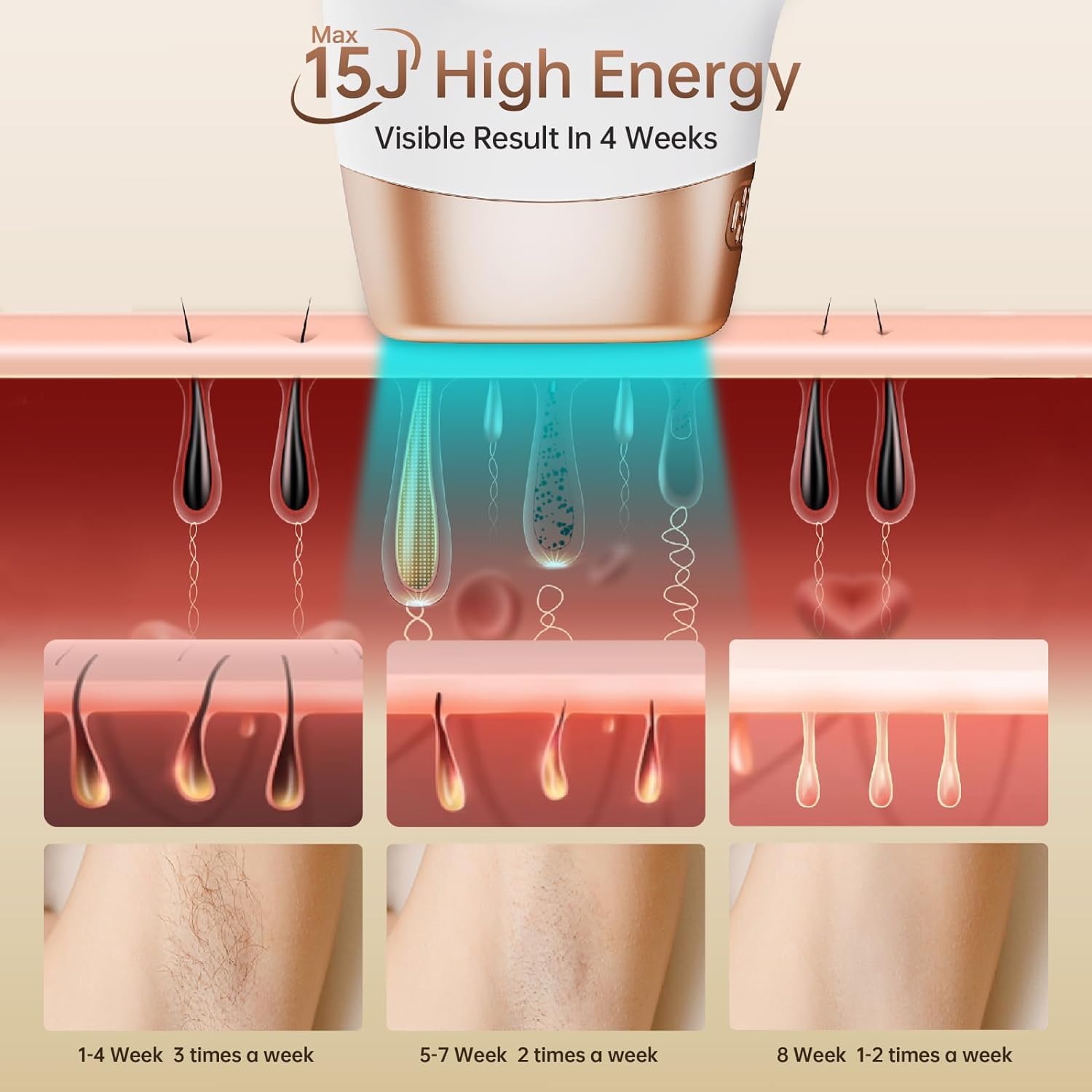
Treatment Schedule and Expected Results
Consistency is key for optimal results. A typical treatment plan involves:
- Weeks 1-4: Use 3 times per week.
- Weeks 5-6: Use 2 times per week.
- Weeks 7-8: Use once per week.
- After 8 Weeks: Maintenance treatments once every 2 weeks or as needed.
Clinical tests indicate that 80% of users achieve a 94% reduction in hair after 7-8 sessions, with complete results typically seen within 8 weeks. Best results are observed on lighter skin tones with darker hair, as the contrast enhances the effectiveness of the IPL technology.

Maintenance and Care
To ensure the longevity and optimal performance of your Aopvui IPL device, follow these maintenance guidelines:
- Cleaning: After each use, gently wipe the light window with a soft, dry cloth. Do not use abrasive cleaners or immerse the device in water.
- Storage: Store the device in a cool, dry place, away from direct sunlight and moisture. Keep it in its original packaging or a protective case when not in use.
- Flashes Remaining: The device features a display showing the remaining flashes (over 999,900 total). This indicates the lifespan of the lamp.
Troubleshooting
If you encounter any issues with your Aopvui IPL device, refer to the following common troubleshooting tips:
- Device Not Turning On: Ensure the power adapter is securely plugged into both the device and a working electrical outlet.
- No Flash Emitted: Check that the light window is fully in contact with your skin. The device has a skin contact sensor that prevents flashing if not properly positioned. Also, ensure the energy level is set and not 'OFF'.
- Skin Irritation: If you experience redness or discomfort, reduce the energy level for your next session. Ensure your skin is clean and dry before treatment. Apply a soothing lotion after treatment.
- Inconsistent Results: Ensure you are following the recommended treatment schedule and applying the device consistently to all desired areas. Hair growth cycles vary, and patience is required for full results.
For issues not covered here, please contact Aopvui customer support.
Specifications
| Feature | Detail |
|---|---|
| Model | IPL-999900 |
| Flashes | 999,900+ |
| Energy Levels | 9 (up to 15J) |
| Modes | Automatic, Manual |
| Technology | IPL (Intense Pulsed Light) |
| Wavelength | 600nm-1200nm |
| Treatment Time (Full Body) | Approx. 15 minutes |
| Package Dimensions | 10.51 x 10.35 x 2.8 inches |
| Weight | 2.36 Pounds |
| Manufacturer | Aopvui |
Warranty and Support
Your Aopvui IPL Laser Hair Removal Device comes with a 6-month guarantee from the date of purchase. For any questions, concerns, or missing accessories, our customer service team is available 24/7 to assist you.
You can visit the official Aopvui store for more information and support: Aopvui Official Store
Ask a question about this manual
Ask about setup, troubleshooting, compatibility, parts, safety, or missing instructions. Manuals+ will review the question and use this page’s manual context to help answer it.