
Mc Haus ARTIC-460 WHITE
Mc HAUS Artic-460 WHITE Portable Air Conditioner User Manual
Model: ARTIC-460 WHITE
1. Introduction
Thank you for choosing the Mc HAUS Artic-460 WHITE Portable Air Conditioner. This manual provides essential information for the safe and efficient operation, installation, and maintenance of your appliance. Please read this manual thoroughly before use and keep it for future reference.
Safety Precautions
- Always ensure the appliance is placed on a flat, stable surface.
- Do not block the air inlets or outlets. Maintain adequate clearance around the unit.
- Do not operate the unit with a damaged power cord or plug.
- Keep children and pets away from the appliance during operation.
- Unplug the unit before cleaning or performing any maintenance.
- This appliance is for indoor use only.
2. Product Overview
The Mc HAUS Artic-460 WHITE is a versatile portable air conditioner designed to provide cooling, heating, dehumidification, and fan functions for your living space. It features a compact design with integrated handles and 360-degree wheels for easy mobility.

Figure 2.1: Overview of the Mc HAUS Artic-460 WHITE portable air conditioner, showing the main unit, remote control, and a smartphone for app control.
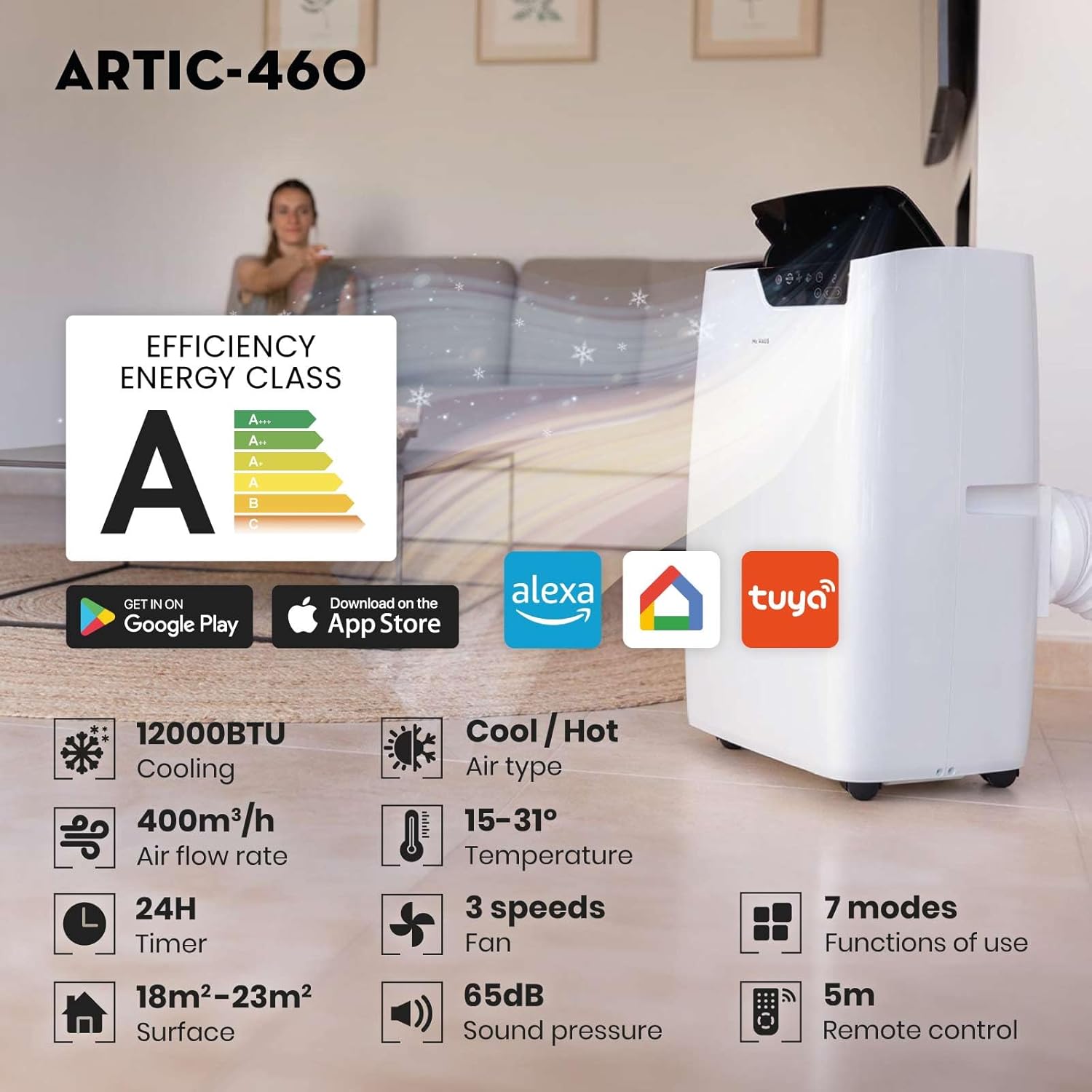
Figure 2.2: Key features of the Artic-460, including Energy Efficiency Class A, 12000 BTU cooling, 400m³/h airflow, 15-31°C temperature range, 3 fan speeds, 7 functions, 24-hour timer, 18m²-23m² surface area coverage, 65dB sound pressure, and 5m remote control range.
Components
- Main Air Conditioner Unit
- Remote Control
- Exhaust Hose
- Window Sealing Kit (adjustable window slider, hose adapter, flat nozzle)
- Drainage Hose (for continuous drainage in dehumidifier mode)
3. Setup and Installation
Proper installation is crucial for the efficient operation of your portable air conditioner. Follow these steps carefully.
Placement
- Place the unit on a firm, level surface in the desired room.
- Ensure there is at least 30 cm (12 inches) of space around the unit for proper airflow.
- Position the unit near a window or door for exhaust hose installation.
Window Kit Assembly
The included window kit is designed for vertical and horizontal sliding windows.

Figure 3.1: Components of the easy-to-install window kit for vertical and horizontal sliding windows, including the adjustable window slider, hose adapter, and flat nozzle.
- Attach the hose adapter to one end of the exhaust hose.
- Connect the other end of the exhaust hose to the exhaust port on the back of the air conditioner unit.
- Adjust the window slider kit to fit your window opening.
- Insert the flat nozzle of the exhaust hose into the opening of the window slider kit.
- Seal any gaps around the window kit to prevent air leakage, which can reduce efficiency.
4. Operation
Your Mc HAUS Artic-460 WHITE can be operated using the control panel on the unit or the included remote control. It also supports Wi-Fi connectivity for smart control via an app.
Control Panel
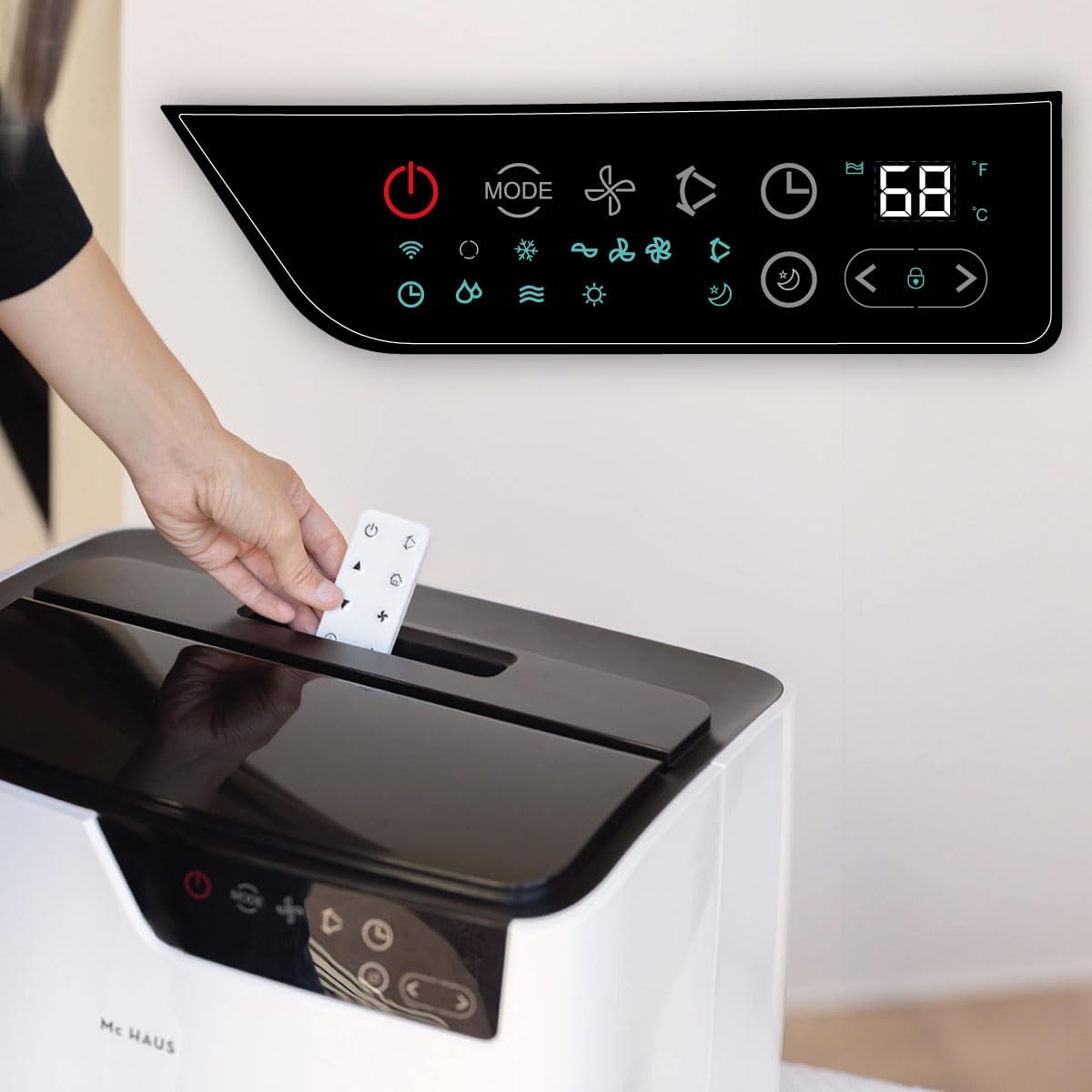
Figure 4.1: The control panel on top of the unit, showing various function icons and a digital display for temperature. A hand is shown placing the remote control into its storage slot on the unit.
The control panel features touch-sensitive buttons and a digital display for easy operation.
Remote Control

Figure 4.2: Detailed view of the remote control with labeled buttons for power, automatic oscillation, temperature/timer settings, mode selection, fan speed, and night mode activation/deactivation.
The remote control allows you to operate the unit from a distance of up to 5 meters.
Operating Modes
- Cooling Mode: For cooling the room. Set your desired temperature using the temperature adjustment buttons.
- Heating Mode: For heating the room. Set your desired temperature.
- Dehumidifier Mode: Removes excess moisture from the air. Consider connecting a drainage hose for continuous operation.
- Fan Mode: Circulates air without cooling or heating. Select from multiple fan speeds.
Additional Functions
- Timer: Set the unit to turn on or off automatically after a specified period (up to 24 hours).
- Automatic Oscillation: Activates the automatic oscillation system for wider air distribution.
- Night Mode: Adjusts operation for quieter performance during sleep.
- Wi-Fi Connectivity: Control your unit remotely via a smartphone app (e.g., Tuya Smart, Alexa, Google Home compatible).

Figure 4.3: Screenshots demonstrating the smartphone app's capabilities, including connection from multiple devices, convenient remote control, simple and instant connection, and easy sharing with family members.
5. Maintenance
Regular maintenance ensures the longevity and optimal performance of your air conditioner.
Cleaning the Air Filter
The air filter should be cleaned every two weeks or more frequently depending on usage and air quality.
- Unplug the unit from the power outlet.
- Locate and remove the air filter from the back or side of the unit.
- Wash the filter under running water or use a vacuum cleaner to remove dust.
- Allow the filter to dry completely before reinserting it into the unit.
Draining Water
The unit has an internal water tank that collects condensed water. When the tank is full, the unit will stop operating and display an indicator. You will need to drain the water manually.
- Unplug the unit.
- Place a shallow pan or tray under the drainage port at the bottom rear of the unit.
- Remove the drain plug to allow water to flow out.
- Once drained, replace the drain plug securely.
For continuous drainage in dehumidifier mode, connect the provided drainage hose to the continuous drainage port.
Storage
If the unit will not be used for an extended period:
- Drain all water from the unit.
- Clean the air filter.
- Unplug the power cord and coil it neatly.
- Store the unit in a cool, dry place, away from direct sunlight and extreme temperatures.
6. Troubleshooting
Before contacting customer support, please refer to the following common issues and solutions.
| Problem | Possible Cause | Solution |
|---|---|---|
| Unit does not turn on | No power supply Water tank full | Check power cord and outlet Drain the water tank |
| Unit not cooling/heating effectively | Air filter dirty Exhaust hose not properly installed Room too large Windows/doors open | Clean the air filter Ensure hose is securely connected and sealed Check recommended room size (18m²-23m²) Close all windows and doors |
| Unit is noisy | Unit not on a level surface Obstruction in fan/air outlet | Place on a flat, stable surface Check for and remove any obstructions |
| Remote control not working | Batteries dead/incorrectly inserted Obstruction between remote and unit | Replace batteries, check polarity Ensure clear line of sight |
7. Specifications
Technical data for the Mc HAUS Artic-460 WHITE Portable Air Conditioner.

Figure 7.1: Dimensions of the unit (71 cm height, 33.5 cm depth, 44 cm width) and features for easy movement, including side handles and 360° wheels.

Figure 7.2: Detailed technical specifications table for the Artic-460, including cooling/heating capacity, dehumidification, airflow, noise levels, energy efficiency, and recommended room sizes (18m²-23m²).
| Specification | Value |
|---|---|
| Model | ARTIC-460 WHITE |
| Cooling Capacity | 12000 BTU/h (3.5 kW) |
| Heating Capacity | 9000 BTU/h (2.7 kW) |
| Dehumidification Capacity | 1.02 L/h |
| Airflow Volume | 400 m³/h |
| Noise Level | 65 dB |
| Energy Efficiency Class | A |
| Refrigerant | R290/200g |
| Voltage | 220-240V / 50Hz |
| Power Consumption (Cooling) | 1300W / 6.0A |
| Power Consumption (Heating) | 1100W / 4.8A |
| Dimensions (W x D x H) | 44 x 33 x 71 cm |
| Weight | 29 kg |
| Recommended Room Size | 18m² - 23m² |
8. Warranty and Support
Your Mc HAUS Artic-460 WHITE Portable Air Conditioner comes with a limited warranty. Please refer to the warranty card included with your purchase for specific terms and conditions.
For technical support, spare parts, or service inquiries, please contact Mc Haus customer service through their official website or the retailer where you purchased the product. When contacting support, please have your model number (ARTIC-460 WHITE) and purchase date ready.
Related documentsARTIC-460 WHITE


Ask a question about this manual
Ask about setup, troubleshooting, compatibility, parts, safety, or missing instructions. Manuals+ will review the question and use this page’s manual context to help answer it.