
1. Introduction
This manual provides essential information for the safe and effective operation of your TCFUNDY 1500W Snow Machine with 12 LED Lights. Please read it thoroughly before use and retain it for future reference.
The TCFUNDY 1500W Snow Machine is designed to produce artificial snow effects for various events, including parties, stages, weddings, and photography. It features 12 integrated LED lights capable of displaying 9 colors and 3 light effects, enhancing the visual experience.
2. Safety Information
- Power Supply: Ensure the machine is connected to a grounded power outlet with the correct voltage (AC110V, 60Hz).
- Fluid Usage: Use only professional snow fluid. Do not use water or other liquids, as this can damage the machine and void the warranty.
- Fluid Level: Always monitor the fluid level using the tank scale. Turn off the machine before the liquid runs out to prevent damage to the pump.
- Tube Placement: Ensure the fluid intake tube is fully extended to the bottom of the tank. Improper tube placement can cause the machine to rattle and lead to permanent damage.
- Ventilation: Ensure adequate ventilation around the machine during operation to prevent overheating.
- Placement: Place the machine on a stable, non-slip surface. Use the hanging bracket for secure elevated installation.
- Children and Pets: Keep the machine out of reach of children and pets.
- Maintenance: Disconnect power before any cleaning or maintenance.

Image Description: This image illustrates the correct and incorrect positioning of the fluid intake tube within the snow fluid bottle. The correct image shows the tube fully extended to the bottom, while the incorrect image shows it partially submerged, indicating a potential issue that could cause rattling and damage.
3. Package Contents
- TCFUNDY 1500W Snow Machine
- Wireless Remote Control
- Power Cord
- User Manual (This document)
- Hanging Bracket (pre-attached or included for installation)
4. Product Overview
The TCFUNDY 1500W Snow Machine is designed for high-output snow effects with integrated lighting. Key features include:
- High Output: 1500W power for significant snow production.
- Integrated LED Lights: 12 LED lights offering 9 colors and 3 light effects (Jump, Fade, Flash).
- Large Tank Capacity: 5-liter (169 oz) tank for extended operation.
- Remote Control: Wireless remote for convenient operation of snow output and light settings.
- Durable Construction: Made from aluminum for better heat dissipation and longevity.
- Portable Design: Features a handle for easy transport and a bracket for versatile mounting.

Image Description: A TCFUNDY 1500W Snow Machine, white with black accents, is shown in an outdoor winter setting, producing artificial snow. The integrated LED lights are illuminated, and a remote control is visible in a hand, demonstrating its use.
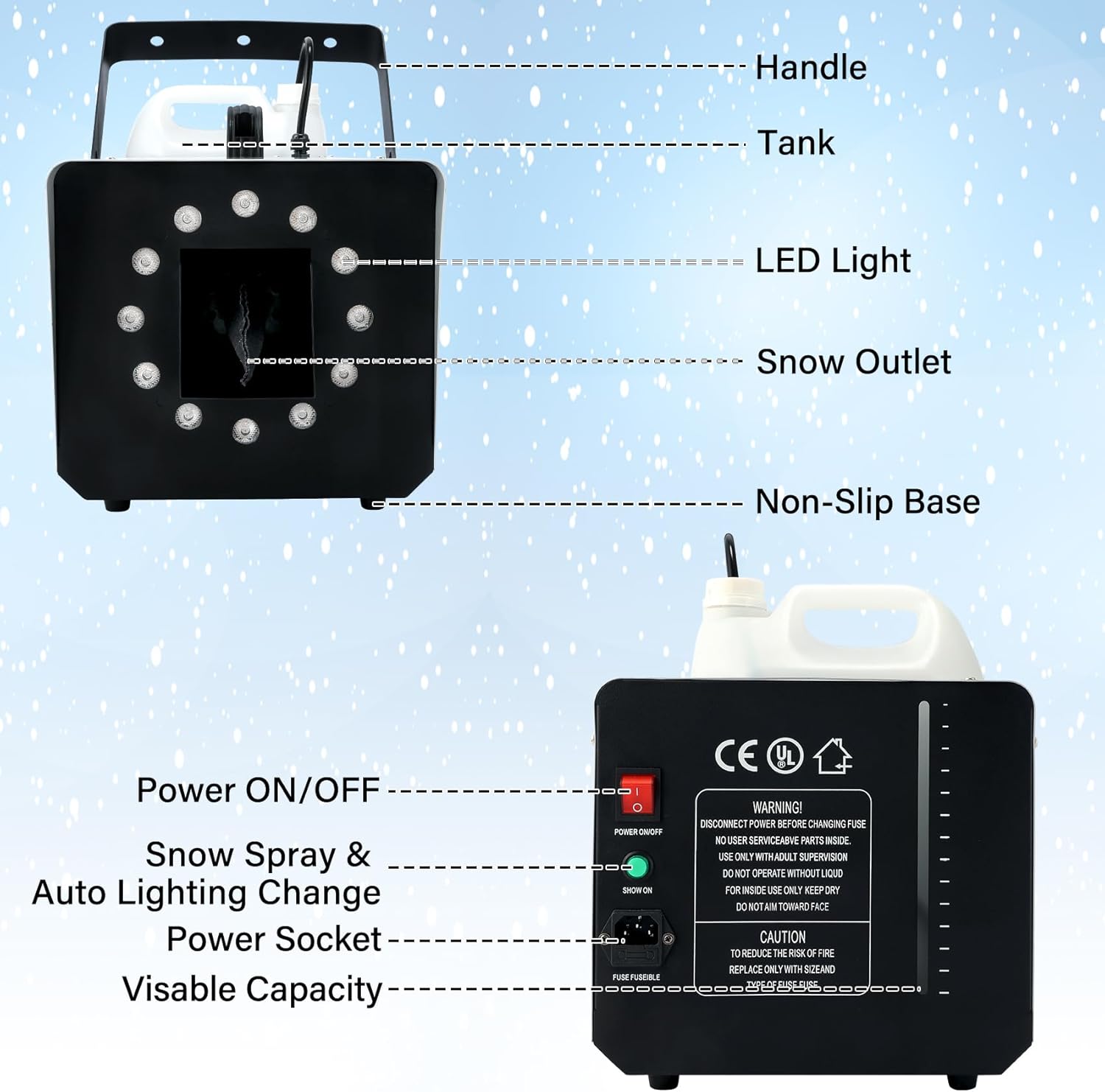
Image Description: This diagram labels the key components of the snow machine, including the handle, tank, LED lights, snow outlet, non-slip base, power ON/OFF switch, snow spray & auto lighting change button, power socket, and visible fluid capacity indicator.
5. Setup
Follow these steps to set up your TCFUNDY Snow Machine:
- Fill the Tank: Pour professional snow fluid (not included) into the machine's tank. Ensure the lid is screwed on tightly. Verify the fluid intake tube is fully extended to the bottom of the tank.
- Connect Power: Connect the power cord to the machine and then to a suitable grounded electrical outlet (AC110V, 60Hz).
- Power On: Turn the main power switch on the machine to the "ON" position.
- Warm-up: Allow the machine a few minutes to warm up.
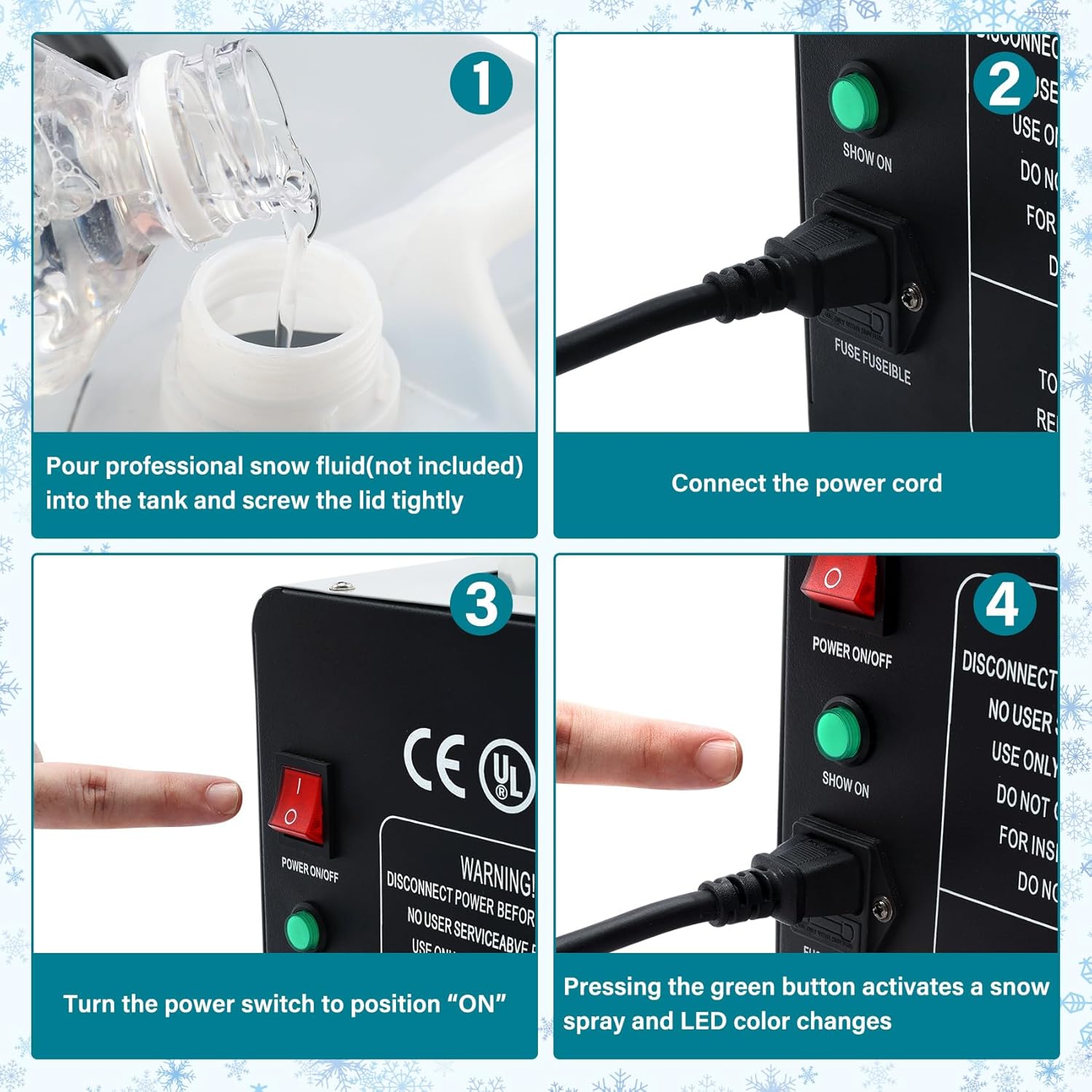
Image Description: A four-panel image illustrating the setup process: 1) Pouring snow fluid into the tank, 2) Connecting the power cord, 3) Turning the power switch to 'ON', and 4) Pressing the green 'SHOW ON' button to activate snow spray and LED lights.
6. Operating Instructions
The TCFUNDY Snow Machine is operated using the included wireless remote control.
Remote Control Functions:
- ON: Activates snow output.
- OFF: Stops snow output.
- AUTO: Activates automatic snow output and light changes.
- Output Adjustment (25%, 50%, 100%): Adjusts the volume of snow output.
- LED ON/OFF: Toggles the LED lights on or off.
- Light Effects (JUMP, FADE, FLASH): Selects different light transition modes.
- LED Lights Color Change (R, G, B, and other color buttons): Selects specific LED light colors.

Image Description: A detailed image of the wireless remote control, with labels pointing to each button and describing its function, such as 'Snow On', 'Snow Off', 'Output Adjustment (25%, 50%, 100%)', 'LED Light On/Off', 'Lights Effects (Jump, Fade, Flash)', and 'LED Lights Color Change (various color buttons)'.
General Operation:
Once the machine is warmed up, use the remote control to initiate snow production and customize the lighting effects. Experiment with different output levels and light settings to achieve your desired ambiance.
7. Maintenance
Proper maintenance ensures the longevity and optimal performance of your snow machine.
- Cleaning: After each use, especially if storing for an extended period, it is recommended to run a small amount of distilled water through the machine to clear any residual snow fluid from the pump and nozzle. This helps prevent clogs.
- Exterior Cleaning: Wipe the exterior of the machine with a soft, dry cloth. Do not use abrasive cleaners or solvents.
- Storage: Store the machine in a cool, dry place, away from direct sunlight and extreme temperatures. Ensure the tank is empty or contains fresh fluid if storing for a short duration.
- Fluid Tube: Periodically check the fluid intake tube for any blockages or damage.
8. Troubleshooting
If you encounter issues with your TCFUNDY Snow Machine, refer to the following common problems and solutions:
| Problem | Possible Cause | Solution |
|---|---|---|
| No snow output or weak output |
|
|
| Remote control not working |
|
|
| Machine rattling during operation | Fluid intake tube not properly seated at the bottom of the tank. | Ensure the fluid intake tube is fully extended to the bottom of the tank. |
| LED lights not working | LED lights turned off via remote or internal issue. | Press the 'LED ON' button on the remote. If issue persists, contact support. |
9. Specifications
| Feature | Detail |
|---|---|
| Model Number | TCFD-SE0000112-SL |
| Power | 1500W |
| Voltage | AC110V, 60Hz |
| Tank Capacity | 5 Liters (169 oz) |
| Output Distance | 19.98-26.25 ft (6-8 meters) |
| LED Lights | 12 LEDs, 9 Colors, 3 Light Effects |
| Control Modes | Wireless Remote Control |
| Material | Aluminum |
| Product Dimensions | 18.5"L x 10.3"W x 11.5"H |
| Item Weight | 14.77 pounds |
| Fuse | 15A |

Image Description: This image provides a visual representation of the snow machine's dimensions (18.5"L x 10.3"W x 11.5"H) and lists key specifications such as Voltage (AC110V, 60Hz), Power (1500W), Tank Capacity (5 Liter), Fuse (15A), Output Distance (19.98-26.25ft/6-8M), and Control Modes (Remote Control).
10. Warranty and Support
For warranty information or technical support, please refer to the product packaging or contact TCFUNDY customer service directly. Keep your purchase receipt as proof of purchase.
You can typically find contact information on the manufacturer's official website or through the retailer where the product was purchased.