
LEKATO B0D8PKJBPT
Contents
LEKATO Guitar Looper Pedal User Manual
Model: B0D8PKJBPT
Introduction
This manual provides detailed instructions for the setup, operation, maintenance, and troubleshooting of your LEKATO Guitar Looper Pedal. Please read this manual thoroughly before using the device to ensure proper functionality and to maximize your musical experience.
What's Included
Upon unboxing your LEKATO Guitar Looper Pedal, please verify that all the following items are present:
- 1 * LEKATO Guitar Looper Pedal
- 1 * 9V 0.6A Power Supply Adapter
- 1 * USB Cable
- 1 * User Manual (this document)

Image: All components included in the LEKATO Guitar Looper Pedal package.
Key Features
- 3 Loop Banks & 18 Minutes Memory: The pedal features three independent loop banks, with each single loop supporting up to 6 minutes of recording, totaling 18 minutes of recording time. A visual indicator displays the current loop time progress.
- Synchronous Recording Function: Allows you to enter the recording state at any point during playback, ensuring no musical moment is missed.
- Built-in Tuner Function: High-sensitivity tuning function integrated for convenient instrument tuning.
- Uncompressed Audio: Operates at a 48K/24bit sampling rate, providing lossless, uncompressed, and professional tone quality. The Analog-Dry-Through design ensures a pure tone without added noise.
- Lossless Upload and Download: Easily import and export WAV loop files to/from a PC (Windows/MAC OS) via USB. Recorded files are automatically saved even when the unit is powered off.
- One Foot Switch Control: All primary functions such as record, undo/redo, stop, and erase are accessible via a single footswitch for intuitive control during performance.
Setup
Follow these steps to set up your LEKATO Guitar Looper Pedal:
- Power Connection: Connect the included 9V 0.6A power supply adapter to the DC 9V input jack on the pedal. Ensure the power supply is 9V Central Negative. Plug the adapter into a standard power outlet.
- Instrument Connection: Connect your guitar or other instrument to the INPUT jack of the looper pedal using a standard 1/4-inch instrument cable.
- Amplifier Connection: Connect the OUTPUT jack of the looper pedal to your amplifier or audio interface using another standard 1/4-inch instrument cable.
- Power On: Once all connections are secure, the pedal will power on and be ready for use.

Image: The looper pedal connected to its dedicated power supply adapter.

Image: The looper pedal connected within a typical guitar pedalboard setup.
Operating Instructions
The LEKATO Guitar Looper Pedal is designed for intuitive operation using its single footswitch and level knob.
Basic Looping Functions
The LED display provides visual feedback on the current mode (Rec/Play/Overdub/Stop/Clean).

Image: The pedal's LED display indicating different operational states like Play, Overdub, and Stop.
- Record: Press the footswitch once to start recording. The LED display will indicate recording mode.
- Play: Press the footswitch again to stop recording and start playback of the recorded loop.
- Overdub: While a loop is playing, press the footswitch once to enter overdub mode. You can record additional layers over the existing loop. Press again to stop overdubbing and continue playback.
- Stop: Double-press the footswitch quickly to stop playback.
- Undo/Redo: While playing or overdubbing, press and hold the footswitch for 1 second to undo the last recorded layer. Hold for 1 second again to redo it.
- Clear: While stopped, press and hold the footswitch for 3 seconds to clear the current loop.

Image: Demonstrating the single footswitch control for various functions.
Loop Banks
The pedal features 3 independent loop banks. Use the multifunction control key (Level knob) to switch between them.

Image: Visual representation of the three loop banks, each capable of storing up to 6 minutes of audio.
Volume Adjustment & Multifunction Control Key
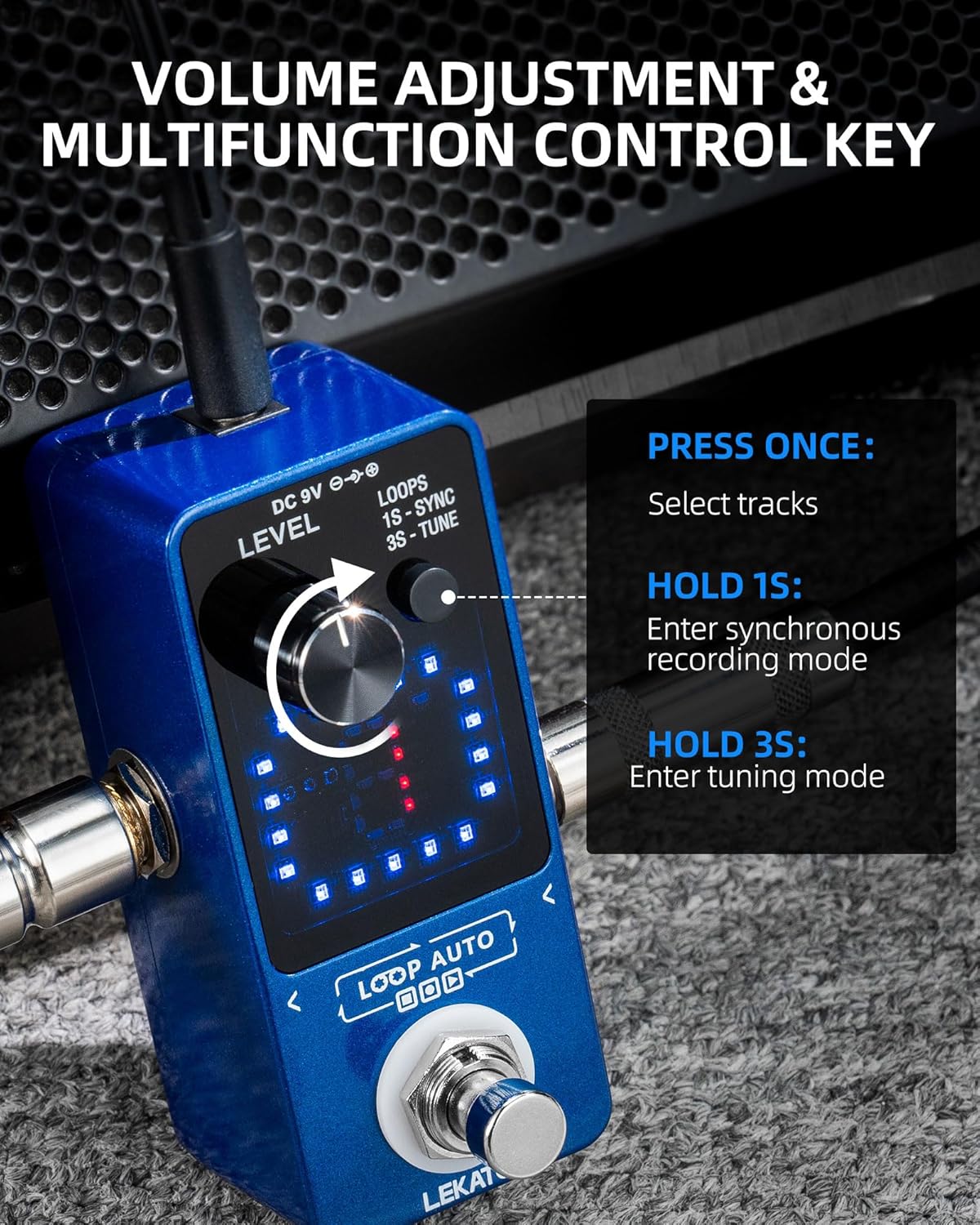
Image: The level knob, which also serves as a multifunction control key.
- Adjust Volume: Rotate the LEVEL knob to adjust the playback volume of your loops.
- Select Tracks (Loops): Press the LEVEL knob once to cycle through and select different loop tracks (1, 2, or 3).
- Enter Synchronous Recording Mode: Press and hold the LEVEL knob for 1 second to activate synchronous recording mode. This allows you to start recording precisely when playback begins.
- Enter Tuning Mode: Press and hold the LEVEL knob for 3 seconds to enter the built-in tuner mode. The display will show tuning information. Press again to exit tuning mode.
Maintenance
Cleaning
To maintain the appearance and functionality of your pedal, wipe it with a soft, dry cloth. Do not use abrasive cleaners or solvents, as they may damage the finish or internal components.
Import/Export Loops
The LEKATO Looper Pedal supports importing and exporting WAV audio files to and from your computer.

Image: The pedal connected to a computer via USB, illustrating the import/export functionality.
- Connect the pedal to your computer using the provided USB cable.
- The pedal will appear as a removable storage device.
- You can drag and drop WAV files to import them into the pedal's memory or copy existing loop files from the pedal to your computer for backup or editing.
- Ensure files are in WAV format (48K/24bit recommended) for optimal compatibility and sound quality.
Troubleshooting
If you encounter any issues with your LEKATO Guitar Looper Pedal, please refer to the following common problems and solutions:
- No Power:
- Ensure the 9V DC power adapter is securely connected to both the pedal and a working power outlet.
- Verify that the power adapter is the correct type (9V, 0.6A, Central Negative).
- No Sound Output:
- Check all instrument cable connections between your guitar, pedal, and amplifier. Ensure they are fully inserted.
- Verify that the LEVEL knob on the pedal is not set to minimum.
- Test cables and other equipment (guitar, amp) independently to rule out other component failures.
- Recording Issues (e.g., short loops, unexpected stops):
- Ensure you are pressing the footswitch correctly for record/play/stop actions (single press, double press, hold).
- Check the available memory. While the pedal has 18 minutes total, individual loops are limited to 6 minutes.
- Static or Noise in Audio:
- Ensure all cables are in good condition and properly shielded.
- Try using a different power outlet or power supply to rule out electrical interference.
- Keep the pedal away from strong electromagnetic fields.
- USB Connection Not Recognized:
- Try a different USB port on your computer.
- Ensure the USB cable is not damaged.
- Restart your computer and reconnect the pedal.
If the problem persists after trying these solutions, please contact LEKATO customer support for further assistance.
Specifications
| Feature | Specification |
|---|---|
| Model | B0D8PKJBPT |
| Item Weight | 14.9 ounces (approx. 422g) |
| Package Dimensions | 5.04 x 4.65 x 2.72 inches (approx. 12.8 x 11.8 x 6.9 cm) |
| Country of Origin | China |
| Color | Blue |
| Recording Time | Total 18 minutes (3 loops, max 6 minutes per loop) |
| Sampling Rate | 48K/24bit |
| Power Supply | DC 9V 0.6A (Central Negative) |
| Connectivity | 1/4" Input, 1/4" Output, USB Port |
Warranty and Support
LEKATO products are designed and manufactured to the highest quality standards. For information regarding warranty coverage and customer support, please refer to the warranty card included with your product or visit the official LEKATO website. If you require technical assistance or have questions not covered in this manual, please contact LEKATO customer service.
Documents and downloads
Ask a question about this manual
Ask about setup, troubleshooting, compatibility, parts, safety, or missing instructions. Manuals+ will review the question and use this page’s manual context to help answer it.