
ANENG SZ06
ANENG SZ06 Digital Multimeter User Manual
Model: SZ06 | Brand: ANENG
Introduction
The ANENG SZ06 Digital Multimeter is a versatile and portable tool designed for accurate electrical measurements. It is ideal for troubleshooting electrical issues in both industrial and domestic environments, including checking household outlets, fuses, batteries, automotive circuits, and electronic components. Its compact, handheld design ensures convenience and ease of use.

ANENG SZ06 Digital Multimeter with included test leads, batteries, and accessories.

ANENG SZ06 Digital Multimeter highlighting its capabilities for Ohm, Volt, Amp, and Diode tests.
What's in the Box
Your ANENG SZ06 Digital Multimeter package includes the following items:
- 1 x ANENG SZ06 Digital Multimeter
- 2 x AAA 1.5V Batteries (pre-installed)
- 1 x Combination Cable (includes 4 connection plugs, 2 PVC wires, 2 copper needles, 2 U-shaped inserts, 2 meter pens, 4 alligator clips, 2 piercing needles)
- 1 x Multimeter Test Lead
- 1 x Instruction Manual

Contents of the ANENG SZ06 Digital Multimeter package, including the multimeter, test leads, and various accessories.
Setup
Battery Installation
The multimeter comes with 2 AAA 1.5V batteries pre-installed. If replacement is needed, open the battery compartment on the back of the device and insert new batteries, ensuring correct polarity.
Connecting Test Leads
Insert the black test lead into the "COM" (Common) jack. Insert the red test lead into the "VΩmA" jack for voltage, resistance, or current measurements. For 10A current measurements, insert the red test lead into the "10A" jack.
Operating Instructions
The ANENG SZ06 features a 1999-count backlit LCD display and a sampling rate of 2 times per second for precise readings. Always ensure the correct function is selected before making measurements.
1. AC Voltage Measurement
Turn the rotary switch to the AC voltage position (V~). Connect the test leads to the circuit or component to be measured. The display will show the AC voltage reading. Note: This meter cannot be used to test AC current.

ANENG SZ06 Digital Multimeter performing an AC voltage test on a power outlet.
2. DC Voltage Measurement
Turn the rotary switch to the DC voltage position (V=). Connect the red test lead to the positive terminal and the black test lead to the negative terminal of the circuit or battery. The display will show the DC voltage reading.
3. DC Current Measurement
Switch the rotary dial to the desired DC current range (mA or 10A). Connect the multimeter in series with the circuit. Ensure the red test lead is in the appropriate current jack (mA or 10A). The display will show the DC current reading.
4. Resistance Measurement
Turn the rotary switch to the resistance position (Ω). Connect the test leads across the component whose resistance you wish to measure. The display will show the resistance value in Ohms (Ω), Kilo-Ohms (kΩ), or Mega-Ohms (MΩ).
5. Diode Test
Turn the rotary switch to the diode test position (→|). Connect the red test lead to the anode and the black test lead to the cathode of the diode. The display will show the forward voltage drop. For a good diode, a reading should appear. Reverse the leads; an open circuit (OL) reading indicates a good diode.
6. Continuity Test
Turn the rotary switch to the continuity position ( ))). Connect the test leads across the circuit or component. If continuity exists (resistance is low), the multimeter will emit an audible beep. An open circuit will show 'OL' and no beep.

ANENG SZ06 Digital Multimeter performing a continuity test on a resistor.

Diagram illustrating various measurement functions of the ANENG SZ06 Digital Multimeter.
Key Features
- Backlit LCD Display: The SZ06 features a clear, backlit LCD screen with a 1999-count display, ensuring readings are visible even in low-light conditions.

Close-up view of the backlit display.
- Data Hold Function: Press the "HOLD" button to freeze the current reading on the display, allowing for easy recording without losing the measurement.

The 'HOLD' button for data retention.
- Auto Power Off: To conserve battery life, the multimeter automatically shuts off after a period of inactivity.
- Safety Features: Equipped with a double ceramic fuse to prevent overheating and provide overload protection, reducing the risk of electrical shock. It also features a low battery indicator.

Double ceramic fuse for enhanced safety.
- Portable Design: Its compact, lightweight, and pocket-sized design with an elastic support frame makes it easy to carry and use with one hand.
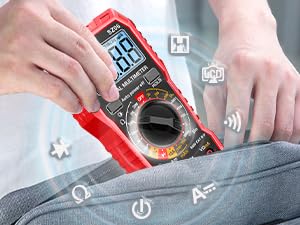
The compact design allows for easy portability.
Maintenance
- Cleaning: Use a soft, damp cloth to clean the multimeter's casing. Do not use abrasive cleaners or solvents.
- Battery Replacement: Replace batteries when the low battery indicator appears on the display to ensure accurate readings.
- Storage: When not in use for extended periods, remove the batteries and store the multimeter in a cool, dry place away from direct sunlight and extreme temperatures.
- Fuse Replacement: If the fuse blows due to overload, replace it with a fuse of the same type and rating to maintain safety and functionality. Refer to specifications for fuse type.
Troubleshooting
| Problem | Possible Cause | Solution |
|---|---|---|
| No display or dim display | Low or dead batteries; Auto power off activated. | Replace batteries; Press any button to wake up the device. |
| "OL" (Overload) displayed | Measurement range exceeded; Open circuit (for continuity/resistance). | Select a higher range; Check circuit connection. |
| Incorrect readings | Incorrect function selected; Poor test lead connection; Damaged test leads. | Ensure correct rotary switch position; Reconnect test leads firmly; Inspect and replace damaged leads. |
| No continuity beep | Open circuit; Multimeter not in continuity mode. | Check circuit for breaks; Ensure rotary switch is on continuity mode. |
Specifications
- Model: SZ06
- Display: 1999 Counts, Backlit LCD
- Sampling Rate: 2 times per second
- Power Source: 2 x AAA 1.5V Batteries
- Min. Operating Voltage: 3 Volts
- Safety Rating: CAT III 600V
- Dimensions: Approximately 16.41 x 10.31 x 4.39 cm (6.46 x 4.06 x 1.73 inches)
- Weight: Approximately 249 g (0.55 lbs)
- Color: Red
Warranty and Support
ANENG provides professional after-sales service and technical support for the SZ06 Digital Multimeter. For any inquiries or assistance, please refer to the contact information provided in your product packaging or visit the official ANENG website. Your purchase includes a 30-day free return policy.


Related Documents - SZ06
 |
ANENG AN8205C Digital Multimeter Operator's Instruction Manual Comprehensive operator's instruction manual for the ANENG AN8205C Digital Multimeter, covering safety information, specifications, operating instructions for various measurements, and maintenance. |
 |
ANENG A3005 Digital Pen Multimeter User Manual and Specifications Comprehensive user manual for the ANENG A3005 digital pen multimeter, covering its features, operation, safety precautions, and technical specifications for measuring voltage, resistance, continuity, and more. |
 |
ANENG SZ08 Digital Multimeter Operating Instructions Operating instructions and technical specifications for the ANENG SZ08 digital multimeter, covering safety precautions, measurement methods, electrical specifications, maintenance, and battery replacement. |
 |
ANENG A3006A Digital Pen Multimeter User Manual - Features, Specifications, and Operation Comprehensive user manual for the ANENG A3006A Digital Pen Multimeter. Learn about its features, safety precautions, operation instructions for DCV, ACV, resistance, continuity, diode testing, NCV, and live wire identification, along with detailed technical specifications. |
 |
ANENG A3002 Digital Pen Multimeter: Operating Instructions and Specifications Comprehensive operating instructions and technical specifications for the ANENG A3002 Digital Pen Multimeter. Covers safety, features, measurement methods (AC/DC voltage, current, resistance, capacitance, NCV), and maintenance for electrical testing and troubleshooting. |
 |
ANENG SZ305 Digital Multimeter Operator's Instruction Manual This manual provides comprehensive safety information, operation instructions, specifications, and maintenance details for the ANENG SZ305 Digital Multimeter, a compact, hand-held, and battery-operated electronic measuring instrument. |