Introduction
This manual provides essential information for the safe and efficient operation of your RadioShack IPX5 Waterproof Bluetooth Speaker. Please read this manual thoroughly before using the product and retain it for future reference.
The RadioShack IPX5 Waterproof Bluetooth Speaker delivers powerful 40W sound with dynamic RGB lighting, designed for both indoor and outdoor use. Its rugged, water-resistant design and long-lasting battery make it ideal for various environments.

Figure 1: RadioShack IPX5 Waterproof Bluetooth Speaker.
Package Contents
Ensure all items are present upon unboxing:
- 1x Portable Bluetooth Speaker with Lights
- 1x User Manual
- 1x Charging Cable (Type-C)
Figure 2: Included accessories and speaker.
Product Features
- Powerful Sound: 40W output for immersive audio with deep bass and clear highs.
- Dynamic RGB Lighting: Customizable lighting to enhance the listening experience.
- Rugged Durability: IPX5 water-resistant rating for protection against splashes.
- Long-Lasting Battery: 3600mAh battery for extended playback.
- Portable Design: Compact and lightweight for easy transport.
- Bluetooth Connectivity: Seamless wireless connection to compatible devices.
- Hands-free Microphone: For easy voice control and calls.
- True Wireless Stereo (TWS): Allows pairing two speakers for synchronized stereo playback.

Figure 3: Overview of key product features.
Safety Information
- Do not expose the speaker to extreme temperatures or direct sunlight for prolonged periods.
- Avoid dropping or subjecting the speaker to strong impacts.
- Do not disassemble, repair, or modify the speaker yourself. Contact qualified service personnel for repairs.
- Keep the speaker away from medical devices, as its magnetic components may interfere with their operation.
- The IPX5 rating means the speaker is resistant to water splashes from any direction. Do not submerge the speaker in water.
- Use only the provided charging cable or a certified Type-C cable for charging.
- Dispose of the battery and speaker according to local regulations. Do not dispose of batteries in fire.
Setup
Charging the Speaker
- Connect the provided Type-C charging cable to the charging port on the speaker.
- Connect the other end of the cable to a USB power adapter (not included) or a computer USB port.
- The charging indicator lights will illuminate to show charging status. The lights will turn off or change color when fully charged.
- A full charge typically takes approximately 4 hours.
Powering On/Off
- To power on, press and hold the Power button (●) for a few seconds until the indicator lights illuminate.
- To power off, press and hold the Power button (●) again for a few seconds until the indicator lights turn off.
Operating Instructions
Bluetooth Pairing
- Ensure the speaker is powered on and in Bluetooth pairing mode (indicated by a flashing blue light).
- On your smartphone or tablet, enable Bluetooth and search for available devices.
- Select "RadioShack Speaker" from the list of devices.
- Once paired, the indicator light will become solid blue, and you will hear a confirmation tone.
Music Playback
- Play/Pause: Press the Play/Pause button (►▮▮) to play or pause music.
- Volume Up: Press the Volume Up button (+).
- Volume Down: Press the Volume Down button (-).
- Next Track: Press and hold the Volume Up button (+).
- Previous Track: Press and hold the Volume Down button (-).
RGB Lighting Control
- Press the Light button (☀) to cycle through different RGB lighting modes.
- Press and hold the Light button to turn the RGB lighting off.
Hands-Free Calling
- When a call comes in, press the Play/Pause button (►▮▮) to answer.
- Press the Play/Pause button (►▮▮) again to end the call.
- Press and hold the Play/Pause button (►▮▮) to reject an incoming call.

Figure 4: Hands-free microphone for easy voice control.
True Wireless Stereo (TWS) Pairing
To achieve a true stereo sound experience, you can pair two RadioShack IPX5 Waterproof Bluetooth Speakers together:
- Ensure both speakers are powered on and not connected to any Bluetooth device.
- On one speaker, press and hold the TWS button (often indicated by an infinity symbol ∞ or a dedicated TWS icon) for a few seconds. It will enter TWS pairing mode.
- The second speaker will automatically connect to the first. You will hear a confirmation tone when TWS pairing is successful.
- Once paired, connect your device to the primary speaker via Bluetooth as described above. Both speakers will now play audio in synchronized stereo.

Figure 5: True Wireless Stereo (TWS) functionality.
Maintenance
- Clean the speaker with a soft, dry cloth. Do not use abrasive cleaners or solvents.
- If the speaker gets wet, wipe it dry thoroughly before charging or storing.
- Store the speaker in a cool, dry place when not in use.
- To preserve battery life, charge the speaker at least once every three months if not used regularly.
Troubleshooting
| Problem | Possible Cause | Solution |
|---|---|---|
| Speaker does not power on. | Battery is low or depleted. | Charge the speaker fully. |
| No sound from speaker. | Volume is too low; device not paired; incorrect audio source. | Increase volume on speaker and connected device. Ensure proper Bluetooth pairing. Check audio output settings on your device. |
| Cannot pair with Bluetooth device. | Speaker is not in pairing mode; device is too far; interference. | Ensure speaker is in pairing mode (flashing blue light). Move device closer to speaker (within 32ft). Turn off other Bluetooth devices nearby. |
| TWS pairing fails. | Speakers are already connected to a device; too far apart. | Disconnect both speakers from any Bluetooth devices. Ensure speakers are close to each other during TWS pairing. |
Specifications
| Feature | Detail |
|---|---|
| Model Name | RadioShack Bluetooth Speaker Pump RGB Light 40W IPX5 3600MAH Black |
| Speaker Type | Portable |
| Power Output | 40 Watts |
| Waterproof Rating | IPX5 |
| Battery Capacity | 3600 mAh Lithium Ion |
| Connectivity Technology | Bluetooth |
| Bluetooth Range | 10 Meters (approx. 32 feet) |
| Product Dimensions (D x W x H) | 5.35"D x 12.52"W x 5.75"H |
| Item Weight | 4.54 pounds |
| Color | Black |
| Included Components | User Manual |
| Control Method | Touch |
| Recommended Uses | Indoor/Outdoor |
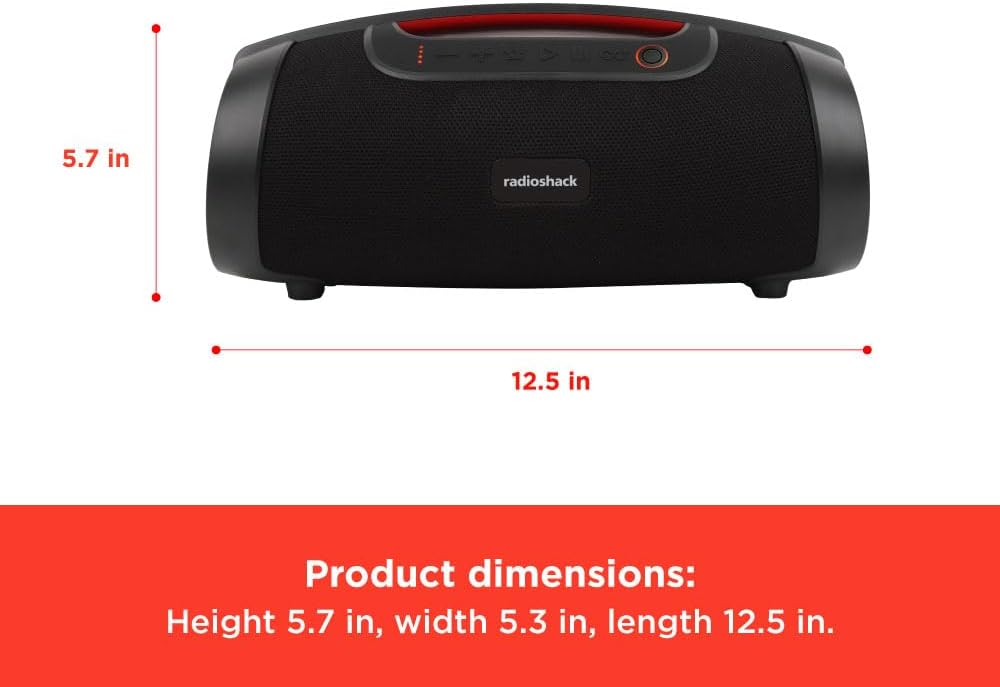
Figure 6: Product dimensions.
Warranty and Support
This RadioShack product comes with a Limited Warranty. For detailed warranty information, please refer to the warranty card included in your package or visit the official RadioShack website.
For technical support, troubleshooting assistance, or warranty claims, please contact RadioShack customer service:
- Manufacturer: Radioshack
- Website: www.radioshack.com (Please note: This is a general placeholder. Refer to your product packaging for the most accurate support contact information.)
- Model Number: 4001771
Additional protection plans may be available for purchase. Please check with your retailer for details.


