
1. Introduction
The OLAX Scorpio Giga Home AX1800 Dual-Band Wi-Fi 6 Router is designed to provide high-speed, reliable internet connectivity for your home or office. Utilizing Wi-Fi 6 technology, this router offers improved efficiency, extended coverage, and enhanced security features. This manual provides detailed instructions for setting up, operating, maintaining, and troubleshooting your device.
2. Package Contents
Verify that all items are present in your package:
- OLAX Scorpio Giga Home AX1800 Dual-Band Wi-Fi 6 Router
- Power Cable
- Ethernet Cable
- User Manual (this document)

Image 2.1: Contents of the OLAX Scorpio Giga Home AX1800 Router package, including the router, power adapter, and an Ethernet cable.
3. Product Overview
3.1 Front and Side View

Image 3.1: A front and slightly angled side view of the OLAX Scorpio Giga Home AX1800 Router, showcasing its four external antennas and sleek white design.
3.2 Rear Panel and Ports

Image 3.2: The rear panel of the OLAX Scorpio Giga Home AX1800 Router, displaying the power input, one WAN port, three LAN ports, and a combined Reset/WPS/Mesh button.
The rear panel of the router features the following ports and buttons:
- POWER: Connects to the included power adapter.
- WAN: Connects to your modem or internet service provider's (ISP) equipment.
- LAN1/LAN2/LAN3: Gigabit Ethernet ports for connecting wired devices such as computers, gaming consoles, or smart TVs.
- RST/WPS/MESH: A multi-function button for resetting the router, initiating WPS (Wi-Fi Protected Setup), or configuring OneMesh.
3.3 Bottom Panel
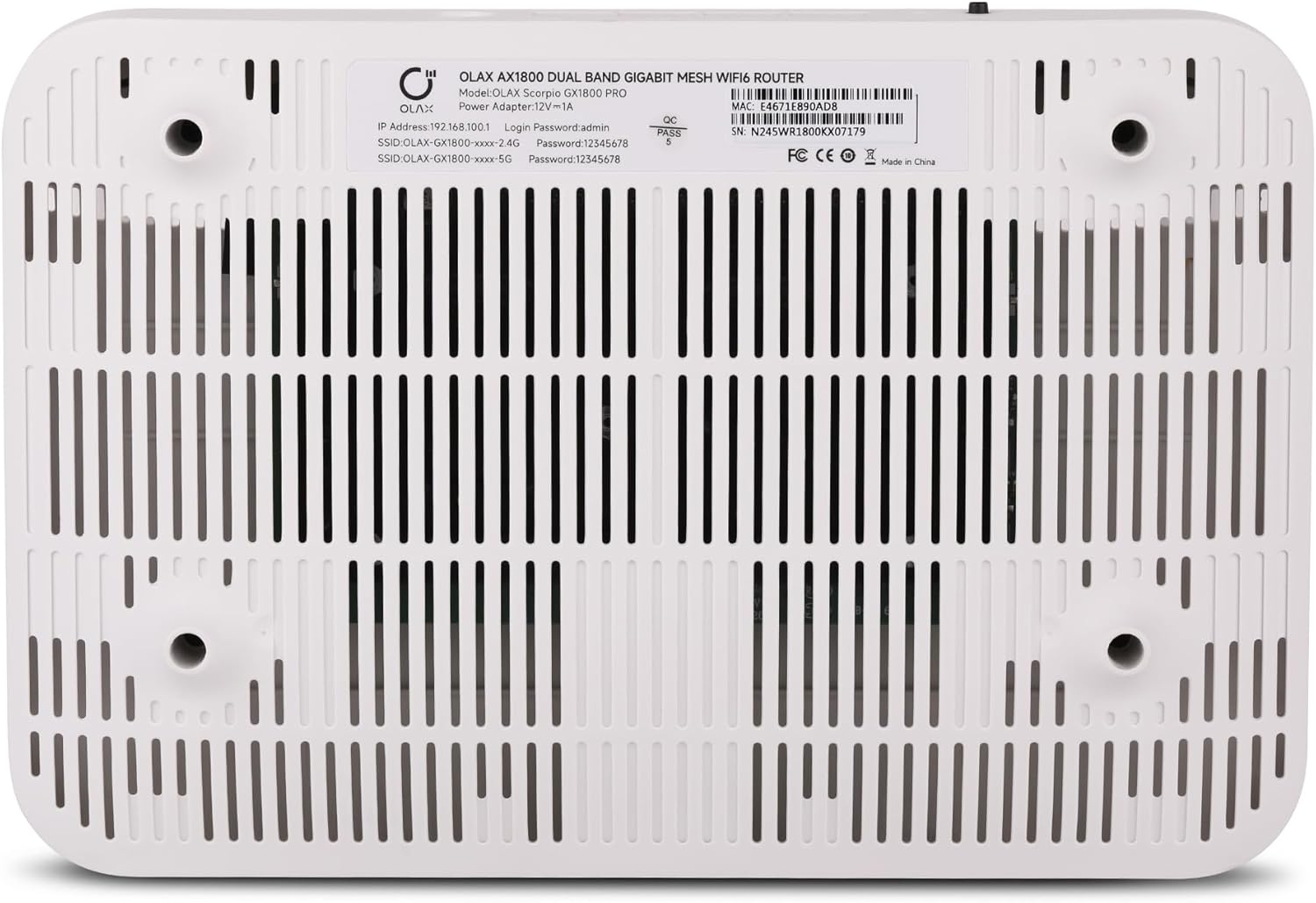
Image 3.3: The bottom panel of the OLAX Scorpio Giga Home AX1800 Router, showing ventilation grilles and a product label with default network information and serial number.
The bottom label provides important information:
- IP Address: 192.168.10.1
- Login Password: admin
- SSID (2.4G): OLAX-GX1800-xxxx-2.4G
- SSID (5G): OLAX-GX1800-xxxx-5G
- Default Wi-Fi Password: 12345678
- Serial Number: E4671E890AD8 (Example, actual number varies)
4. Setup Instructions
Follow these steps to set up your OLAX Scorpio Giga Home AX1800 Router:
- Power On: Connect the power adapter to the router's POWER port and plug the other end into a power outlet. Wait for the router to power on and initialize.
- Connect to Modem: Use an Ethernet cable to connect your modem's Ethernet port to the router's WAN port.
- Connect Devices (Optional): For wired connections, use Ethernet cables to connect your devices (e.g., computer, gaming console) to the router's LAN ports.
- Connect Wirelessly: On your computer or mobile device, search for available Wi-Fi networks. Select one of the default SSIDs (e.g., OLAX-GX1800-xxxx-2.4G or OLAX-GX1800-xxxx-5G) and enter the default Wi-Fi password (12345678).
- Access Router Management Page: Open a web browser and enter the default IP address 192.168.10.1 in the address bar. Log in using the default username (if prompted) and password admin.
- Configure Settings: Follow the on-screen instructions to change your Wi-Fi name (SSID) and password for security. It is highly recommended to change the default login password for the router management page as well.
5. Operating Instructions
5.1 Connecting Devices
You can connect devices to your router via Wi-Fi or Ethernet cable. For optimal performance, use the 5GHz band for devices that support it and are closer to the router, and the 2.4GHz band for devices further away or those that only support 2.4GHz.
5.2 Wi-Fi 6 Technology
This router supports Wi-Fi 6 (802.11ax) technology, offering faster speeds, increased capacity, and reduced network congestion compared to previous Wi-Fi standards. Devices compatible with Wi-Fi 6 will experience these benefits.
5.3 Dual-Band Operation
The router operates on two frequency bands: 2.4GHz and 5GHz. The 2.4GHz band provides wider coverage and better penetration through walls, while the 5GHz band offers higher speeds and less interference over shorter distances.
5.4 OneMesh Functionality
The OLAX Scorpio Giga Home AX1800 supports OneMesh, allowing you to create a seamless mesh Wi-Fi network with compatible OLAX range extenders. This eliminates Wi-Fi dead zones and provides a single, unified network name for smooth roaming throughout your home.
5.5 Enhanced Security
The router incorporates WPA3 security protocols, providing stronger encryption and protection against brute-force attacks, enhancing the security of your wireless network.
6. Maintenance
To ensure optimal performance and longevity of your router:
- Placement: Place the router in a central location, away from obstructions, large metal objects, and devices that emit electromagnetic interference (e.g., microwaves, cordless phones).
- Firmware Updates: Regularly check the router's management page for available firmware updates. Keeping the firmware updated ensures you have the latest features, security patches, and performance improvements.
- Cleaning: Keep the router clean and free from dust. Use a soft, dry cloth to wipe the exterior. Ensure ventilation holes are not blocked.
- Restarting: Periodically restart your router (unplug from power for 10 seconds, then plug back in) to refresh its network connections and clear temporary issues.
7. Troubleshooting
If you encounter issues with your router, refer to the following common problems and solutions:
| Problem | Solution |
|---|---|
| No internet access |
|
| Cannot connect to Wi-Fi |
|
| Slow Wi-Fi speed |
|
| Forgot router login password | Perform a factory reset by pressing and holding the RST/WPS/MESH button for approximately 10 seconds until the router restarts. This will revert all settings to factory defaults, including the login password (admin) and Wi-Fi password (12345678). |
8. Specifications
Key technical specifications for the OLAX Scorpio Giga Home AX1800 Router:
- Model Number: SGX1800P
- Wireless Standard: 802.11ax (Wi-Fi 6)
- Frequency Band Class: Dual-Band (2.4GHz & 5GHz)
- Wi-Fi Speed: Up to 1201 Mbps (5GHz) + 574 Mbps (2.4GHz)
- Ethernet Ports: 1x WAN Gigabit Port, 3x LAN Gigabit Ports
- Antennas: 4 High Gain Antennas
- Security: WPA3
- Special Features: Gigabit, High Speed, WPA3 Security, OneMesh
- Compatible Devices: Gaming Console, Personal Computer, Smart Television, Smartphone, Tablet
- Item Weight: 1.35 pounds
- Package Dimensions: 9 x 9 x 3 inches
9. Warranty and Support
OLAX products are designed for reliability and performance. For warranty information and technical support, please refer to the official OLAX website or contact their customer service. Keep your purchase receipt for warranty claims.