
Introduction
Thank you for choosing the Moto Quip 6 Amp Battery Charger MQ1232. This manual provides essential information for the safe and efficient operation, setup, and maintenance of your battery charger. Please read this manual thoroughly before using the device and retain it for future reference.
This charger is designed to provide a reliable charging solution for 12V lead-acid batteries, featuring a durable plastic housing and clear gauges for monitoring the charging process.
Safety Information
WARNING: Failure to follow these safety instructions may result in electric shock, fire, or serious injury.
- Read all instructions before using the charger.
- Use the charger only in a well-ventilated area.
- Do not expose the charger to rain or excessive moisture.
- Ensure the charger is disconnected from the power supply before making or breaking connections to the battery.
- Wear eye protection and protective clothing when working with batteries.
- Keep children and unauthorized persons away from the charging area.
- Do not charge frozen batteries.
- Never attempt to charge non-rechargeable batteries.
- If the supply cord is damaged, it must be replaced by the manufacturer, its service agent, or similarly qualified persons to avoid a hazard.
Product Features
The Moto Quip 6 Amp Battery Charger MQ1232 offers the following key features:
- Lightweight and durable plastic housing for portability and protection.
- Operating voltage of 230V/50-60Hz, suitable for standard household outlets.
- Charge indicator and switch setting for 12V batteries.
- Maximum charging current of 12V 6A.
- Integrated gauges to monitor the charging process effectively.
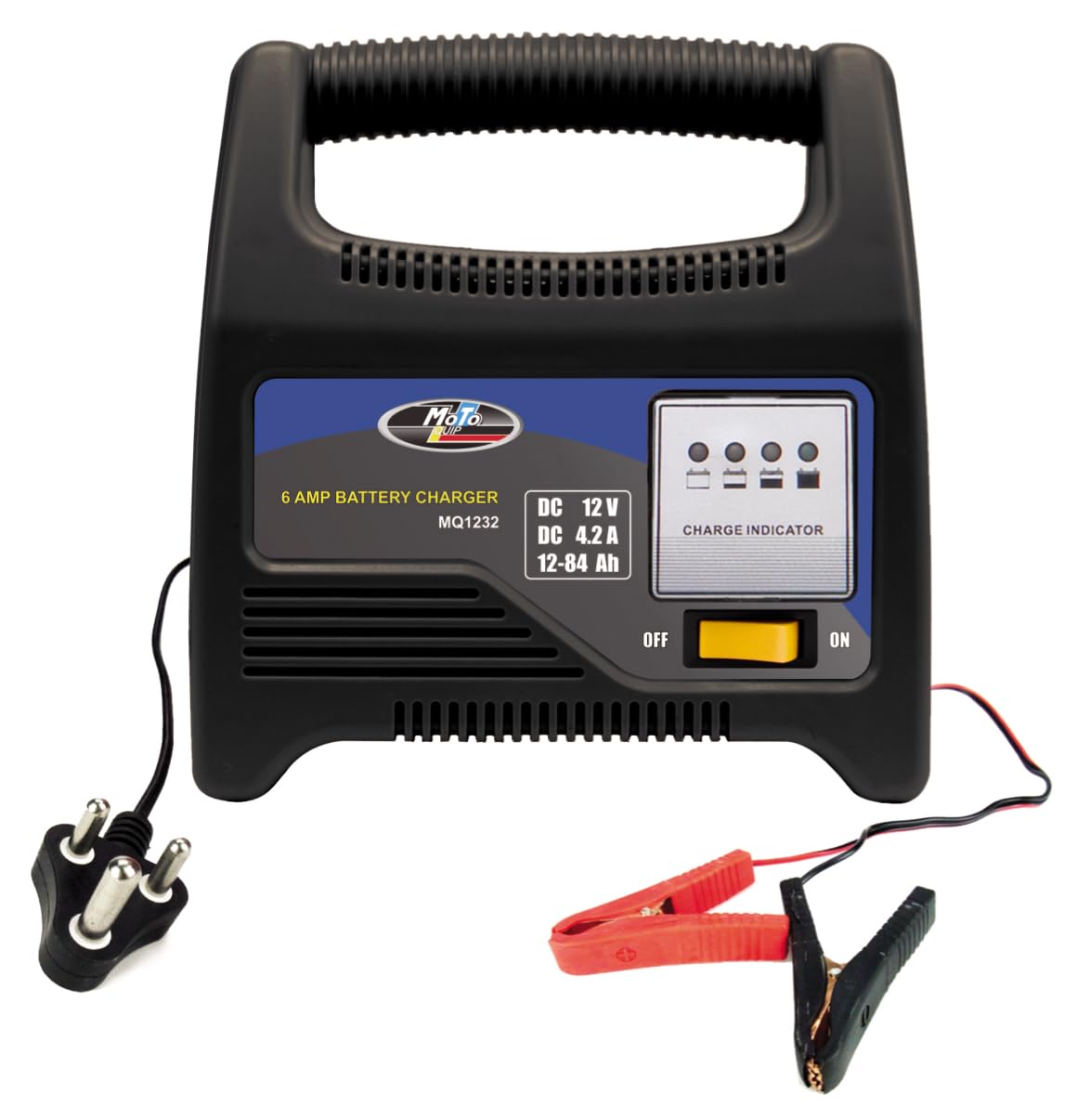
Image: Front view of the Moto Quip 6 Amp Battery Charger MQ1232, showing the control panel, gauges, and battery clamps.
Setup
- Unpack the Charger: Carefully remove the charger and all accessories from the packaging. Inspect for any damage.
- Ventilation: Ensure the charging area is well-ventilated and free from flammable materials.
- Battery Preparation: Clean the battery terminals. If the battery has removable caps, check the electrolyte level and top up with distilled water if necessary. Ensure the caps are securely replaced.
- Positioning: Place the charger on a stable, non-conductive surface, away from the battery to prevent corrosive fumes from damaging the charger.
Operating Instructions
Follow these steps to safely charge your 12V battery:
- Connect to Battery:
- Connect the RED positive (+) clamp to the positive (+) terminal of the battery.
- Connect the BLACK negative (-) clamp to the negative (-) terminal of the battery. If charging a battery installed in a vehicle, connect the negative clamp to the vehicle chassis away from the battery and fuel line.
- Connect to Power: Plug the charger's power cord into a standard 230V/50-60Hz electrical outlet.
- Select Voltage: Ensure the charger's switch is set to 12V.
- Monitor Charging: The integrated gauges will indicate the charging status. The charge indicator light will illuminate. Monitor the gauges periodically.
- Disconnect: Once the battery is fully charged (indicated by the gauge or charge indicator), first unplug the charger from the AC power outlet. Then, disconnect the negative (-) clamp, followed by the positive (+) clamp.

Image: The Moto Quip 6 Amp Battery Charger MQ1232 showing the connected battery clamps and power cord.
Maintenance
- Cleaning: Disconnect the charger from all power sources before cleaning. Wipe the exterior with a soft, dry cloth. Do not use solvents or abrasive cleaners.
- Storage: Store the charger in a cool, dry place when not in use. Keep cables neatly coiled.
- Cable Inspection: Regularly inspect the power cord and battery cables for any signs of damage, such as cuts or fraying. Do not use the charger if cables are damaged.
Troubleshooting
| Problem | Possible Cause | Solution |
|---|---|---|
| Charger not turning on. | No power from outlet; faulty connection; internal fault. | Check power outlet with another device. Ensure power cord is securely plugged in. If problem persists, contact support. |
| Battery not charging. | Incorrect battery connection; deeply discharged battery; faulty battery. | Verify positive and negative connections. Allow more time for deeply discharged batteries. Test battery condition. |
| Charger gets hot. | Normal operation; poor ventilation; excessive load. | Some heat is normal. Ensure adequate ventilation around the charger. If excessively hot, disconnect and allow to cool. |
Specifications
| Brand | Moto Quip |
| Model | MQ1232 |
| Input Voltage | 230V / 50-60Hz |
| Output Voltage | 12 Volts |
| Current Rating | 6 Amps (Max Charging Current) |
| Housing Material | Plastic |
| Product Dimensions (L x W x H) | 17.8D x 11W x 18.1H centimetres |
| Manufacturer | Moto Quip (Pty) Ltd. |
Warranty and Support
For warranty information or technical support, please refer to the documentation provided with your purchase or contact Moto Quip customer service. Keep your proof of purchase for warranty claims.