
1. Introduction
This manual provides essential instructions for the safe operation, setup, maintenance, and troubleshooting of your Actualia C138 RC Helicopter. Please read this manual thoroughly before operating the helicopter to ensure proper function and to maximize your flying experience.
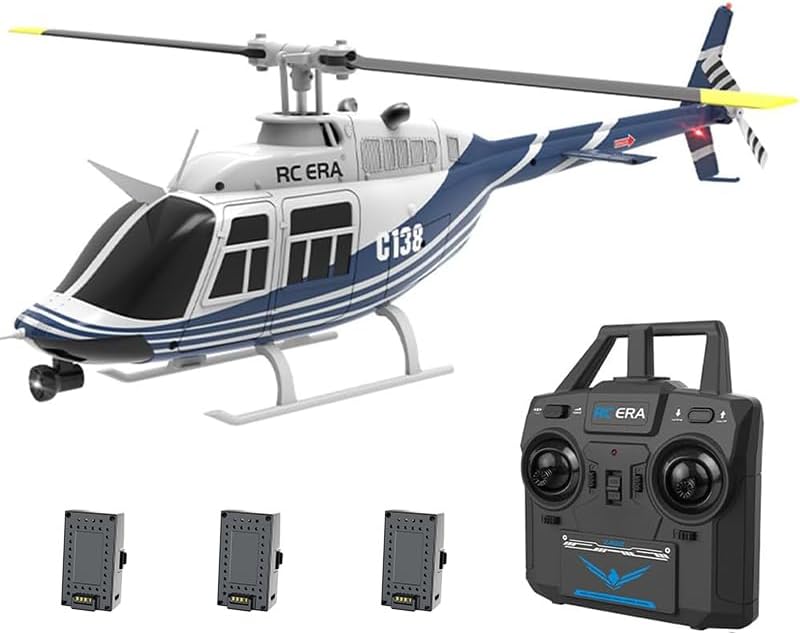
Image 1.1: The Actualia C138 RC Helicopter, its remote control, and three included batteries.
2. Package Contents
Upon opening your package, please verify that all components listed below are present:
- Gift Box *1
- Helicopter *1
- Remote Controller *1
- Instruction Manual *1 (This document)
- USB Charger *1
- Main Rotors *2 (Spare)
- Tail Rotor *1 (Spare)
- Lithium Battery *3
- Screwdriver *1
- Hex Wrench *1
3. Setup
3.1 Charging the Battery
- Connect the provided USB charger to a compatible USB power source (e.g., computer USB port, USB wall adapter).
- Connect the helicopter's lithium battery to the USB charger.
- The charging indicator on the USB charger will show the charging status. Refer to the charger's specific instructions for light indications.
- Charging typically takes approximately 60 minutes for a full charge. Do not overcharge the battery.
3.2 Remote Controller Setup
- Install appropriate batteries (not included) into the remote controller. Ensure correct polarity.
- Turn on the remote controller.

Image 3.1: The remote control for the C138 helicopter, illustrating its layout and controls.
3.3 Helicopter Preparation
- Ensure the helicopter's battery is fully charged and securely installed.
- Place the helicopter on a flat, level surface.
- Turn on the helicopter's power switch.
- The helicopter and remote controller should automatically pair. Wait for the indicator lights to confirm a successful connection.
4. Operating Instructions
4.1 Basic Flight Controls
The C138 features a 6CH design for precise control:
- One-Key Takeoff/Landing: Press the designated button on the remote for automatic takeoff or landing.
- Ascending/Descending: Control the throttle stick to increase or decrease altitude.
- Moving Forward/Backward: Push the directional stick forward or backward.
- Flying Left/Right (Sideways): Push the directional stick left or right.
- Rotating Left/Right: Use the rudder stick to rotate the helicopter clockwise or counter-clockwise.

Image 4.1: Visual representation of one-click takeoff and the intelligent anti-stuck protection feature.
4.2 Advanced Features
- 6-Axis Gyro System: Ensures ultra-stable flight and easier maneuverability.
- Altitude Hold: The barometer altitude hold feature allows the helicopter to maintain a steady altitude automatically.
- Optical Flow Positioning: Provides enhanced stability and precise hovering, especially in indoor environments.
- Three Speed Adjustment: Multiple flight speeds can be configured based on user proficiency, offering low, moderate, and high-speed options for a more exciting flight experience.
- Stunt Maneuvers: Capable of flight path flying and other stunt maneuvers.

Image 4.2: The C138 helicopter's three-speed adjustment and six-channel variable pitch structure for stable flight.
4.3 Flight Tips
- Always perform pre-flight checks, including battery levels and rotor integrity.
- Start with low-speed settings, especially if you are a beginner.
- Fly in open areas free from obstacles, people, and animals.
- Avoid flying in strong winds.
- Practice gentle control inputs to maintain stability.
Video 4.1: A demonstration of the Actualia C138 RC Helicopter in flight, showcasing its stability and control.
5. Maintenance
5.1 Battery Care
- Always use the provided USB charger.
- Do not leave batteries charging unattended.
- Store batteries in a cool, dry place away from direct sunlight and extreme temperatures.
- If the helicopter will not be used for an extended period, charge the battery to approximately 50% before storage.

Image 5.1: The modular battery design for easy replacement and the helicopter's stable flight due to its six-axis gyroscope.
5.2 Rotor Replacement
In case of damage, main rotors and tail rotors can be replaced using the included screwdriver and hex wrench. Ensure the replacement rotors are installed correctly and securely.
5.3 Cleaning and Storage
- Clean the helicopter with a soft, dry cloth after each use. Avoid water or harsh chemicals.
- Store the helicopter in its original packaging or a protective case to prevent damage.
6. Troubleshooting
If you encounter issues with your C138 RC Helicopter, please refer to the following common problems and solutions:
| Problem | Possible Cause | Solution |
|---|---|---|
| Helicopter does not respond to remote. | Low battery in helicopter or remote; not paired. | Charge helicopter battery; replace remote batteries; re-pair helicopter and remote. |
| Short flight time. | Battery not fully charged; aging battery. | Ensure full charge; consider replacing battery if performance degrades significantly. |
| Helicopter is unstable or drifts. | Improper calibration; strong wind; damaged rotors. | Recalibrate the gyroscope (refer to remote instructions); fly in calm conditions; inspect and replace damaged rotors. |
| Helicopter does not take off. | Low battery; rotors obstructed; throttle not engaged. | Charge battery; clear obstructions; ensure throttle is pushed up after one-key takeoff. |
| Low voltage alarm. | Helicopter battery is low. | Land the helicopter immediately and recharge the battery. |
| Stuck protection activated. | Propellers are obstructed. | Turn off the helicopter, clear the obstruction, then restart. |
| Loss control protection activated. | Out of range or signal interference. | Fly within the specified control range; avoid areas with strong electromagnetic interference. |
7. Specifications
Detailed technical specifications for the Actualia C138 RC Helicopter:
- Model: BELL 206 6CH Single-Rotor No-Aileron Helicopter (C138)
- Material: PA/PC (Composite engineering materials/electronic components)
- Rotor Diameter: 306mm
- Fuselage Dimensions: 306mm (Length) * 79mm (Width) * 101mm (Height)
- Helicopter Battery: 7.4V Lithium Battery (350mAh capacity)
- Remote Control Distance: 120-200 meters
- Charging Time: Approximately 60 minutes
- Usage Time: 10-13 minutes
- Helicopter Weight: 105g
- Product Weight (Total): 400g
- Applicable Age: 16+ years
- Item Model Number: 62Q46Y07R8HWLRP7IQ19QS95

Image 7.1: Detailed product parameters and dimensions of the C138 RC Helicopter.
8. Warranty and Support
For warranty information or technical support, please refer to the purchase platform or contact Actualia customer service directly. Keep your proof of purchase for any warranty claims.