
1. Introduction
1.1 Product Overview
The ZWP YAP1F is a high-quality replacement remote control designed for various GREE A/C Air Conditioner models. It offers a comfortable hand feeling and is made of durable ABS material, ensuring long-lasting performance. This remote control requires no programming; simply insert batteries to begin operation.
1.2 Package Contents
- 1 x YAP1F Replacement Remote Controller
- Note: Batteries are not included.
1.3 Compatible Models
This remote control is compatible with the following GREE A/C Air Conditioner models:
- YB1F2, YB1FA, YAP1FF, YAP1F
- GWHART12SA, GWHART09SA, GWART12SA, GWART09S, GWART12S, GWART18S, GWART24S, GWART36S2
- GWHART36S2, GWHART09S, GWHART12S, GWHART18S, GWHART24S
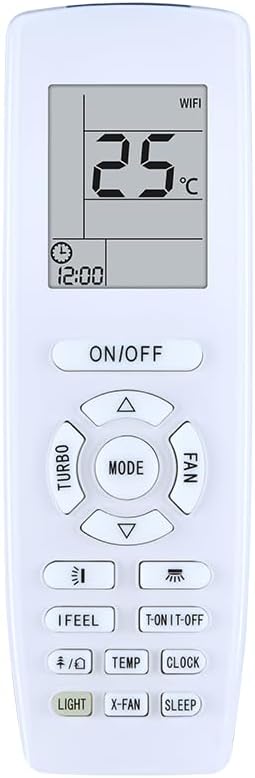
Figure 1.1: Front view of the ZWP YAP1F remote control, showing the display and button layout.
2. Setup
2.1 Battery Installation
The YAP1F remote control operates on two AAA 1.5V batteries. Please ensure correct polarity when inserting the batteries.
Battery Requirements:
- Battery Type: AAA
- Quantity: 2
- Voltage: 1.5V per battery
Installation Steps:
- Locate the battery compartment cover on the back of the remote control.
- Slide the cover downwards to open the compartment.
- Insert two AAA batteries, ensuring that the positive (+) and negative (-) ends align with the markings inside the compartment.
- Slide the battery compartment cover back into place until it clicks securely.

Figure 2.1: Front and back view of the ZWP YAP1F remote control, illustrating the battery compartment location.
3. Operating Instructions
3.1 Basic Functions
- ON/OFF: Press the ON/OFF button to power the air conditioner on or off.
- MODE: Press the MODE button to cycle through operating modes such as Cool, Heat, Fan, Dry, and Auto.
- Temperature Adjustment: Use the ▲ (up) and ▼ (down) buttons to increase or decrease the desired temperature.
- FAN: Press the FAN button to adjust the fan speed (e.g., Auto, Low, Medium, High).
3.2 Button Descriptions
The following table provides a detailed description of the buttons on the YAP1F remote control:
| Button | Function |
|---|---|
| ON/OFF | Powers the air conditioner on or off. |
| MODE | Cycles through operating modes (Cool, Heat, Fan, Dry, Auto). |
| ▲ / ▼ | Adjusts temperature settings. |
| FAN | Adjusts fan speed. |
| TURBO | Activates rapid cooling/heating. |
| LIGHT | Controls the display light on the air conditioner unit. |
| X-FAN | Activates the X-FAN (anti-mildew) function, which continues fan operation after shutdown to dry the evaporator. |
| SLEEP | Activates sleep mode for quiet operation and optimized temperature control during sleep. |
| IFeel | Measures the temperature at the remote control's location and adjusts the air conditioner's operation accordingly. |
| T-ON/T-OFF | Sets the timer for automatic power on/off. |
| TEMP | Switches between Celsius and Fahrenheit temperature display. |
| CLOCK | Sets the current time on the remote control's display. |

Figure 3.1: Detailed view of the remote control's display and button functions.

Figure 3.2: Illustration highlighting the display and key function buttons on the remote.

Figure 3.3: The remote control maintains an effective operational distance of up to 8 meters from the air conditioner unit.
4. Maintenance
4.1 Cleaning
- Wipe the remote control with a soft, dry cloth.
- Do not use liquid cleaners, sprays, or abrasive materials, as these may damage the remote's surface or internal components.
4.2 Storage
- If the remote control will not be used for an extended period, remove the batteries to prevent leakage and corrosion.
- Store the remote in a cool, dry place away from direct sunlight and extreme temperatures.
5. Troubleshooting
If you encounter issues with your remote control, please refer to the following table for common problems and solutions:
| Problem | Possible Cause | Solution |
|---|---|---|
| Remote control not responding. | Dead or incorrectly inserted batteries. | Replace batteries with new AAA 1.5V batteries, ensuring correct polarity. |
| Remote control range is reduced. | Weak batteries or obstruction between remote and AC unit. | Replace batteries. Ensure there are no obstacles blocking the signal path to the air conditioner's receiver. |
| Air conditioner does not respond to commands. | Remote control is not compatible with the AC unit. | Verify that your air conditioner model is listed in the 'Compatible Models' section of this manual. |
| Display on remote is dim or blank. | Low battery power. | Replace batteries. |
6. Specifications
Technical specifications for the ZWP YAP1F Replacement Remote Control:
| Feature | Detail |
|---|---|
| Model Number | YAP1F |
| Compatible Devices | Air Conditioner (GREE A/C models as listed) |
| Max Number of Supported Devices | 1 |
| Color | Black |
| Special Feature | Ergonomic design |
| Item Weight | 2.4 ounces (approx. 68 grams) |
| Package Dimensions | 10 x 3 x 1 inches (approx. 25.4 x 7.6 x 2.5 cm) |
| Manufacturer | ZWP |
7. Support
For any questions or assistance regarding your ZWP YAP1F Replacement Remote Control, please do not hesitate to contact us before leaving feedback. We are committed to helping you resolve any issues you may encounter. Thank you for choosing our product.