
DANOPLUS DP-420
DANOPLUS DP-420 Digital Differential Manometer User Manual
Model: DP-420 | Brand: DANOPLUS
1. Introduction
This manual provides detailed instructions for the safe and effective operation of your DANOPLUS DP-420 Digital Differential Manometer. Please read this manual thoroughly before use and retain it for future reference.
1.1. Product Overview
The DANOPLUS DP-420 is a high-precision digital manometer designed for measuring air pressure, including differential pressure. It features a wide measurement range, multiple selectable units, data logging capabilities, and PC software connectivity.

Image: DANOPLUS DP-420 Digital Differential Manometer with included accessories.
2. What's in the Box
Carefully unpack your DANOPLUS DP-420 and verify that all items listed below are present and undamaged:
- 1 x Pressure Manometer
- 2 x Plastic Hoses
- 1 x USB Data Cable
- 1 x Instruction Manual
- 1 x Carrying Case

Image: Contents of the DANOPLUS DP-420 package, including the manometer, hoses, USB cable, manual, and carrying case.
3. Key Features
The DANOPLUS DP-420 offers a range of functionalities to enhance your pressure measurement tasks:
- 13 Selectable Pressure Units: Supports bar, mbar, Kpa, Kgf/cm2, mmHg, cmH2O, Ozf/in2, Psi, inHg, inH2O, ftH2O, HPa, Pa.
- Differential Pressure Mode: Measures the difference between two pressure inputs.
- MAX/MIN/AVG Display: Shows maximum, minimum, and average pressure values.
- Data Hold Function: Freezes the current reading on the display.
- Data Recording: Stores up to 15,996 groups of data internally, with unlimited storage via PC software.
- USB Connectivity: For PC software communication, data transfer, and charging.
- Time/Date Display: Integrated clock and calendar.
- Zero Calibration: Ensures accurate measurements by calibrating to zero pressure.
- Large LCD Screen with Backlight: Provides clear visibility in various lighting conditions.
- Low Battery Alarm: Alerts when battery power is low.
- Automatic Power-Off: Conserves battery life.

Image: Visual representation of the DANOPLUS DP-420's key features.
4. Setup
4.1. Battery Installation and Charging
The DANOPLUS DP-420 is equipped with a rechargeable battery. To charge the device, connect the included USB data cable to the manometer's USB port and to a standard USB power source (e.g., computer USB port, USB wall adapter). The battery/charging status is indicated on the LCD screen.
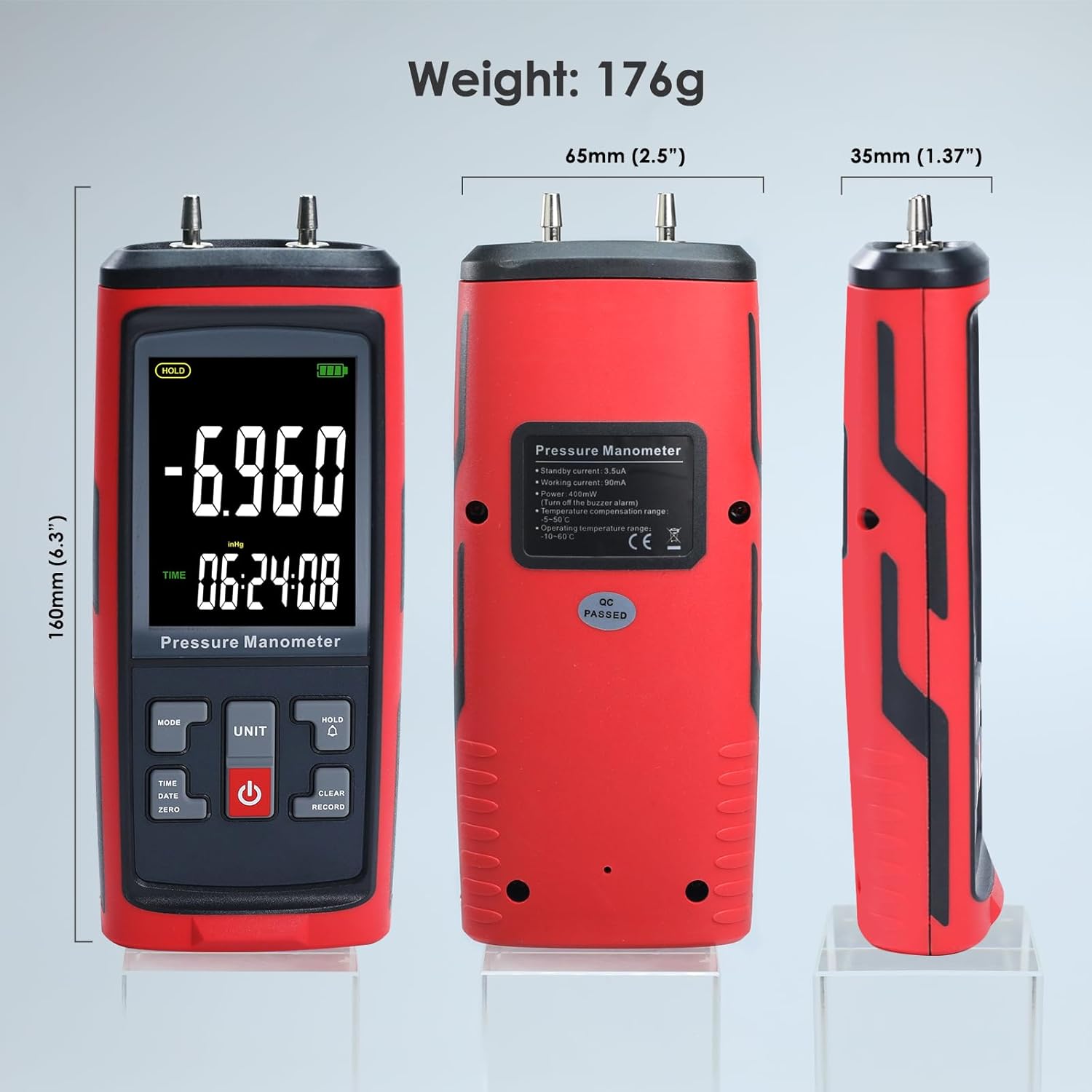
Image: Close-up of the DANOPLUS DP-420 showing dual pressure input ports and USB charging port.
4.2. Connecting Hoses
For differential pressure measurements, connect the two plastic hoses to the input ports located at the top of the manometer. Ensure that the hoses are securely attached to prevent leaks and ensure accurate readings.

Image: The DANOPLUS DP-420 manometer held in a hand with hoses connected.
5. Operating Instructions
5.1. Power On/Off
Press the POWER button (red button with power symbol) to turn the device on or off.
5.2. Zero Calibration
Before taking measurements, it is recommended to perform a zero calibration. Ensure both input ports are open to atmospheric pressure (or connected to the same pressure source for differential zeroing). Press the ZERO button to calibrate the device to zero. This compensates for any sensor drift and ensures accuracy.
5.3. Unit Selection
Press the UNIT button to cycle through the 13 available pressure units. The selected unit will be displayed on the LCD screen.

Image: Table of 13 selectable pressure units with ranges, resolution, and accuracy.
5.4. Measurement Modes (MAX/MIN/AVG)
Press the MODE button to switch between normal measurement, Maximum (MAX), Minimum (MIN), and Average (AVG) display modes. This allows you to capture peak, lowest, or average pressure values over a period.
5.5. Data Hold
Press the HOLD button to freeze the current reading on the display. Press it again to release the hold function and resume live measurements.
5.6. Data Recording and PC Software
The manometer can record data internally. For advanced data logging, trend analysis, and customizable settings, connect the device to a PC using the provided USB cable and the dedicated software. The software allows for unlimited data storage, real-time monitoring, and data export.

Image: DANOPLUS DP-420 connected to a laptop, showing the PC software interface.
5.7. Time and Date Setting
Use the TIME/DATE button to access and adjust the device's internal clock and calendar. Refer to the full instruction manual for detailed steps on setting the time and date.
6. Maintenance
6.1. Cleaning
Wipe the device with a soft, dry cloth. Do not use abrasive cleaners, solvents, or immerse the device in water. Ensure the input ports are free from dust and debris.
6.2. Storage
When not in use, store the manometer in its protective carrying case in a cool, dry place, away from direct sunlight and extreme temperatures. Remove hoses if storing for extended periods.
7. Troubleshooting
If you encounter issues with your DANOPLUS DP-420, refer to the following common problems and solutions:
7.1. Device does not power on
- Check the battery level. Recharge the device if the battery is low or depleted.
- Ensure the power button is pressed firmly and held for a moment.
7.2. Inaccurate readings
- Perform a zero calibration before measurement.
- Ensure hoses are securely connected and not kinked or blocked.
- Verify that the correct pressure unit is selected for your application.
- Ensure the measurement environment is stable and free from sudden temperature changes.
7.3. PC software not connecting
- Ensure the USB cable is properly connected to both the manometer and the PC.
- Check if the necessary drivers for the device are installed on your PC.
- Restart the PC software and the manometer, then try connecting again.
- Try a different USB port on your computer.
8. Specifications
| Parameter | Value |
|---|---|
| Model | DP-420 |
| Brand | DANOPLUS |
| Measurement Range | ± 200 inH2O (approx. ± 50 kPa, ± 7.25 psi) |
| Selectable Units | 13 (bar, mbar, Kpa, Kgf/cm2, mmHg, cmH2O, Ozf/in2, Psi, inHg, inH2O, ftH2O, HPa, Pa) |
| Data Storage | 15,996 groups (device), unlimited (PC software) |
| Connectivity | USB |
| Dimensions (L x W x H) | 14.99 x 6.35 x 2.49 cm (5.9 x 2.5 x 0.98 inches) |
| Weight | 712 grams (1.57 lbs) |
| Power | Rechargeable Battery (1000mAh) |
| Country of Origin | China |
| ASIN | B0D8L1SRVM |

Image: Detailed view of the DANOPLUS DP-420's colored LCD screen.

Image: Dimensions and weight of the DANOPLUS DP-420 manometer.
9. Warranty and Support
For detailed warranty information, technical support, or service inquiries, please refer to the contact details provided in the included instruction manual or visit the official DANOPLUS website. Keep your purchase receipt as proof of purchase for warranty claims.
Related documentsDP-420


Ask a question about this manual
Ask about setup, troubleshooting, compatibility, parts, safety, or missing instructions. Manuals+ will review the question and use this page’s manual context to help answer it.