
1. Important Safety Information
Always read and understand all safety warnings, instructions, illustrations, and specifications provided with this power tool. Failure to follow all instructions listed below may result in electric shock, fire, and/or serious injury.
- Work Area Safety: Keep your work area clean and well-lit. Cluttered or dark areas invite accidents. Do not operate power tools in explosive atmospheres, such as in the presence of flammable liquids, gases, or dust. Power tools create sparks which may ignite the dust or fumes.
- Electrical Safety: Avoid body contact with earthed or grounded surfaces, such as pipes, radiators, ranges, and refrigerators. There is an increased risk of electric shock if your body is earthed or grounded.
- Personal Safety: Always wear eye protection. Use safety equipment such as dust masks, non-skid safety shoes, hard hats, or hearing protection when appropriate. Dress properly. Do not wear loose clothing or jewelry. Keep your hair and clothing away from moving parts.
- Tool Use and Care: Do not force the power tool. Use the correct power tool for your application. The correct power tool will do the job better and safer at the rate for which it was designed. Disconnect the battery pack from the power tool before making any adjustments, changing accessories, or storing power tools.
- Battery Pack Use and Care: Recharge only with the charger specified by the manufacturer. A charger that is suitable for one type of battery pack may create a risk of fire when used with another battery pack. Use power tools only with specifically designated battery packs. Use of any other battery packs may create a risk of injury and fire.
2. Product Overview
The boen IW-75 Cordless Impact Wrench is a high-performance tool designed for various fastening and dismantling tasks. It features a brushless motor for efficiency and durability, multiple speed settings, and an auto-stop mode for enhanced control.
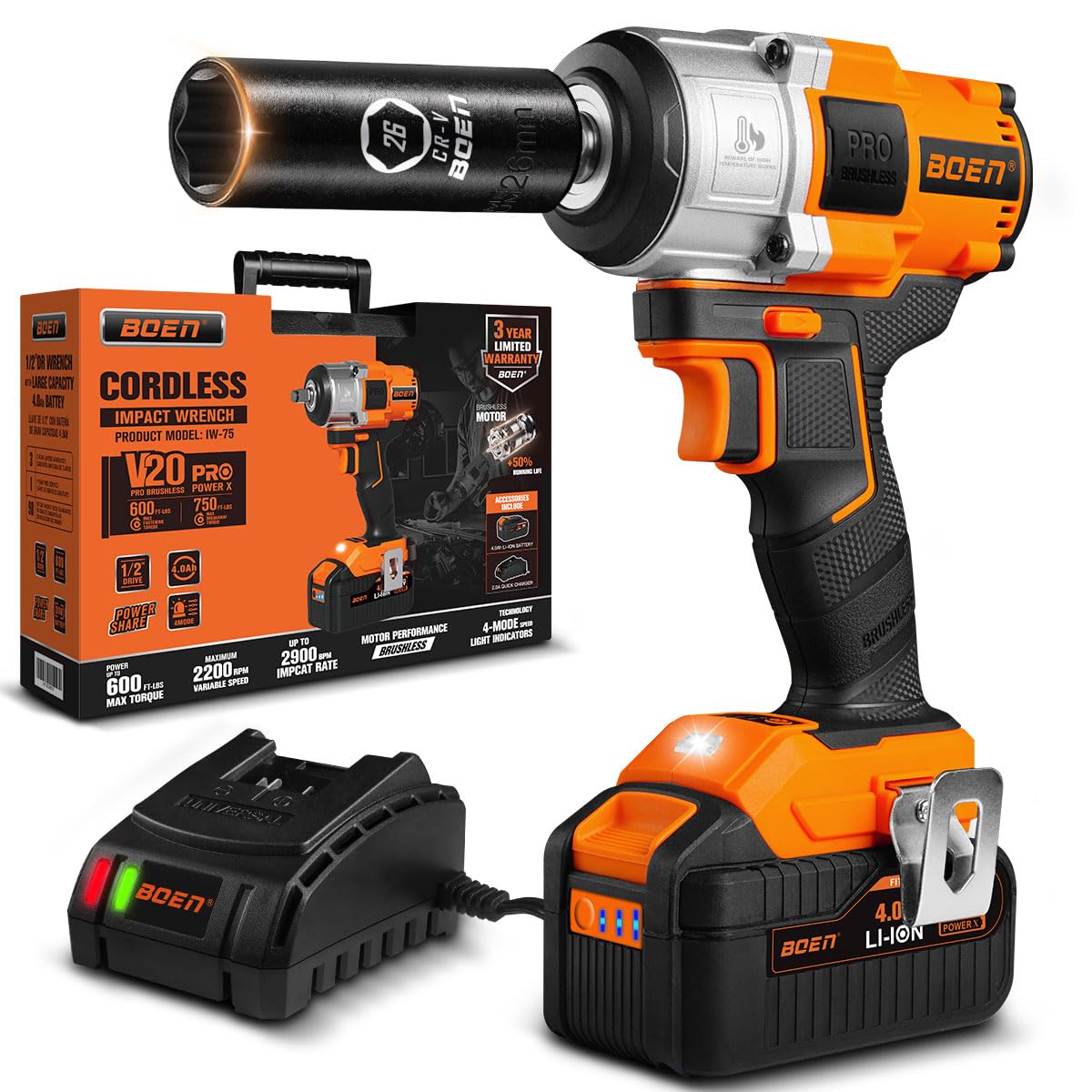
The boen IW-75 Cordless Impact Wrench, showcasing its compact and lightweight design.

Key components of the impact wrench, including the 1/2" square drive anvil, direction switch, brushless motor, ergonomic handle, 4-speed mode adjustable button, LED worklight, and 4.0Ah battery.
Key Features:
- High Torque Output: Delivers a maximum torque of 600 FT-LBS (800 N.m) and a maximum breakaway torque of 750 FT-LBS (1000 N.m) for demanding applications.
- Brushless Motor: Provides longer service life, more stable and precise speed regulation, reduced noise, and fewer sparks compared to brushed motors.
- 4-Speed Mode Adjustment: Offers three speed settings (0-950 RPM, 0-1500 RPM, 0-2200 RPM) and an Auto-Stop mode for versatile use.
- Auto-Stop Mode: Automatically slows down when a screw is loose to prevent damage to sockets and nuts, and reduces the risk of nuts falling off when working at heights.
- 4.0Ah High-Capacity Battery: Ensures extended runtime and features a battery indicator for convenient power monitoring.
- Automatic LED Worklight: Illuminates the work area for 10 seconds after the trigger is released, improving visibility in dark or confined spaces.
- Ergonomic Design: Features an anti-slip, ergonomically designed handle for comfortable and safer operation.
- Ventilation Opening: Designed to effectively reduce internal temperature and prolong the tool's service life.
- Convenient Belt Clip: Allows for easy carrying and hands-free operation in various working scenarios.
3. Setup
3.1 Charging the Battery
The boen IW-75 comes with a 4.0Ah Li-ion battery and a fast charger. Ensure the battery is fully charged before first use.
- Connect the fast charger to a standard power outlet.
- Slide the battery pack onto the charger until it clicks into place.
- The charger indicator light will show the charging status. Refer to the charger's specific instructions for light indications (e.g., red for charging, green for fully charged).
- Once fully charged, remove the battery from the charger.

The package includes the impact wrench, 4.0Ah battery, fast charger, user manual, and tool box.
3.2 Attaching and Removing the Battery
- To Attach: Align the battery pack with the base of the impact wrench and slide it in until it locks securely.
- To Remove: Press the battery release button (usually located on the side of the battery) and slide the battery pack out.
3.3 Attaching Sockets
Always use impact-rated sockets with this tool. Standard sockets may crack or shatter under the force of an impact wrench.
- Ensure the tool is off and the battery is removed for safety.
- Push the desired 1/2-inch square drive impact socket onto the anvil until it snaps into place.
- To remove, pull the socket firmly off the anvil.
4. Operating Instructions
Familiarize yourself with the controls before operating the tool.

The boen Impact Wrench in use, demonstrating its compact size and ease of handling.
4.1 Powering On/Off
To turn the tool on, press the trigger switch. The tool will start operating. To turn it off, release the trigger switch.
4.2 Forward/Reverse Rotation
The direction switch (located above the trigger) controls the rotation direction of the anvil.
- Push the switch to the left for forward (tightening) rotation.
- Push the switch to the right for reverse (loosening) rotation.
- Center the switch to lock the trigger and prevent accidental startup.

Illustration of the forward and reverse rotation settings, controlled by the direction switch.
4.3 Adjusting Speed Modes
The 4-speed mode adjustable button allows you to select the appropriate speed for your task.
- Press the speed selection button (usually located on the base of the tool) to cycle through the modes.
- Mode 1: 0-950 RPM (Low speed, ideal for delicate tasks or initial loosening/tightening to prevent overtightening).
- Mode 2: 0-1500 RPM (Medium speed, for general applications).
- Mode 3: 0-2200 RPM (High speed, for maximum power and quick fastening/loosening).
- Auto-Stop Mode: This mode is designed to prevent overtightening or dropping nuts. When loosening, the tool will operate at full power until the nut is loose, then automatically slow down to prevent it from falling off. When tightening, it will stop once a certain torque is reached.

The 4-speed mode selector, including the auto-stop feature, which helps prevent screw damage.

The auto-stop design, illustrating how it prevents nuts from falling off and reduces screw damage.
4.4 Automatic LED Light
The integrated LED light automatically activates when the trigger is pressed and remains on for approximately 10 seconds after the trigger is released, providing illumination for your work area.

The LED working light automatically activates during usage and deactivates 10 seconds after the usage ends.
4.5 Applications
This impact wrench is suitable for a wide range of tasks, including:
- Removing and tightening car tires.
- Maintenance of lawn mowers and other machinery.
- Assembling furniture.
- Installing scaffolding.
- General garage use and DIY projects.

The boen Impact Wrench being used for various tasks such as changing car tires, working on a lawn mower, and general fastening.
5. Maintenance
Regular maintenance ensures the longevity and optimal performance of your impact wrench.
5.1 Cleaning
- Always disconnect the battery pack before cleaning.
- Use a soft, damp cloth to clean the exterior of the tool. Do not use harsh chemicals or abrasive cleaners.
- Keep the ventilation openings clear of dust and debris to prevent overheating. Use compressed air if necessary.

The ventilation opening helps reduce internal temperature and prolong the tool's service life.
5.2 Battery Care and Storage
- Store batteries in a cool, dry place away from direct sunlight and extreme temperatures.
- Do not store batteries in a discharged state for extended periods. Recharge them periodically if not in use.
- Avoid dropping or subjecting batteries to impact.
5.3 General Storage
- Store the impact wrench and its accessories in the provided tool box in a dry, secure location.
- Keep out of reach of children.
6. Troubleshooting
If you encounter issues with your boen IW-75 Impact Wrench, refer to the following common problems and solutions.
| Problem | Possible Cause | Solution |
|---|---|---|
| Tool does not start | Battery not charged or improperly inserted. Direction switch in locked position. | Ensure battery is fully charged and correctly inserted. Move direction switch out of the center (locked) position. |
| Reduced power or performance | Low battery charge. Incorrect speed mode selected. Tool overheating. | Recharge the battery. Select a higher speed mode. Allow the tool to cool down. Ensure ventilation openings are clear. |
| Battery not charging | Charger not plugged in. Faulty battery or charger. | Check power connection. Try another outlet. If problem persists, contact customer support. |
| Excessive vibration or noise | Loose components. Damaged anvil or socket. | Inspect the tool and socket for damage. If damage is found, discontinue use and seek professional repair. |
7. Specifications
| Feature | Specification |
|---|---|
| Model Number | IW-75 |
| Voltage | 20 Volts |
| Max Fastening Torque | 600 FT-LBS (800 N.m) |
| Max Breakaway Torque | 750 FT-LBS (1000 N.m) |
| No-Load Speed | 0-950 / 0-1500 / 0-2200 RPM |
| Drive Size | 1/2 inch Square Drive |
| Battery Capacity | 4.0Ah Li-ion |
| Motor Type | Brushless |
| Material | Tool Steel, Alloy Steel, Stainless Steel, Chrome Vanadium Steel, or High Carbon Steel |
| Item Length | 5.1 centimeters |
8. Warranty and Support
8.1 Warranty Information
The boen IW-75 Cordless Impact Wrench typically comes with a 3-Year Limited After-Sales Warranty. An additional 12-month warranty may be available upon product registration. Please note that warranty terms may vary and are often applicable only when the product is purchased directly from boen or authorized retailers. Refer to your purchase documentation for specific warranty details.
8.2 Customer Support
For technical assistance, warranty claims, or general inquiries, please contact boen customer support through their official website or the retailer where the product was purchased. Keep your purchase receipt and product model number (IW-75) handy when contacting support.
9. Product Videos
Watch these official product videos for additional guidance on using your boen Cordless Impact Wrench.
Video: BOEN IW75 800NM Cordless Impact Wrench. This video provides an overview and demonstration of the boen IW-75 Cordless Impact Wrench, highlighting its features and capabilities.