
Introduction
This manual provides comprehensive instructions for the LENCENT Bluetooth 5.4 FM Transmitter Car Adapter. Please read thoroughly to ensure proper usage and optimal performance of your device. This device allows you to stream audio from your Bluetooth-enabled devices to your car's FM radio, make hands-free calls, and charge your mobile devices.

Figure 1: LENCENT Bluetooth 5.4 FM Transmitter Car Adapter
Safety Information
Do not expose the device to excessive heat or moisture. Avoid short circuits and do not insert foreign objects into the ports. Always use the correct charger and do not exceed the recommended charging current and voltage. Keep the device away from magnetic fields and other electronic devices that may be affected by radio frequency interference.
Product Features
Upgraded Bluetooth 5.4 Technology
The LENCENT car adapter features the latest Bluetooth 5.4 technology, ensuring faster pairing, lower latency transmission, and a more stable connection with minimal sound loss. This provides an uninterrupted calling and music playing experience. The device is designed to automatically reconnect to your last-connected device, eliminating the need for manual re-pairing each time you start your vehicle.

Figure 2: Benefits of Bluetooth 5.4 Technology
Enhanced Microphone and Music Player
Equipped with an advanced microphone system and CVC noise reduction technology, this transmitter effectively minimizes road noise, wind disturbances, and other distractions for crystal-clear hands-free calling. It connects to your car radio via an FM channel and supports three playing modes: Bluetooth devices, TF card (up to 64GB), and U disk (up to 64GB). Compatible music formats include WMA, MP3, WAV, APE, and FLAC.

Figure 3: Noise Reduction Technology for Clear Calls

Figure 4: Multiple Audio Input Options
48W Safe and Efficient Charging Ports
The LENCENT car charger includes a PD 30W USB-C port and a QC3.0 18W USB-A charging port, enabling simultaneous high-speed charging for two devices. It is compatible with various fast-charging protocols for devices like Samsung, iPhone, and Xiaomi. Built-in intelligent safety features protect against over-current, over-voltage, over-heating, and short-circuits, ensuring secure and efficient charging.

Figure 5: High-Speed Charging Capabilities
Hands-Free Calling and Voice Navigation
This FM transmitter broadcasts audio through your car's speakers, allowing you to make phone calls and activate voice assistants like Siri or Google Assistant without handling your smartphone. This is ideal for streaming music or planning routes. The unique raised button design provides tactile control, helping you keep your focus on the road for safer driving.

Figure 6: Safe Driving with Hands-Free Features
Light Switch Design
The Bluetooth car adapter features 7 color lighting modes, creating a visually engaging display. The dynamic LED light enhances the music ambiance and helps locate the transmitter easily in the dark, contributing to safer night driving. You can easily adjust the lights or turn them off as preferred.
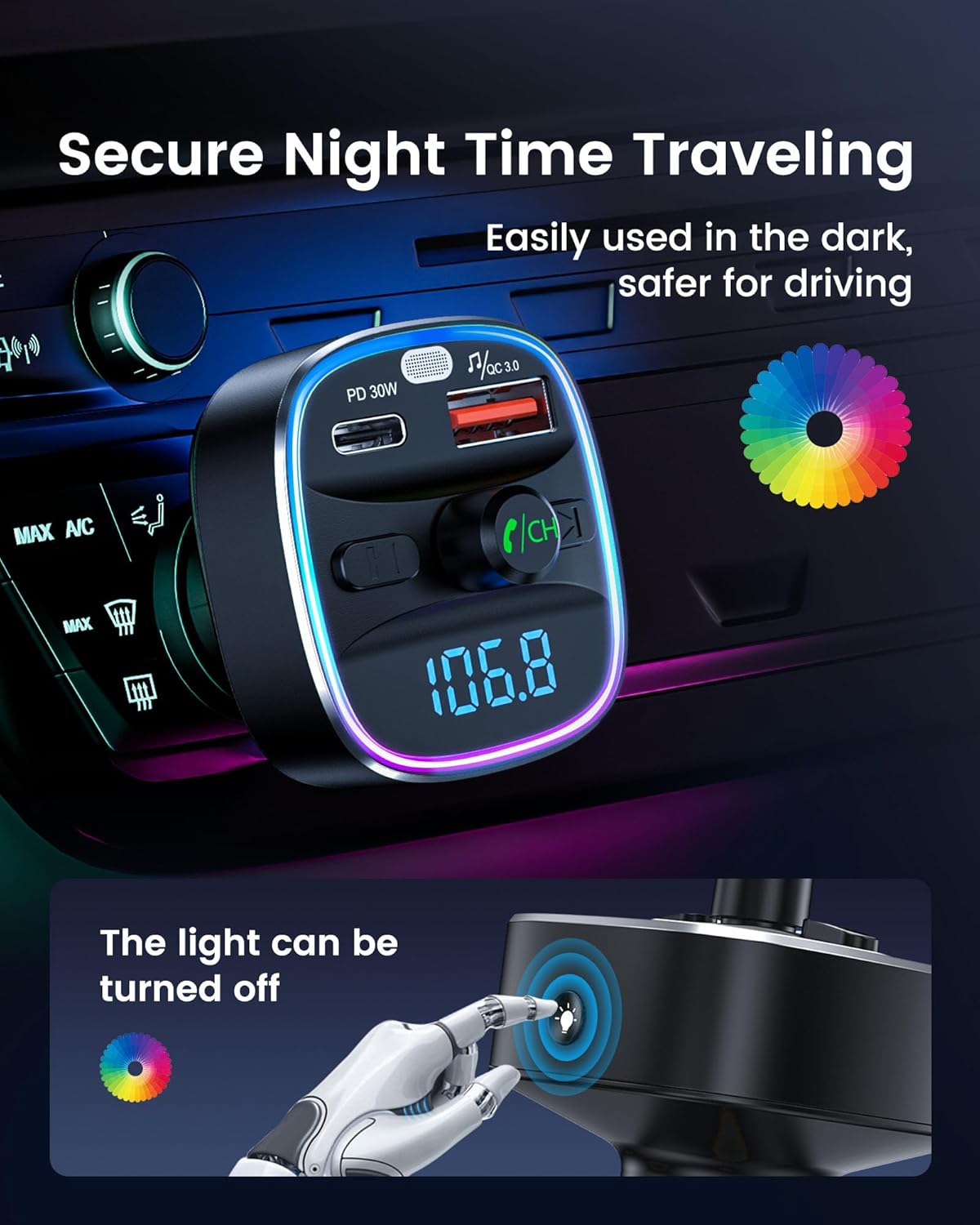
Figure 7: Customizable LED Lighting for Ambiance and Visibility
Setup Instructions
Follow these four simple steps to set up your LENCENT FM Transmitter:
- Step 1: Find a blank station. Tune your car's FM radio to an empty frequency with no active broadcast.
- Step 2: Press "CH". On the LENCENT transmitter, press the "CH" button to enter FM frequency adjustment mode.
- Step 3: Tune to the same FM frequency. Adjust the transmitter's frequency to match the blank FM station you found in Step 1.
- Step 4: Select "T25M" to connect. On your smartphone or Bluetooth-enabled device, search for Bluetooth devices and select "T25M" to pair.

Figure 8: Visual Guide to Device Setup
Operating Instructions
Music Playback
- Bluetooth Streaming: Once paired with your device (e.g., smartphone), audio will automatically stream to your car's FM radio. Use your device or the transmitter's controls (forward/back buttons) to manage playback.
- TF Card/USB Drive Playback: Insert a TF card or USB drive (up to 64GB) containing WMA, MP3, WAV, APE, or FLAC audio files into the designated slot. The transmitter will automatically detect and play the music. Use the forward/back buttons to navigate tracks.
Hands-Free Calling
- Answering/Ending Calls: Press the central multi-function button (often marked with a phone icon) to answer an incoming call or end an ongoing call.
- Rejecting Calls: Press and hold the central multi-function button to reject an incoming call.
- Redialing: Double-press the central multi-function button to redial the last number called.
- Voice Assistant: Long-press the central multi-function button to activate your smartphone's voice assistant (Siri, Google Assistant).
Charging Devices
Connect your device's charging cable to either the PD 30W USB-C port or the QC3.0 18W USB-A port on the transmitter. The device will begin charging automatically.
LED Light Control
The transmitter features 7 color LED lighting modes. Refer to the device's physical buttons or a dedicated light control button (if present) to cycle through colors or turn the lights off.
Maintenance
To ensure the longevity and optimal performance of your LENCENT FM Transmitter, follow these maintenance guidelines:
- Cleaning: Use a soft, dry cloth to clean the exterior of the device. Do not use liquid cleaners or aerosols.
- Storage: When not in use for extended periods, store the device in a cool, dry place away from direct sunlight and extreme temperatures.
- Handling: Avoid dropping the device or subjecting it to strong impacts. Do not attempt to disassemble or modify the device, as this will void the warranty and may cause damage.
Troubleshooting
| Problem | Possible Cause | Solution |
|---|---|---|
| No power/device not turning on | Not properly inserted into cigarette lighter; vehicle's power outlet is faulty. | Ensure the transmitter is fully inserted. Check the vehicle's power outlet with another device. |
| Static or poor audio quality | FM frequency interference; transmitter/phone volume too low/high. | Find a clearer, unused FM frequency. Adjust the volume on both the transmitter and your phone. |
| Bluetooth not connecting | Device not in pairing mode; incorrect device selected; Bluetooth off on phone. | Ensure the transmitter is powered on. Turn off and on your phone's Bluetooth. Re-scan for "T25M" and try pairing again. |
| Charging is slow or not working | Cable issue; device not compatible with fast charging; multiple devices charging. | Try a different charging cable. Ensure your device supports the fast charging protocols (PD/QC). Disconnect other charging devices. |
Specifications
| Feature | Detail |
|---|---|
| Brand | LENCENT |
| Model Number | T25M |
| Connectivity Technology | Bluetooth 5.4 |
| Charging Ports | 1x PD 30W USB-C, 1x QC3.0 18W USB-A |
| Music Playback Support | Bluetooth, TF Card (≤64GB), U Disk (≤64GB) |
| Supported Audio Formats | WMA, MP3, WAV, APE, FLAC |
| Special Features | Hands-Free Calls, Noise Cancellation (CVC), Fast Charging, 7 Color LED Light |
| Product Dimensions | 1.89 x 1.69 x 3.15 inches |
| Item Weight | 1.67 ounces |
| Material | Plastic |
Warranty and Support
For warranty information and technical support, please refer to the documentation included with your product packaging or visit the official LENCENT website. Keep your purchase receipt as proof of purchase for any warranty claims.
For further assistance, you may contact LENCENT customer service through their official channels.


