
1. Product Overview
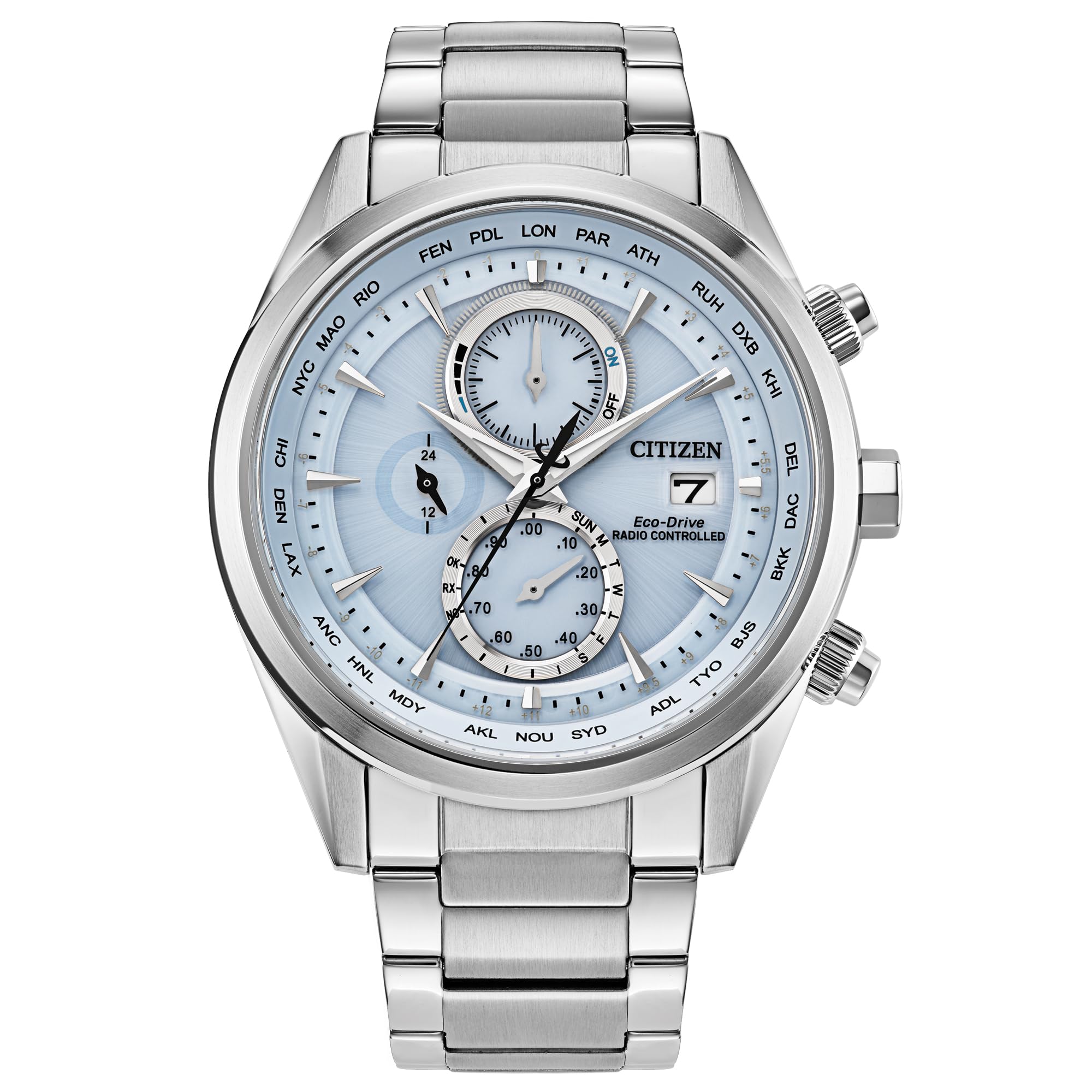
The Citizen AT8260-51M is a 43mm stainless steel watch featuring a blue dial and a matching stainless steel bracelet. It incorporates Citizen's Eco-Drive Atomic Timekeeping technology, which powers the watch using light and synchronizes time with atomic clocks for superior accuracy. This model includes a vertical three-register chronograph, world time in 26 time zones, a perpetual calendar with day and date indicators, 12/24-hour timekeeping, and a power reserve display. The watch is water resistant up to 100 meters and features a sapphire crystal for enhanced scratch resistance.
Key Features:
- Eco-Drive Technology: Powered by any light source, eliminating the need for battery replacement.
- Atomic Timekeeping: Radio-controlled time adjustment in 26 time zones for precise accuracy.
- Chronograph: 1/20 second chronograph measures up to 60 minutes.
- Perpetual Calendar: Automatically adjusts for varying month lengths and leap years.
- World Time: Displays time in 26 time zones.
- Power Reserve Indicator: Shows the current charge level of the watch.
- Water Resistance: Up to 10 Bar (100 meters / 333 feet), suitable for swimming, showering, and snorkeling.
- Sapphire Crystal: Provides superior scratch resistance.
2. Initial Setup and Charging
2.1 Eco-Drive Charging
Your Citizen Eco-Drive watch is powered by light. It converts any light source (natural or artificial) into electrical energy, which is stored in a rechargeable power cell. For optimal performance, ensure your watch is regularly exposed to light.
- Initial Charge: Upon receiving your watch, expose it to bright light (e.g., direct sunlight or a strong fluorescent lamp) for several hours to ensure a full charge.
- Regular Charging: Wear your watch regularly or place it near a light source when not in use. Avoid prolonged storage in dark places.
- Power Reserve: A fully charged Eco-Drive watch can operate for several months in the dark, thanks to its power reserve. Refer to the power reserve indicator on the dial to monitor the charge level.
Video: This video explains the fundamental principles of Citizen's Eco-Drive technology, demonstrating how light is converted into energy to power the watch.
Video: This video provides a general overview of Citizen Eco-Drive watches, highlighting their light-powered functionality.
2.2 Time and Date Setting (Atomic Timekeeping)
The AT8260-51M features Atomic Timekeeping, which automatically synchronizes the watch with atomic clocks via radio signals. This ensures highly accurate time and date display.
- Automatic Reception: The watch attempts to receive time signals automatically, typically overnight. Ensure the watch is placed in an area with good signal reception (e.g., near a window, away from electronic interference).
- Manual Reception: If automatic reception fails or you are in a new time zone, you can initiate manual reception. Refer to the detailed operating instructions for your specific movement (Caliber H800) for precise steps.
- Time Zone Adjustment: The watch allows for easy adjustment to different time zones. Consult the full manual for instructions on selecting and setting your desired time zone.
Video: This video demonstrates the atomic timekeeping feature, showing how the watch synchronizes with radio signals for accurate time.
3. Operating Instructions
3.1 Chronograph Function
The watch features a 1/20 second chronograph capable of measuring up to 60 minutes. The chronograph is operated using the pushers on the side of the watch case.
- Start/Stop: Press the upper pusher to start and stop the chronograph.
- Reset: While the chronograph is stopped, press the lower pusher to reset it to zero.
- Split Time: Some chronographs allow for split time measurement. Refer to the full operating manual for detailed instructions on advanced chronograph features.
3.2 World Time Function
The world time function allows you to easily view the time in 26 different time zones. The cities representing these time zones are typically indicated on the bezel or dial.
- Selecting a Time Zone: Use the crown or a dedicated pusher (depending on the specific movement) to rotate the city ring and select the desired time zone.
- Local Time Display: The main hands will adjust to display the local time for the selected city.
3.3 Perpetual Calendar
The perpetual calendar automatically adjusts for the correct date, including varying month lengths and leap years, until February 28, 2100. Once set, it generally does not require manual adjustment.
- Checking the Date: The date is displayed in a window at the 3 o'clock position. The day of the week is also indicated on a sub-dial.
- Manual Adjustment (if needed): In rare cases, if the calendar is incorrect (e.g., after a significant impact or prolonged power loss), refer to the full operating manual for instructions on how to manually set the perpetual calendar.
4. Maintenance and Care
4.1 General Care
- Cleaning: Wipe the watch case and bracelet with a soft, dry cloth regularly to remove dirt and perspiration. For stainless steel, a slightly damp cloth can be used, followed by drying.
- Avoid Chemicals: Do not expose the watch to harsh chemicals, solvents, or detergents, as these can damage the case, crystal, or seals.
- Temperature Extremes: Avoid exposing the watch to extreme temperatures (hot or cold) or sudden temperature changes, which can affect its accuracy and water resistance.
4.2 Water Resistance
The AT8260-51M is water resistant up to 100 meters (10 Bar / 333 feet). This rating makes it suitable for:
- Daily use, hand washing, and light rain.
- Swimming and showering.
- Snorkeling.
Important: Do not operate the crown or pushers while the watch is wet or submerged, as this can compromise its water resistance. Ensure the crown is pushed in completely after any adjustments.
5. Troubleshooting
- Watch Not Running: Ensure the watch is adequately charged by exposing it to bright light for several hours. Check the power reserve indicator.
- Incorrect Time/Date: Verify that the watch is receiving atomic time signals. If not, try manual reception or manually set the time zone. Ensure the crown is fully pushed in.
- Hands Not Moving Smoothly: This could indicate a low charge. Recharge the watch. If the issue persists, a service may be required.
- Condensation Under Crystal: If condensation appears under the crystal, it may indicate a loss of water resistance. Have the watch inspected by an authorized service center immediately.
For more detailed troubleshooting or issues not covered here, please refer to the comprehensive user manual provided with your watch or contact Citizen customer support.
6. Specifications
| Feature | Detail |
|---|---|
| Model Number | AT8260-51M |
| Case Material | Stainless Steel |
| Bracelet Material | Stainless Steel |
| Dial Color | Blue |
| Case Diameter | 43mm |
| Crystal | Sapphire Crystal |
| Movement | Eco-Drive (Caliber H800) |
| Water Resistance | 10 Bar (100 meters / 333 feet) |
| Functions | Atomic Timekeeping, 1/20 Second Chronograph, Perpetual Calendar, World Time (26 zones), 12/24 Hour Time, Power Reserve Indicator, Day/Date |
| Lug Width | 22mm |
7. Warranty and Support
Citizen watches are known for their quality and durability. For specific warranty information, please refer to the warranty card included with your purchase or visit the official Citizen website. Citizen offers comprehensive customer support and authorized service centers for maintenance and repairs.
For additional information or to explore other Citizen products, visit the Citizen Store on Amazon.
8. Product Images

Front view of the Citizen AT8260-51M Sport Luxury watch, showcasing the blue dial, chronograph sub-dials, and stainless steel bracelet.

Side profile view of the Citizen AT8260-51M watch, highlighting the case design, crown, and chronograph pushers.
Back view of the Citizen AT8260-51M watch, displaying the engraved case back with model information and the stainless steel bracelet clasp.


