
Desktronic SitPro
Desktronic SitPro Ergonomic Office Chair User Manual
Model: SitPro | Brand: Desktronic
Introduction
Thank you for choosing the Desktronic SitPro Ergonomic Office Chair. This manual provides detailed instructions for assembly, operation, maintenance, and troubleshooting to ensure you get the most out of your new chair. Please read this manual thoroughly before assembly and use.
The Desktronic SitPro chair is designed to provide superior ergonomic support and comfort for extended periods of sitting, promoting good posture and reducing discomfort.
Safety Information
WARNING:
- Always assemble the chair according to the provided instructions to ensure stability.
- Do not exceed the maximum weight capacity of 150 kg (330 lbs) to prevent damage or injury.
- Keep hands and fingers clear of moving parts during adjustment.
- Ensure all screws and bolts are tightened securely before use and periodically check for looseness.
What's in the Box
Please verify that all components are present before beginning assembly:
- Armrests
- Swivel Base
- Backrest with Tilt Function
- Seat Cushion
- Gas Lift Cylinder
- Casters (Wheels)
- Assembly Hardware (Screws, Allen Key)
Setup and Assembly
Follow these steps for proper assembly of your Desktronic SitPro chair. It is recommended to assemble the chair on a soft, clean surface to prevent scratches.
- Attach Casters to Base: Insert the casters firmly into the holes at the end of each leg of the swivel base. Apply pressure until they click into place.
- Insert Gas Lift: Place the gas lift cylinder into the center hole of the swivel base.
- Attach Armrests to Seat: Secure the armrests to the underside of the seat cushion using the provided screws. Ensure they are oriented correctly.
- Attach Backrest to Seat: Connect the backrest to the seat assembly. Align the mounting holes and secure with screws.
- Place Seat Assembly on Gas Lift: Carefully place the assembled seat and backrest onto the gas lift cylinder, ensuring it is centered and stable.
- Final Checks: Verify all connections are secure and the chair is stable before use.

Image: Overview of the 10 adjustable points on the Desktronic SitPro chair, including headrest, backrest height, lumbar support, tilt function, height adjustment, 3D armrests, sliding seat, seat tilt regulation, and backrest tension adjustment.
Operating Your Chair
The Desktronic SitPro chair offers multiple adjustment options for personalized comfort and ergonomic support.
1. Height Adjustment
To adjust the chair height, pull the lever located under the right side of the seat upwards. While pulling the lever, either stand up to raise the chair or sit down to lower it. Release the lever to lock the height.
2. Backrest Tilt and Lock
The chair features a recline function with 5 lockable positions, ranging from 90° to 135°.
- To Recline: Pull the lever on the left side of the seat upwards and lean back.
- To Lock Tilt: Once you reach your desired angle, push the lever downwards to lock the backrest in place.
- To Unlock and Return: Pull the lever upwards again. The backrest will return to its upright position as you lean forward.

Image: The chair's recline function allows for 5 lockable positions, from 90 to 135 degrees, providing flexibility for various activities.
3. Lumbar Support Adjustment
The integrated lumbar support can be adjusted vertically to align with the natural curve of your spine. Locate the adjustment knob or lever on the backrest and move it up or down to find the most comfortable position for your lower back.
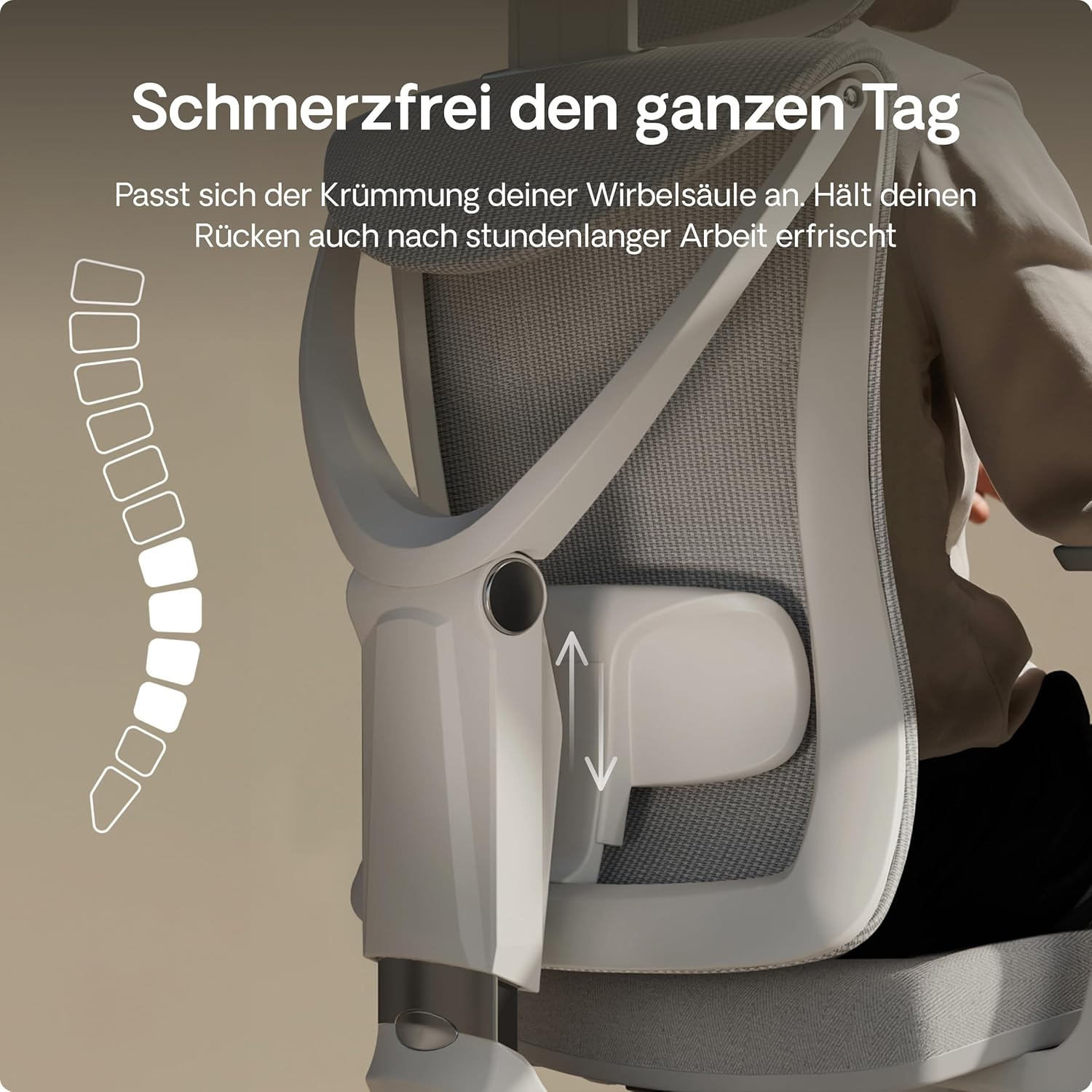
Image: Detail of the adjustable lumbar support, designed to conform to the spine's curvature for all-day comfort.
4. Headrest Adjustment
The headrest can be adjusted for height and angle to provide optimal neck support. Grasp the headrest and move it up or down, and tilt it forward or backward until it comfortably supports your head and neck.

Image: The fully adjustable headrest provides precise neck support, helping to prevent neck strain.
5. 3D Armrest Adjustment
The 3D armrests offer multiple adjustment options:
- Height Adjustment: Press the button on the side of the armrest and slide it up or down.
- Forward/Backward Slide: Slide the armrest pad forward or backward.
- Pivot: Rotate the armrest pad inwards or outwards.

Image: The soft 3D armrests provide full range of motion and adapt to your natural arm posture.
6. Seat Depth Adjustment
To adjust the seat depth, locate the lever under the seat (usually on the left side). Pull the lever and slide the seat forward or backward to achieve optimal thigh support, ensuring there is a gap between the edge of the seat and the back of your knees.

Image: The seat depth can be adjusted by 8 cm in 5 steps, allowing for a tailored fit for various body types.
Maintenance and Care
Regular maintenance will extend the life and appearance of your Desktronic SitPro chair.
- Cleaning: For mesh and fabric parts, use a soft brush or vacuum cleaner to remove dust. For spills, gently blot with a damp cloth and mild soap, then wipe with a clean, dry cloth. Avoid harsh chemicals.
- Frame: Wipe the frame with a soft, damp cloth.
- Casters: Periodically clean hair and debris from the casters to ensure smooth movement.
- Hardware: Check all screws and bolts every few months and tighten if necessary to maintain stability.
Troubleshooting
| Problem | Possible Cause | Solution |
|---|---|---|
| Chair does not adjust height | Gas lift not engaged or faulty. | Ensure the height adjustment lever is fully pulled. If problem persists, contact customer support. |
| Chair wobbles or is unstable | Loose screws or improper assembly. | Check all assembly screws and tighten them securely. Re-check assembly steps. |
| Casters not rolling smoothly | Debris (hair, dust) caught in casters. | Remove casters and clean any accumulated debris. |
| Backrest does not recline or lock | Tilt mechanism not engaged or faulty. | Ensure the tilt lock lever is correctly operated. Check for obstructions. |
Specifications
- Model: SitPro
- Brand: Desktronic
- Color: Grey
- Product Dimensions: 50 x 67 x 109.5 cm (Depth x Width x Height)
- Item Weight: 26.5 Kilograms
- Maximum Weight Capacity: 150 kg (330 lbs)
- Adjustments: Height, Backrest Tilt (5 positions), Lumbar Support, Headrest, 3D Armrests, Seat Depth
- Certifications: BIFMA certified
Warranty and Support
The Desktronic SitPro Ergonomic Office Chair comes with a 3-year warranty, reflecting our confidence in the product's quality and durability. This warranty covers manufacturing defects and significant malfunctions under normal use.
For warranty claims, technical support, or any questions regarding your chair, please contact Desktronic customer service:
- Website: Visit the Desktronic Store on Amazon for FAQs and contact information.
- Email: Refer to your purchase documentation for direct email support.
Please have your purchase receipt and model number (SitPro) ready when contacting support.
Related documentsSitPro


Ask a question about this manual
Ask about setup, troubleshooting, compatibility, parts, safety, or missing instructions. Manuals+ will review the question and use this page’s manual context to help answer it.