1. Introduction
Welcome to the user manual for your new Blackstar IDCORE V4 Super Wide Stereo 10W Amplifier. This amplifier is designed to provide an immersive and versatile playing experience for guitarists, featuring dual 3-inch speakers, a wide range of voices, and patented ISF (Infinite Shape Feature) technology. This manual will guide you through the setup, operation, maintenance, and troubleshooting of your IDCORE V4 amplifier, ensuring you get the most out of its advanced features.

Figure 1.1: Blackstar IDCORE V4 Super Wide Stereo 10W Amp (Double Cream)
2. Safety Information
Please read and understand all safety instructions before operating your amplifier. Retain this manual for future reference.
- Power Supply: Use only the specified power adapter provided with your amplifier. Ensure the voltage matches your local power supply.
- Ventilation: Do not block any ventilation openings. Ensure adequate airflow around the amplifier to prevent overheating.
- Water and Moisture: Do not expose the amplifier to rain, moisture, or any liquids. Do not place objects filled with liquids on or near the amplifier.
- Heat Sources: Keep the amplifier away from heat sources such as radiators, heat registers, stoves, or other apparatus (including amplifiers) that produce heat.
- Cleaning: Unplug the amplifier from the power outlet before cleaning. Use a dry cloth only.
- Servicing: Do not attempt to service this product yourself. Refer all servicing to qualified service personnel. Servicing is required when the apparatus has been damaged in any way, such as power-supply cord or plug is damaged, liquid has been spilled or objects have fallen into the apparatus, the apparatus has been exposed to rain or moisture, does not operate normally, or has been dropped.
3. Product Overview
The Blackstar IDCORE V4 is a compact yet powerful 10-watt stereo amplifier designed for practice, recording, and streaming.
Key Features:
- 10W Super Wide Stereo Output: Two 3-inch speakers provide a broad, immersive soundstage.
- 6 Amp Voices: Offers a versatile range from pristine cleans to high-gain distortion.
- Patented ISF Control: Infinite Shape Feature allows for precise tone shaping, from British to American amp characteristics.
- Built-in Effects: Studio-quality modulation, delay, and reverb effects.
- Integrated Tuner: Convenient chromatic tuner for quick tuning.
- USB-C Connectivity: Direct recording to computer and access to Blackstar Architect software.
- CabRig Lite: Advanced cabinet simulator with user-configurable mic and cabinet placement.
- Line-in & Streaming Input: Jam along with backing tracks or stream audio.
- Power Reduction: Switchable 1W/10W output for quiet practice or full volume.
Control Panel Layout:
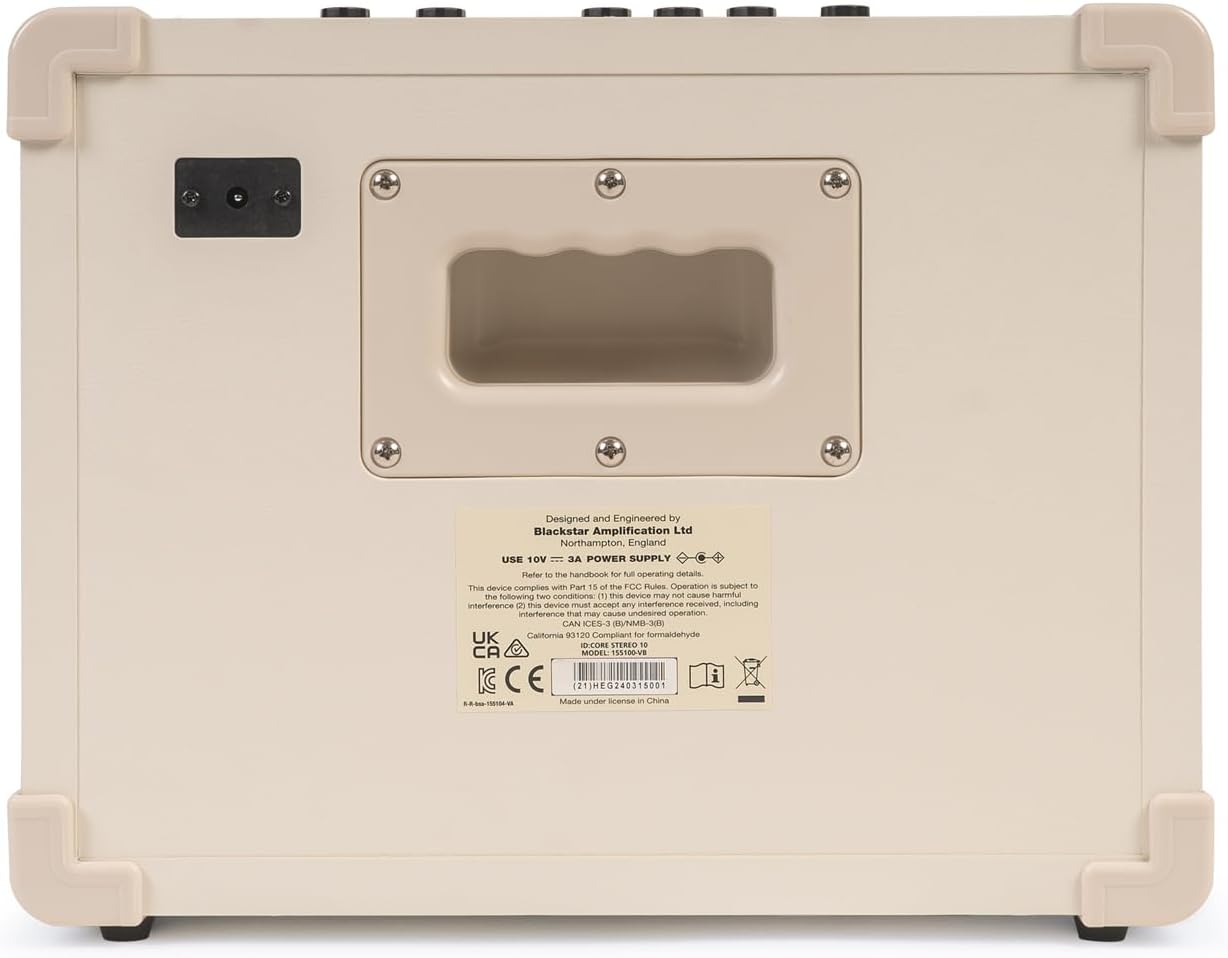
Figure 3.1: Top Control Panel
The top panel of your IDCORE V4 features all the essential controls for shaping your sound.
- Input Jack: Connect your guitar here.
- Line In / Streaming Input: Connect external audio devices.
- CabRig & Phones Output: Headphone output with CabRig speaker simulation.
- Voice Selector: Rotary switch to choose between 6 distinct amp voices (Clean Warm, Clean Bright, Crunch, Super Crunch, OD 1, OD 2).
- Gain Control: Adjusts the amount of overdrive or distortion.
- Volume Control: Master volume for the amplifier.
- ISF (Infinite Shape Feature): Patented Infinite Shape Feature for tone character adjustment.
- Effects Section:
- Type Knob: Selects between Modulation, Delay, and Reverb effects.
- Level Knob: Adjusts the intensity of the selected effect.
- Tap Button: Sets the tempo for time-based effects.
- Power Switch: Turns the amplifier on or off.
- USB Port: USB-C connection for recording and Architect software.
- 1W/10W Power Switch: Reduces output power for quieter practice.
- Manual Button: Toggles between manual mode and stored patches.

Figure 3.2: Rear Panel
The rear panel primarily houses the power input. Ensure you use the correct power supply as indicated on the label.
4. Setup
Follow these steps to set up your Blackstar IDCORE V4 amplifier.
- Unboxing: Carefully remove the amplifier and all accessories from the packaging. Check for any signs of damage.
- Placement: Place the amplifier on a stable, flat surface, ensuring adequate ventilation around the unit.
- Power Connection: Connect the supplied power adapter to the DC input on the rear of the amplifier. Plug the adapter into a suitable wall outlet. Do not power on the amplifier yet.
- Guitar Connection: Connect your guitar to the Input jack on the top panel using a standard 1/4" instrument cable.
- Headphones (Optional): If using headphones, connect them to the CabRig & Phones output. This output features Blackstar's CabRig Lite speaker simulation.
- External Audio (Optional): To play along with music, connect your audio device (phone, tablet, MP3 player) to the Line In / Streaming input using a 3.5mm stereo cable.
- USB Connection (Optional): For recording or using the Blackstar Architect software, connect a USB-C cable from the amplifier's USB port to your computer.
5. Operating Instructions
This section details how to operate your IDCORE V4 amplifier and utilize its various features.
5.1 Powering On/Off
- Ensure all connections are secure.
- Turn the Volume knob down to its minimum setting.
- Flip the Power switch to the 'ON' position. The power indicator LED will illuminate.
- To power off, turn the Volume knob down and flip the Power switch to 'OFF'.
5.2 Selecting Amp Voices
The IDCORE V4 offers six distinct amp voices. Rotate the Voice knob to select:
- Clean Warm: Smooth, dynamic clean tone.
- Clean Bright: Brighter, more articulate clean tone.
- Crunch: Classic rock crunch.
- Super Crunch: Higher gain crunch.
- OD 1: Overdrive with a modern character.
- OD 2: High-gain lead tone.
5.3 Gain, Volume, and ISF Controls
- Gain: Adjusts the amount of pre-amp gain, affecting the level of distortion.
- Volume: Controls the overall output volume of the amplifier.
- ISF (Infinite Shape Feature): This unique control shifts the tone stack from a 'British' characteristic (counter-clockwise) with a more aggressive mid-range, to an 'American' characteristic (clockwise) with a tighter low-end and more scooped mids.
5.4 Effects Section
The effects section provides three types of effects: Modulation, Delay, and Reverb.
- Type Knob: Rotate to select the desired effect type. Each type has multiple variations accessible via the Architect software.
- Level Knob: Adjusts the wet/dry mix or intensity of the selected effect.
- Tap Button: Press this button repeatedly to set the tempo for time-based effects (Delay, Tremolo, etc.).
5.5 Power Reduction (1W/10W)
The 1W/10W Power switch allows you to reduce the amplifier's output power for quieter practice sessions without sacrificing tone. This is ideal for home use.
5.6 USB-C Recording and Architect Software
The USB-C port enables direct recording to your computer and provides access to the Blackstar Architect software.
- Recording: Connect the amplifier to your computer via USB-C. The amplifier will appear as an audio interface. You can record your guitar directly into your DAW (Digital Audio Workstation).
- Blackstar Architect: Download and install the Blackstar Architect software from the official Blackstar website. This software allows for deep editing of patches, access to more effect variations, firmware updates, and sharing patches online.
- CabRig Lite: Within Architect, you can customize the CabRig Lite emulated output, adjusting virtual cabinet types, microphone models, and mic placement for a professional direct sound.

Figure 5.1: USB-C connection for recording and software control.

Figure 5.2: Using the amplifier for streaming audio.
6. Maintenance
Proper care and maintenance will ensure the longevity and optimal performance of your Blackstar IDCORE V4 amplifier.
- Cleaning:
- Always unplug the amplifier before cleaning.
- Use a soft, dry, lint-free cloth to wipe down the exterior surfaces.
- Do not use abrasive cleaners, solvents, or waxes, as these can damage the finish.
- Storage:
- When not in use, store the amplifier in a cool, dry place, away from direct sunlight and extreme temperatures.
- Avoid storing in areas with high humidity.
- Transportation:
- When transporting the amplifier, ensure it is securely packed to prevent physical damage.
- Use the integrated carry handle for easy portability.
7. Troubleshooting
If you encounter issues with your IDCORE V4, refer to the table below for common problems and solutions.
| Problem | Possible Cause | Solution |
|---|---|---|
| No sound from amplifier. |
|
|
| Distorted or poor sound quality. |
|
|
| USB connection not recognized. |
|
|
| Effects not working. |
|
|
8. Specifications
Detailed specifications for the Blackstar IDCORE V4 Super Wide Stereo 10W Amp (Model: IDCV410CREAM2).
| Feature | Detail |
|---|---|
| Model Number | IDCV410CREAM2 |
| Output Wattage | 10 Watts (switchable to 1 Watt) |
| Speakers | 2 x 3-inch Stereo Speakers |
| Amp Voices | 6 (Clean Warm, Clean Bright, Crunch, Super Crunch, OD 1, OD 2) |
| Controls | Voice, Gain, Volume, ISF, Effects Type, Effects Level, Tap, 1W/10W Power, Manual, Power Switch |
| Effects | Modulation, Delay, Reverb (multiple variations via Architect) |
| Connectivity | 1/4" Guitar Input, 3.5mm Line In/Streaming, 3.5mm CabRig & Phones Output, USB-C |
| Software Compatibility | Blackstar Architect (PC/Mac) |
| Dimensions (D x W x H) | 12 x 6 x 12 inches (approx. 30.5 x 15.2 x 30.5 cm) |
| Item Weight | 11 pounds (approx. 5 kg) |
| Color | Double Cream |
| Power Source | Corded Electric (10V DC, 3A) |
9. Warranty and Support
Your Blackstar IDCORE V4 amplifier is covered by a manufacturer's warranty. For specific warranty terms and conditions, please refer to the warranty card included with your product or visit the official Blackstar Amplification website.
For technical support, product registration, or to download the latest version of the Blackstar Architect software and firmware updates, please visit:
www.blackstaramps.com/support
You can also find FAQs and community forums on the Blackstar website for additional assistance.


