
Introduction
This manual provides detailed instructions for the use and maintenance of your Lefant Remote Control. This remote control is designed to enhance the functionality and convenience of operating your compatible Lefant robot vacuum cleaner.
Applicable Models:
- Lefant robot vacuum cleaner models: M210, M210B, M210P, M213, M213S, N1K, P1, F1, M501B, U180, M310, M320.
Package Contents:
- Lefant Remote Control x 1
- Instructions for Use x 1
Setup
Battery Installation
The Lefant Remote Control requires 2 AAA batteries for operation. Batteries are not included in the package.
- Locate the battery compartment on the back of the remote control.
- Open the battery compartment cover.
- Insert two AAA batteries, ensuring correct polarity (+ and -) as indicated inside the compartment.
- Close the battery compartment cover securely.
Initial Use
No complex connection or pairing is needed. Simply aim the remote control directly at your Lefant robot vacuum cleaner to control it.

Image: The Lefant Remote Control, a sleek black device with various control buttons.

Image: Side and front view of the Lefant Remote Control with dimensions: 130.5mm/5.1in length, 43mm/1.7in width, and 19mm/0.7in thickness.
Operating Instructions
The Lefant Remote Control offers a variety of functions to manage your robot vacuum's cleaning tasks efficiently.

Image: Diagram of the Lefant Remote Control with labels for each button: Direction Control, START/PAUSE, Automatic Recharge, Suction Adjustment, Edge Cleaning, Spot Cleaning, and Random Cleaning.
Button Functions:
- Direction Control Buttons: Use the arrow buttons (Up, Down, Left, Right) to manually steer the robot vacuum.
- START/PAUSE Button: Press to start or pause the cleaning cycle.
- Automatic Recharge Button: Sends the robot vacuum back to its charging station.
- Suction Adjustment Button: Cycles through different suction power levels (e.g., standard, strong).
- Edge Cleaning Button: Initiates cleaning along the edges of rooms.
- Spot Cleaning Button: Directs the robot to clean a specific concentrated area.
- Random Cleaning Button: Activates a random cleaning pattern for general area coverage.
Cleaning Modes and Features:
- Schedule Time: Set specific times for the robot vacuum to begin cleaning automatically.
- Control Cleaning Modes: Easily switch between various cleaning modes (e.g., Auto, Spot, Edge, Random) using the dedicated buttons.
- Adjust Suction: Optimize cleaning performance for different debris types by adjusting suction power.
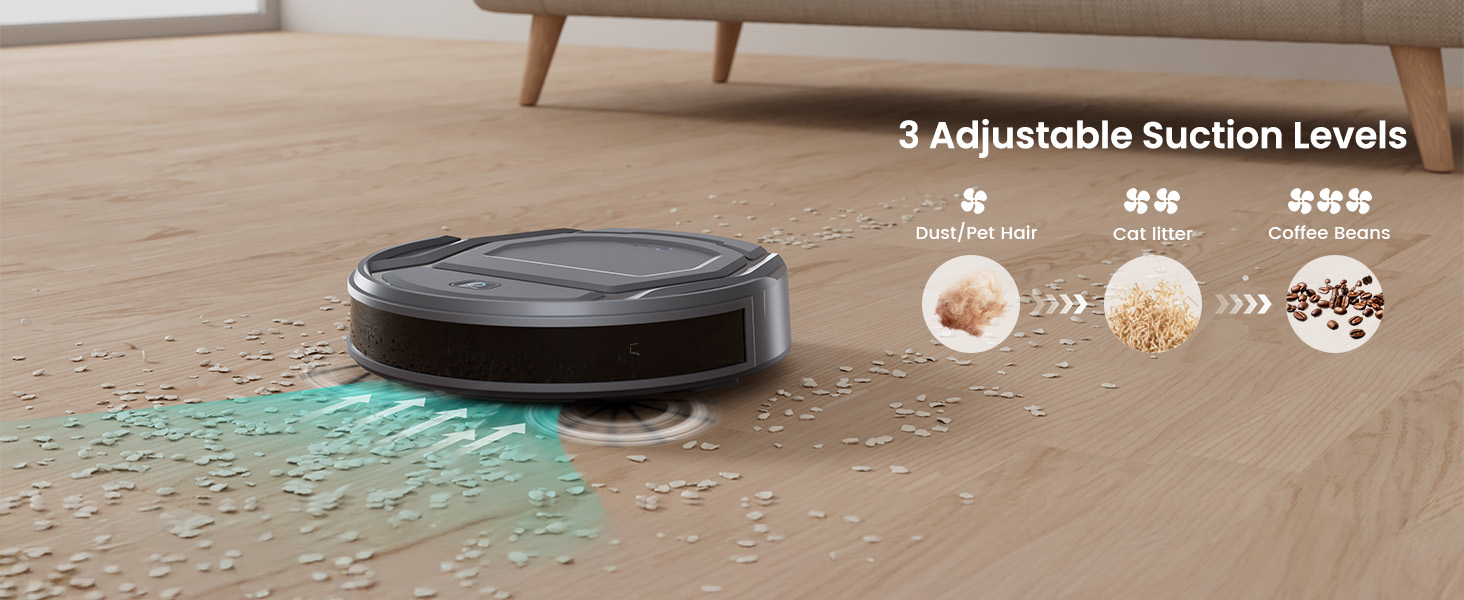
Image: A robot vacuum cleaning a floor, illustrating three adjustable suction levels for different debris like dust/pet hair, cat litter, and coffee beans.
- Automatic Return to Charging Station: The robot can be commanded to return to its charging station when the battery is low or after completing tasks.

Image: A robot vacuum automatically navigating back to its charging station, demonstrating the auto-recharge feature.
- Adjust Path Direction: Manually guide the robot vacuum's movement as needed.

Image: A robot vacuum following a systematic cleaning path on a wooden floor, illustrating efficient coverage.
- Spot Cleaning: Focus on specific dirty areas.

Image: A robot vacuum performing spot cleaning, moving in a spiral pattern to thoroughly clean a concentrated area.
- Edge Cleaning: Ensure thorough cleaning along walls and furniture.

Image: A robot vacuum cleaning along the edge of a room, demonstrating its ability to reach corners and wall lines.
Note: While the remote control provides direct functionality, the Lefant APP offers additional features like scheduling and detailed mapping for compatible robot vacuums.

Image: A user interacting with the Lefant APP on a smartphone, showing the app's interface for controlling the robot vacuum.

Image: A person using voice commands with Alexa and Google Assistant to control the robot vacuum, demonstrating smart home integration.
Specifications
| Feature | Detail |
|---|---|
| Product Dimensions | 5.5 x 2.36 x 1.57 inches |
| Item Weight | 2.08 ounces |
| Item Model Number | 09a91ab8-fa48-41a9-96c4-71cd2f1d069b |
| Manufacturer | Lefant |
| Brand | Lefant |
| Special Feature | No Programming Required, Universal |
| Color | Black |
| Max Number of Supported Devices | 1 (at a time) |
| Compatible Devices | Lefant Robot Vacuums (M210, M210B, M210P, M213, M213S, N1K, P1, F1, M501B, U180, M310, M320) |
| Battery Requirement | 2 AAA batteries (Not Included) |
Troubleshooting & FAQs (for Robot Vacuums)
This section addresses common questions related to the Lefant Robot Vacuums that this remote control operates.
Q: Why can't the robot connect to Wi-Fi?
A: The robot works with 2.4GHz Wi-Fi networks only. Ensure your network is 2.4GHz when attempting to connect the robot to the APP.

Image: A step-by-step guide on how to connect the Lefant Robot Vacuum to the Lefant App, emphasizing 2.4GHz Wi-Fi.
Q: How high can a robot climb?
A: The robot can climb to the top of objects with a height of less than 12mm. If you don't want it to climb on them, please take them away.
Q: Why do robot vacuums stop working after a few minutes of first use?
A: For first-time use, it is recommended to fully charge the battery before use.
Q: Where is the remote control?
A: This set (referring to some robot vacuum packages) does not include the remote control, and you may need to buy it additionally. This product is the remote control itself.

Image: Visual representation of common questions and answers regarding Lefant robot vacuums, including climbing ability, initial charging, and remote control availability.
Additional Robot Vacuum Features (Controlled via Remote or App)
The remote control allows you to access many of the advanced features of your Lefant robot vacuum. Here are some general capabilities:
- Low Profile Design: Many Lefant robot vacuums feature a slim design to clean under furniture.

Image: A robot vacuum cleaning under a sofa, highlighting its low profile of 2.99 inches.
- Efficient Navigation: Optimized paths for comprehensive cleaning.

Image: Comparison of robot vacuum navigation, showing an efficient 11-inch path versus a less efficient 14-inch path.
- Carpet Auto-Detection: Automatically increases suction on carpets (for low pile carpets only).

Image: A robot vacuum on a carpet, illustrating its carpet auto-detection feature which increases suction power for deeper cleaning.
- Scheduling: Plan cleaning times in advance via the Lefant APP.
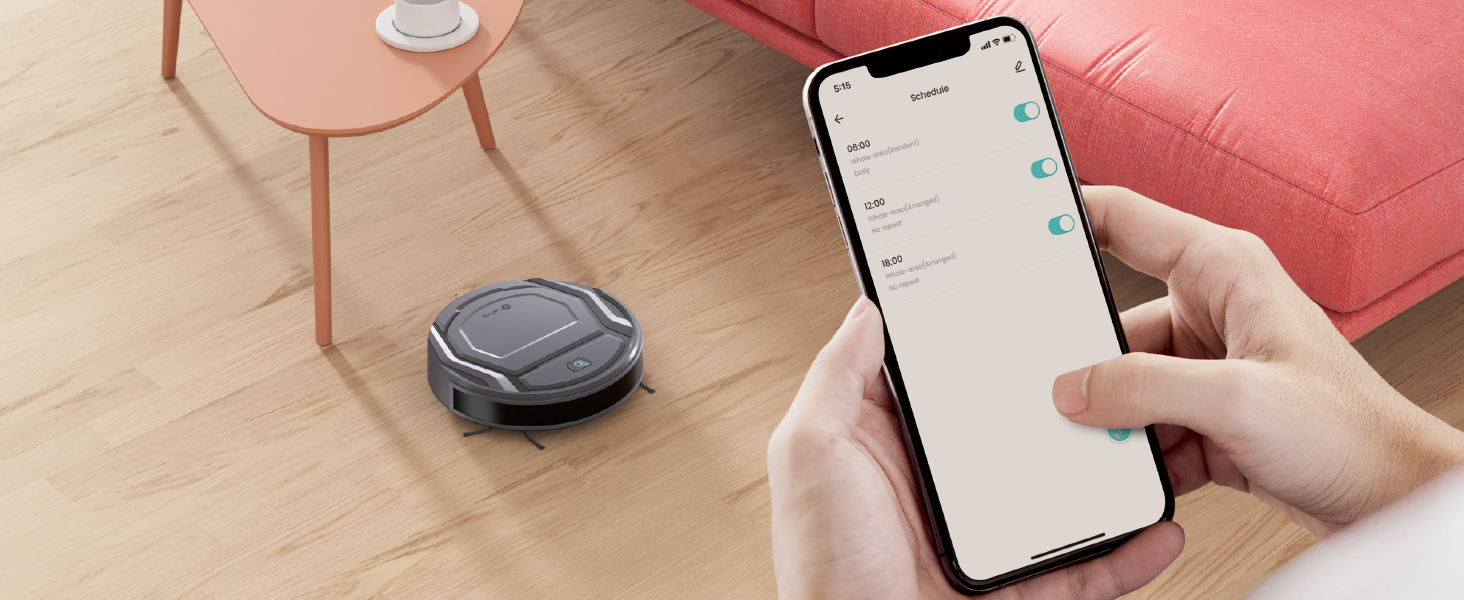
Image: A user setting cleaning schedules for the robot vacuum using the Lefant App on a smartphone.
- Smart Sensors: Equipped with cliff sensors and obstacle avoidance.

Cliff Sensor

Obstacle Avoidance
- Dustbin Capacity: 500ML dustbin for efficient debris collection.

Image: A close-up of the robot vacuum's dustbin, indicating a 500ML capacity.
- Long Battery Life: Up to 120 minutes of cleaning, covering up to 1300 sqft.

Image: An illustration showing the robot vacuum's battery life of 120 minutes and coverage area of 1300 sqft.


