
1. Introduction and Overview
The EIOTCLUB Physical eSIM Card is designed to provide seamless global connectivity for your Android and unlocked phones. This innovative solution allows for unlimited eSIM downloads and deletions, enabling you to store up to 8 eSIM profiles simultaneously for flexible use across various countries and providers. It's an ideal choice for travelers and users seeking a versatile and convenient mobile data solution without the need for multiple physical SIM cards.

Image: The EIOTCLUB Physical eSIM Card in its packaging, highlighting its unlimited download feature and global trial plan.
Video: An overview of the physical eSIM card, demonstrating its design and key features for users.
2. Key Features
- Unlimited eSIM Downloads: The EIOTCLUB eSIM card includes a pre-installed seed profile with 1GB free data for the U.S. and 100MB Global Data. It supports unlimited downloads and deletions, allowing storage of up to 8 eSIM profiles simultaneously.
- Global Travel Convenience: Eliminate the need for multiple physical SIM cards when traveling. Download eSIM profiles from various providers and countries directly through the EIOTCLUB app.
- Convenient Management: Insert the EIOTCLUB eSIM card into your device, activate it via the dedicated app, and instantly connect to the eSIM service. Manage your eSIMs easily through the app for seamless switching and control.
- Broad Compatibility: The physical eSIM card is pre-cut into Standard, Micro, and Nano sizes to fit various devices. For iPhones with SIM slots, the card can be inserted to enable roaming functionality.

Image: A visual comparison highlighting the unlimited download capability and free download cost of the EIOTCLUB eSIM compared to other eSIMs.

Image: Illustrates the global travel flexibility, showing a traveler with the eSIM card and options for various destinations and carriers.
3. Setup and Installation
3.1 Physical Installation
The EIOTCLUB eSIM card is a physical card that needs to be inserted into your device's SIM card slot. It comes pre-cut in Standard, Micro, and Nano sizes to fit various devices.
Video: This video demonstrates the unboxing process of the EIOTCLUB eSIM card and how to detach the correct SIM size for insertion into a phone's SIM tray.
3.2 Android Phone Setup
- Insert the Card: Place the EIOTCLUB eSIM card into Slot 1 of your Android phone.
- Check Settings: Go to "Settings" > "Network & Internet". Ensure data roaming is enabled.
- Set up APN: Navigate to "Mobile Network" > "Access Point Names (APN)". Add a new APN with Name: eiotclub and APN: america.bics (for U.S.) or bicsapn (for Europe).
- Confirm Connection: Verify that the eSIM is connected properly.
- Start Using: Once setup is complete, enjoy your EIOTCLUB service.

Image: Step-by-step guide for setting up the APN on an Android device, including required Name and APN values.
Video: A detailed demonstration on how to set up and manage the eSIM through the EIOTCLUB app on an Android phone, including initial detection and slot management.
3.3 iPhone Setup (for SIM slot models)
For iPhone users with SIM slot models, the physical eSIM card can be used. To download new eSIM profiles, you may need an Android device or a dedicated card reader to manage the profiles.
- Access Setup Page: Visit the EIOTCLUB website for the card reader setup file.
- Install eSIM Profile: Insert the eSIM Card into the card reader. Download the profile via the EIOTCLUB eSIM Reader app, select the card reader, and click "Download." You can also upload a QR code image file.
- Enable eSIM Profile: Check the profile status and click the ICCID in the bottom right corner to enable it.
- Insert eSIM Card into iPhone: Remove the eSIM card from the reader and insert it into your iPhone's SIM slot.
- Complete Setup: Go to Settings > Cellular, locate the eSIM profile, and ensure it's enabled.
- Test Connection: Confirm your phone is connected to the internet and manage card status and packages through the app.
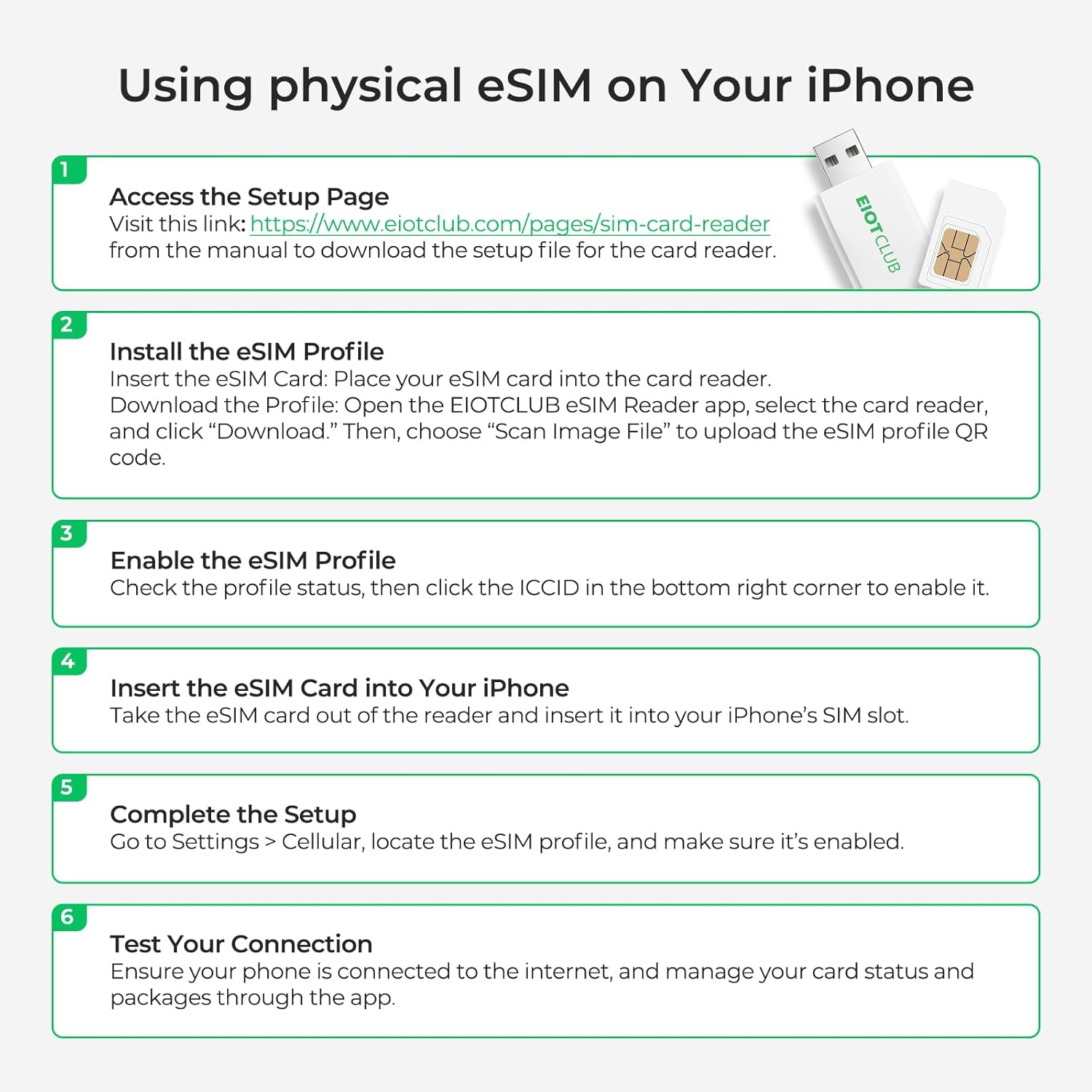
Image: Instructions for using the physical eSIM on an iPhone, including steps for card reader use and profile activation.
Video: An overview of the EIOTCLUB eSIM reader, explaining its function and how it facilitates managing eSIM profiles, particularly for devices that require external management.
4. Operating Instructions
Once your EIOTCLUB eSIM card is installed and activated, you can manage your data plans and profiles directly through the EIOTCLUB app. The app provides a user-friendly interface for all your connectivity needs.
4.1 Managing eSIM Profiles
- The EIOTCLUB eSIM card allows you to store up to 8 additional eSIM profiles, totaling 9 profiles including the pre-installed one.
- You can download new virtual eSIMs or purchase new ones directly from the eShop within the app.
- Monitor data usage for each SIM card and easily refill data as needed.
- Enable or disable individual eSIM profiles directly from the app interface.
- Delete unwanted eSIM profiles through the app's management section.

Image: The EIOTCLUB app interface demonstrating how to unlock eSIM power on non-eSIM phones and manage multiple eSIM profiles.

Image: A diagram illustrating the remote switching capability with unlimited downloads, eliminating the need for physical SIM swaps.
4.2 Data Plan Management
The EIOTCLUB app allows for quick preset eSIM recharges, offering various data plans for local, regional, and global use.

Image: Screenshot of the EIOTCLUB app displaying various data recharge options for US Local, Global 77 Countries, and Global 200+ Countries.
4.3 Using with GL.iNet Router
The physical eSIM can also be used with compatible GL.iNet routers for broader connectivity options.
- Insert eSIM: Insert your physical eSIM into your GL.iNet router.
- Access Router Interface: Open your browser and enter 192.168.8.1 to access the router's settings.
- Update Firmware: Ensure your GL.iNet router has the latest firmware.
- Manage eSIM: Access eSIM Management to view your eSIM's status.
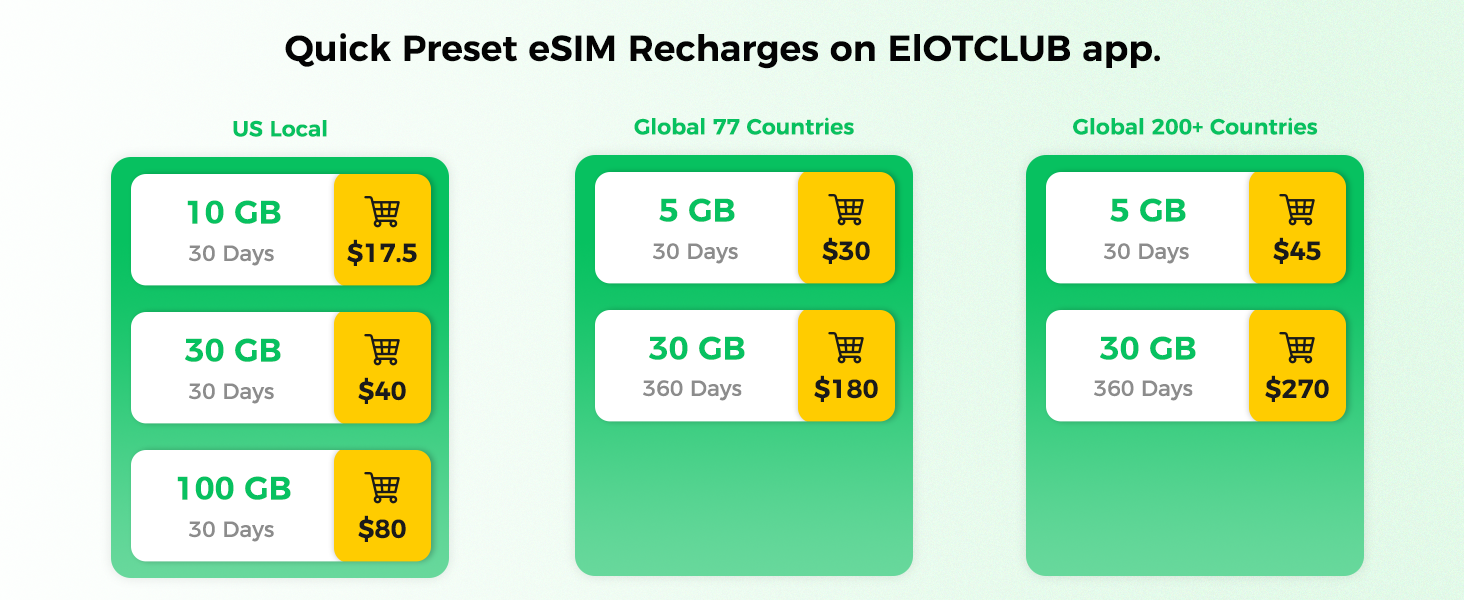
Image: A four-step visual guide on how to set up and use the physical eSIM with a GL.iNet Router.
4.4 Using the EIOTCLUB eSIM Kit
For advanced management and compatibility with devices like laptops, the EIOTCLUB eSIM Kit (which includes a SIM Card Reader) can be utilized.
- Install the eSIM Reader app to your computer.
- Connect the reader to your computer.
- Download eSIM profiles using the app.
- Insert the eSIM Card into your iPhone/devices.
- Complete the setup as per device instructions.
- Check your connection.

Image: A six-step visual guide on how to use the EIOTCLUB eSIM Kit, including installing the reader app, connecting the reader, downloading profiles, and inserting the card.
Video: A short preview video demonstrating the EIOTCLUB eSIM reader's ability to manage third-party eSIMs, highlighting its versatility.
5. Compatibility
The EIOTCLUB eSIM Card is designed for broad compatibility with various devices, primarily focusing on unlocked smartphones and IoT devices.
- Android Phones: Compatible with most unlocked Android phones, including Samsung, Google Pixel, Motorola, Xiaomi, Redmi, OnePlus, Sony, Huawei, OPPO, HONOR, VIVO, RAKUTEN, HAMMER, Lenovo, ASUS, and more.
- iPhones: Supports iPhone models that have a physical SIM card slot. Note: Not compatible with carrier-locked phones.
- Other Devices: Can be used with tablets, laptops (with card reader), routers (like GL.iNet), and smart terminals.

Image: Visual representation of the EIOTCLUB eSIM's compatibility with over 100 devices, including various smartphone brands.

Image: A clear diagram indicating support for Android phones and iPhones with SIM card slots, and explicitly stating non-compatibility with carrier-locked phones.

Image: Icons representing broad device compatibility, including Android phones, iPhones, tablets, laptops, routers, and smart terminals.
6. Troubleshooting
If you encounter issues with your EIOTCLUB eSIM card, please refer to the following common troubleshooting steps:
- No Connection After Installation:
- Ensure data roaming is enabled in your phone's settings.
- Verify that the APN settings are correctly configured (Name: eiotclub, APN: america.bics for U.S. or bicsapn for Europe).
- Restart your device after inserting the eSIM and configuring settings.
- Difficulty Switching Profiles:
- An active internet connection is required to switch eSIM profiles within the app. Ensure you have Wi-Fi or another active data connection before attempting to switch.
- Check for updates to the EIOTCLUB app to ensure you have the latest version with potential bug fixes and improvements.
- App Usability Issues:
- If the app interface is unclear or functions are hard to find (e.g., deleting an eSIM), refer to the in-app help or contact customer support for guidance.
- Regional Connectivity Problems:
- While the eSIM offers global coverage, specific regional data packages may have limitations. If experiencing issues in a particular country, verify the purchased data package's coverage and validity.
- General Issues:
- Always ensure your device's operating system is up to date.
- If problems persist, contact EIOTCLUB customer support for personalized assistance.
7. Specifications
| Attribute | Detail |
|---|---|
| Brand | EIOTCLUB |
| Model Number | B0D8HWQHBF |
| UPC | 764544363464 |
| Cellular Technology | eSIM |
| Service Provider | AT&T, T-mobile, global |
| Package Dimensions | 3.86 x 3.11 x 0.16 inches |
| Item Weight | 1.76 ounces |
| Manufacturer | EIOTCLUB |
| Country of Origin | China |
8. Warranty and Support
EIOTCLUB is committed to providing reliable and affordable SIM card products. Your satisfaction is our priority.
- Customer Support: A responsive customer support team is available 24/7 to assist with any issues and ensure your eSIM Card works smoothly.
- App Management: Easily manage your SIM cards and access support features directly through the EIOTCLUB app, available on both the App Store and Google Play.
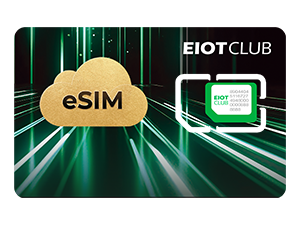
Image: Visual representation of EIOTCLUB's 24/7 customer support availability.

Image: The EIOTCLUB app icon, emphasizing its role as an all-in-one solution for managing SIM cards.

Image: Logos for App Store and Google Play, indicating where the EIOTCLUB app can be downloaded.
