
1. Introduction
This manual provides essential instructions for the safe and efficient use of your GT POWER 200W AC/DC Adapter, Model 475. This adapter is designed to provide power to compatible portable power stations, such as the Anker Powerhouse II 400 and Anker 533. Please read this manual thoroughly before using the product and retain it for future reference.
2. Safety Instructions
WARNING: Failure to follow these safety instructions may result in fire, electric shock, or other injury.
- Indoor Use Only: This adapter is designed for indoor use in dry locations. Do not expose it to rain, moisture, or extreme temperatures.
- Proper Voltage: Ensure the input voltage (AC 100-240V) matches your local power supply.
- Ventilation: Do not cover the adapter or place it in an enclosed space during operation. Ensure adequate ventilation to prevent overheating.
- Cable Integrity: Regularly inspect the power cord and adapter for any damage. Do not use if the cord is frayed or the adapter casing is cracked.
- Disconnect Power: Always unplug the adapter from the power outlet before cleaning or when not in use for extended periods.
- No Disassembly: Do not attempt to open or repair the adapter. It contains no user-serviceable parts. Unauthorized disassembly voids the warranty and poses a safety risk.
- Children and Pets: Keep the adapter and its cables out of reach of children and pets.
- Compatibility: Use this adapter only with compatible devices as specified. Using it with incompatible devices may cause damage or malfunction.
- Protection Features: This adapter includes Over Voltage Protection (OVP), Over Current Protection (OCP), and Short Circuit Protection (SCP) to safeguard your devices.
CAUTION: RISK OF ELECTRIC SHOCK. DO NOT OPEN.
3. Package Contents
Verify that all items are present in your package:
- GT POWER 200W AC/DC Adapter (Model 475)
- AC Input Power Cord
4. Product Overview
The GT POWER 200W AC/DC Adapter is a robust power supply designed for efficient charging of your portable power station.

Figure 4.1: Front view of the GT POWER 200W AC/DC Adapter, showing the model number (H-200-24), input (AC 100-240V, 1.8A, 50-60Hz), and output (DC 24V, 8A) specifications, along with safety certifications and a "Risk of Electric Shock" warning.

Figure 4.2: Top view of the GT POWER 200W AC/DC Adapter, highlighting the LED indicator light which shows the operational status of the adapter.

Figure 4.3: Close-up of the DC output barrel connector, which connects to the portable power station.
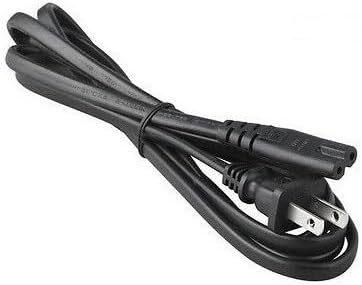
Figure 4.4: The AC input power cord, featuring a standard US plug for connecting the adapter to a wall outlet.
Key Components:
- Adapter Unit: The main body containing the power conversion circuitry.
- AC Input Port: Where the AC power cord connects to the adapter.
- DC Output Cable with Barrel Connector: Permanently attached cable that delivers power to your device.
- LED Indicator: Illuminates when the adapter is receiving power and operating correctly.
- AC Power Cord: Connects the adapter to a wall outlet.
5. Setup Instructions
Follow these steps to set up your GT POWER AC/DC Adapter:
- Unpack: Carefully remove the adapter and AC power cord from the packaging.
- Connect AC Cord: Insert the female end of the AC power cord firmly into the AC input port on the adapter unit.
- Connect to Power Station: Plug the DC barrel connector from the adapter's output cable into the DC input port of your compatible portable power station (e.g., Anker Powerhouse II 400/533). Ensure a secure connection.
- Connect to Wall Outlet: Plug the male end of the AC power cord into a standard wall outlet (AC 100-240V).
- Verify Power: The LED indicator on the adapter should illuminate, indicating that it is receiving power and ready to charge.
Note: Always connect the adapter to the device first, then to the wall outlet, and disconnect from the wall outlet first, then from the device.
6. Operating Instructions
Once set up, the adapter operates automatically:
- When connected to a power outlet and a compatible power station, the adapter will begin supplying power for charging.
- The LED indicator will remain lit during operation.
- The adapter features an "Automatic Off" special feature, which implies it will cease charging or power delivery once the connected device is fully charged or if an overload/fault condition is detected. Refer to your power station's manual for specific charging indicators.
- To stop operation, first unplug the AC power cord from the wall outlet, then disconnect the DC barrel connector from your power station.
7. Maintenance
Proper maintenance ensures the longevity and safe operation of your adapter:
- Cleaning: Disconnect the adapter from all power sources before cleaning. Use a soft, dry cloth to wipe the exterior. Do not use liquid cleaners or solvents.
- Storage: When not in use, store the adapter in a cool, dry place, away from direct sunlight and moisture. Coil the cables loosely to prevent damage.
- Inspection: Periodically inspect the adapter casing, cables, and connectors for any signs of wear, cuts, or damage. If damage is found, discontinue use immediately and replace the adapter.
8. Troubleshooting
If you encounter issues with your adapter, refer to the following common problems and solutions:
| Problem | Possible Cause | Solution |
|---|---|---|
| Adapter LED is off, no power output. |
|
|
| Power station not charging. |
|
|
| Adapter feels excessively hot. |
|
|
If the problem persists after trying these solutions, please contact customer support.
9. Specifications
| Model Number | 475 (H-200-24) |
| Input Voltage | AC 100-240V, 1.8A, 50-60Hz |
| Output Voltage | DC 24V |
| Output Current | 8A |
| Wattage | 200W |
| Connector Type | Barrel Connector |
| Protection Features | OVP (Over Voltage Protection), OCP (Over Current Protection), SCP (Short Circuit Protection) |
| Special Feature | Automatic Off |
| Compatible Devices | Anker Powerhouse II 400, Anker 533 Portable Power Stations (and other devices requiring 24V, 8A DC input with compatible barrel connector) |
| Dimensions (Approx.) | 7 x 5 x 3 inches (Package Dimensions) |
| Weight (Approx.) | 14 ounces |
10. Customer Support and Warranty
For technical assistance, warranty information, or to report any issues with your GT POWER 200W AC/DC Adapter, please contact your retailer or the manufacturer directly.
Please have your product model number (475) and purchase information ready when contacting support.
Warranty details are typically provided at the point of purchase or on the manufacturer's official website.


