
CHOYONG LC90
CHOYONG LC90 Internet Radio User Manual
Model: LC90
Brand: CHOYONG
Introduction
The CHOYONG LC90 is a professional multi-functional smart radio designed for global use. It offers extensive connectivity options including Wi-Fi and 4G, allowing access to over 40,000 internet radio stations worldwide. Beyond internet radio, it supports traditional multi-band reception including FM, LW, MW, SW, and SSB. The LC90 features a user-friendly interface, high-quality audio output, and a range of convenient functions such as Bluetooth connectivity, TF card support, voice search, and a long-lasting rechargeable battery.

Image: Front view of the CHOYONG LC90 Internet Radio, showcasing its display, controls, and extended antenna.
Setup
1. Powering On
The LC90 radio comes with a 5000mAh rechargeable battery included. Ensure the battery is properly inserted. If the radio does not power on, connect the charger and allow it to charge for at least 3 hours before attempting to power on again.
2. Network Connectivity
The LC90 supports multiple networking methods to access internet radio stations:
- 2.4G Wi-Fi: Connect to your local Wi-Fi network. Navigate to the settings menu on the radio to select and connect to your desired Wi-Fi network.
- 4G SIM Card: Insert a 4G SIM card into the designated slot for mobile network connectivity. Supported bands include FDD Band2/3/4/5 and TDD Band38/39/40/41.
- E-SIM Card: E-SIM card functionality is supported, primarily for North American regions.

Image: Illustration of the CHOYONG LC90's networking options, including 4G SIM card, 2.4G Wi-Fi, and E-SIM card.
3. Initial Software Update
Upon receiving the LC90, it is recommended to check for the latest software version. If your radio is not running version 4.6.2 or later, perform an Over-The-Air (OTA) upgrade. Ensure a stable Wi-Fi connection before starting the upgrade. The process typically takes 1-2 minutes, during which the radio will restart automatically.
Operating Instructions
1. Internet Radio Operation
Access over 40,000 internet radio stations globally via Wi-Fi or SIM card. Stations are categorized by continent, country, province, city, type, and popularity. You can bookmark your favorite stations for quick access.
- Adding Stations: You can manually add new internet radio stations by entering a valid URL directly on the radio. The LC90 supports various audio formats including MP3, AAC, and M3U8.
- Voice Search: Utilize the voice search feature to quickly find radio stations. For example, say "Play VOA" to tune into Voice of America.

Image: Depiction of the voice search functionality on the CHOYONG LC90, enabling quick station access.
2. Multi-Band Radio Operation (FM/LW/MW/SW/SSB)
The LC90 allows reception of traditional radio bands with advanced controls:
- Band Selection: Easily switch between FM, LW, MW, and SW (Shortwave) bands.
- SSB Support: Supports Single Side Band (SSB) reception, including USB/LSB.
- Tuning: Features ATS (Automatic Tuning System) and direct frequency tuning. Fine tuning and quick shift tuning controls are available.
- Bandwidth Control: Manual and automatic bandwidth control options are provided.
- Signal Indication: The display shows signal strength and SNR (Signal-to-Noise Ratio) for optimal reception.

Image: The CHOYONG LC90's display interface for multi-band radio, showing tuning options and signal indicators.
3. Bluetooth and TF Card Playback
The LC90 can connect to external devices via Bluetooth and play media from a Micro-SD (TF) card.
- Bluetooth Connectivity: Connect your mobile phones, computers, or tablets via Bluetooth 5.2. The radio automatically connects within a range of 32 feet (approximately 10 meters).
- TF Card Support: Insert a Micro-SD card (up to 32GB) to play audio files. The radio supports various formats including FLAC, WAV, APE, WMA, MP3, and MP4. It also supports folder management and direct chapter tuning by keyboard.
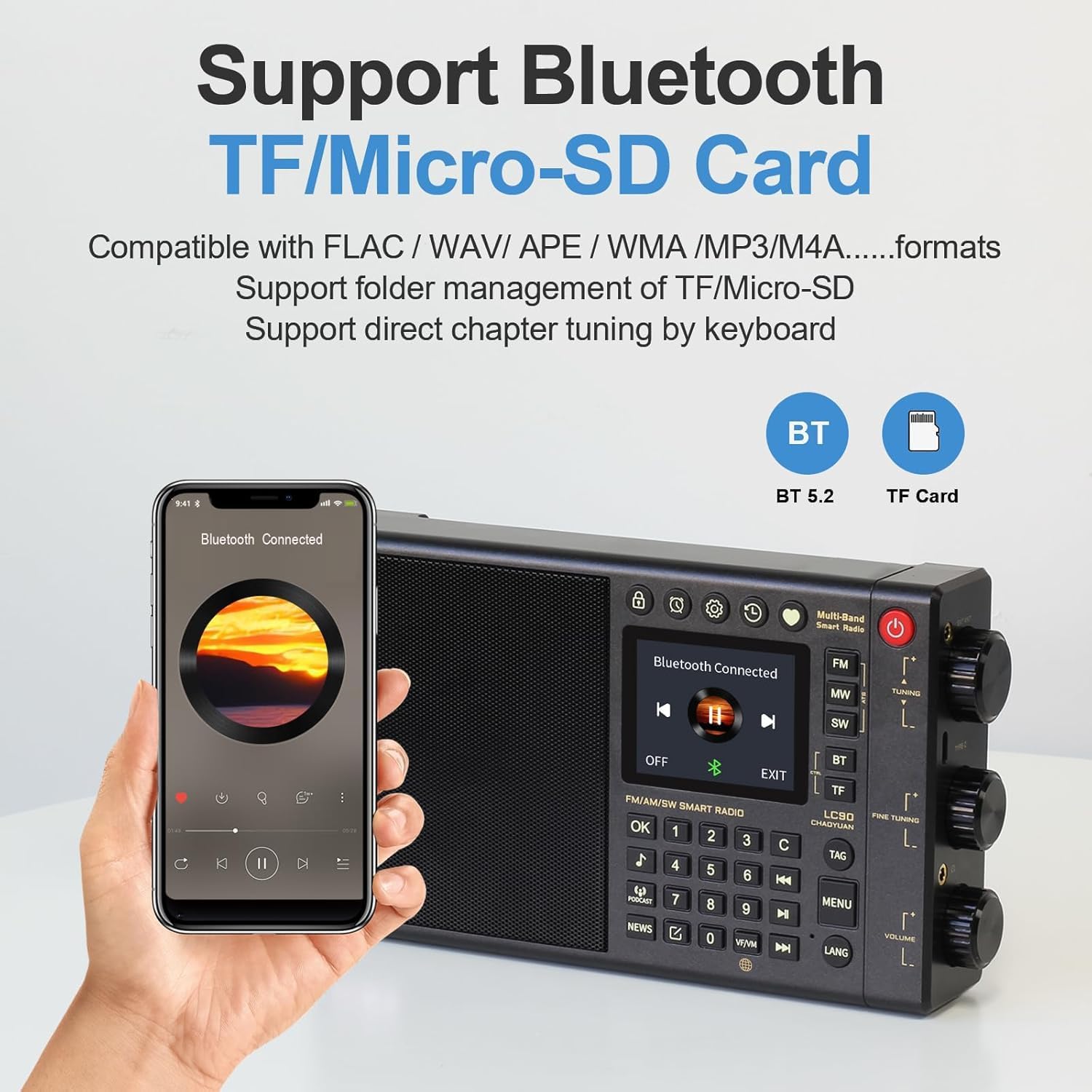
Image: The CHOYONG LC90 demonstrating Bluetooth connectivity with a smartphone and highlighting the TF/Micro-SD card slot.
4. Audio Quality and Features
The LC90 is equipped with a two-way speaker system for excellent sound reproduction.
- Speaker System: Composed of a mid-bass speaker, a silk dome tweeter, and a low-frequency diaphragm, providing naturally fine-tuned sound.
- Additional Features: Includes a clock, alarm clock, timer playback, digital point of sale, and key backlighting for enhanced usability.

Image: An internal view of the CHOYONG LC90's speaker system, illustrating the bass driver, bass radiator, and silk dome tweeter for optimal sound.
Maintenance
1. Battery Care
The LC90 uses a 5000mAh rechargeable battery. To prolong battery life:
- Avoid fully discharging the battery frequently.
- Charge the battery regularly, even if not in use for extended periods.
- If the battery needs replacement, use the provided battery removal tool and replace it with a compatible 5000mAh rechargeable battery.
2. Cleaning
To clean the radio, use a soft, dry cloth. Do not use liquid cleaners or abrasive materials, as they may damage the surface or internal components.
Troubleshooting
1. Radio Fails to Switch On (Low Voltage)
If the radio does not power on due to low voltage:
- Keep the radio charging for more than 3 hours to ensure the battery is fully charged.
- Press and hold the power button for 30 seconds, then release it.
- Press and hold the power button again for 5 seconds to attempt to power on.
2. Unable to Connect to Wi-Fi
If you encounter issues connecting to Wi-Fi:
- Ensure your Wi-Fi network is 2.4GHz. The radio only supports 2.4GHz Wi-Fi.
- Check your router settings. The radio supports WAP/WAP2/WAP3 encryption protocols. Ensure your network's encryption is compatible.
- Restart the radio and your Wi-Fi router.
Specifications
| Feature | Detail |
|---|---|
| Product Dimensions | 7.87 x 1.57 x 4.8 inches (200 x 40 x 122 mm) |
| Item Weight | 1.41 pounds (640g) |
| Model Number | LC90 |
| Battery | 5000mAh rechargeable battery (included, replaceable) |
| Connectivity Technology | 2.4GHz Wi-Fi, 4G Network, Bluetooth 5.2 |
| Radio Bands Supported | Internet Radio (40,000+ stations), FM (64-108MHz), LW (153-279KHz), MW (522-1710KHz), SW (2300-29999KHz), SSB (1KHz/10Hz step) |
| Speaker Output | 15W |
| TF Card Support | Maximum 32GB |
| Earphone Jack | 3.5mm |
| External Antenna Jack | 3.5mm |
| Included Components | Owner's Manual, Quick Start Guide, Storage bag, Charger, Battery removal tool |
Warranty and Support
For warranty information and technical support, please refer to the Owner's Manual included with your CHOYONG LC90 radio. You may also visit the official CHOYONG website or contact their customer service for assistance.
For additional resources, visit the CHOYONG Store on Amazon.
Related documentsLC90


Ask a question about this manual
Ask about setup, troubleshooting, compatibility, parts, safety, or missing instructions. Manuals+ will review the question and use this page’s manual context to help answer it.