
Omethey WY-KW-135
Omethey 53.15" Wall Safe Instruction Manual
Model: WY-KW-135
Introduction
This manual provides comprehensive instructions for the safe and efficient operation, installation, and maintenance of your Omethey 53.15" Wall Safe. Please read this manual thoroughly before using the product to ensure proper functionality and to prevent potential damage or injury. Keep this manual for future reference.
Safety Information
- Always store the emergency keys and battery box in a secure location away from the safe and out of reach of children.
- Do not store the emergency keys inside the safe.
- Ensure the safe is securely mounted according to the installation instructions to prevent unauthorized removal or tipping.
- Keep the safe's digital keypad clean and dry. Avoid using abrasive cleaners.
- Do not attempt to force the safe open if it is jammed or malfunctioning. Refer to the troubleshooting section or contact customer support.
- This safe is designed to deter theft and protect valuables. It is not guaranteed to prevent all forms of unauthorized access or damage from extreme conditions.
- The safe is equipped with a dual alarm system. Be aware of its activation conditions to avoid accidental triggers.
Package Contents
Verify that all items listed below are included in your package:
- Omethey 53.15" Wall Safe (White-Fingerprint)
- Emergency keys (x2)
- Emergency battery box (x1)
- Instruction manual (x1)
- Expansion screws (x8)
- Fix Buckle (x12)
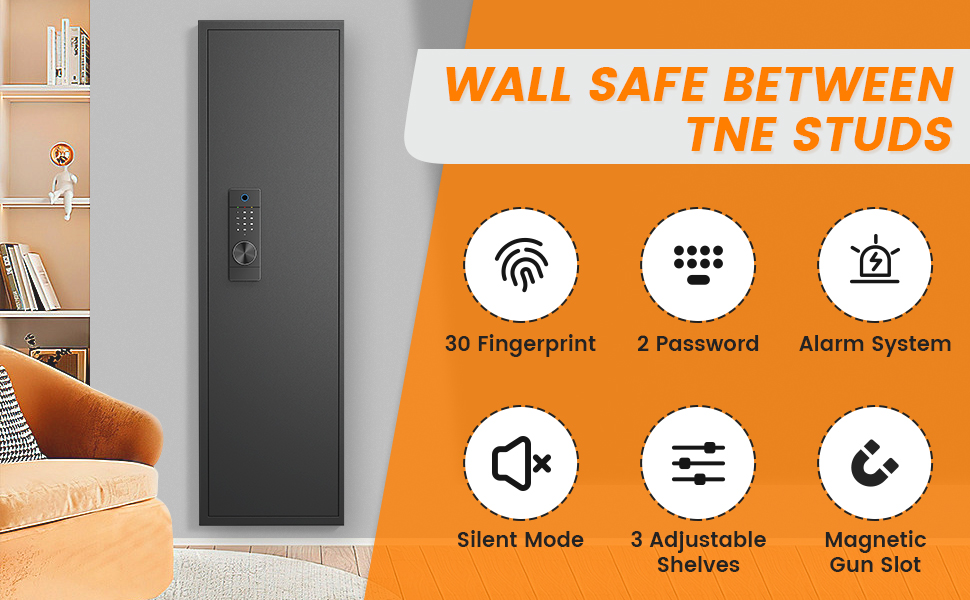
Figure 1: Included Components of the Omethey Wall Safe.
Setup
1. Initial Opening (Using Emergency Key)
For the first time opening the safe, or if the battery is dead, use the emergency key:
- Locate the emergency keyhole, usually hidden behind a cover on the keypad panel.
- Insert the emergency key and turn it.
- Simultaneously turn the knob on the keypad to open the safe door.
Video 1: Demonstrates the initial opening of the safe using the emergency key and knob. This video also covers battery installation, fingerprint and code setting, mute function, alarm system, emergency battery box use, and shelf/gun slot adjustments.
2. Battery Installation
The safe requires 4*AA batteries for the electronic keypad. Install them after opening the safe:
- Locate the battery compartment inside the safe door.
- Open the battery compartment cover.
- Insert 4*AA batteries, ensuring correct polarity (+/-).
- Close the battery compartment cover securely.
Note: The video above (Video 1) also demonstrates battery installation from 0:20 to 0:30.
Operating the Safe
1. Setting Fingerprints
To set a fingerprint for unlocking:
- With the safe door open, short press the red setting button located on the inside of the safe door.
- Place your finger on the fingerprint sensor 4 times, lifting it slightly between each scan, until the safe confirms successful registration.
- Test the registered fingerprint before closing the door.
Note: The video above (Video 1) demonstrates fingerprint setting from 0:30 to 0:43.
2. Setting the First Code
To set the primary access code:
- With the safe door open, press the '#' key on the keypad.
- Press '0' twice.
- Short press the red setting button on the inside of the safe door.
- Enter your desired new code (4-8 digits).
- Press '#' to confirm the new code.
- Test the new code before closing the door.
Note: The video above (Video 1) demonstrates setting the first code from 0:44 to 1:00.
3. Setting the Second Code
To set a secondary access code:
- With the safe door open, press the '#' key on the keypad.
- Press '1' twice.
- Short press the red setting button on the inside of the safe door.
- Enter your desired new code (4-8 digits).
- Press '#' to confirm the new code.
- Test the new code before closing the door.
Note: The video above (Video 1) demonstrates setting the second code from 1:01 to 1:17.
4. Unlocking Methods Overview
Your Omethey wall safe offers four convenient unlocking methods:
- Fingerprint + Turn Knob: For fast and convenient access.
- Password + Turn Knob: Use your set digital code.
- Emergency Key + Turn Knob: For initial opening, forgotten passwords, or dead batteries.
- USB Type-C Cable + Password + Turn Knob: If batteries are completely dead, connect a USB Type-C power source to the port on the keypad, then enter your password and turn the knob.

Figure 2: Four Unlocking Methods.
5. Dual Alarm System and Silent Mode
The safe is equipped with a dual alarm system for enhanced security:
- Vibration Alarm: Triggered by shaking or moving the safe.
- Input Error Alarm: Activated after 3 consecutive incorrect password attempts or 5 incorrect fingerprint inputs.
- When activated, the buzzer will sound for 30 seconds. To stop the alarm, enter the correct code or fingerprint.
To activate the vibration alarm mode, press '*' on the keypad.
Silent Mode: To avoid disturbing others, you can enable silent mode. This will disable the audible feedback from the keypad and alarms.
- Turn on mute function: Press '#', then press '11', and then press '#' to confirm.
- Turn off mute function: Press '#', then press '11', and then press '#' to confirm.
Note: The video above (Video 1) demonstrates the alarm system from 1:38 to 1:58, and mute function from 1:18 to 1:37.

Figure 3: Dual Alarm System Triggers.
Customization and Features
Adjustable Shelves and Magnetic Gun Slots
The safe features adjustable shelves and magnetic gun slots to customize your storage space:
- The shelves are removable and can be adjusted to different heights to accommodate various items.
- The magnetic gun slot design allows for easy adjustments and prevents items from falling off easily.
Note: The video above (Video 1) demonstrates adjustable shelves from 2:07 to 2:19 and magnetic gun slots from 2:20 to 2:24.

Figure 4: Customizable Storage with Adjustable Shelves and Gun Slot.
Installation
The Omethey wall safe is designed to fit perfectly between standard 16-inch on-center wall studs. It can be mounted on the wall or floor using the provided expansion screws.
The back and both sides of the safe have a total of 8 mounting holes for secure installation.

Figure 5: Easy Installation Steps.

Figure 6: Product Dimensions and Stud Compatibility.
Note: The video above (Video 1) shows the mounting holes from 2:35 to 2:41.
Maintenance
- Regularly check the battery level and replace batteries when low to ensure continuous operation.
- Clean the exterior of the safe with a soft, damp cloth. Avoid harsh chemicals or abrasive materials that could damage the finish.
- Ensure the locking bolts and internal mechanisms are free from obstructions.
- Periodically check the mounting screws to ensure the safe remains securely fastened to the wall or floor.
Troubleshooting
| Problem | Possible Cause | Solution |
|---|---|---|
| Safe does not open with fingerprint/code. | Low battery, incorrect fingerprint/code, or system error. | Replace batteries. Re-enter fingerprint/code carefully. Use emergency key or emergency battery box. |
| Alarm sounds unexpectedly. | Vibration alarm activated, or incorrect entries. | Enter correct code/fingerprint to stop. Check if silent mode is desired. Avoid shaking the safe. |
| Keypad is unresponsive. | Dead batteries. | Use emergency battery box or emergency key to open, then replace batteries. |
| Door does not close/lock properly. | Obstruction in the door frame or locking mechanism. | Check for any items blocking the door or bolts. Ensure the safe is level. |
Specifications
| Feature | Detail |
|---|---|
| Brand | Omethey |
| Model Number | WY-KW-135 |
| Product Dimensions | 5.12"D x 15.74"W x 53.15"H |
| Lock Type | Biometric, Electronic Combination Lock, Key |
| Material | Alloy Steel |
| Special Features | Alarm System, Biometric Fingerprint, Combination Lock, Silent Mode, Adjustable Shelves, Magnetic Gun Slot |
| Mounting Type | Wall Mount (fits 16" on-center studs) |
| Item Weight | 41 Pounds |
| Alarm Type | Vibration, Audible |
| Water Resistance Level | Waterproof |
| Chamber Depth | 5.12 Inches |
Warranty and Support
Omethey provides after-sales service to ensure your satisfaction. If you encounter any questions or issues with your wall safe, please do not hesitate to contact our professional customer service team.
- Customer service is available 7 days a week, 24 hours a day.
- For support, please refer to the contact information provided on the product packaging or the official Omethey website.
Ask a question about this manual
Ask about setup, troubleshooting, compatibility, parts, safety, or missing instructions. Manuals+ will review the question and use this page’s manual context to help answer it.