
Introduction
This manual provides comprehensive instructions for the setup, operation, and maintenance of your SAFFUN 2.4 GHz Wireless GameCube Controller. Please read this manual thoroughly before use to ensure proper functionality and longevity of your device.
Package Contents
Verify that all items are present in the package:
- 1 x SAFFUN 2.4 GHz Wireless GameCube Controller
- 1 x GameCube Receiver
- 1 x Charging Cable (Type-C)
- 1 x User Manual (this document)
Key Features
- Iconic original GameCube layout for familiar gameplay.
- Reliable 2.4 GHz wireless connection with up to 10 meters (33 feet) range.
- Octagonal gated analog stick and analog triggers for enhanced precision.
- Built-in vibration motor for immersive feedback.
- Integrated rechargeable battery offering up to 10 hours of continuous use.
- Player indicator and low battery warning LED.
- Plug and Play convenience with the included receiver.
Setup
Follow these steps to connect your wireless controller to your GameCube console:
- Charge the Controller: Before initial use, fully charge the controller using the provided Type-C charging cable. Connect the cable to the controller's Type-C port and a compatible USB power source. The charging time is approximately 2.5 hours.
- Insert the Receiver: Locate an available controller port on your GameCube console. Insert the GameCube Receiver firmly into the port.
- Power On the Controller: Slide the ON/OFF switch on the controller to the "ON" position. The player indicator LEDs will begin to flash.
- Pairing: The controller will automatically attempt to pair with the receiver. Once successfully paired, one of the player indicator LEDs on the controller will illuminate steadily, indicating its assigned player number.
- Begin Gameplay: Your controller is now ready for use.

Image: The SAFFUN Wireless GameCube Controller being used with a GameCube console, demonstrating the receiver plugged into the console's controller port.
Note: If the controller does not pair automatically, ensure the receiver is properly inserted and the controller is charged. You may need to briefly press the reset button on the controller (if available, or power cycle) to re-initiate pairing.
Operating Instructions
Basic Operation
- Power On/Off: Use the ON/OFF switch located on the controller to power it on or off.
- Automatic Sleep Mode: To conserve battery, the controller may enter sleep mode after a period of inactivity. Press any button to wake it up.
- Player Indicator: The LEDs on the controller indicate the assigned player number (1-4) and also serve as a low battery warning.
Button Layout
Familiarize yourself with the controller's button layout:
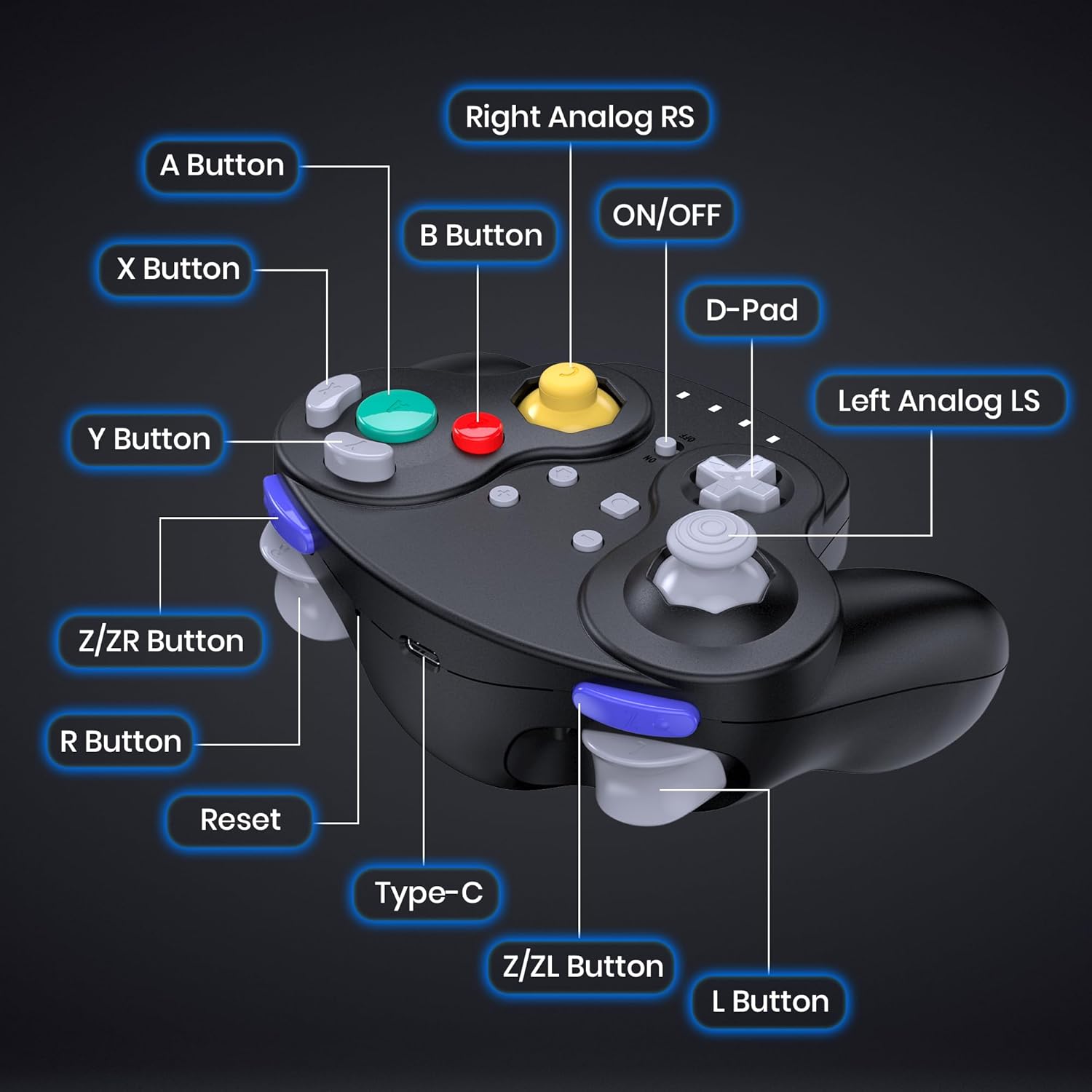
Image: Diagram illustrating the button layout of the SAFFUN Wireless GameCube Controller. Labels include A, B, X, Y buttons, D-Pad, Left Analog Stick (LS), Right Analog Stick (RS), Z/ZR Button, R Button, Z/ZL Button, L Button, ON/OFF switch, Reset button, and Type-C charging port.
- A Button: Primary action button.
- B Button: Secondary action button, often used for canceling or backing out.
- X/Y Buttons: Auxiliary action buttons.
- D-Pad: Directional input.
- Left Analog Stick (LS): Main movement control.
- Right Analog Stick (RS): Camera control or secondary actions.
- L/R Buttons: Shoulder buttons, often used for blocking or special moves.
- Z/ZL/ZR Buttons: Trigger buttons, providing additional input options.
- ON/OFF Switch: Powers the controller on or off.
- Reset Button: Used for re-pairing or resolving minor issues.
- Type-C Port: For charging the controller.
Charging and Battery
The controller is equipped with a built-in 500mAh lithium battery.
- Charging Time: Approximately 2.5 hours for a full charge.
- Usage Time: Up to 10 hours of continuous gameplay on a full charge.
- Low Battery Warning: The player indicator LEDs will flash rapidly or change color (depending on model) to indicate a low battery level. Connect the charging cable immediately.
- Charging Indicator: While charging, the LEDs may indicate charging status (e.g., blinking while charging, solid when fully charged). Refer to the specific behavior of your controller's LEDs.

Image: Graphic illustrating the battery capacity and charging details of the SAFFUN Wireless GameCube Controller, showing 2.5 hours charging time, 10 hours usage time, and Type-C fast charging.
Maintenance
Proper care will extend the life of your controller:
- Cleaning: Use a soft, dry cloth to clean the controller. Do not use liquid cleaners or solvents.
- Storage: Store the controller in a cool, dry place away from direct sunlight and extreme temperatures.
- Battery Care: Avoid fully discharging the battery frequently. For long-term storage, charge the controller to about 50% every few months.
- Avoid Drops: Protect the controller from drops and impacts, which can damage internal components.
Troubleshooting
If you encounter issues with your controller, refer to the following common solutions:
| Problem | Solution |
|---|---|
| Controller does not power on. | Ensure the ON/OFF switch is in the "ON" position. Charge the controller fully using the provided Type-C cable. |
| Controller does not connect/pair. |
|
| Input lag or dropped connection. |
|
| Vibration function not working. |
|
| Analog stick drift. |
|
Specifications
| Model Number | Y-D002-562C-0628 |
| Connectivity | 2.4 GHz Wireless |
| Wireless Range | Up to 10 meters (33 feet) |
| Compatible Devices | GameCube, Nintendo Wii |
| Battery Type | Built-in Rechargeable Lithium Battery |
| Battery Capacity | 500mAh |
| Charging Time | Approx. 2.5 hours |
| Usage Time | Up to 10 hours |
| Dimensions (L x W x H) | 8 x 6 x 0.72 inches |
| Number of Buttons | 12 |
| Additional Features | Ergonomic design, Built-in Rumble, Player Indicator LED, Low Battery Warning LED |
Warranty and Support
For warranty information or technical support, please refer to the contact details provided with your purchase or visit the official SAFFUN website. Keep your proof of purchase for warranty claims.
Manufacturer: SAFFUN