
Dynavin D9-MB10V Premium Flex
DYNAVIN D9-MB10V Premium Flex Android Car Radio Navigation System
User Instruction Manual
Model: D9-MB10V Premium Flex | Brand: Dynavin
1. Introduction
This manual provides comprehensive instructions for the installation, operation, and maintenance of your DYNAVIN D9-MB10V Premium Flex Android Car Radio Navigation System. This advanced head unit is designed for specific Mercedes-Benz models, offering a 10.1-inch high-resolution display, wireless CarPlay, Android Auto, and an integrated Head-up Display for an enhanced driving experience.

Image 1.1: The DYNAVIN D9-MB10V Premium Flex unit installed in a car dashboard, showcasing its large display and user interface.

Image 1.2: A view of the Dynavin unit's interface, emphasizing its German design and functionality within a vehicle cockpit.
2. Vehicle Compatibility and Installation
2.1 Compatible Vehicles
The DYNAVIN D9-MB10V Premium Flex Android Car Radio is compatible with the following Mercedes-Benz models:
- Mercedes Sprinter II W906 (2006-2018)
- Mercedes Vito W639 (from 2006)
- Mercedes Vito W447 (from 2014)
- Mercedes Viano W639 (from 2006)
- Mercedes Classe A W169 (2004-2012)
- Mercedes B Class W245 (2005-2011)
It supports steering wheel remote control and Multifunction Display (MFD+). The time displayed in the instrument cluster can be adjusted via the radio.
2.2 Package Contents (Accessory List)
Before installation, please verify that all components listed below are present in your package:
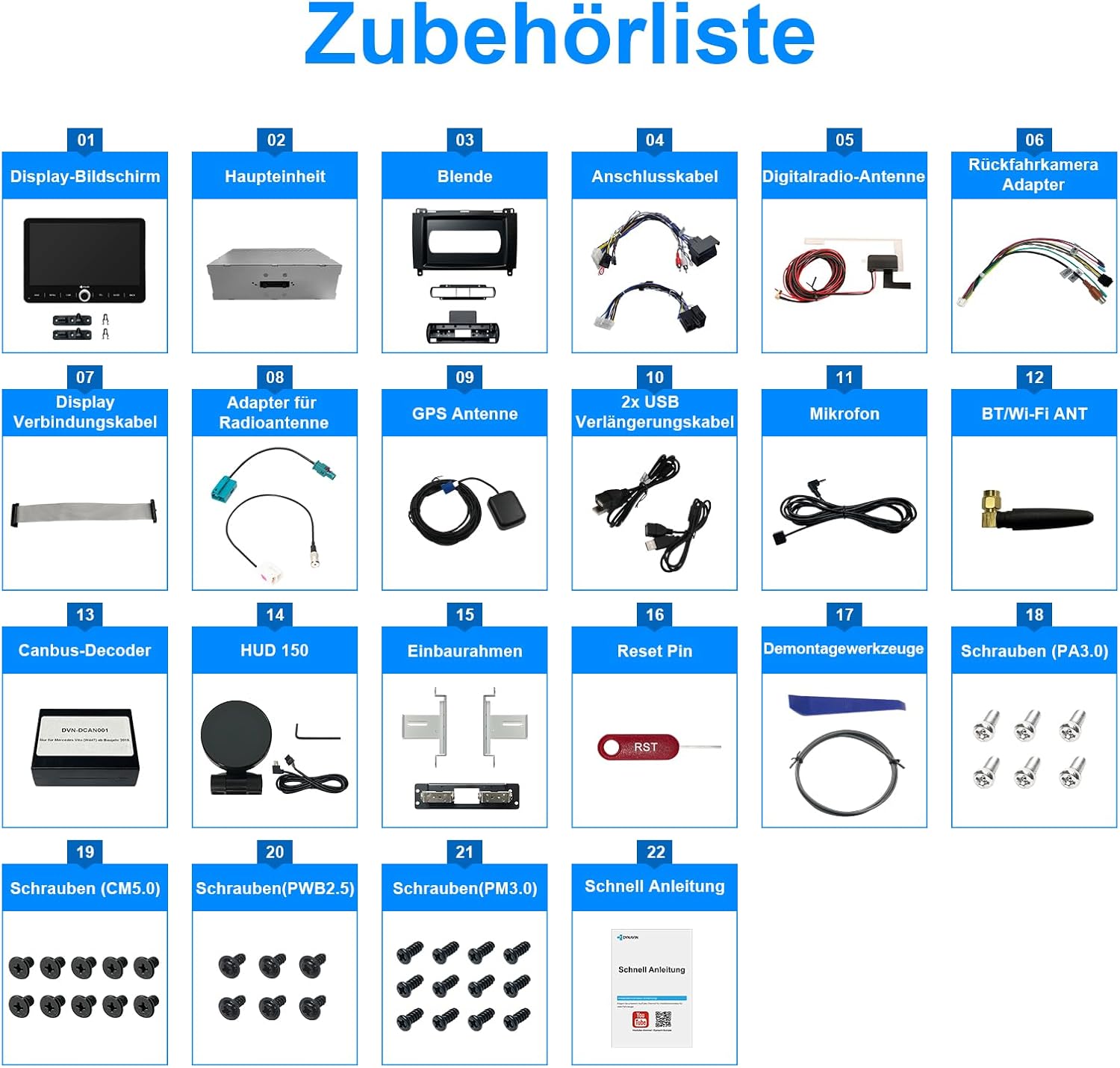
Image 2.1: Comprehensive list of accessories included with the Dynavin D9-MB10V Premium Flex unit.
- Display Screen
- Main Unit
- Bezel
- Connection Cables
- Digital Radio Antenna
- Rear Camera Adapter
- Display Connection Cable
- Adapter for Radio Antenna
- GPS Antenna
- 2x USB Extension Cables
- Microphone
- BT/Wi-Fi Antenna
- Canbus Decoder
- HUD 150 (Head-up Display unit)
- Installation Frame
- Reset Pin
- Disassembly Tools
- Screws (PA3.0)
- Screws (CM5.0)
- Screws (PWB2.5)
- Screws (PM3.0)
- Quick Manual
The main unit includes a USB port for media storage.
2.3 Display Flexibility
The 10.1-inch display offers ultimate flexibility for optimal viewing. It can rotate up to 50 degrees and move vertically up to 66mm.
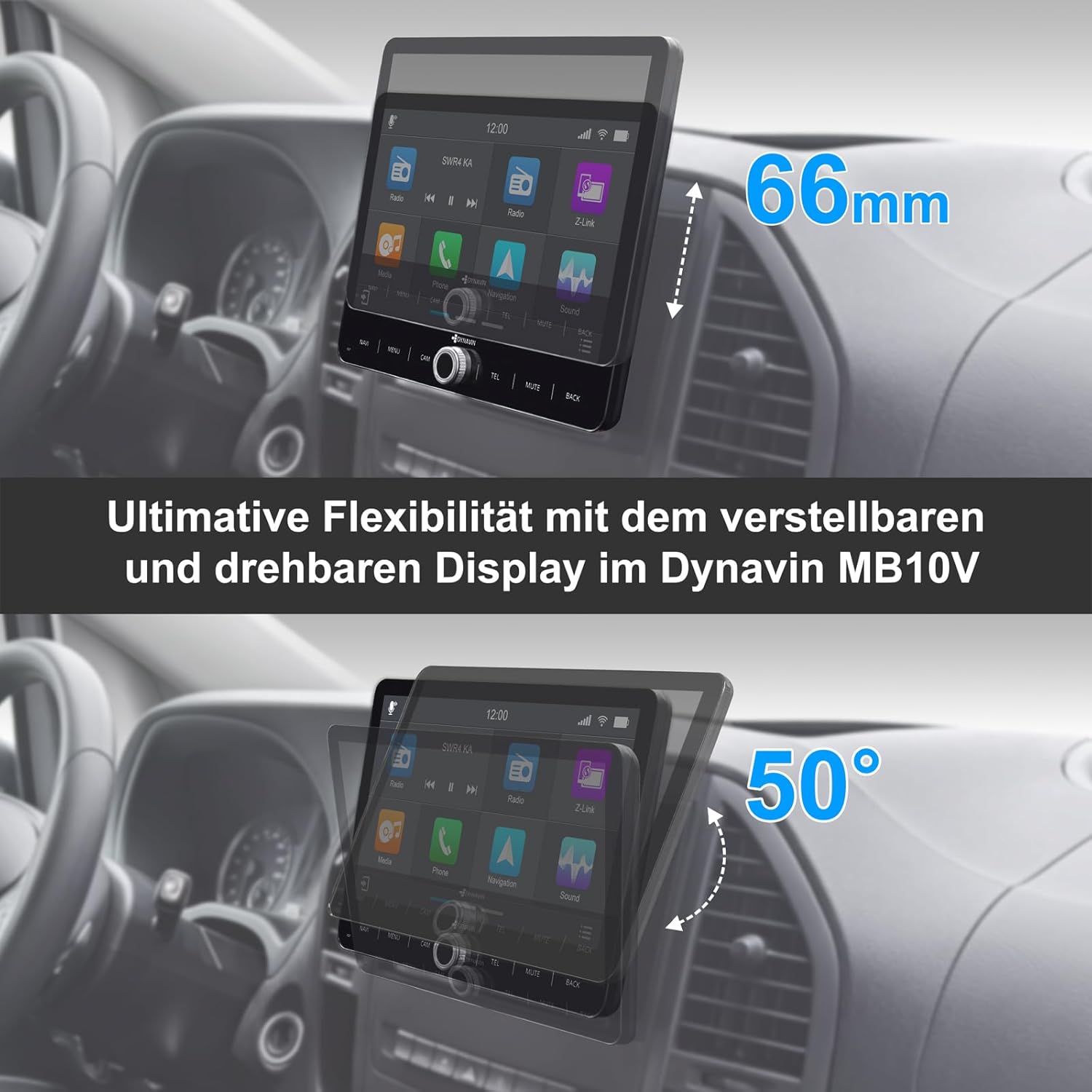
Image 2.2: Demonstrating the adjustable and rotatable display of the Dynavin MB10V for optimal viewing angles.
3. Operating Instructions
3.1 Display and User Interface
The unit features a 10.1-inch high-resolution 1280 x 720 pixel anti-glare optimized display. It runs on Android 11 with a Quad-Core CPU and 4GB RAM, ensuring smooth operation.

Image 3.1: Dimensions of the Dynavin 10.1-inch display.
3.2 Head-up Display (HUD)
The included Head-up Display shows navigation information from Dynaway, Apple Maps (with CarPlay), and Google Maps (with Android Auto). It also displays vehicle speed and speed camera information from Blitzer.de.

Image 3.2: The Head-up Display showing navigation and time information.

Image 3.3: Head-up Display providing navigation cues.

Image 3.4: Navigation interface with optional speed camera alerts.
3.3 Smartphone Integration (CarPlay, Android Auto, Mirroring)
The unit is compatible with wireless CarPlay, Android Auto, and SmartPhone Mirroring. A 31-day trial is included, after which an activation code must be purchased online.

Image 3.5: Wireless CarPlay and Android Auto functionality with the Z-Link app.
3.4 Dynapp-Pack and Navigation
The Dynapp-Pack (31-day trial, activation code required) includes:
- Access to the Dynaway navigation app.
- Access to the Google Playstore for third-party app installation.
- Display of speed limits with Blitzer.de data on the Head-up Display.
Integrated navigation software with Blitzer.de database is included (part of Dynapp-Pack).
3.5 Audio Features
The unit features an integrated Class D DSP amplifier (4 * 60 W RMS) with less than 1% distortion (THD+N). Adjustable crossover and speaker gain settings are available.

Image 3.6: High power amplifier capabilities of the Dynavin unit.

Image 3.7: High Power Amplifier.

Image 3.8: Fader Balance and Time Correction settings.

Image 3.9: Professional Equalizer settings.
3.6 Hands-free System and Microphone
The unit includes a compact digital dual microphone with a unique noise cancellation algorithm, ensuring excellent voice quality during calls.

Image 3.10: The innovative Dynavin Digital Dual-Microphone for clear calls.
3.7 Radio and Connectivity
The system supports DAB/DAB+ radio. Bluetooth connectivity is available for hands-free calls and audio streaming. The unit also features Wi-Fi for internet access and app downloads.

Image 3.11: DAB/DAB+ radio interface.
3.8 Additional Features
- Multifunction Steering Wheel Support: Control key functions directly from your vehicle's steering wheel.

Image 3.12: Multifunction Steering Wheel compatibility.
- Multifunction Display (MFD+) Integration: Information can be displayed on your vehicle's existing multifunction display.

Image 3.13: Multifunction Display integration.
- On-board Clock Synchronization: Synchronize the unit's time with your vehicle's on-board clock.

Image 3.14: On-board Clock Synchronization setting.
- Rear View Camera Ready: Connect a rear camera for enhanced parking safety.

Image 3.15: Rear View Camera input with adjustable parking lines.
4. Maintenance
To ensure the longevity and optimal performance of your DYNAVIN D9-MB10V Premium Flex, follow these maintenance guidelines:
- Cleaning: Use a soft, dry, lint-free cloth to clean the display and unit surfaces. For stubborn marks, slightly dampen the cloth with water. Avoid abrasive cleaners, solvents, or aerosol sprays.
- Software Updates: Periodically check for software updates from the official Dynavin website or through the unit's system settings to ensure you have the latest features and bug fixes.
- Environmental Conditions: Avoid exposing the unit to extreme temperatures, direct sunlight for prolonged periods, or excessive moisture.
5. Troubleshooting
If you encounter issues with your DYNAVIN D9-MB10V Premium Flex, refer to the following common troubleshooting steps:
- No Power:
- Check all power connections to ensure they are securely fastened.
- Verify the vehicle's fuse related to the car radio.
- No Sound:
- Check volume levels and mute settings.
- Ensure speaker connections are correct and secure.
- Verify audio output mode settings.
- Display Not Working/Frozen:
- Perform a soft reset using the provided Reset Pin (refer to Image 2.1, item 16). Insert the pin gently into the reset hole until the unit restarts.
- If the issue persists, disconnect the power for a few minutes and then reconnect.
- GPS Signal Issues:
- Ensure the GPS antenna is properly installed and has a clear view of the sky.
- Check the GPS antenna connection to the main unit.
- CarPlay/Android Auto Not Connecting:
- Ensure Wi-Fi and Bluetooth are enabled on both the unit and your smartphone.
- Verify that the Z-Link app (or equivalent) is running on your phone.
- Check if the trial period has expired or if the activation code is needed.
- Poor Radio Reception (DAB/DAB+):
- Ensure the digital radio antenna is correctly installed and positioned.
- Check for local signal strength in your area.
For persistent issues, please contact Dynavin customer support.
6. Specifications
| Feature | Specification |
|---|---|
| Model Number | D9-MB10V Premium Flex |
| Manufacturer | DYNAVIN |
| Operating System | Android 11 |
| CPU | Quad-Core |
| RAM | 4GB |
| Screen Size | 10.1 Inches |
| Display Resolution | 1280 x 720 pixels |
| Amplifier | Integrated Class D DSP, 4 * 60 W RMS |
| Connectivity Technology | Bluetooth, Wi-Fi, USB |
| Special Features | DAB+, Wireless CarPlay, Android Auto, Head-up Display, DSP Amplifier, Steering Wheel Control Support, Rear Camera Input |
| Map Type | Europe (via Dynaway/Google Maps/Apple Maps) |
| Mounting Type | Dashboard Mount |
| Product Dimensions | 63 x 29 x 10 cm; 3.5 kg |
7. Warranty and Support
Warranty Information:
If you wish to return a product within 30 days of receipt because you have changed your mind, please consult the return policy of the seller. If you have received a defective or damaged product, please consult the seller's return policy for defective items. For specific information on purchases made on the Marketplace, please consult the relevant help page.
This product is sold by Dynavin Shop.
Customer Support:
For technical assistance, troubleshooting not covered in this manual, or warranty claims, please contact Dynavin customer support directly. Refer to the contact information provided with your purchase or visit the official Dynavin website for support resources.
Ask a question about this manual
Ask about setup, troubleshooting, compatibility, parts, safety, or missing instructions. Manuals+ will review the question and use this page’s manual context to help answer it.