
SENCKIT ZIGBEE-SOIL-UK
SENCKIT ZIGBEE-SOIL-UK Smart Soil Moisture and Temperature Sensor User Manual
Model: ZIGBEE-SOIL-UK | Brand: SENCKIT
1. Introduction
This manual provides detailed instructions for the SENCKIT Smart Soil Moisture and Temperature Sensor (Model ZIGBEE-SOIL-UK). This device allows for remote monitoring of soil moisture and temperature, integrating with the Tuya Smart or Smart Life mobile application for intelligent garden management. Please note that a Tuya Zigbee hub is required for the operation of this sensor.

Image 1: The SENCKIT Smart Soil Moisture and Temperature Sensor, a compact device designed for monitoring soil conditions.
2. Product Features
- Moisture and Temperature 2-in-1: Integrated sensor for simultaneous soil moisture and temperature monitoring.
- Smart Life App Control: Remote monitoring, alarm settings, °F/°C reading, history records, and data graphs via Tuya Smart/Smart Life APP.
- Smart Home Automation: Seamless integration with other Smart Life/Tuya devices for automated irrigation systems.
- Accurate Data & Settable Update Frequency: High-accuracy sensor with data updates configurable from 10 to 300 minutes.
- New Upgrade & Low Power Consumption: Durable, waterproof design (IP66) with minimal power usage for extended battery life.
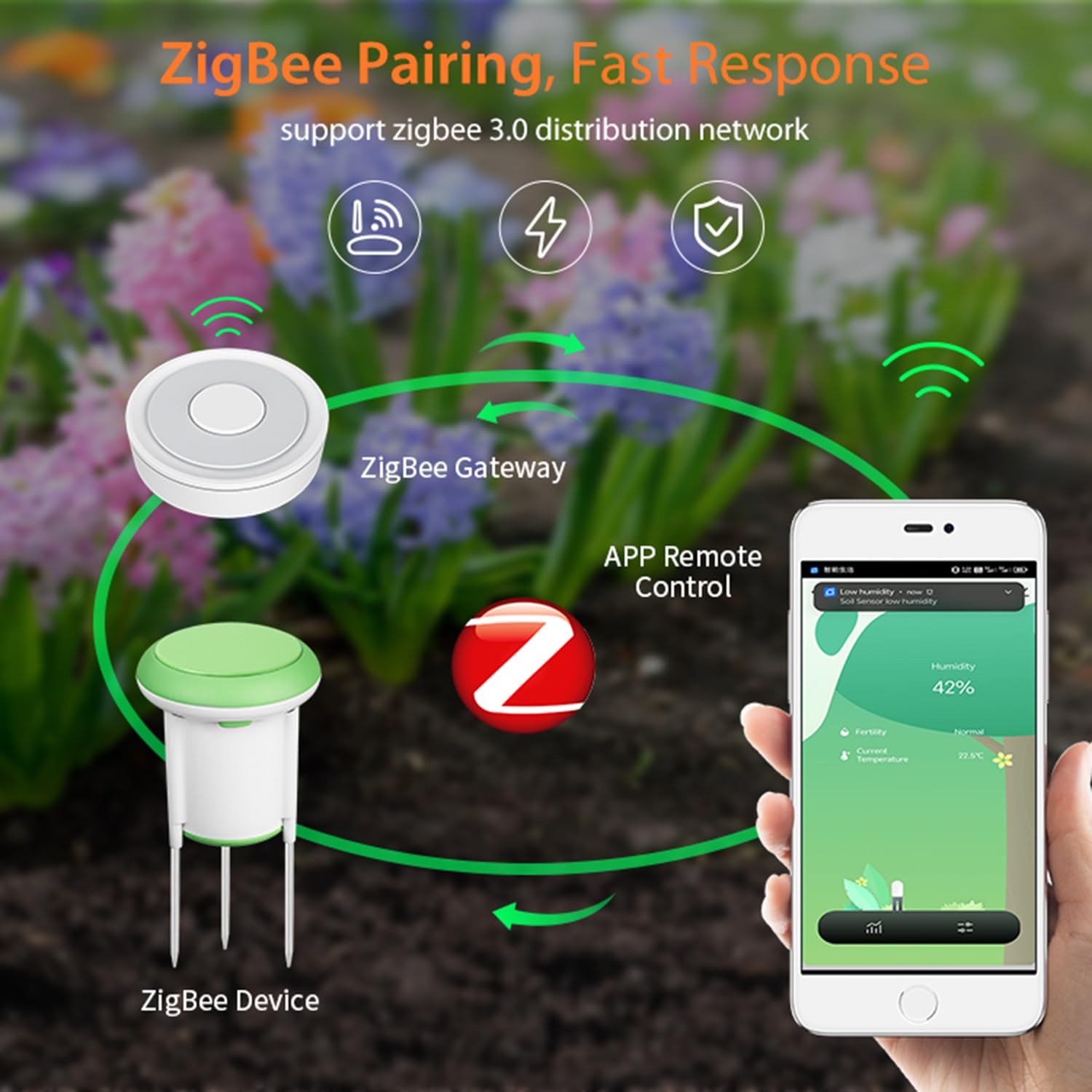
Image 2: An illustration highlighting key features of the SENCKIT Smart Soil Sensor, including Zigbee 3.0 support, smart home integration, accurate detection, IP66 waterproofing, and app remote control.
3. What's in the Box
The product package includes the following items:
- 1 x SENCKIT Smart Soil Sensor
- 3 x AA Batteries (pre-installed or included separately)
4. Specifications
| Name | Soil Sensor |
| APP Compatibility | Tuya Smart / Smart Life App |
| Battery Type | 3 * AA batteries |
| Communication Protocol | Zigbee 3.0 |
| Wireless Protocol | Zigbee IEEE802.15.4 |
| Wireless Distance | Up to 50M (open area) |
| Waterproof Level | IP66 |
| Temperature Detection Range | -10℃ to 60℃ (14℉ to 140℉) |
| Humidity Detection Range | 0-100 %RH (Non-Condensing) |
| Temperature Detection Accuracy | 0.5℃ (Adjustable) |
| Humidity Detection Accuracy | 5%RH (Adjustable) |
| Detection Timespan | 10 minutes (Adjustable: 10-300 minutes) |
| Working Temperature | -10℃ to 60℃ (14℉ to 140℉) |
| Working Humidity | 0-100% RH (Non-Condensing) |
| Item Size | 78 x 78 x 147mm / 3.07 x 3.07 x 5.79in |
| Item Weight | 190g / 6.70oz (approx. 7.1 ounces) |
| Model Number | ZIGBEE-SOIL-UK |
5. Setup and Installation
5.1. Download the App
The SENCKIT Smart Soil Sensor requires the Tuya Smart or Smart Life application for control and monitoring. Please download one of these applications to your smartphone or tablet.
- Method 1: Scan the QR codes provided below using your device's camera or a QR code scanner app.
- Method 2: Search for "Tuya Smart" or "Smart Life" in your device's respective app store (e.g., Apple App Store, Google Play Store) and download the official application.

Image 3: QR codes for direct download of the Tuya Smart and Smart Life applications.
5.2. Install Batteries
The sensor is powered by 3 AA batteries. Ensure these are correctly installed before proceeding with pairing.
- Locate the battery compartment on the sensor.
- Open the compartment and insert 3 AA batteries, observing the correct polarity (+/-).
- Securely close the battery compartment.

Image 4: Illustration of the SENCKIT Smart Soil Sensor and AA batteries, indicating its power source.
5.3. Connect to Zigbee Hub
A Tuya Zigbee hub (gateway) is essential for the soil sensor to communicate with the app. Ensure your Zigbee hub is powered on and properly connected to your home network and the Tuya Smart/Smart Life app.
Video 1: A demonstration of the steps required to add the SENCKIT Smart Soil Sensor to the Tuya Smart/Smart Life app via a Zigbee gateway. This includes connecting the gateway and pairing the soil sensor.
5.4. Pair the Soil Sensor
Once your Zigbee hub is set up in the app, you can pair the soil sensor:
- Open the Tuya Smart or Smart Life app.
- Navigate to your Zigbee gateway's device page.
- Select the "Add Device" or "Search for new devices" option within the gateway's interface.
- On the soil sensor, press and hold the reset button (usually located near the waterproof rubber plug) for approximately 5 seconds until the LED indicator flashes, signifying it is in pairing mode.
- The app will discover and add the soil sensor. Follow any on-screen prompts to complete the pairing process.
Image 5: Visual representation of the Zigbee pairing process, showing the soil sensor, Zigbee gateway, and smartphone app interacting.
5.5. Insert the Sensor into Soil
For accurate readings, proper placement of the sensor is crucial:
- Carefully insert the metal probes of the sensor into the soil near the plant you wish to monitor.
- Ensure the probes are fully submerged in the soil, avoiding large air pockets around them.
- Avoid placing the sensor directly in water or in extremely rocky soil that could damage the probes.

Image 6: The SENCKIT Smart Soil Sensor correctly inserted into soil, demonstrating its function in detecting soil temperature and humidity.
6. Operating Instructions
6.1. Viewing Data
After successful pairing and installation, you can view real-time data:
- Open the Tuya Smart or Smart Life app.
- Select the SENCKIT Soil Sensor from your device list.
- The app will display current soil moisture and temperature readings.

Image 7: A smartphone screen displaying the Tuya Smart/Smart Life app interface, showing real-time soil moisture and temperature data from the SENCKIT sensor.
6.2. Setting Alarms
Customize alerts to maintain optimal plant health:
- Within the app, navigate to the sensor's settings or automation section.
- Set custom high and low thresholds for both soil moisture and temperature.
- You will receive push notifications on your smartphone if readings fall outside these defined ranges.
6.3. Data History and Graphs
Track long-term trends in your soil conditions:
- The app automatically records historical data for moisture and temperature.
- View these records in graphical format to analyze changes over days, weeks, or months.
- Adjust the data update frequency in the app settings (10-300 minutes) to balance data granularity with battery life.
6.4. Smart Automation
Leverage the sensor's capabilities for smart garden management:
- Integrate the soil sensor with other Tuya-compatible smart devices, such as smart irrigation timers or valves.
- Create automated
Ask a question about this manual
Ask about setup, troubleshooting, compatibility, parts, safety, or missing instructions. Manuals+ will review the question and use this page’s manual context to help answer it.