
Locksworth ET521-2-Banks
Locksworth Digital Security Safe User Manual
Model: ET521-2-Banks (0.6 Cubic Feet)
1. Introduction
Thank you for choosing the Locksworth Digital Security Safe. This manual provides essential information for the safe and proper operation, installation, and maintenance of your new security safe. Please read this manual thoroughly before use and retain it for future reference.

Figure 1.1: Locksworth 0.6 Cubic Feet Digital Security Safe, showcasing its versatile interior with a removable shelf, ideal for storing various valuables like cash, jewelry, and firearms.
2. Safety Information
Always follow basic safety precautions when using this product to reduce the risk of injury or damage.
- Do not store the emergency keys inside the safe. Keep them in a secure, separate location.
- Ensure the safe is securely mounted if you choose to install it to a wall or floor to prevent unauthorized removal.
- Keep the safe and its contents out of reach of children.
- Do not attempt to force the safe open if the battery is low or the code is forgotten. Use the emergency keys.
- Avoid exposing the safe to extreme temperatures or humidity.
3. Package Contents
Verify that all items are present in the package:
- 1 x Locksworth Digital Security Safe
- 2 x Emergency Keys
- 2 x Sets of Expansion Bolts (for mounting)
- 4 x AA Batteries
- 1 x User Manual (this document)
- 1 x Flannel (soft felt floor mat)

Figure 3.1: All components included with your Locksworth Digital Security Safe.
4. Setup and Initial Use
4.1. Battery Installation
The safe requires 4 AA batteries for the electronic keypad to function. The battery compartment is typically located on the inside of the safe door.
- Open the safe door using one of the emergency keys. Insert the key into the keyhole, turn it clockwise, and rotate the knob to open.
- Locate the battery compartment cover on the inside of the door.
- Remove the cover and insert the 4 AA batteries, ensuring correct polarity (+/-).
- Replace the battery compartment cover.
4.2. Setting Your Personal Passcode
It is highly recommended to set your personal passcode immediately after installing batteries.
- With the safe door open, locate the red reset button on the inside of the door, near the hinge.
- Press the red reset button. You will hear a beep, and the yellow indicator light on the keypad will illuminate.
- Within 5 seconds, enter your desired 3-8 digit passcode on the keypad.
- Press the "A" or "B" button to confirm your new passcode. You will hear a confirmation beep.
- Test your new passcode with the door open to ensure it works correctly before closing the safe.

Figure 4.1: Illustration of the safe's internal layout and setup process.
5. Operating Instructions
5.1. Opening the Safe
There are two primary methods to open your Locksworth safe:
- Using your Passcode:
- Enter your 3-8 digit passcode.
- Press the "A" or "B" button. The green "READY" light will illuminate.
- Within 5 seconds, turn the knob clockwise to open the safe door.
- Using Emergency Keys:
- Remove the keyhole cover (if present) on the keypad panel.
- Insert one of the emergency keys into the keyhole and turn it clockwise.
- Simultaneously turn the knob clockwise to open the safe door.
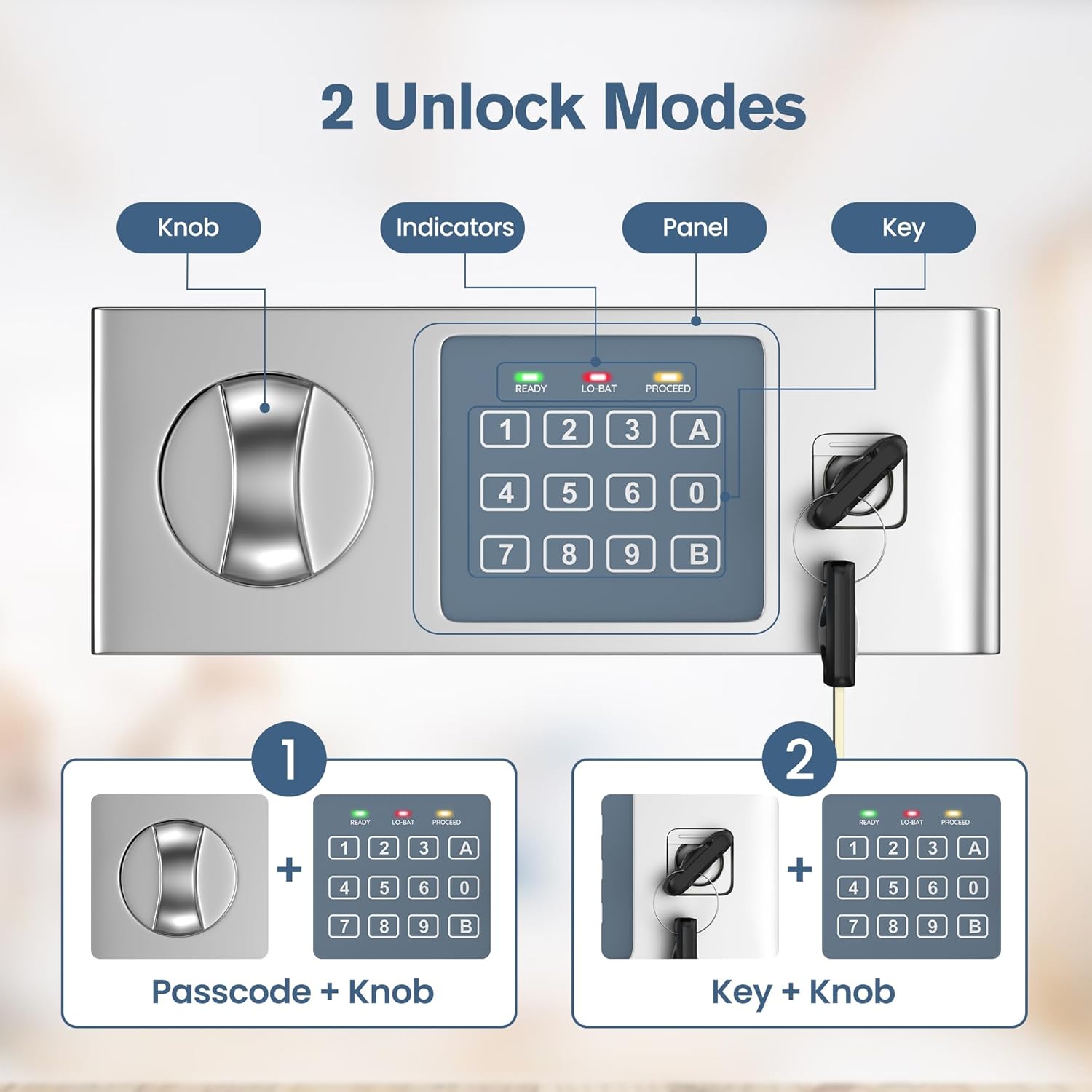
Figure 5.1: The two primary methods for unlocking your safe.
5.2. Changing Your Passcode
To change your passcode, follow the same steps as setting the initial passcode (Section 4.2).
5.3. Alarm System
The safe is equipped with an alarm system to deter unauthorized access.
- If 3 invalid code entries are made consecutively, the keypad will become inaccessible for 20 seconds, and an alert will sound.
- If 6 invalid code entries are made consecutively (after the initial 3), the keypad will become inaccessible for 5 minutes, and an alert will sound.
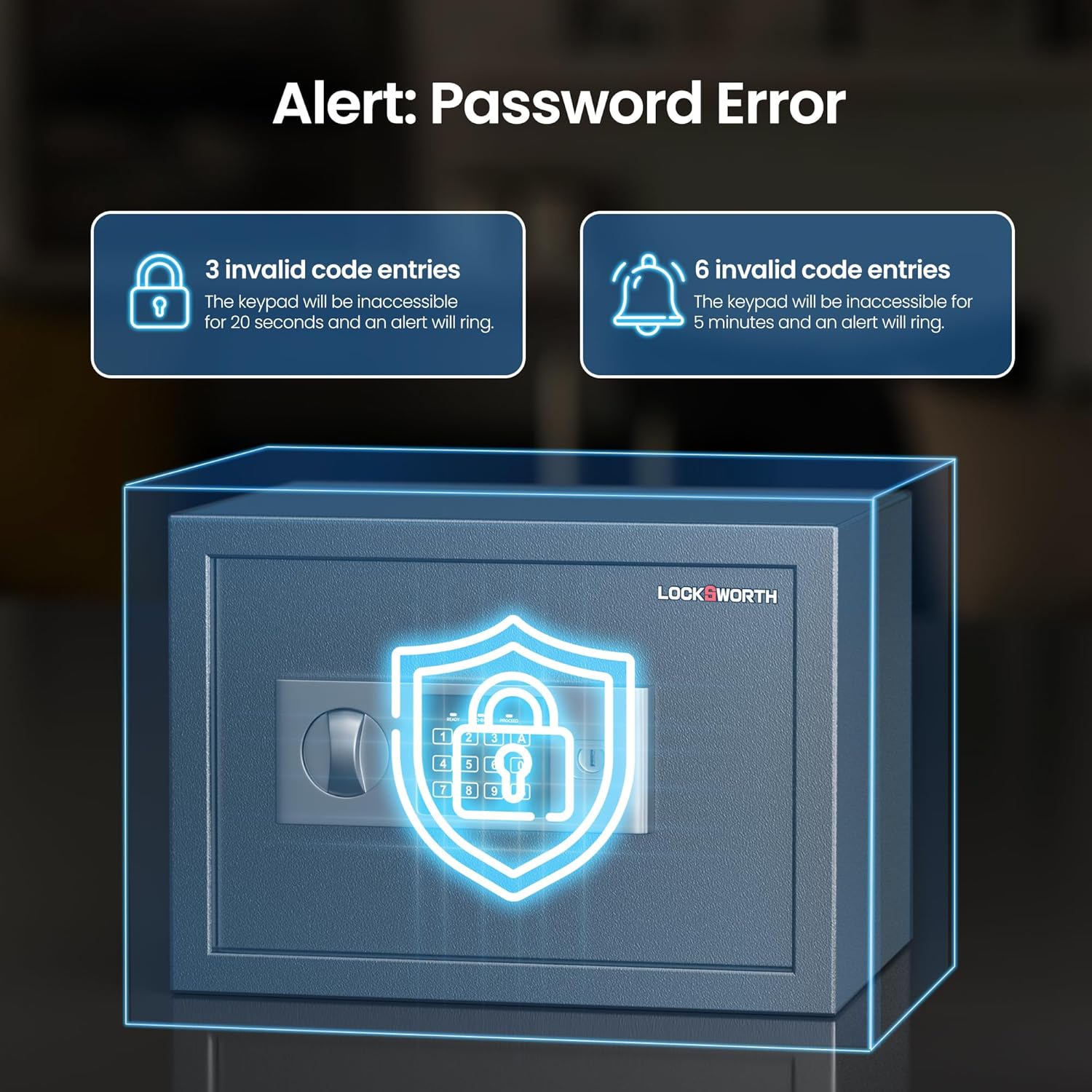
Figure 5.2: Understanding the safe's alarm system for incorrect passcode attempts.
6. Installation (Mounting)
The Locksworth safe can be securely mounted to a floor, wall, or inside a cabinet using the provided expansion bolts. This significantly enhances security.
- Step 1: Prepare the Safe. Unlock the safe box and open the door. Check the bottom or the back of the safe for two indentations (pre-drilled holes). Drill a hole through each indentation perpendicular to the surface. Do not drill from any location inside the safe other than the designated points.
- Step 2: Mark Drilling Points. Place the safe in its intended mounting location. Using the pre-drilled holes in the safe as a guide, mark the drilling points on the floor or wall with a pencil. Move the safe aside.
- Step 3: Drill Holes. Drill holes into the marked points on the wall or floor. Ensure the depth and diameter of the drilled holes match the expansion bolts.
- Step 4: Secure the Safe. Place the safe back into position, aligning its holes with the drilled holes in the wall or floor. Thread each lag screw through a washer, the safe, and a masonry anchor. Use the wrench to tighten the expansion bolts securely.

Figure 6.1: Detailed steps for wall or floor mounting of the safe.
7. Maintenance
- Battery Replacement: When the "LO-BAT" indicator light illuminates, it's time to replace the batteries. Use 4 new AA alkaline batteries.
- Cleaning: Wipe the safe's exterior with a soft, damp cloth. Do not use abrasive cleaners or solvents.
- Internal Care: The soft felt floor can be removed and cleaned if necessary. Ensure it is dry before placing it back inside.
- Keyhole Maintenance: Periodically check the keyhole for any obstructions. Do not lubricate the lock mechanism.
8. Troubleshooting
| Problem | Possible Cause | Solution |
|---|---|---|
| Safe does not open with passcode. | Incorrect passcode entered; Batteries are low or dead; Keypad is locked due to multiple incorrect entries. | Re-enter passcode carefully; Replace batteries; Wait for the lockout period to expire, then try again or use emergency key. |
| Keypad is unresponsive. | Dead batteries; Keypad malfunction. | Replace batteries; If still unresponsive, use emergency key and contact customer support. |
| Safe door does not close properly. | Obstruction in the door frame; Locking bolts are not fully retracted. | Check for any items blocking the door; Ensure the knob is fully turned to retract bolts before closing. |
| Alarm sounds frequently. | Multiple incorrect passcode attempts. | Ensure only authorized users know the passcode and enter it correctly. |
9. Specifications
| Feature | Detail |
|---|---|
| Brand | Locksworth |
| Model Number | ET521-2-Banks |
| Capacity | 0.6 Cubic Feet |
| External Dimensions (W x D x H) | 13.78" x 9.85" x 9.85" (35cm x 25cm x 25cm) |
| Internal Dimensions (W x D x H) | Approx. 13.66" x 8.98" x 9.72" (34.7cm x 22.8cm x 24.7cm) |
| Weight | 14.12 pounds (6.4 kg) |
| Material | Carbon Steel |
| Lock Type | Electronic Combination Lock, Key, Mechanical Code Lock |
| Power Source | 4 x AA Alkaline Batteries |
| Special Features | Alarm System, Anti-Theft, Removable Shelf |
| Mounting Type | Under Counter Mount, Wall Mount, Floor Mount |

Figure 9.1: Key dimensions of the Locksworth 0.6 Cubic Feet Safe.
10. Warranty and Support
Locksworth products are manufactured to high-quality standards. For warranty information or technical support, please refer to the contact details provided on the product packaging or visit the official Locksworth website. Please have your model number (ET521-2-Banks) and purchase information ready when contacting support.
For additional resources, you may visit the Locksworth Store on Amazon.
Ask a question about this manual
Ask about setup, troubleshooting, compatibility, parts, safety, or missing instructions. Manuals+ will review the question and use this page’s manual context to help answer it.