
Force USA G20 Pro
Force USA G20 Pro All-In-One Trainer User Manual
Model: G20 Pro
1. Introduction
Welcome to the user manual for the Force USA G20 Pro All-In-One Trainer. This comprehensive guide provides essential information for the safe and effective setup, operation, and maintenance of your new fitness equipment. The G20 Pro is designed as a complete, compact training solution, integrating a commercial-grade Functional Trainer, Smith Machine, Power Rack, Chin Up Station, and Leg Press into a single unit.
Please read this manual thoroughly before assembling or using the G20 Pro All-In-One Trainer to ensure proper function and to prevent injury.
2. Safety Information
Your safety is paramount. Adhere to all safety warnings and instructions provided in this manual. Failure to do so may result in serious injury or equipment damage.
- Always consult with a healthcare professional before starting any new exercise program.
- Ensure the equipment is assembled correctly and all bolts are tightened before use. Professional assembly is recommended.
- Do not exceed the maximum load capacity of 450kg for the Smith Machine.
- Keep children and pets away from the equipment during operation.
- Inspect the equipment for worn or damaged parts before each use. Do not use if any components are compromised.
- Maintain a clear space of at least 1 meter (3 feet) around the equipment during use.
- This product is considered bulky. Please note that extra charges may apply for delivery via stairs, and it is not eligible for return or refund due to its size and nature.
3. Product Overview
The Force USA G20 Pro All-In-One Trainer is engineered from heavy-duty, high tensile steel, offering a robust and versatile training experience. It combines multiple gym stations into one compact footprint.
Key Features:
- Functional Trainer: Dual 130kg weight stacks with a 2:1 cable ratio and 19 adjustable cable positions.
- Smith Machine: Rated for up to 450kg, with roller J-hooks and safety spotters.
- Power Rack: Features Westside hole spacing (25mm) with 65 adjustment points.
- Chin Up Station: Multi-grip design for varied exercises.
- Leg Press: Integrated footplate for lower body training.
- Swing Arm: 5-foot arm with six lock-in positions (0-90 degrees), suitable for a 3-5ft punching bag (up to 60kg, punching bag not included).
- Storage Solutions: 10 weight plate holders and 2 barbell holders.
- Force USA Training App Compatibility: Access to hundreds of tutorial videos.
Included Attachments (Base Unit):
- 1 x Calf Block
- 1 x Ankle Cuff
- 1 x Tricep Rope
- 1 x Tricep V-bar
- 1 Pair of Monolifts
- 1 x Seated Row Bar
- 1 x Lat Pulldown Bar
- 4 x Extension Chains
- 1 x Long Straight Bar
- 1 x Short Straight Bar
- 1 x Leg Press Footplate
- 1 x Low Row Foot Plate
- 1 Pair of Roller J-Hooks
- 1 x Core Trainer + T-bar
- 3 Pairs of Spring Collars
- 1 Pair of Safety Spotters
- 4 x Resistance Band Pegs
- 1 Pair of Metal D-handles
- 1 Pair of Easy Lock Collars
- 1 x Lat Pulldown Knee Anchor
- 1 Pair of Nylon Single Handles
- 1 x Multi-Grip Lat Pulldown Bar
Optional Upgrade Kit Attachments (Sold Separately):
- 1 Pair of Dip Handles
- 1 x Leg Extension/Curl
- 1 Pair of Jammer Arms

Figure 3.1: Front view of the Force USA G20 Pro All-In-One Trainer, showcasing its compact design and integrated components.

Figure 3.2: Angled view of the G20 Pro, highlighting the integrated weight stacks and storage horns for weight plates.

Figure 3.3: A comprehensive display of all attachments included with the base unit of the Force USA G20 Pro All-In-One Trainer.

Figure 3.4: The G20 Pro shown with optional upgrade kit attachments, including Dip Handles, Leg Extension/Curl, and Jammer Arms, which are sold separately.
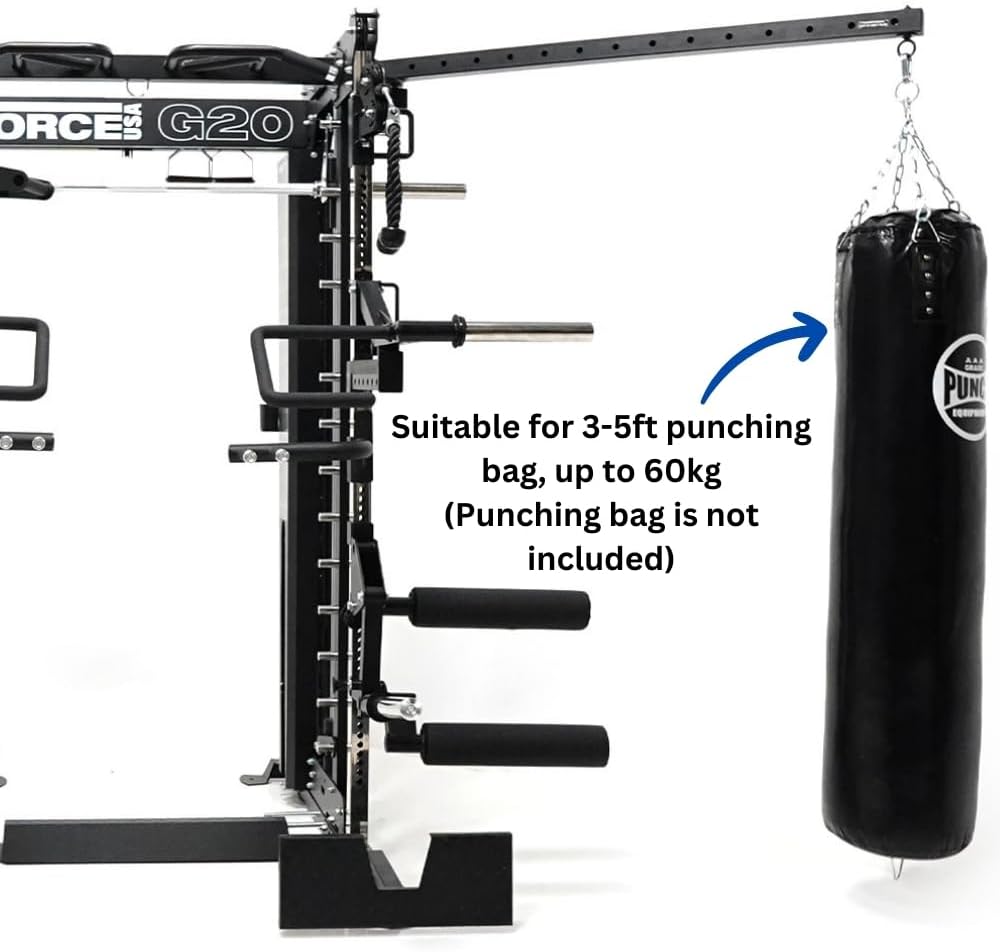
Figure 3.5: Detail of the 5-foot swing arm attachment, suitable for a 3-5ft punching bag (punching bag not included), supporting up to 60kg.

Figure 3.6: Screenshot of the Force USA Training App interface on a smartphone, demonstrating its compatibility and program features.
4. Setup
The Force USA G20 Pro All-In-One Trainer requires assembly. Due to its complexity and weight (620kg product weight), professional assembly is highly recommended to ensure proper and safe setup. Refer to the separate assembly guide provided with your purchase for detailed, step-by-step instructions.
Site Preparation:
- Choose a level, stable surface for installation.
- Ensure adequate space around the unit for safe operation. The dimensions are approximately 190 cm (W) x 169 cm (D) x 230 cm (H). If the Swing Arm attachment is installed, add an additional 152.4 cm to the depth.
- The mainframe is constructed from 50 x 50 mm, 3mm thick steel.
Component Identification:
Before beginning assembly, unpack all components and verify them against the parts list in the assembly guide. Familiarize yourself with key components such as the uprights, weight stacks, and various attachment points.
- Hole Spacing: The uprights feature Westside spacing (25mm) with 65 adjustment points from top to bottom.
- Storage: Utilize the 10 weight plate holders and 2 barbell holders for organized storage of your equipment.
5. Operating Instructions
The G20 Pro offers a wide range of exercises. Always ensure proper form and use appropriate weight. If you are new to strength training, seek guidance from a certified fitness professional.
5.1 Functional Trainer
The functional trainer features dual 130kg weight stacks and a 2:1 pulley ratio, meaning the effective resistance is half of the selected weight. There are 19 adjustable cable positions to accommodate various exercises and user heights. To adjust the cable height, pull the pin, slide the carriage to the desired position, and ensure the pin fully re-engages.
5.2 Smith Machine
The Smith Machine allows for guided barbell movements, ideal for squats, bench presses, and other exercises. The maximum load capacity is 450kg. The loadable sleeve for the smith bar is 2 x 30.5 cm. Utilize the safety spotters by setting them to a height just below your lowest point of movement to prevent injury in case of failure. The roller J-hooks protect your barbell and assist in positioning.
5.3 Power Rack
For free weight exercises, use the Power Rack section. Position the J-hooks at the desired height for your barbell. Always use the safety spotters, which have a length of 38cm, to catch the barbell if you cannot complete a lift. Ensure both J-hooks and safety spotters are securely inserted into the uprights before loading weight.
5.4 Chin Up Station
The multi-grip chin up bar allows for various grip positions to target different muscle groups. Ensure a secure grip before performing exercises.
5.5 Leg Press
Attach the Leg Press Footplate to the functional trainer cables as per the assembly guide. Ensure the footplate is securely attached and the cables are properly routed before performing leg press exercises.
5.6 Swing Arm
The 5-foot swing arm can be installed on either side of the unit. It features six lock-in positions from 0 to 90 degrees. This arm is designed to support a 3-5ft punching bag weighing up to 60kg. Ensure the swing arm is securely locked into position before attaching or using a punching bag.
5.7 Force USA Training App
Enhance your training experience by utilizing the Force USA Training App. The app provides hundreds of tutorial videos for various exercises that can be performed on your G20 Pro. Download the app from your device's app store for guided workouts and exercise demonstrations.
6. Maintenance
Regular maintenance is crucial for the longevity and safe operation of your Force USA G20 Pro All-In-One Trainer.
- Daily: Wipe down the equipment with a damp cloth after each use to remove sweat and dust. Avoid abrasive cleaners.
- Weekly: Inspect all cables, pulleys, and moving parts for signs of wear, fraying, or damage. Ensure all pins and adjustment mechanisms are functioning smoothly.
- Monthly: Check all nuts and bolts for tightness. Re-tighten any loose fasteners. Lubricate moving parts as recommended by the manufacturer (refer to assembly guide for specific lubrication points).
- General: Keep the area around the equipment clean and free of obstructions.
7. Troubleshooting
This section addresses common issues you might encounter with your G20 Pro All-In-One Trainer. For problems not listed here or if solutions do not resolve the issue, please contact Force USA customer support.
| Problem | Possible Cause | Solution |
|---|---|---|
| Cables feel rough or sticky | Lack of lubrication, dirt buildup, or worn cable. | Clean cables and pulleys. Apply silicone-based lubricant. If worn, contact support for replacement. |
| Unusual noises (squeaking, grinding) | Loose bolts, lack of lubrication, or worn bearings/pulleys. | Check and tighten all bolts. Lubricate moving parts. Inspect bearings and pulleys for damage. |
| Weight stack plates sticking | Guide rods are dirty or not lubricated. | Clean guide rods thoroughly and apply a thin layer of silicone lubricant. |
| Smith machine bar not moving smoothly | Accumulated dust/debris on guide rods, or lack of lubrication. | Clean the guide rods and apply a suitable lubricant. |
8. Specifications
Detailed technical specifications for the Force USA G20 Pro All-In-One Trainer:
| Brand | Force USA |
| Model | G20 Pro |
| Product Dimensions (L x W x H) | 169 cm x 190 cm x 230 cm (Add 152.4 cm depth with Swing Arm) |
| Product Weight | 620 kg |
| Max Load Capacity (Smith Machine) | 450 kg |
| Material | Alloy Steel (Mainframe: 50 x 50 mm, 3mm thick steel) |
| Color | BLACK |
| Weight Stack | 2 x 130 kg (Dual Weight Stacks) |
| Pulley Ratio | 2:1 |
| Adjustable Cable Positions | 19 |
| Hole Spacing | Westside spacing (25mm) with 65 adjustment points |
| Hole Size | 16mm (5/8") |
| Loadable Sleeve (Smith Bar) | 2 x 30.5 cm |
| Storage Sleeves | 10 x 20cm weight storage horns |
| Handle Type | Fixed Handle |
9. Warranty and Support
Force USA stands behind the quality of the G20 Pro All-In-One Trainer with the following warranty for home use (Strength Premium):
- Structural Frame: Lifetime warranty (excludes coating & rust).
- Moving Frames & Components: 2 years warranty (includes bearings, lock pins, pulleys, cables, glide rods, etc.).
- Labor: 1 year warranty.
Please note: Warranty does not cover wear and tear.
For technical support, warranty claims, or inquiries regarding parts and service, please contact Force USA customer service through their official website or the contact information provided at the point of purchase. When contacting support, please have your product model (G20 Pro) and purchase details ready.
Related documentsG20 Pro


Ask a question about this manual
Ask about setup, troubleshooting, compatibility, parts, safety, or missing instructions. Manuals+ will review the question and use this page’s manual context to help answer it.