

1. Introduction
Thank you for choosing the Rraycom BW4 Plus 2K QHD Wireless Outdoor Security Camera System. This manual provides essential information for the proper installation, operation, and maintenance of your security cameras. Please read this manual thoroughly before use and retain it for future reference.
2. What's in the Box
- Security Camera (4 units)
- Mounting Screws and Anchors
- USB Charging Cable
- User Manual
Note: An SD card for local storage is not included and must be purchased separately.
3. Product Overview
The Rraycom BW4 Plus camera system offers advanced features for comprehensive outdoor surveillance. Key features include:
- 2K QHD 3MP Resolution: Captures clear and detailed footage (2304x1296 pixels).
- 120° Wide-Angle Lens: Provides expanded coverage of your property.
- Color Night Vision: Ensures vivid footage even in low-light conditions.
- 12000mAh Battery: Offers extended surveillance for up to 300 days on a single charge.
- IP66 Weatherproof: Designed for reliable outdoor performance in various weather conditions.
- Two-Way Audio: Allows for real-time communication through the camera.
- Motion Sensor with Siren & Strobe Lights: Alerts to potential threats and deters intruders.
- 2.4 GHz Wi-Fi & Alexa Compatible: Easy connectivity and smart home integration.
- Cloud Service & Local Storage: Complimentary 3-day cloud trial or local storage up to 256 GB (SD card not included).

4. Setup
4.1 Initial Charging
Before first use, fully charge the camera using the provided USB charging cable. Connect the cable to the camera's charging port and a standard USB power adapter (not included). The LED indicator will show charging status.
4.2 App Installation & Pairing
- Download the official Rraycom app from your smartphone's app store (iOS or Android).
- Register for an account and log in.
- Tap 'Add Device' and select 'Battery Camera'.
- Follow the in-app instructions to power on the camera and confirm the LED indicator is flashing.
- Scan the QR code displayed in the app with your camera lens. A voice prompt will confirm successful pairing.
- Name your camera (e.g., 'Front Door', 'Backyard').
- Ensure your Wi-Fi signal is strong at the camera's intended location (2.4 GHz Wi-Fi only).
4.3 Mounting the Camera
Choose a mounting location that provides optimal viewing angle and Wi-Fi signal strength. Use the provided screws and anchors to securely mount the camera. Ensure the solar panel (if purchased separately) is positioned to receive maximum sunlight.

Video 4.1: An overview of the Rraycom BW4 Plus wire-free camera, showcasing its features and ease of installation.
5. Operating Instructions
5.1 Live View & Playback
Access the Rraycom app to view live footage from your camera. You can also review recorded events stored in the cloud or on an inserted SD card.
5.2 Motion Detection & Alerts
The camera features advanced motion detection. Customize sensitivity levels and detection zones within the app to minimize false alarms. When motion is detected, the camera can trigger a siren and strobe lights, and send instant alerts to your smartphone.

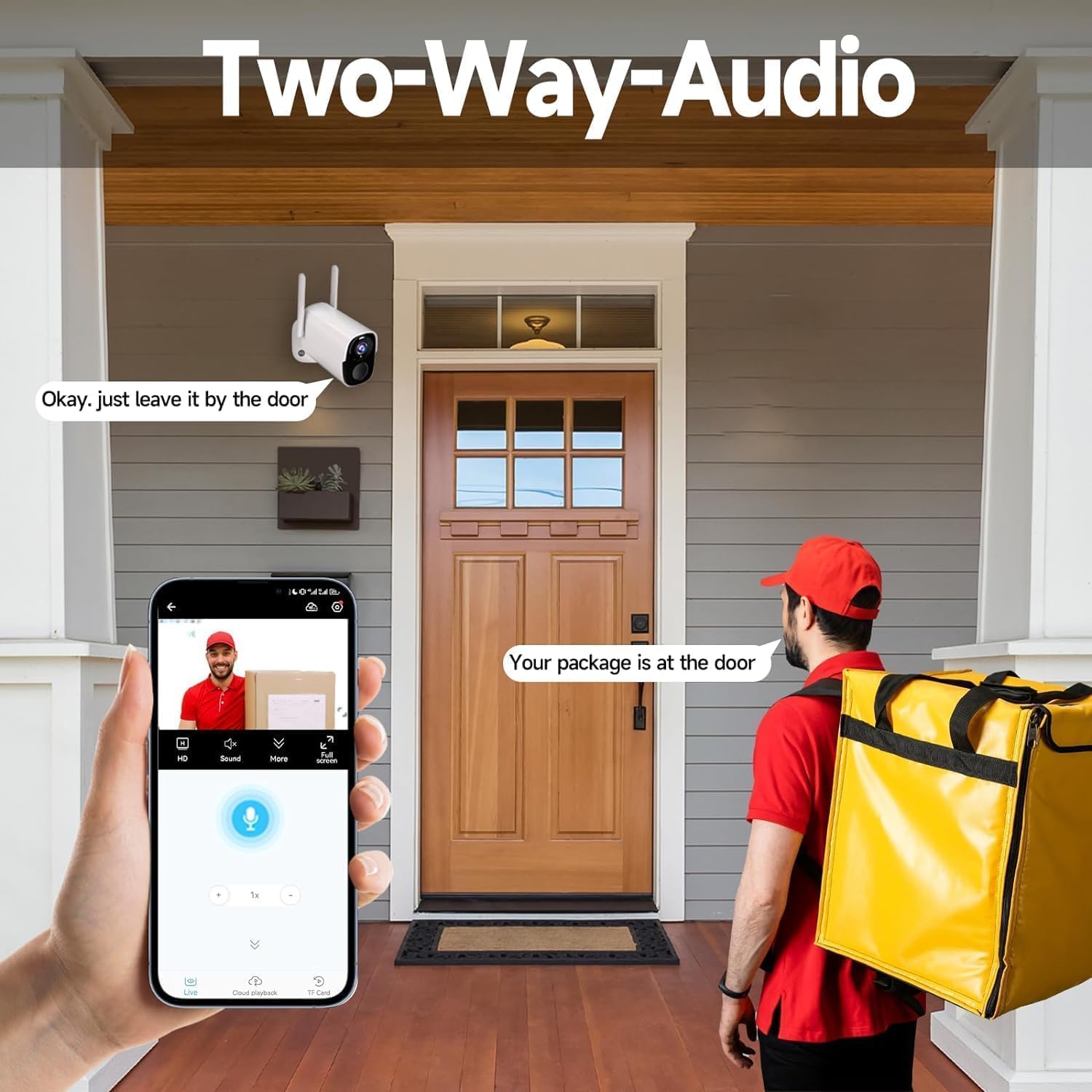
5.3 Two-Way Audio
Use the two-way audio feature in the app to communicate with visitors or deter unwanted guests. Simply tap the microphone icon in the live view to speak through the camera's speaker.
5.4 Night Vision
The camera automatically switches to night vision mode in low-light conditions. Enjoy clear 2K QHD footage with advanced Full Color Night Vision for enhanced security.

5.5 Alexa Integration
Connect your Rraycom camera to Amazon Alexa for convenient voice control. Use commands like, "Alexa, show me the front door camera" to view live feeds on compatible Alexa devices.
6. Maintenance
6.1 Cleaning
Regularly clean the camera lens and housing with a soft, damp cloth to ensure optimal image clarity. Avoid using harsh chemicals or abrasive materials.
6.2 Battery Management
The 12000mAh battery provides long-lasting power. Monitor battery levels via the app and recharge as needed. If using a solar panel, ensure it is clean and positioned for maximum sun exposure to maintain battery charge.
6.3 Firmware Updates
Check the app regularly for firmware updates. Keeping your camera's firmware up-to-date ensures optimal performance and access to new features.

7. Troubleshooting
- Camera Offline: Check Wi-Fi connection, ensure camera is charged, and restart the camera if necessary.
- Poor Image Quality: Clean the lens, check Wi-Fi signal strength, and ensure adequate lighting for night vision.
- False Motion Alerts: Adjust motion detection sensitivity and detection zones in the app.
- Two-Way Audio Issues: Check microphone and speaker volume settings in the app. Ensure no obstructions.
- Battery Draining Quickly: Reduce motion detection sensitivity, shorten recording times, or ensure solar panel is receiving sufficient sunlight.
8. Specifications
| Feature | Detail |
|---|---|
| Model Name | BW4plus |
| Video Capture Resolution | 2K QHD (2304x1296 pixels) |
| Field of View (FOV) | 120° |
| Power Source | Battery Powered (12000mAh) |
| Connectivity Protocol | Wi-Fi (2.4 GHz only) |
| International Protection Rating | IP66 |
| Special Features | 2-Way Audio, Color Night Vision, Local Recording, Built-In Light, Motion Sensor, Portable, Alexa Compatible |
| Local Storage Support | Up to 256 GB (SD card not included) |
| Compatible Devices | Android, iOS, PC, Amazon Alexa |
9. Warranty and Support
Rraycom products come with a standard manufacturer's warranty. For detailed warranty information, please refer to the warranty card included in your product packaging or visit the official Rraycom website.
9.1 Customer Support
If you encounter any issues or have questions regarding your Rraycom BW4 Plus camera system, please contact our customer support team:
- Email: aftersale@rraycom.com
- Online Support: Visit the Rraycom official website for FAQs and support resources.


