Brookstone BK1778

Brookstone Tablet Lap Cushion BK1778 User Manual

Model: BK1778

1. Overview

The Brookstone Tablet Lap Cushion, model BK1778, is a versatile memory foam lap desk designed for comfortable, hands-free use of tablets, phones, and books. Its ergonomic design aims to reduce wrist strain and improve posture by maintaining an optimal viewing angle for your device. The cushion is suitable for various environments, from relaxing at home to traveling.

Key Features:

  • Two Display Angles: Offers versatile viewing options for different activities.
  • Soft & Scratch-Free Plush: Ensures device protection and user comfort.
  • Lightweight & Compact: Easy to transport for use anywhere.
  • Ergonomic Support: Designed to reduce neck and wrist strain.
  • Integrated Storage Pockets: Conveniently holds small accessories.
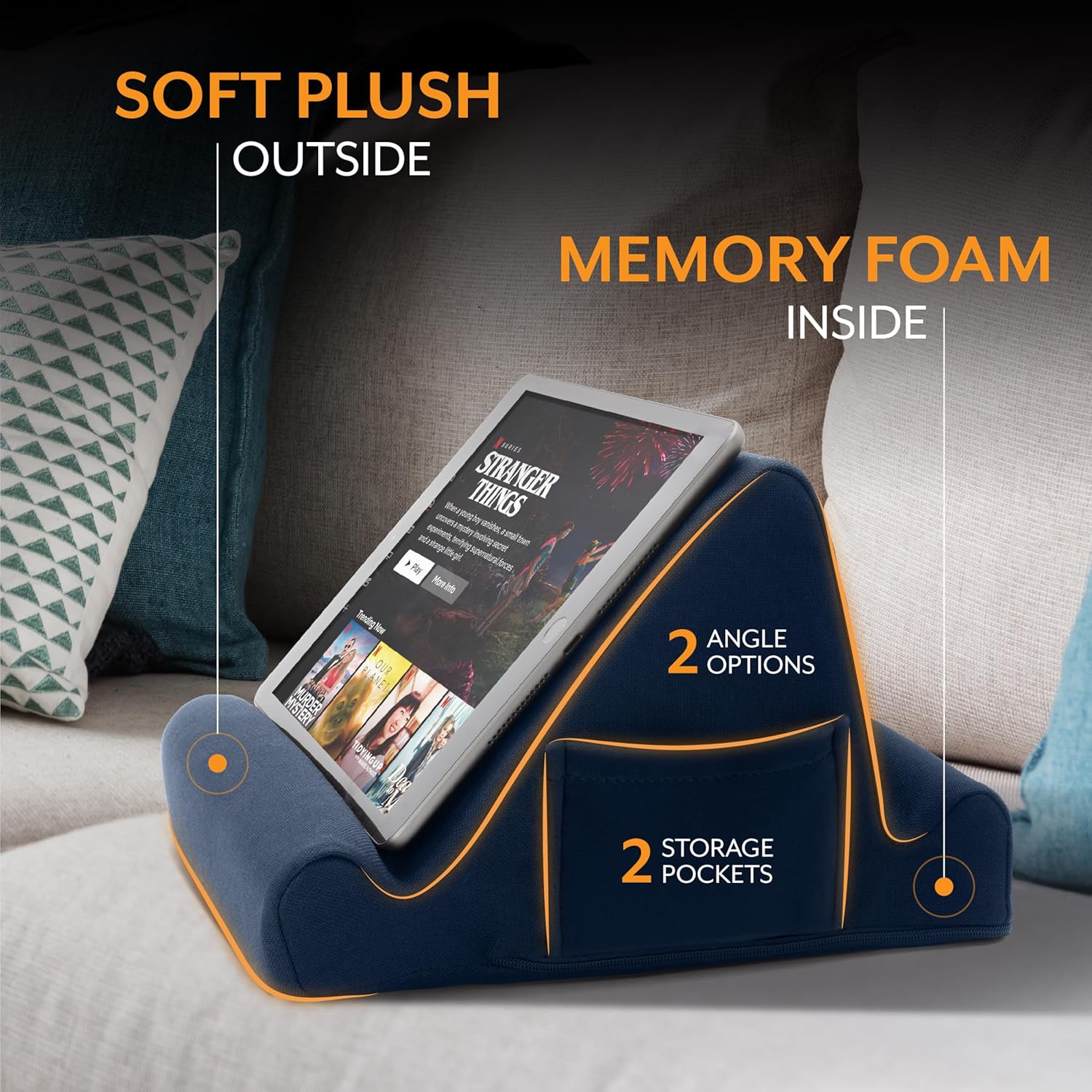
Diagram of the Brookstone Tablet Lap Cushion highlighting its soft plush exterior, memory foam interior, two angle options, and two storage pockets.
Constructed with soft plush material and memory foam, the cushion features two distinct viewing angles and two convenient side pockets for accessories.

2. Setup

The Brookstone Tablet Lap Cushion is designed for immediate use and requires no assembly. Simply remove it from its packaging.

Brookstone Tablet Lap Cushion with dimensions (10 inches wide, 10 inches deep, 6 inches high) and text indicating it is ready to use out of the box.
The cushion is designed for immediate use upon unboxing, with dimensions of approximately 10 inches (width) x 10 inches (depth) x 6 inches (height).

3. Operating Instructions

Selecting a Viewing Angle:

The cushion offers two distinct viewing angles. Place your device in the deeper groove for a more reclined view, or use the shallower groove for a more upright position. Experiment with both angles to find the most comfortable setup for your activity and device.

Woman relaxing on a sofa using the Brookstone Tablet Lap Cushion to hold her tablet.
The Tablet Lap Cushion provides a comfortable and stable platform for hands-free viewing of your tablet while relaxing at home.

Using Side Pockets:

Utilize the two mesh side pockets for convenient storage of small items such as charging cables, earbuds, or a stylus.

Man in a car using the Brookstone Tablet Lap Cushion to hold his tablet for work.
The portable design allows for productive work or entertainment from various locations, including the back seat of a car.
Woman using the Brookstone Tablet Lap Cushion on an airplane tray table to hold her phone while writing.
Ideal for travel, the cushion can be placed on a tray table or lap, offering stability for devices during flights, train rides, or car trips.
Woman comfortably reading a book in bed with the Brookstone Tablet Lap Cushion supporting her book.
Whether reading a book or using a tablet, the cushion supports your device at an optimal angle for comfort in bed.

4. Maintenance

Cleaning the Cover:

The outer cover of the Tablet Lap Cushion is removable for cleaning. Locate the zipper on the side of the cushion to remove the cover.

  • Machine wash the cover on a gentle cycle with cold water.
  • Tumble dry on low heat or air dry.
  • Do not bleach or iron.
  • Ensure the cover is completely dry before reattaching it to the foam insert.

5. Troubleshooting

If you encounter any issues with your Brookstone Tablet Lap Cushion, please refer to the following general advice:

  • Device Stability: Ensure your device is properly seated in one of the two grooves. If using a device with a thick case, adjust its position to ensure a secure fit.
  • Cleaning: For minor spills or dirt, spot clean the cover with a damp cloth. For thorough cleaning, remove the cover as described in the Maintenance section.
  • Loss of Shape: The memory foam is designed to retain its shape. If it appears compressed, gently fluff the cushion to restore its form.

For further assistance, please contact customer support.

6. Specifications

FeatureDetail
BrandBrookstone
Model NumberBK1778
ColorRoyal Blue
Form FactorPillow
Compatible DevicesAll Tablets, Phones, and Books
Item Weight1.06 pounds
Package Dimensions11.61 x 10 x 6.42 inches

7. Warranty and Support

For product support or inquiries regarding your Brookstone Tablet Lap Cushion, please contact Brookstone customer service:

Information regarding specific warranty terms can be obtained by contacting customer service directly.

8. Product Video

This video demonstrates the Brookstone Tablet Lap Cushion, showcasing its use as a versatile holder for tablets, phones, and books, highlighting its design and functionality.

Related Documents - BK1778

Preview Brookstone Nature Sounds Sleep Pillow: User Manual and Features
Detailed guide for the Brookstone Nature Sounds Sleep Pillow, covering setup, usage, care, specifications, and warranty information. Features memory foam neck support and multiple nature sounds.
Preview Brookstone Bluetooth Tablet Station User Manual and Specifications
Comprehensive user manual for the Brookstone Bluetooth Tablet Station, covering safety instructions, setup, usage, charging, syncing, care, troubleshooting, specifications, and warranty information.
Preview Brookstone Travel Converter for Appliances Up to 85 Watts - User Guide & Warranty
Learn how to use the Brookstone Travel Converter (Model 599431) for your 110/120-volt appliances in 220/240-volt outlets worldwide. Includes safety warnings and a one-year limited warranty.
Preview Brookstone Slim Personal Desk Fan User Manual
User manual for the Brookstone Slim Personal Desk Fan, covering safety instructions, operation, maintenance, specifications, and warranty information.
Preview Brookstone eComfort Home Office All-in-One Workstation User Guide and Warranty
User guide and one-year limited warranty information for the Brookstone eComfort Home Office All-in-One Workstation, detailing setup, features, cautions, and warranty terms.
Preview Brookstone Travel Clock with Flashlight User Manual
Learn how to operate and maintain your Brookstone Travel Clock with Flashlight, including setting time, alarm, calendar, and using the Microbeam LEDs. This guide covers battery installation, care, and warranty information.