
1. Introduction
Thank you for choosing the Homix 60-Grind Setting Coffee Bean Grinder CG001. This manual provides essential information for the safe and efficient operation, maintenance, and troubleshooting of your new coffee grinder. Please read it thoroughly before first use and keep it for future reference.
The Homix CG001 is designed to provide precise and consistent coffee grounds for various brewing methods, featuring 60 distinct grind settings and a powerful 150W motor.
2. Important Safety Instructions
- Read all instructions before using the appliance.
- Do not immerse the motor base, cord, or plug in water or other liquids.
- Close supervision is necessary when any appliance is used by or near children.
- Unplug from outlet when not in use, before assembling or disassembling parts, and before cleaning.
- Avoid contact with moving parts.
- Do not operate any appliance with a damaged cord or plug, or after the appliance malfunctions or has been damaged in any manner.
- The use of attachments not recommended or sold by the manufacturer may cause fire, electric shock, or injury.
- Do not use outdoors.
- Do not let cord hang over edge of table or counter, or touch hot surfaces.
- Check the bean hopper for the presence of foreign objects before use.
- Ensure the appliance is placed on a stable, flat surface during operation.
3. Product Components
Familiarize yourself with the parts of your Homix coffee grinder:
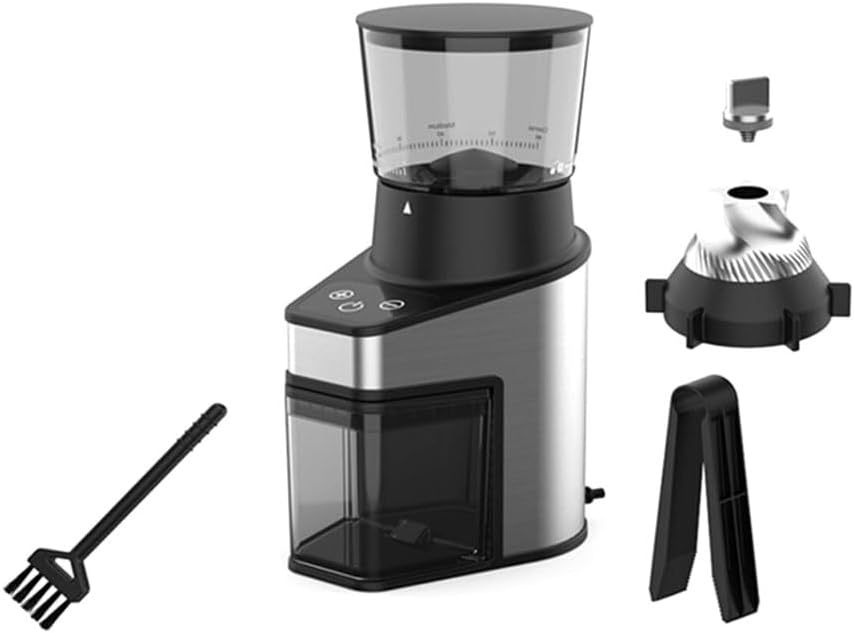
Image 1: Homix CG001 Coffee Grinder and its accessories, including the main unit, bean hopper, ground coffee container, cleaning brush, and burr components.
- Bean Hopper (Top container for whole coffee beans)
- Grind Setting Dial (Adjusts fineness of grind)
- Grinder Body (Main unit housing the motor and controls)
- Ground Coffee Container (Bottom container for collecting ground coffee)
- Start/Stop Button
- Quantity Selection Buttons
- Cleaning Brush (For maintenance)
- Upper Burr (Removable for cleaning)
4. Initial Setup
Follow these steps to set up your Homix coffee grinder for the first time:
- Unpack: Carefully remove all components from the packaging.
- Clean: Wash the bean hopper lid, bean hopper, and ground coffee container with warm, soapy water. Rinse thoroughly and dry completely. The grinder body and burrs should be wiped with a damp cloth.
- Assemble:
- Place the ground coffee container into its designated slot on the grinder body.
- Ensure the upper burr is correctly seated in the grinder.
- Attach the bean hopper to the top of the grinder body, twisting it clockwise until it locks into place.
- Position: Place the assembled grinder on a stable, dry, and level surface.
- Connect: Plug the power cord into a suitable electrical outlet.
5. Operating Instructions
Operating your Homix coffee grinder is straightforward:

Image 2: The Homix CG001 grinder filled with whole coffee beans in the upper hopper and ground coffee collected in the lower container, demonstrating its capacity.
- Add Beans: Pour whole roasted coffee beans into the bean hopper. The hopper has a large capacity of 250g. Do not overfill.
- Select Grind Setting: Rotate the grind setting dial to choose your desired fineness. The Homix CG001 offers 60 grind settings, from very fine (for espresso) to coarse (for French press). Refer to the table below for common recommendations:
Brew Method Recommended Grind Setting Range Description Espresso 1-10 Very fine, like flour or powdered sugar. Moka Pot 11-20 Fine, slightly coarser than espresso. Drip Coffee (Filter) 21-35 Medium, like table salt. Pour Over 30-45 Medium-coarse, like coarse sand. French Press 46-60 Coarse, like sea salt or breadcrumbs. - Select Quantity: Use the quantity selection buttons to choose the desired amount of coffee to grind. The grinder will automatically stop once the selected quantity is reached.
- Start Grinding: Press the Start/Stop button to begin the grinding process.
- Collect Grounds: Once grinding is complete, remove the ground coffee container and use the fresh grounds immediately for optimal flavor.
6. Maintenance and Cleaning
Regular cleaning ensures optimal performance and extends the life of your grinder.

Image 3: A close-up view of the lower section of the Homix CG001 grinder, highlighting the ground coffee container and the main body's finish.
- Unplug: Always unplug the grinder from the power outlet before cleaning.
- Disassemble: Remove the bean hopper, bean hopper lid, and ground coffee container.
- Clean Removable Parts: Wash the bean hopper, its lid, and the ground coffee container in warm, soapy water. Rinse thoroughly and dry completely. These parts are generally not dishwasher safe unless specified.
- Clean Burrs:
- Remove the upper burr by twisting it counter-clockwise and lifting it out.
- Use the provided cleaning brush to remove any coffee grounds from both the upper and lower burrs.
- Do not wash the burrs with water.
- Reinsert the upper burr, twisting clockwise until it locks into place.
- Clean Grinder Body: Wipe the exterior of the grinder body with a soft, damp cloth. Do not use abrasive cleaners or immerse the body in water.
- Reassemble: Ensure all parts are dry before reassembling the grinder.
Note: For best results, clean your grinder regularly, especially if you switch between different types of coffee beans or grind settings frequently.
7. Troubleshooting
If you encounter issues with your Homix coffee grinder, refer to the following common problems and solutions:
| Problem | Possible Cause | Solution |
|---|---|---|
| Grinder does not start. | Not plugged in; Hopper not correctly assembled; Power outage. | Ensure the power cord is securely plugged in. Check if the bean hopper is correctly locked into position. Verify power supply. |
| Grinder stops during operation. | Overheating; Beans jammed; Ground coffee container full. | Unplug and let cool for 30 minutes. Clear any jammed beans from the burrs (after unplugging). Empty the ground coffee container. |
| Inconsistent grind. | Burrs are dirty or worn; Incorrect grind setting. | Clean the burrs thoroughly as per maintenance instructions. Adjust the grind setting to a finer or coarser level as needed. |
| Grinder is noisy. | Foreign object in burrs; Loose parts. | Unplug and inspect the burrs for any foreign objects. Ensure all removable parts are securely assembled. |
If the problem persists after trying these solutions, please contact Homix customer support.
8. Product Specifications
- Brand: Homix
- Model Number: CG001
- Color: Black and Silver
- Power: 150 W
- Grind Settings: 60
- Bean Hopper Capacity: 250 g
- Construction Material: Plastic and Stainless Steel
- Item Weight: Approximately 2.48 kg
- Package Dimensions: 46 x 26 x 16 cm
9. Warranty and Support
Homix products are manufactured to high-quality standards. This product comes with a standard manufacturer's warranty against defects in materials and workmanship. Please refer to the warranty card included in your product packaging for specific terms and conditions, including the warranty period and how to make a claim.
For technical support, spare parts, or warranty inquiries, please contact Homix customer service through the contact information provided on your warranty card or the official Homix website. When contacting support, please have your model number (CG001) and purchase date ready.
You can find more information and support resources on the official Homix website: www.homix.com (Note: This is a placeholder URL, please refer to your product documentation for the actual support website.)