
Introduction
Thank you for choosing the NEWBAXS UR02 Wireless Microphone System. This dual handheld dynamic wireless microphone system is designed for various audio applications including karaoke, meetings, singing, and public speaking. It features rechargeable microphones and receiver, ensuring stable signal transmission and ease of use. This manual provides detailed instructions for setup, operation, maintenance, and troubleshooting to ensure optimal performance of your device.
What's Included
- Microphone (x2)
- Charging cable (x1)
- Anti-skid ring (x2)
- Rechargeable battery (x3)
- 3.5mm conversion plug (x1)

Image: All components included in the NEWBAXS UR02 Wireless Microphone System package.
Product Components
Microphones
The system includes two professional handheld microphones. Each microphone features a metallic mesh head for clear sound transmission and durability, built-in thickened cotton for noise reduction, and a display screen. They are rechargeable via a USB-C port at the base.

Image: Detailed view of the microphone, highlighting its metal material, sound filter cotton, ON/OFF power button, battery case, and charging interface. Dimensions are also shown.
Receiver
The compact receiver unit features a 1/4'' (6.35mm) audio jack for direct connection to compatible audio equipment. It is also rechargeable and includes an external independent antenna output port for stable signal reception.
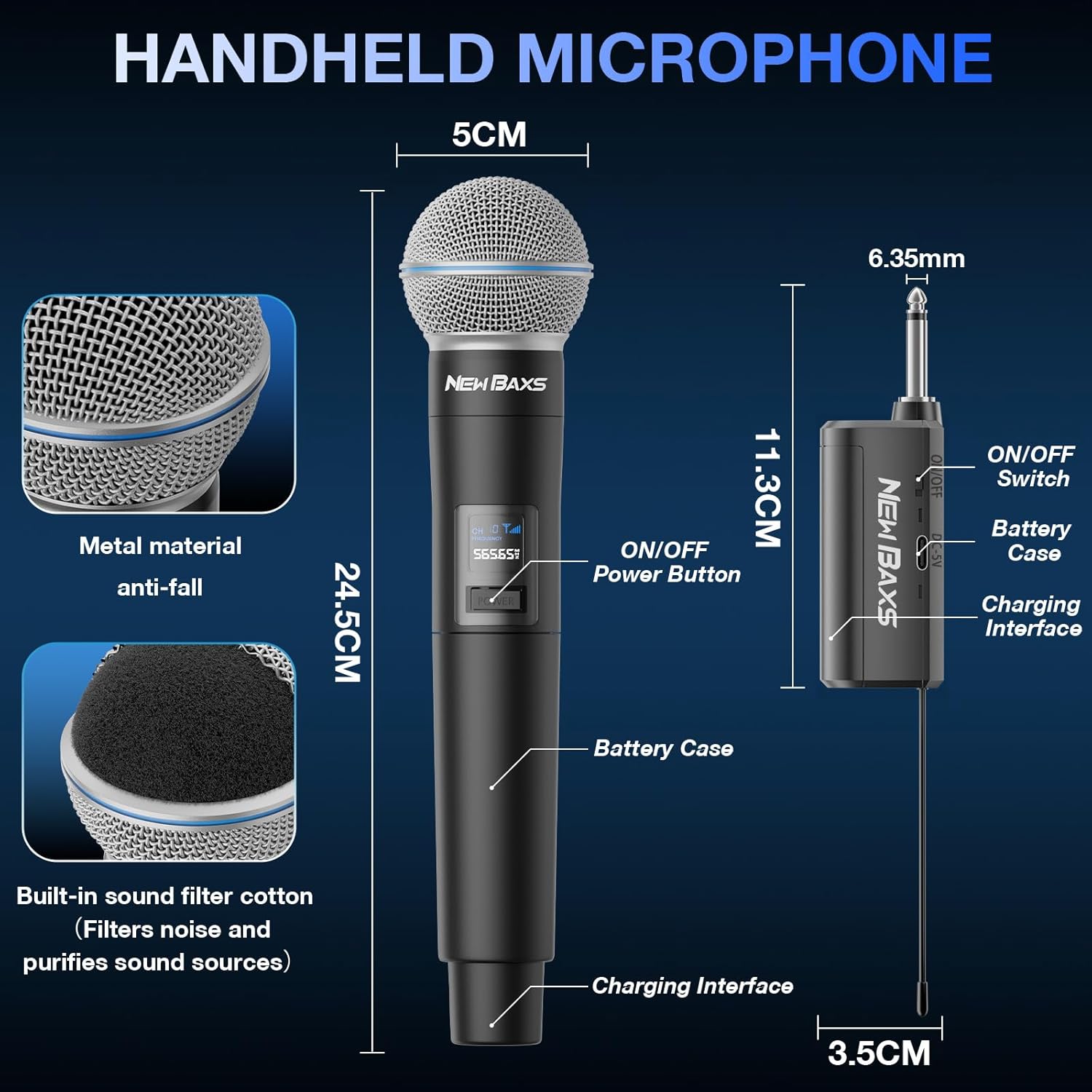
Image: Detailed view of the receiver, showing its ON/OFF switch, battery case, charging interface, and 3.5cm width.
Setup Guide
Battery Installation & Charging
- Unscrew the bottom part of each microphone to access the battery compartment.
- Insert one rechargeable battery into each microphone, ensuring correct polarity.
- Open the receiver's battery compartment and insert the third rechargeable battery.
- To charge, connect the provided USB-C charging cable to the charging interface at the bottom of the microphones and on the receiver. A full charge typically takes 2 hours.

Image: Illustration showing the internal rechargeable battery within the microphone and receiver, along with battery capacity, life, and charging time details.
Connecting the Receiver
- Ensure your audio equipment (karaoke machine, amplifier, mixer, powered speaker) has a 1/4'' (6.35mm) or 1/8'' (3.5mm) microphone input.
- If your device has a 1/4'' input, directly plug the receiver into the microphone connector.
- If your device has a 1/8'' input, attach the provided 3.5mm conversion plug to the receiver's 1/4'' jack before plugging it into your audio equipment.

Image: Diagram illustrating the wide compatibility of the receiver with various audio devices such as outdoor speakers, power amplifiers, street stereo speakers, car audio systems, PA speaker systems, karaoke speakers, and audio mixers. It also shows compatibility with 1/8" and 1/4" MIC inputs, and incompatibility with Bluetooth and AUX inputs.
Operating Instructions
Powering On/Off
- Slide the ON/OFF switch on the receiver to the 'ON' position. The indicator light will illuminate.
- Press and hold the power button on each microphone until its display screen lights up.
- To power off, press and hold the power button on the microphones and slide the receiver's switch to 'OFF'.

Image: Illustration showing the power button on the microphone and the ON/OFF switch on the receiver, demonstrating the plug-and-play connection process to a stereo system.
Pairing
The microphones and receiver are designed for automatic pairing. Once both are powered on and within range, they should connect automatically. The receiver's indicator light will turn solid blue or green (depending on the microphone) when successfully connected.
Usage
The wireless microphone system offers a massive signal range of up to 150ft, ensuring stable transmission indoors or outdoors. It is compatible with various audio equipment for karaoke, meetings, singing, and other events. Ensure you speak directly into the microphone for optimal sound capture.

Image: Illustration demonstrating the long-distance wireless signal range of up to 150ft from the microphone to the receiver, indicating stable transmission.
Care and Maintenance
Battery Usage Notes
- In cold conditions, lithium battery capacity may drop by 40%, leading to faster draining. This is normal.
- Charge the batteries a day before extended usage or if unused for several days.
- If the device will not be used for a long period, it is recommended to remove the batteries.
Cleaning
Wipe the microphones and receiver with a soft, dry cloth. Avoid using harsh chemicals or abrasive materials. The metallic mesh on the microphone head helps prevent dust intake, extending the life of the microphone.
Troubleshooting
- No Sound/Connection Issues: Ensure both microphones and the receiver are fully charged and powered on. Verify the receiver is correctly plugged into a compatible audio input. If connection fails, refer to the user manual for specific pairing/reset methods.
- Poor Sound Quality/Feedback: Ensure you are speaking directly into the microphone. The microphones feature noise reduction, but proper technique is essential. Check for any obstructions between the microphones and receiver that might interfere with the signal.
Technical Specifications
| Feature | Specification |
|---|---|
| Brand | NEW BAXS |
| Model Name | Handheld Wireless Microphone (UR02) |
| Connectivity Technology | 2.4G, RF |
| Connector Type | 3.5 mm Jack, 6.35 mm Jack |
| Special Feature | Noise Reduction, Rechargeable, Wireless |
| Compatible Devices | Car Audio System / PA Speaker System, Karaoke Machine, Outdoor Speaker, Power Amplifier, Street Stereo Speaker |
| Microphone Form Factor | Handheld |
| Power Source | Battery Powered |
| Number of Channels | 2 |
| Frequency Response | 15000 Hz |
| Item Weight | 10.6 ounces (0.3 Kilograms) |
| Product Dimensions | 7.68 x 2.56 x 12.01 inches |
| Material | Metal, Plastic |
| Battery Type | Lithium Ion (3 AA batteries required, included) |
| Polar Pattern | Hyper Cardioid |
Warranty and Customer Support
NEWBAXS provides a 24-month extended warranty for this product. For any issues or inquiries, please contact our 24-hour prompt customer service. We are committed to resolving any concerns to your satisfaction.