
1. Product Overview
The llano NP-W235 Dual Battery Fast Charger is designed for efficient charging of Fujifilm NP-W235 batteries. This compact and travel-friendly charger offers simultaneous charging for two batteries, featuring a digital display for instant battery level recognition. It also functions as a secure storage box for batteries and SD cards.

Image 1.1: The llano NP-W235 Dual Battery Fast Charger, showcasing its compact design.
Key Features:
- Super Fast Charging: Supports PD3.0 & QC3.0, fully charging two batteries in approximately 3 hours.
- Instant Battery Level Recognition: Digital display shows individual battery power levels and charging status.
- Dual Functionality: Serves as both a charger and a storage box for two batteries and two SD cards.
- Compact & Travel-Friendly: Lightweight design with a magnetic flip-open lid for secure transport.
- Versatile Charging Options: Compatible with various power sources including car chargers, computers, power banks, and USB-C wall adapters.
- Multiple Safeguards: Built-in protections against overvoltage, overcharge, overheating, overcurrent, and short circuits.
2. Setup Instructions
- Unpack the Charger: Carefully remove the llano NP-W235 Dual Battery Fast Charger from its packaging.
- Connect Power: Use the provided USB-C charging cable to connect the charger to a suitable power source. This can be a PD3.0 or QC3.0 compatible wall adapter, a computer USB-C port, a power bank, or a car charger.
- Insert Batteries: Open the magnetic flip-open lid. Insert up to two Fujifilm NP-W235 batteries into the designated slots. Ensure the battery contacts align correctly with the charger pins.
- Insert SD Cards (Optional): The charger includes slots for two SD cards for convenient storage. Insert your SD cards into these slots if desired.
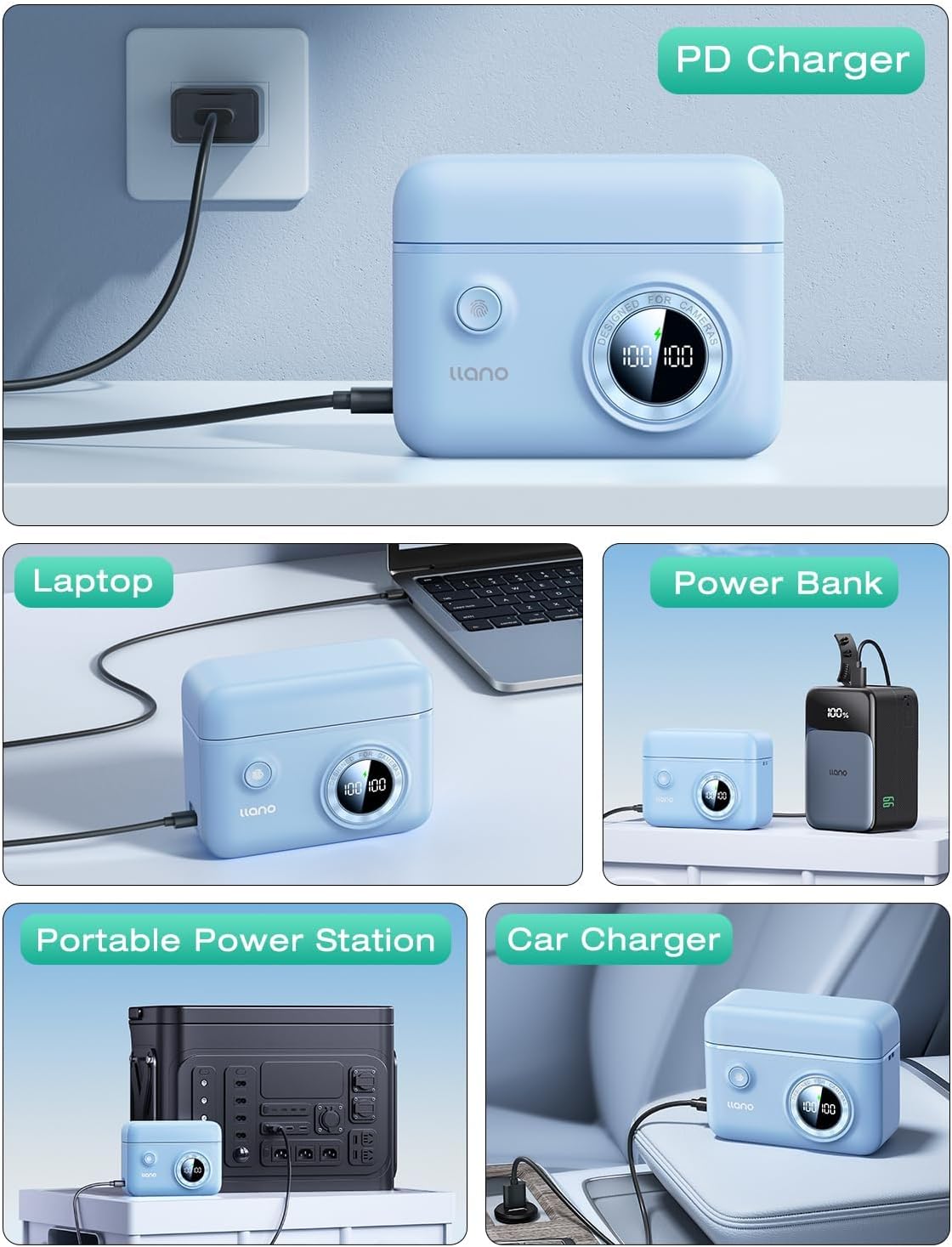
Image 2.1: The charger connected to a power source, demonstrating versatile charging options.
3. Operating Instructions
3.1 Charging Process
- Once batteries are inserted and the charger is connected to a power source, the digital display will activate.
- The display shows the current charge percentage for each battery independently. A lightning bolt icon indicates active charging.
- Charging typically takes about 3 hours for two fully depleted batteries when using a PD3.0 or QC3.0 compatible power source.
- The display will show "100%" when a battery is fully charged.

Image 3.1: Digital display indicating battery charge levels and charging status.
3.2 Checking Battery Levels
- Even when not connected to a power source, pressing the button on the charger will briefly activate the digital display to show the current charge level of the inserted batteries.
- This allows for quick checks of battery readiness before use.
3.3 Storage Function
- The magnetic flip-open lid securely holds batteries and SD cards in place, protecting them from dust and accidental disconnections.
- The compact design makes it suitable for travel and storage in camera bags.

Image 3.2: Features of the charger including the magnetic lid and SD card storage.
4. Maintenance
- Cleaning: Use a soft, dry cloth to clean the exterior of the charger. Avoid using liquid cleaners or solvents.
- Storage: Store the charger in a cool, dry place away from direct sunlight and extreme temperatures. Ensure the lid is closed to protect batteries and SD cards from dust.
- Battery Care: For optimal battery life, avoid fully discharging batteries frequently. Store batteries with a partial charge (around 50%) if not used for extended periods.
- Cable Care: Inspect the USB-C cable regularly for any signs of wear or damage. Replace if necessary.
5. Troubleshooting
5.1 Charger Not Powering On
- Check Power Source: Ensure the USB-C cable is securely connected to both the charger and a functional power outlet or device.
- Verify Cable: Try using a different USB-C cable to rule out a faulty cable.
- Test Outlet: Plug another device into the power outlet to confirm it is working.
5.2 Batteries Not Charging
- Proper Insertion: Ensure batteries are correctly inserted into the slots with contacts aligned.
- Battery Condition: Check if the batteries themselves are damaged or at the end of their lifespan. Try charging a different, known-good battery.
- Charger Functionality: If the display shows an error or no charging indication, refer to "Charger Not Powering On" steps.
5.3 Slow Charging
- Power Adapter Output: For fast charging, use a power adapter that supports PD3.0 or QC3.0 with sufficient wattage (e.g., 18W or higher). Standard USB ports on computers may charge slower.
- Cable Quality: Ensure you are using a high-quality USB-C cable capable of supporting fast charging.
6. Product Specifications
| Brand | llano |
| Model Number | LJN-CS008 |
| Compatible Batteries | Fujifilm NP-W235 |
| Input | USB-C (PD3.0 & QC3.0 compatible) |
| Output Voltage | 8.4 Volts |
| Charging Time | Approx. 3 hours for two batteries (with compatible fast charger) |
| Product Dimensions | 4.3 x 3.3 x 1.7 inches (10.9 x 8.4 x 4.3 cm) |
| Item Weight | 6.4 ounces (181 grams) |
| Additional Features | Digital display, SD card storage, magnetic lid, portable lanyard attachment points, anti-slip pads. |
7. Warranty and Support
For warranty information and customer support, please refer to the documentation included with your purchase or contact llano customer service directly through their official website or the retailer where the product was purchased.
Optional protection plans may be available for extended coverage. Please check with your retailer for details on available plans.