
1. Introduction
Thank you for choosing the PARD Optics Night Stalker 4K NS4-70/940/LRF Precision Riflescope. This advanced digital night vision riflescope is designed to provide superior optical performance and a rich feature set for various outdoor activities, including hunting and observation. Featuring a 4K CMOS sensor, a 1000m laser rangefinder, and a comfortable 100mm eye relief, this device offers exceptional clarity and precision in both day and night conditions. Please read this manual thoroughly before using the device to ensure proper operation and to maximize its lifespan.
2. Safety Information
- Eye Safety: Never look directly at the sun or any intense light source through the riflescope, as this can cause permanent eye damage.
- Laser Safety: The integrated laser rangefinder emits invisible laser radiation. Avoid direct eye exposure to the laser beam. Do not aim the laser at aircraft or personnel.
- Battery Handling: Use only the specified battery type. Ensure correct polarity when inserting batteries. Do not expose batteries to extreme heat or dispose of them in fire.
- Mounting: Ensure the riflescope is securely mounted to your firearm according to the instructions to prevent injury from recoil.
- Storage: Store the device in a cool, dry place, away from direct sunlight and extreme temperatures. Keep out of reach of children.
3. Package Contents
Verify that all items listed below are included in your package. If any items are missing or damaged, please contact your dealer.

Image: Contents of the PARD Night Stalker 4K package, including the riflescope, battery, cables, and mounting accessories.
- PARD Night Stalker 4K Riflescope (NS4-70/940/LRF)
- USB Type-C Cable
- Lithium Ion Battery (1 included)
- Rubber Eyepiece
- Scope Cover
- Cleaning Cloth
- Allen Wrench Set
- Mount Rings
- User Manual
4. Product Overview
Familiarize yourself with the main components and controls of your Night Stalker 4K riflescope.

Image: Front-left view of the riflescope, showing the objective lens and integrated rangefinder.

Image: Rear-right view of the riflescope, highlighting the eyepiece and control buttons.

Image: Top view of the riflescope, illustrating the main control knobs and buttons.

Image: Close-up of the riflescope's eyepiece, featuring the long eye relief design.
5. Setup
5.1 Battery Installation
- Locate the battery compartment, typically on the side or bottom of the main body.
- Unscrew the battery cap.
- Insert the provided Lithium Ion battery, ensuring the correct polarity (+/-) as indicated inside the compartment.
- Securely screw the battery cap back on.
5.2 Mounting the Riflescope
The Night Stalker 4K is designed for Picatinny rail mounting systems.
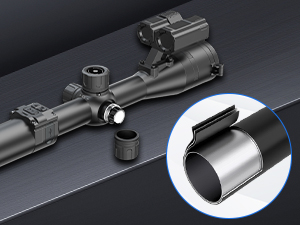
Image: Illustration of the mounting rings for the PARD Night Stalker 4K riflescope.
- Attach the provided mount rings to the riflescope body, ensuring they are evenly spaced.
- Place the riflescope with attached rings onto your firearm's Picatinny rail.
- Adjust the position for optimal eye relief (100mm is recommended for safety and comfort).
- Tighten the mounting screws securely using the Allen wrench, ensuring the riflescope is stable and aligned. Do not overtighten.
5.3 Initial Power On
Press and hold the power button (refer to Product Overview for location) for a few seconds until the display illuminates. The device will boot up and display the main observation screen.
6. Operating Instructions
6.1 Power On/Off
- Power On: Press and hold the power button until the screen activates.
- Power Off: Press and hold the power button until the device shuts down.
6.2 Focus Adjustment
- Diopter Adjustment: Rotate the diopter ring on the eyepiece to achieve a sharp image of the reticle.
- Objective Focus: Rotate the objective lens focus ring to bring your target into sharp focus.
6.3 Day/Night Mode Switching
The device automatically adjusts between day and night modes. Manual switching may also be available via the menu or a dedicated button for specific lighting conditions.
6.4 Zoom Functionality
The Night Stalker 4K offers a wide magnification range from 1x to 70x. Use the designated zoom control (typically a rotary knob) to adjust the magnification level to suit your observation needs.
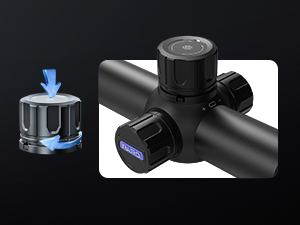
Image: Close-up of the control knobs, including the zoom adjustment.
6.5 Zeroing (Reticle Adjustment)
The device features a swift and simple zeroing process, allowing you to save up to 5 zeroing profiles.

Image: Visual representation of the swift and simple zeroing process.
- Fire a shot at a target.
- Without moving the riflescope, use the adjustment controls to move the reticle to the point of impact.
- Save the zeroing profile. Repeat for different distances or ammunition types if desired.
6.6 Rangefinder Usage
The integrated 1000m laser rangefinder provides accurate distance measurements to your target.

Image: Display showing the integrated 1000m rangefinder in use, indicating target distance.
- Activate the rangefinder function via the menu or a dedicated button.
- Aim the reticle at your target and press the measurement button. The distance will be displayed on the screen.
6.7 Reticle Options
The Night Stalker 4K offers multiple reticle patterns and color options to suit user preference and environmental conditions.

Image: Various reticle patterns and colors available for selection.
- Navigate to the reticle settings in the device menu.
- Select your preferred reticle style and color.
6.8 Video Recording and Wi-Fi
The device supports video recording and Wi-Fi connectivity for sharing and reviewing footage.
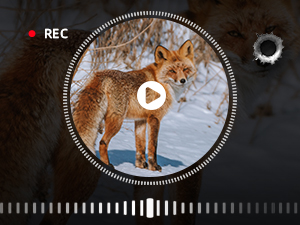
Image: Screen display indicating active video recording.
- Recording: Press the record button to start/stop video recording. Footage is saved to an internal memory or an inserted SD card (if applicable).
- Wi-Fi: Activate Wi-Fi in the settings to connect to a smartphone or tablet via the PARD Vision app for live view, remote control, and media transfer.
7. Maintenance
7.1 Cleaning
- Lenses: Use the provided cleaning cloth or a soft, lint-free cloth specifically designed for optics. Gently wipe the lens surfaces. For stubborn dirt, use a small amount of lens cleaning fluid.
- Body: Wipe the riflescope body with a soft, damp cloth. Avoid abrasive cleaners or solvents.
7.2 Storage
- Ensure the device is turned off and the battery is removed if storing for extended periods.
- Store the riflescope in its protective cover in a cool, dry, and well-ventilated area.
- Avoid areas with high humidity, extreme temperatures, or direct sunlight.
8. Troubleshooting
If you encounter issues with your Night Stalker 4K, refer to the following common problems and solutions:
| Problem | Possible Cause | Solution |
|---|---|---|
| Device does not power on | Low or dead battery; Incorrect battery installation | Charge or replace battery; Check battery polarity |
| Unclear or blurry image | Improper focus adjustment; Dirty lenses | Adjust objective and diopter focus; Clean lenses with a soft cloth |
| Reticle not centered or zeroing issues | Improper zeroing procedure; Loose mounting | Repeat zeroing procedure carefully; Ensure riflescope is securely mounted |
| Rangefinder not working | Obstruction in laser path; Target too far or too small | Ensure clear line of sight; Try measuring a closer or larger target |
| Wi-Fi connection issues | Wi-Fi not enabled; Incorrect app settings | Enable Wi-Fi in device settings; Check PARD Vision app for correct configuration |
If the problem persists after attempting these solutions, please contact PARD customer support or your authorized dealer for further assistance.
9. Specifications
Detailed technical specifications for the PARD Night Stalker 4K NS4-70/940/LRF riflescope.
| Feature | Specification |
|---|---|
| Model Number | NS4-70/940/LRF |
| Sensor Resolution | 3840 x 2160 (4K CMOS) |
| Magnification | 1x - 70x |
| Eye Relief | 100 mm |
| Integrated Rangefinder | 1000m / 1200 yards |
| IR Illuminator Wavelength | 940nm (Invisible IR) |
| Display Type | Round Display |
| Zeroing Profiles | 5 sets |
| Material | Aluminum |
| Weight | 680 g |
| Dimensions | 34.6 x 9.3 x 8.2 cm |
| Battery Type | 1x Lithium Ion (included) |
| Mounting Type | Picatinny Mount |
| Compatible Devices | Rifles, Shotguns |
| Origin | China |
10. Warranty and Support
PARD Optics products are manufactured to high-quality standards and are covered by a limited warranty. For specific warranty terms and conditions, please refer to the warranty card included with your product or visit the official PARD Optics website. For technical support, service, or inquiries, please contact your local dealer or PARD customer service through their official channels.
Online Resources: For additional information, firmware updates, and FAQs, please visit the official PARD Optics website.


