
1. Introduction
Thank you for choosing the arungo MP10 MP3 Player. This device is designed to provide a portable and versatile audio experience, featuring HiFi lossless sound, a built-in speaker, voice recording, e-book reading, and FM radio functions. This manual will guide you through the setup, operation, and maintenance of your new MP3 player.
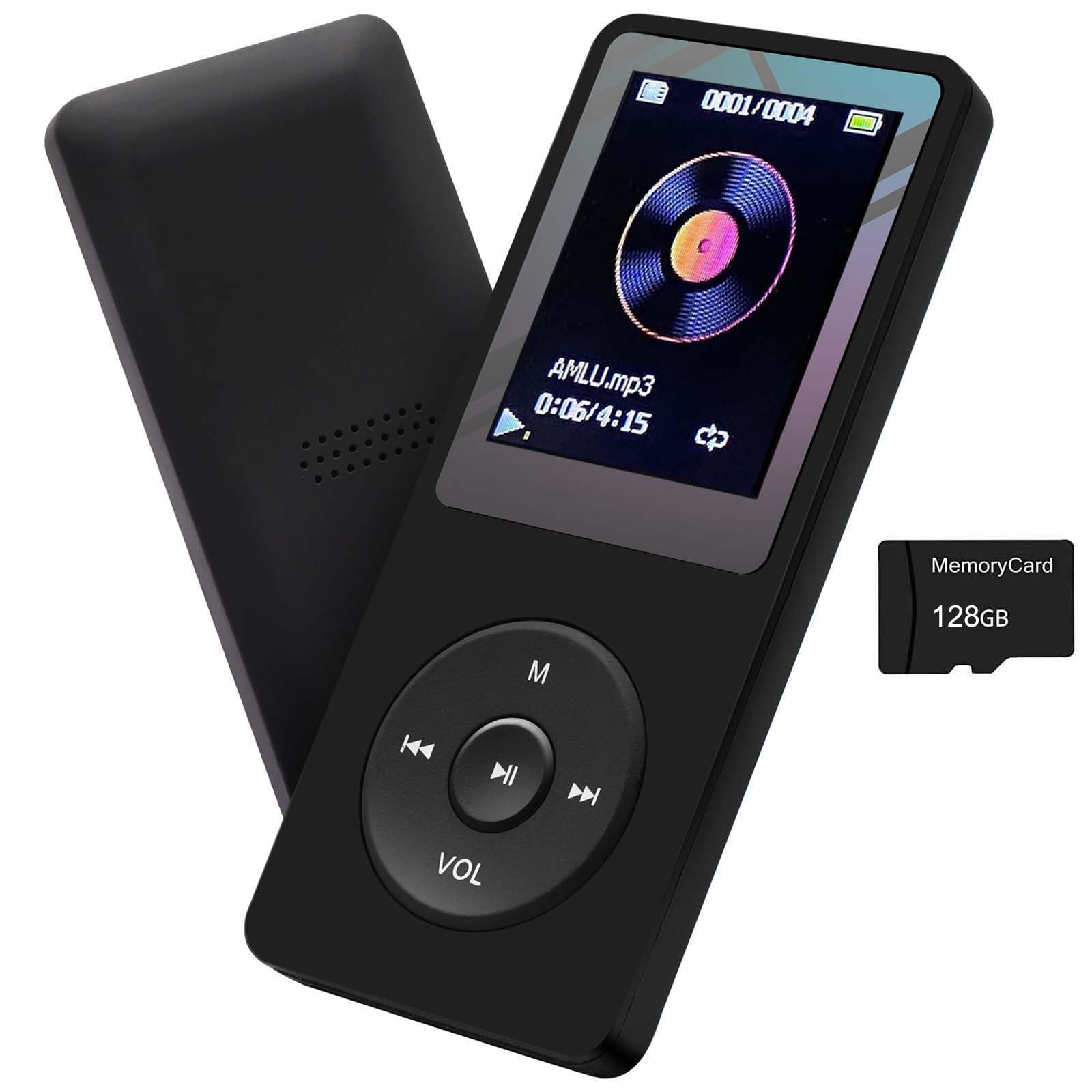
Figure 1: arungo MP10 MP3 Player
2. Package Contents
Please check the package for the following items:
- 1 x arungo MP10 MP3 Player
- 1 x 128GB TF Card (pre-inserted)
- 1 x Earphone
- 1 x Charging Cable
- 1 x User Manual (this document)

Figure 2: Package Contents
3. Setup
3.1. Inserting the TF Card
The 128GB TF card is typically pre-inserted into the player. If you need to insert or replace it, locate the TF card slot on the side of the device. Gently push the card into the slot until it clicks into place. To remove, push the card again until it springs out.
Important: It is recommended to format the memory card on a computer before initial use to ensure optimal performance and compatibility.

Figure 3: TF Card Insertion
3.2. Charging the Device
Connect the provided charging cable to the MP3 player's charging port and the other end to a USB power source (e.g., computer USB port, USB wall adapter). The battery icon on the screen will indicate charging status. When the battery icon turns stable green, the device is fully charged. A full charge typically takes 3-4 hours.

Figure 4: Charging the MP3 Player
3.3. Transferring Music Files
To transfer music or other files, connect the MP3 player to your computer using the charging cable. The player will appear as a removable disk drive. Drag and drop your desired files into the appropriate folders on the player's memory card. Ensure the memory card is inserted before transferring files.
4. Operating Instructions
4.1. Button Guide
Familiarize yourself with the player's buttons for easy navigation:

Figure 5: Button Functions
- M (Menu/Up): Short press to enter the menu. Long press to return to the main interface.
- ◀◀ (Left/Previous): When playing music, short press to select the previous music file. Long press to rewind the music.
- ►► (Confirm/Play/Pause): Short press to confirm selection or play/pause music. Long press to turn the player on or off.
- ▶▶ (Right/Next): When playing music, short press to select the next music file. Long press to fast forward the music.
- VOL (Volume/Down/Return): Short press to return to the previous step. Long press to enter the volume adjustment menu, then use ◀◀ or ▶▶ to adjust.
4.2. Main Functions Overview
The arungo MP10 offers several functions accessible from the main menu:

Figure 6: Main Menu Functions
- Music: Play audio files (MP3, WMA, APE, FLAC, WAV, AAC).
- Videos: Play video files (specific formats may apply).
- FM Radio: Listen to FM radio stations.
- Picture: View image files.
- Record: Use the built-in voice recorder.
- E-book: Read text files.
- Files: Browse and manage files on the memory card.
- Games: Access pre-loaded games.
- Settings: Adjust device preferences.
4.3. Using the FM Radio
To use the FM radio function, ensure earphones are connected to the player, as they act as the antenna. Navigate to the 'FM Radio' option from the main menu. You can then scan for stations, save presets, and adjust the frequency range.

Figure 7: FM Radio Interface
5. Maintenance
- Keep the device dry. Avoid exposure to moisture or liquids.
- Clean the screen and body with a soft, dry cloth. Do not use abrasive cleaners.
- Avoid extreme temperatures. Store the player in a cool, dry place.
- Do not attempt to disassemble or repair the device yourself. This may void the warranty.
- Regularly back up important files from the memory card to prevent data loss.
6. Troubleshooting
If you encounter issues with your arungo MP10 MP3 Player, please refer to the following common solutions:
| Problem | Possible Solution |
|---|---|
| Device does not turn on | Ensure the battery is charged. Connect to a power source and try again. If unresponsive, perform a soft reset by holding the power button for an extended period. |
| Cannot transfer files to the device | Check if the USB cable is properly connected. Ensure the TF card is correctly inserted and formatted. Try connecting to a different USB port or computer. |
| "Format error" message when playing music/viewing pictures | The file format may not be supported. Refer to the specifications for supported formats. The memory card might also require reformatting (back up data first). |
| Poor sound quality | Check earphone connection. Ensure the audio file is not corrupted. Adjust equalizer settings if available. |
| FM Radio not working | Ensure earphones are plugged in, as they serve as the antenna. Try rescanning for stations. |
7. Specifications
| Feature | Detail |
|---|---|
| Brand | arungo |
| Model Name | MP10 |
| Memory Storage Capacity | 128 GB (via TF Card) |
| Screen Size | 1.8 Inches |
| Display Technology | LCD |
| Connectivity Technology | Aux (for earphones) |
| Special Feature | Built-In Speaker |
| Supported Audio Formats | MP3, WMA, APE, FLAC, WAV, AAC |
| Battery Average Life | Up to 10 Hours |
| Item Dimensions (D x W x H) | 0.28"D x 1.54"W x 3.54"H |
8. Warranty
The arungo MP10 MP3 Player comes with a 1-year warranty from the date of purchase. This warranty covers manufacturing defects and malfunctions under normal use. It does not cover damage caused by misuse, accidents, unauthorized modifications, or normal wear and tear. For warranty claims, please retain your proof of purchase.
Additionally, a 30-day refund/replacement return policy is typically offered through the retailer.
9. Support
For further assistance, technical support, or inquiries regarding your arungo MP10 MP3 Player, please contact arungo customer service. Refer to the contact information provided with your product packaging or visit the official arungo website for support details.