
1. Introduction
Thank you for choosing the InnoView 15.6-inch Touch Panel Portable Monitor. This device is designed to enhance your productivity and entertainment experience with its vibrant IPS Full HD display and versatile connectivity options. This manual provides essential information for setting up, operating, and maintaining your new monitor.
Key Features:
- 15.6-inch Full HD (1920x1080) IPS Display: Enjoy crisp, clear visuals with a wide 178° viewing angle and a high 1200:1 contrast ratio.
- 10-Point Multi-Touch Functionality: Interact intuitively with your content, supporting various gestures for enhanced convenience.
- Versatile Connectivity: Equipped with two full-featured USB Type-C ports and a standard HDMI port for broad compatibility.
- Built-in Speakers: Enjoy audio directly from the monitor without external speakers.
- Integrated Self-Standing Stand: Adjustable from 0° to 90° for optimal viewing angles, with non-slip rubber for stability.
- VESA Mount Compatible: Supports 75x75mm VESA mounting for flexible setup options.
- Lightweight and Portable: Designed for easy transport, making it ideal for travel and mobile workstations.
2. Setup Guide
Package Contents:
- InnoView 15.6-inch Portable Monitor
- Protective Bag
- USB Type-C to Type-C Cable (Full-featured)
- HDMI to HDMI Cable
- USB-A to USB Type-C Cable
- Power Adapter (USB-C)
- User Manual

Image: InnoView Portable Monitor and its accessories, including cables and protective bag.
Connecting Your Device:
The monitor offers flexible connection options depending on your device. Ensure your device's USB Type-C port supports DisplayPort Alt Mode for full functionality (video, power, touch) via a single cable.
- Single USB Type-C Cable Connection (Full Function):
- Connect one end of the full-featured USB Type-C to Type-C cable to your laptop/smartphone's USB Type-C port (which supports DisplayPort Alt Mode).
- Connect the other end to the monitor's full-featured USB Type-C port.
- The monitor will automatically display the screen, receive power, and enable touch functionality.

Image: Connection diagram for laptop and smartphone using a single USB Type-C cable.
- HDMI and USB-A to USB Type-C Connection (for devices without full-featured USB-C):
- Connect the HDMI cable from your device (PC, game console) to the monitor's HDMI port.
- Connect the USB-A to USB Type-C cable from your device's USB-A port to the monitor's USB Type-C port for touch functionality.
- For power, connect the provided USB Type-C power adapter (not included in all packages, 15W or higher recommended) to the monitor's second USB Type-C port.
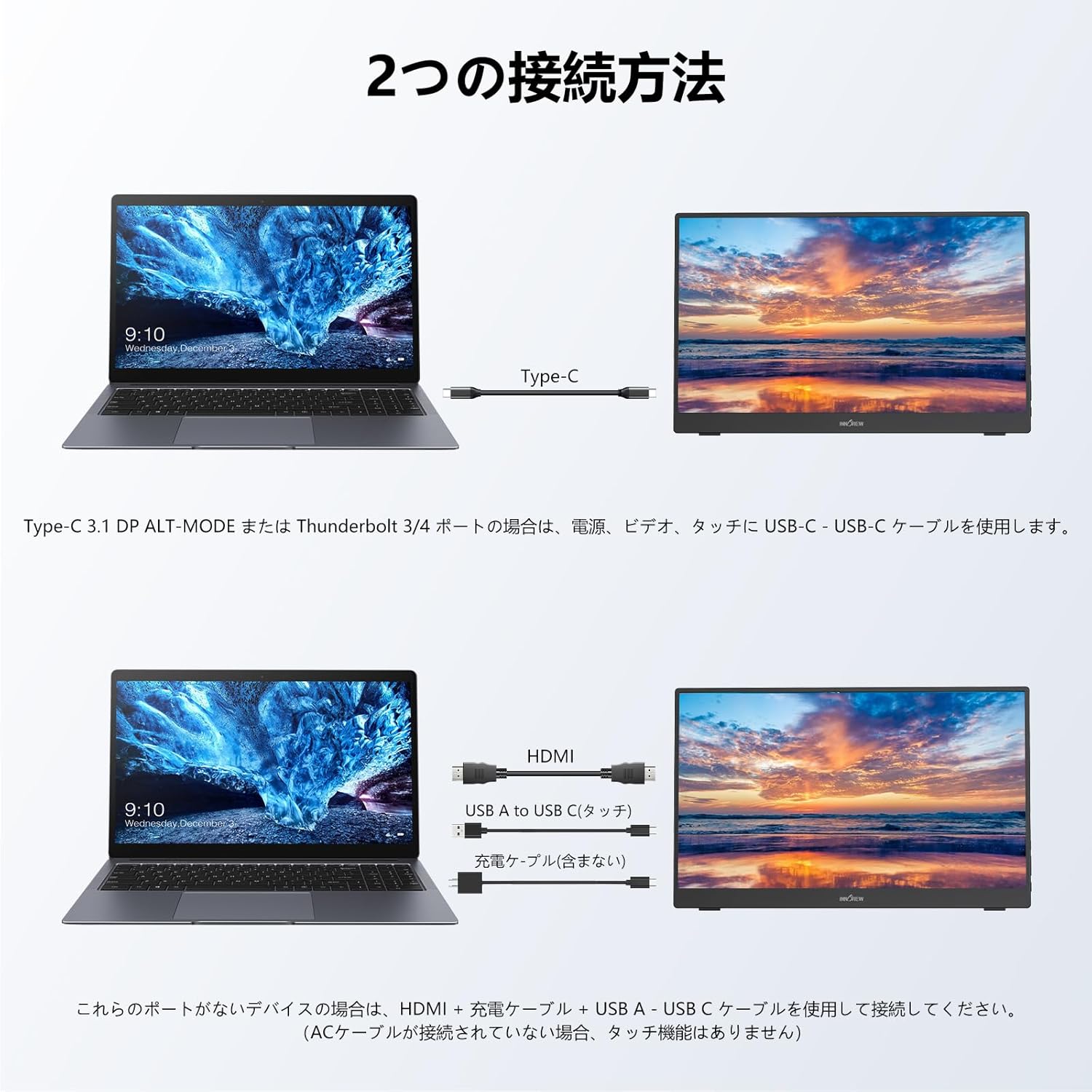
Image: Connection diagram for PC and game console using HDMI and USB-A to USB Type-C cables.
Note: If the display brightness or volume is low, ensure the monitor is powered by a 15W or higher power adapter (sold separately).
3. Operating Instructions
Power On/Off and Menu Controls:
The monitor features intuitive buttons for power, volume, and menu navigation located on the side. Refer to the diagram below for button functions.

Image: Side view of the monitor highlighting the headphone jack, menu button, brightness/volume controls, and power button.
Display Modes:
The monitor supports three display modes:
- Duplicate Mode: Mirrors your primary screen.
- Extend Mode: Extends your desktop, providing more screen real estate.
- Second Screen Only Mode: Displays content only on the portable monitor.
These modes can typically be configured through your connected device's display settings.
Touch Functionality:
The 10-point multi-touch screen allows for gestures like zooming, scrolling, and tapping, making navigation and interaction highly efficient. This feature is particularly useful for presentations and creative work.

Image: A user demonstrating multi-touch gestures on the portable monitor, connected to a laptop.
Integrated Stand and VESA Mount:
The monitor features a built-in self-standing stand that can be adjusted from 0° to 90° for comfortable viewing. For more permanent or space-saving setups, the monitor is compatible with 75x75mm VESA mounts, allowing it to be attached to monitor arms or wall brackets.
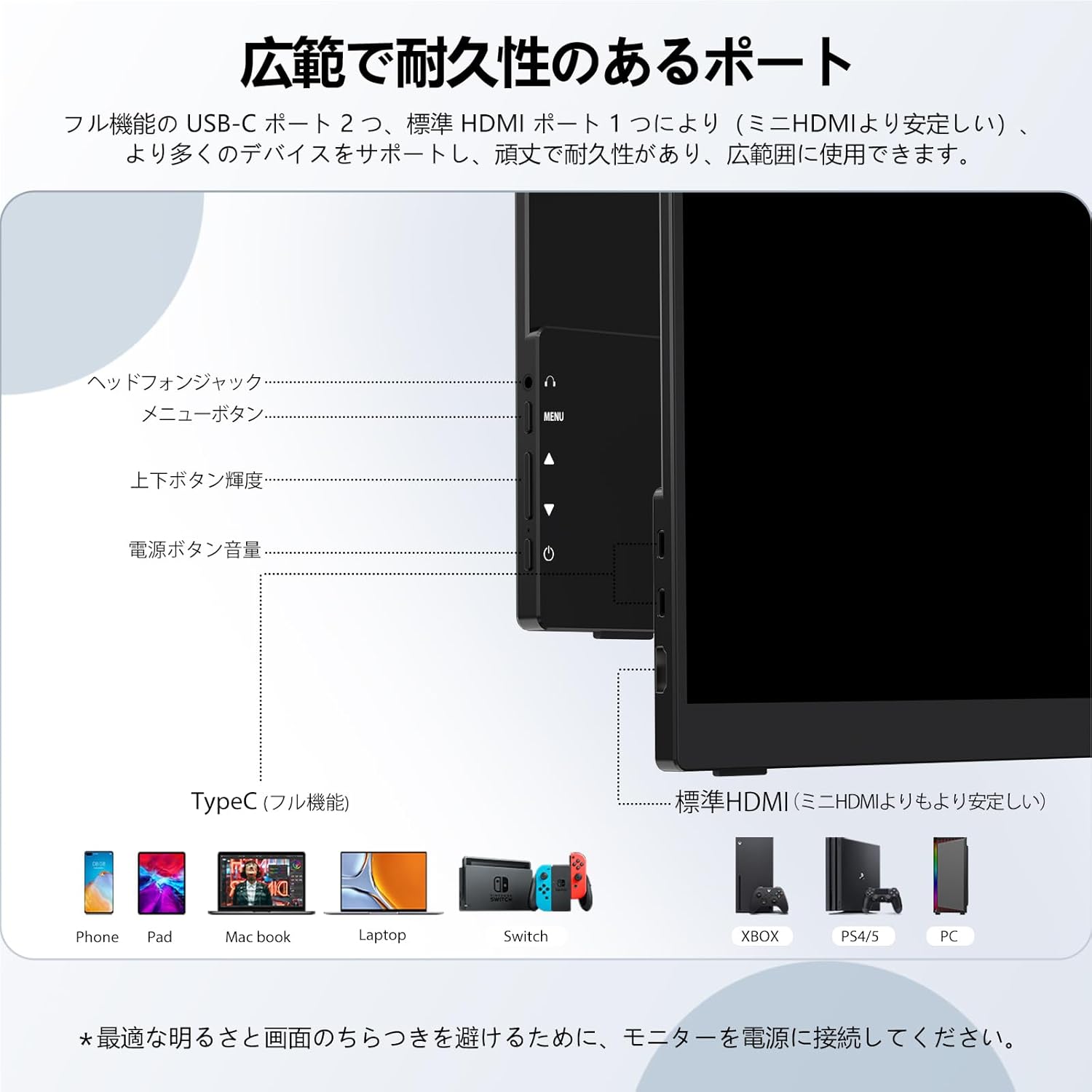
Image: Diagram illustrating the monitor's adjustable stand and its compatibility with VESA mounts.
4. Maintenance
- Cleaning: Use a soft, lint-free cloth to gently wipe the screen. For stubborn smudges, slightly dampen the cloth with water or a screen-cleaning solution. Avoid harsh chemicals.
- Storage: When not in use, store the monitor in its protective bag to prevent scratches and damage.
- Handling: Handle the monitor with care to avoid dropping or impacting it.
5. Troubleshooting
- No Display/Low Brightness:
- Ensure the monitor is properly connected to a power source (15W or higher adapter recommended if using HDMI or if USB-C power is insufficient).
- Verify that your device's USB Type-C port supports DisplayPort Alt Mode if using a single USB-C cable.
- Check cable connections for looseness or damage.
- Touch Function Not Working:
- Ensure the USB Type-C cable is connected for touch data (or the USB-A to USB Type-C cable if using HDMI).
- Some devices (e.g., iOS, iPadOS, PS3/4/5, Switch, Xbox) may not support touch functionality due to system protection.
- No Audio:
- Check the monitor's volume settings and your connected device's audio output settings.
- Ensure the audio source is correctly routed to the monitor.
6. Specifications
| Feature | Specification |
|---|---|
| Brand | InnoView |
| Model Number | YC-PM001-04B |
| Screen Size | 15.6 inches |
| Resolution | 1920 x 1080 (Full HD) |
| Panel Type | IPS LCD |
| Viewing Angle | 178° |
| Contrast Ratio | 1200:1 |
| Refresh Rate | 60 Hz |
| Response Time | 20 ms |
| Touch Function | 10-point Multi-Touch |
| HDR Support | Yes |
| Connectivity | 2x Full-featured USB Type-C, 1x Standard HDMI |
| Built-in Speakers | Yes |
| VESA Mount | 75x75mm |
| Product Dimensions | 1.1 x 35.5 x 22 cm |
| Product Weight | 1.7 kg |
7. Warranty and Support
Product Warranty:
- All products undergo 100% inspection before shipment to ensure no initial defects.
- Enjoy a 30-day free refund and exchange policy from the date of purchase.
- A 1-year warranty is included from the date of purchase. This can be extended by an additional 2 years upon warranty registration.
- During the warranty period, if the product malfunctions due to non-human error, refunds, exchanges, or repairs will be provided.
After-Sales Service:
InnoView is a specialized manufacturer of portable monitors. Our technical support team is available 24/7 to assist with any technical issues. Please do not hesitate to contact us if you have any questions or concerns.
For support, please refer to the contact information provided with your product or visit the official InnoView website.
8. Product Media
Official Product Videos:
Video: A detailed overview of the 15.6-inch touch panel portable monitor, showcasing its features and connectivity options. This video demonstrates the product's lightweight design, ease of setup, and various display modes, including its use with a laptop and smartphone.
Video: This video highlights the 15.6-inch touch panel portable monitor's 2.8K resolution and 100Hz refresh rate, emphasizing its suitability for gaming and high-definition content. It also demonstrates the multi-touch capabilities and various connection methods.
Video: A brief demonstration of the Mydual 15.6-inch touch portable monitor, showcasing its compact design and ease of use for various applications.
Video: This video provides a quick look at the 15.6-inch portable touch monitor, emphasizing its portability and touch screen features for on-the-go use.
Video: A demonstration of the EVICIV 15.6-inch touch monitor, highlighting its portability and functionality for various tasks and entertainment.
Video: This video from BestCONSUNG showcases the 15.6-inch touch panel portable monitor with 2.8K resolution, focusing on its visual quality and touch interface.