1. Introduction
Thank you for choosing the Moman HA1 True Wireless Ski Helmet Speakers. This innovative headset is designed to provide high-quality audio and convenient control for various outdoor activities, including skiing, snowboarding, and motorcycling. Its ultra-compact and portable design ensures easy installation and a comfortable experience.
Key Features:
- True Wireless & Easy Installation: No tangled cables, simple setup.
- HD Sound Quality & Noise Reduction: 42mm speakers with Hi-Fi articulation and effective wind noise reduction.
- Wide Compatibility: Designed for audio-ready, ski, snowboard, three-quarter, earmuff half, and vintage helmets. (Note: Not compatible with most full face, modular, and rally helmets.)
- Glove-Friendly Remote Control: IPX4 waterproof remote for easy music, volume, and voice assistant control.
- LED Display Charging Case & Long Battery Life: 1900mAh charging case provides up to 10 hours of working time.
- Wireless 5.3 & One-step Matching: Faster transmission, stable connection, lower latency, and better interference immunity.
2. Package Contents
Please check the package for the following items:
- Charging Case x1
- Pair of Headphones (Speakers) x1
- Remote Control x1
- USB Cable x1
- Velcro Pads x4
- Instruction Manual x1
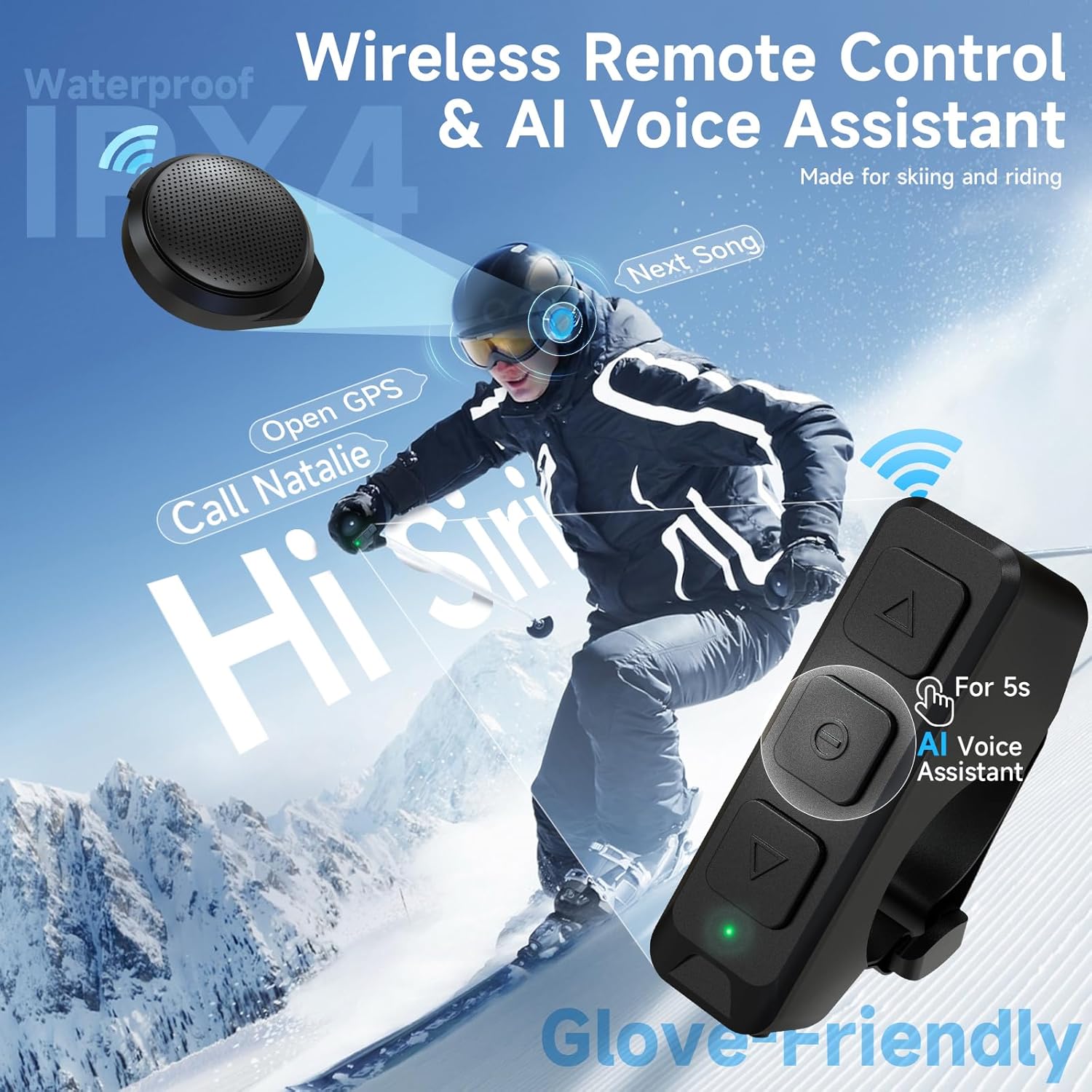
Figure 2.1: All components included in the Moman HA1 package.
3. Product Overview
The Moman HA1 system consists of two main units: the helmet speakers with their charging case, and a separate remote control.

Figure 3.1: Moman HA1 True Wireless Ski Helmet Speakers with charging case and remote control.
3.1 Helmet Speakers
The two compact speakers are designed to fit inside compatible helmets. They feature a slim profile (42mm diameter, 14mm thickness) for comfort and integrate seamlessly into the helmet's ear pads.

Figure 3.2: Dimensions of the Moman HA1 helmet speakers.
3.2 Charging Case
The robust charging case not only protects the speakers but also provides extended battery life with its built-in 1900mAh battery. An LED display on the case shows the remaining power for both the case and individual speakers.

Figure 3.3: The charging case displays battery levels for both the case and the individual speakers.
3.3 Remote Control
The IPX4 waterproof remote control allows for easy operation of music, volume, and voice assistant functions without needing to remove gloves. It can be mounted on handlebars or ski poles.

Figure 3.4: The remote control can be easily mounted for convenient access during activities.
4. Setup
4.1 Speaker Installation in Helmet
- Identify the ear pad pockets or suitable flat surfaces inside your helmet where the speakers can be placed comfortably without obstructing your ears.
- Peel off the protective paper from one side of the provided Velcro pads.
- Attach the Velcro pad firmly to the back of each speaker.
- Peel off the protective paper from the other side of the Velcro pads attached to the speakers.
- Carefully position and press each speaker into the helmet's ear pad area, ensuring a secure fit.
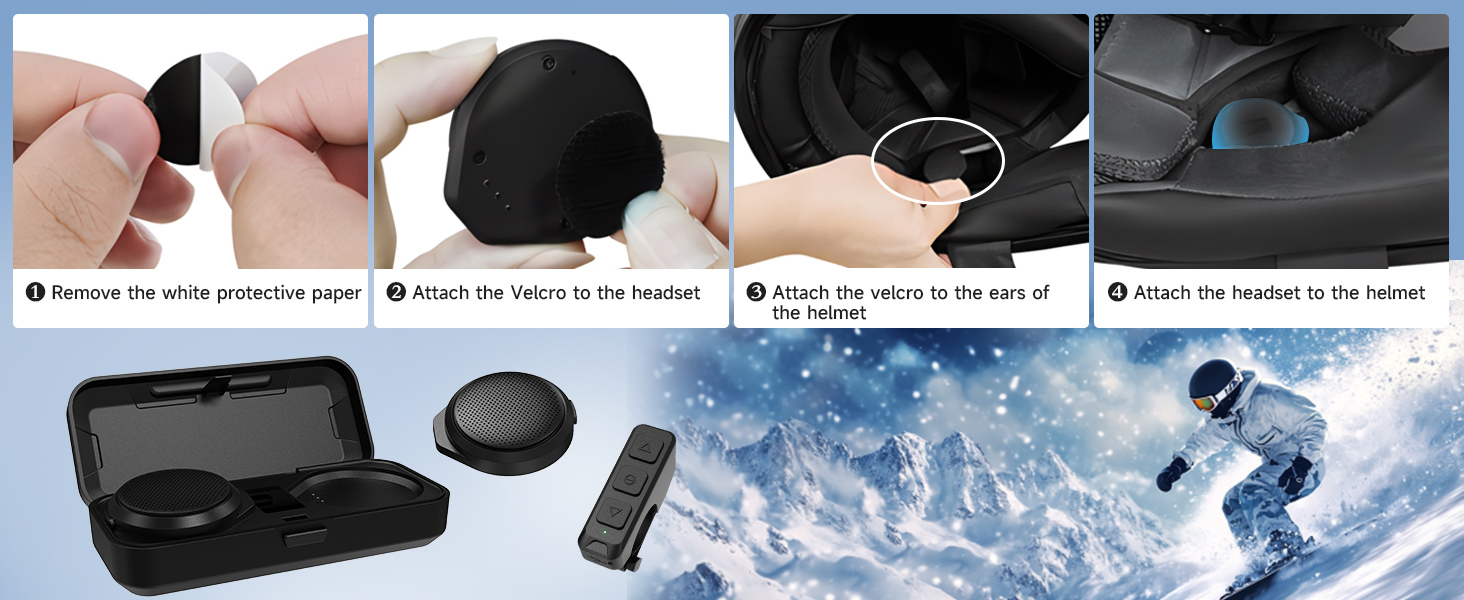
Figure 4.1: Step-by-step guide for installing the speakers into your helmet.
4.2 Remote Control Installation
The remote control comes with a silicone case and a strap for easy attachment.
- Insert the remote control into its silicone case.
- Use the adjustable strap to secure the remote control to your motorcycle handlebar, ski pole, or other convenient location. Ensure it is tightly fastened to prevent movement during activity.
4.3 Bluetooth Pairing
- Ensure the speakers are charged and removed from the charging case. They will automatically enter pairing mode.
- On your smartphone or Bluetooth-enabled device, go to the Bluetooth settings.
- Search for "H360" (or similar device name) in the list of available devices.
- Select "H360" to connect. Once connected, you will hear a confirmation tone, and the device name will show as paired.
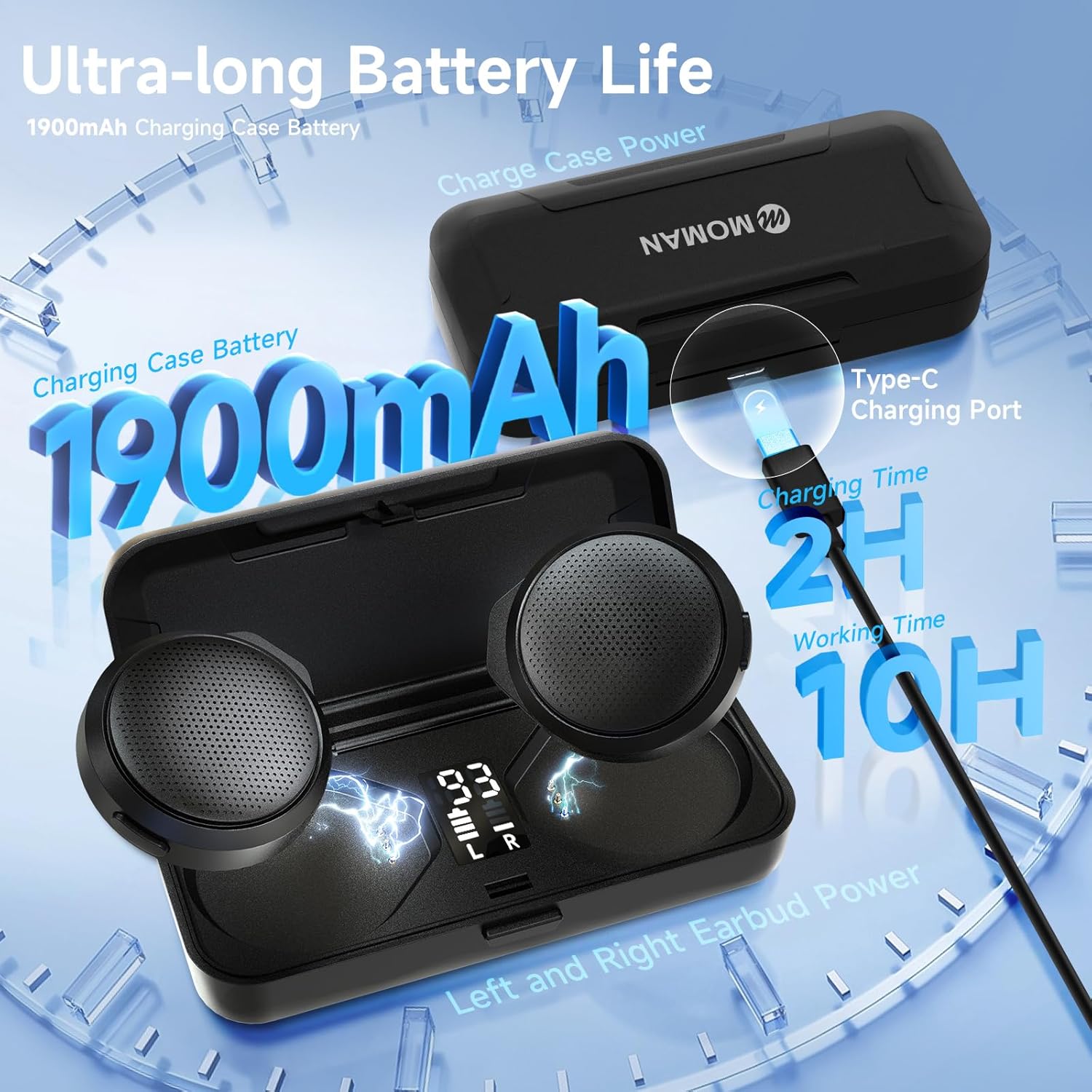
Figure 4.2: Bluetooth pairing interface on a smartphone.
4.4 Setup Videos
Video 4.1: An overview of the Moman Ski Helmet Speakers, including unboxing, installation, and initial setup.
Video 4.2: Detailed demonstration of the Moman HA1 Ski Helmet Speakers' features and installation process.
5. Operating Instructions
5.1 Power On/Off
- Speakers: The speakers automatically power on when removed from the charging case and power off when placed back inside.
- Remote Control: Press and hold the center button for a few seconds to power on or off.
5.2 Music Playback
Use the remote control to manage your audio:
- Play/Pause: Press the center button once.
- Volume Up: Press the top button (▲) once.
- Volume Down: Press the bottom button (▼) once.
- Next Song: Press and hold the bottom button (▼).
- Previous Song: Press and hold the top button (▲).
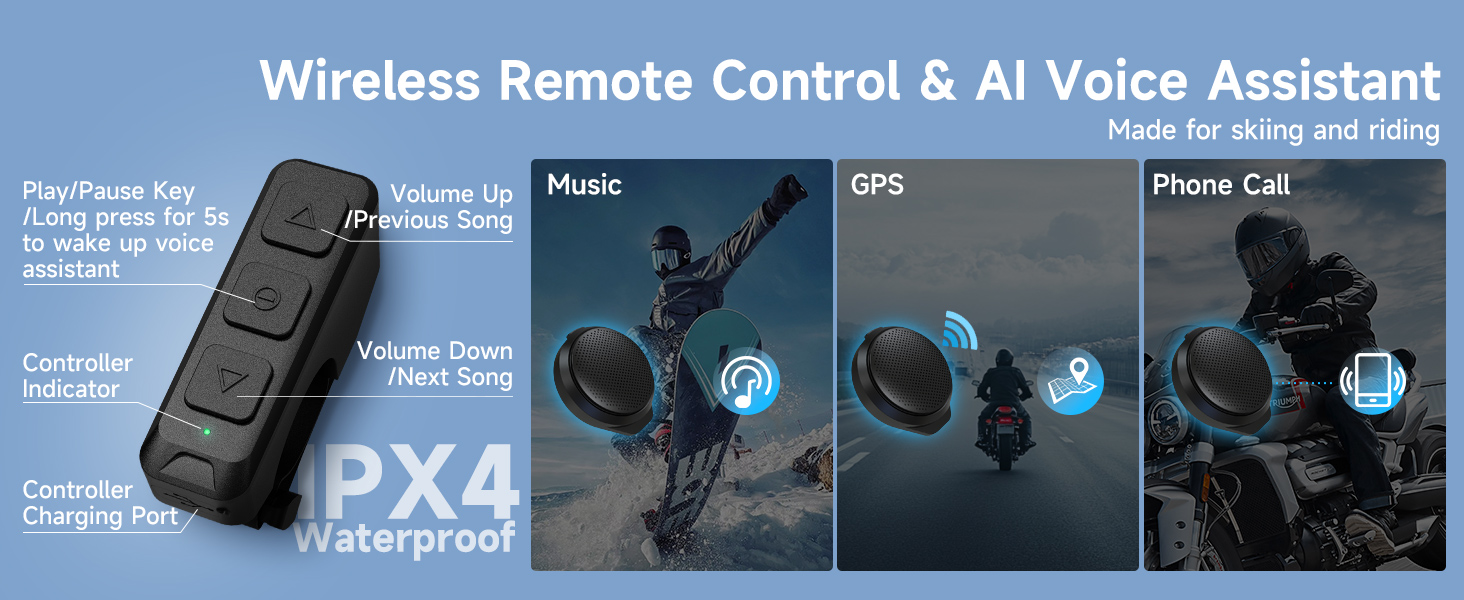
Figure 5.1: Remote control layout and functions for music, GPS, and phone calls.
5.3 Call Management
- Answer Call: Press the center button once.
- End Call: Press the center button once during a call.
- Reject Call: Press and hold the center button.
5.4 Voice Assistant
- Activate Voice Assistant (Siri/Google Assistant): Press and hold the center button for 5 seconds.
6. Maintenance
6.1 Charging
To charge the speakers, place them back into the charging case. The LED display on the case will indicate charging status and battery levels. Connect the charging case to a USB power source using the provided USB-C cable.
- Charging Time: Approximately 2 hours for a full charge.
- Working Time: Up to 10 hours on a single charge.
- Standby Time: Up to 50 hours.

Figure 6.1: Charging details and battery life of the Moman HA1 system.
6.2 Cleaning and Storage
- Wipe the speakers and remote control with a soft, dry cloth. Do not use harsh chemicals or abrasive materials.
- Store the device in its charging case in a cool, dry place when not in use.
- Avoid exposing the device to extreme temperatures or direct sunlight for prolonged periods.
7. Troubleshooting
| Problem | Possible Cause | Solution |
|---|---|---|
| No sound from speakers. | Speakers not powered on or paired. Low battery. | Ensure speakers are removed from case and paired. Charge speakers and case. |
| Unable to pair with device. | Speakers not in pairing mode. Device Bluetooth off. Interference. | Place speakers back in case then remove to re-enter pairing mode. Ensure Bluetooth is enabled on your device. Move closer to the device. |
| Remote control not responding. | Remote battery low. Not paired with speakers. | Ensure remote control is charged. Re-pair remote with speakers (refer to pairing instructions if needed). |
| Poor sound quality or static. | Distance from paired device. Interference. | Reduce distance between speakers and paired device. Avoid strong electromagnetic interference. |
8. Specifications
- Model Name: HA1
- Connectivity Technology: Wireless (Bluetooth 5.3)
- Audio Driver Size: 42 Millimeters (Dynamic Driver)
- Frequency Range: 20 Hz - 20,000 Hz
- Control Type: Media Control (Remote)
- Water Resistance Level: Not Water Resistant (Remote is IPX4)
- Charging Case Battery: 1900mAh
- Working Time: Up to 10 hours
- Standby Time: Up to 50 hours
- Material: Plastic
- Item Weight: 8.8 ounces
- Package Dimensions: 7.01 x 3.94 x 1.81 inches
9. Warranty and Support
Moman products are manufactured to the highest quality standards. For information regarding warranty coverage, technical support, or service inquiries, please refer to the warranty card included in your package or visit the official Moman website.
For direct support, please contact Moman customer service through their official channels, typically found on their website or product packaging.


