
1. Introduction
This manual provides detailed instructions for the AGPTEK A65 64GB MP3 Player. Please read this manual carefully before using the device to ensure proper operation and to maximize its features. This device is designed for portable audio playback, recording, and other functions, ideal for sports and daily use.

Figure 1: Overview of AGPTEK A65 MP3 Player's multi-functional capabilities.
2. Product Overview
The AGPTEK A65 MP3 Player is a compact and lightweight device featuring a clip design for easy portability during activities like running or sports. It offers 64GB of internal storage, expandable up to 128GB via a TF card, and supports Bluetooth 5.3 for wireless audio.

Figure 2: Front and side view of the AGPTEK A65 MP3 Player, highlighting its compact design and integrated clip.

Figure 3: The AGPTEK A65 MP3 Player's clip design allows for secure attachment during physical activity.

Figure 4: The compact size of the AGPTEK A65 MP3 Player makes it easy to handle and carry.
3. Setup
3.1 Charging the Device
Before first use, fully charge the MP3 player. Connect the device to a computer or a USB wall adapter using the provided USB-C cable. The battery icon on the screen will indicate charging status.
3.2 Loading Music and Files
Connect the MP3 player to your computer using the USB-C cable. The device will appear as a removable disk. Drag and drop your music files (MP3, WMA, APE, FLAC, WAV, DRM, ACELP, M4A, AAC) or other supported files into the appropriate folders on the device. For Bluetooth playback, supported formats are MP3, WMA, WAVE, FLAC, APE, M4A, AAC.
3.3 Inserting a TF Card
The device supports TF (Micro SD) cards up to 128GB for expanded storage. Locate the TF card slot on the side of the player and gently insert the card until it clicks into place. Ensure the card is inserted correctly to avoid damage.
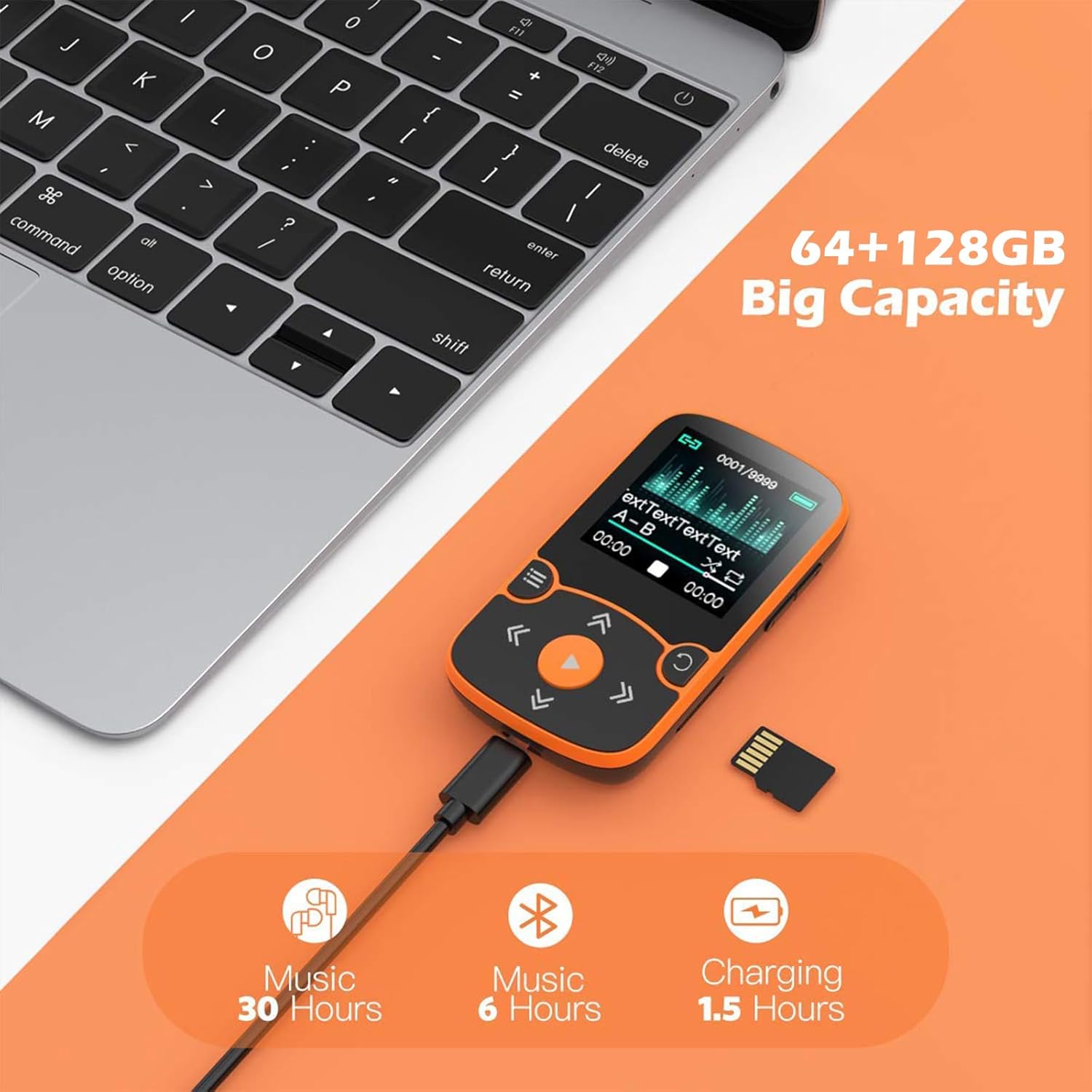
Figure 5: Connecting the MP3 player to a computer for charging and file transfer, and the option to expand storage with a TF card.
4. Operating Instructions
4.1 Basic Navigation
Use the physical buttons on the device to navigate through menus and control playback. The central play button initiates playback and confirms selections. The arrow buttons are used for navigation and volume control, while the menu button accesses options.
4.2 Music Playback
From the main menu, select 'Music' to browse your audio files. You can play, pause, skip tracks, and adjust volume. The device supports various audio formats, ensuring high-fidelity lossless sound quality.
4.3 Bluetooth Connectivity
The AGPTEK A65 features Bluetooth 5.3 for wireless connection to headphones or speakers. To pair:
- Go to the 'Bluetooth' menu on your MP3 player.
- Enable Bluetooth and search for available devices.
- Select your Bluetooth headphones or speaker from the list to pair.
Note: This device cannot connect to cell phones or cars via Bluetooth. An audio line can be used for car connections.

Figure 6: Bluetooth 5.3 connectivity for wireless audio experience.
4.4 FM Radio
Access the 'FM Radio' function from the main menu. You can auto-scan for stations or manually tune to your preferred frequencies. Ensure wired headphones are connected as they often act as the antenna.
4.5 Voice Recorder
Select 'Voice Recorder' to capture audio. The device has a built-in microphone. Recordings are saved internally and can be managed through the file browser.
4.6 Pedometer Mode
Activate 'Pedometer Mode' to track your steps during physical activity. The device records data when running, providing a basic fitness tracking function.

Figure 7: The AGPTEK A65 MP3 Player is suitable for sports activities, offering Hi-Fi audio on the go.
4.7 Other Functions
- Video Play: Supports video playback on its 1.5-inch screen.
- Photo Browsing: View images stored on the device.
- E-book: Read text files (TXT format only).
- A-B Repeat: Loop a specific section of an audio track.
- Alarm Clock & Calendar: Basic utility functions.
- File Folders: Manage your stored files directly on the device.
- Built-in Speaker: For audio playback without headphones.
- Time Screen-saver: Customize screen display settings.
5. Maintenance
- Keep the device dry. Moisture can damage electronic components.
- Avoid extreme temperatures.
- Clean the screen and body with a soft, dry cloth. Do not use harsh chemicals.
- Handle the device gently to prevent physical damage.
- Regularly back up important data to a computer.
6. Troubleshooting
6.1 Device Not Turning On
- Ensure the battery is charged. Connect to a power source and try again.
- If unresponsive, try resetting the device (refer to the device's specific reset method, usually a small pinhole button or holding the power button for an extended period).
6.2 Cannot Connect to Bluetooth Device
- Ensure the Bluetooth device (headphones/speaker) is in pairing mode.
- Verify the MP3 player's Bluetooth is enabled and scanning.
- Move the devices closer to each other.
- Restart both the MP3 player and the Bluetooth device.
- Remember, the MP3 player cannot connect to cell phones or car systems via Bluetooth.
6.3 Files Not Appearing or Playing
- Check if the files are in a supported format (MP3, WMA, APE, FLAC, WAV, DRM, ACELP for earphones; MP3, WMA, WAVE, FLAC, APE, M4A, AAC for Bluetooth).
- Ensure files are transferred to the correct folders on the device or TF card.
- Verify the TF card is properly inserted and recognized.
7. Specifications
| Feature | Detail |
|---|---|
| Model Name | A65 |
| Brand | AGPTEK |
| Memory Storage Capacity | 64 GB (expandable up to 128 GB via Micro SD/TF card) |
| Connectivity Technology | Bluetooth 5.3 |
| Screen Size | 1.5 Inches |
| Special Feature | Built-In Clip, Pedometer, FM Radio, Voice Recorder, E-book |
| Compatible Devices | Headphones |
| Media Type | Micro SD |
| Product Dimensions | 0.47 x 1.42 x 2.36 inches |
| Item Weight | 5.3 ounces |
| Batteries | 1 Lithium Polymer battery required |
| Included Components | MP3 Player |
8. Warranty and Support
For warranty information and customer support, please refer to the documentation included in your product packaging or visit the official AGPTEK website. Keep your purchase receipt for warranty claims.


