
1. Introduction
This manual provides essential information for the safe and efficient operation of your PiSFAU 600W Power Inverter. Please read these instructions thoroughly before using the device. This power inverter converts 12V DC power from your vehicle's battery into 110V AC power, suitable for various electronic devices and appliances.

Image 1.1: The PiSFAU 600W Power Inverter is designed for versatile use during road trips, camping, and other outdoor activities, providing power for various devices.
2. Product Overview
2.1 Key Features
- 600W Continuous Power: Provides 600W continuous DC to AC power with two 110V AC outlets.
- Versatile Charging: Includes USB-C (65W) and USB-A (24W) fast charging ports.
- Dual Connection Options: Can be connected via cigarette lighter plug (for devices under 150W) or directly to the battery with alligator clips (for devices between 150W and 600W).
- Efficient Cooling: Features an aluminum alloy casing and a smart, quiet fan for rapid heat dissipation.
- Multiple Protections: Built-in overload, short circuit, overheat, and low voltage protection mechanisms.
- Compact Design: Ultra-compact and lightweight, measuring approximately 6.5 x 4 x 2.17 inches, making it ideal for travel.
2.2 What's in the Box
- PiSFAU 600W Power Inverter
- Cigarette Lighter Cable
- Crocodile Clip Cable
- Instruction Manual

Image 2.1: The PiSFAU 600W Power Inverter, showcasing its compact design and the two types of input cables provided for different power needs.

Image 2.2: The compact size of the PiSFAU 600W Power Inverter, illustrating its portability and ease of storage, shown next to a smartphone for scale.
3. Safety Instructions
To ensure safe operation, please observe the following precautions:
- Do not expose the inverter to water, rain, or snow.
- Do not operate the inverter if it has been dropped or damaged.
- Ensure proper ventilation around the inverter to prevent overheating.
- Keep the inverter away from flammable materials and gases.
- Always connect the inverter to a 12V DC power source only.
- Do not exceed the rated power output of 600W. For devices over 150W, use the alligator clips to connect directly to the car battery.
- Disconnect the inverter from the power source when not in use.
- Keep out of reach of children.
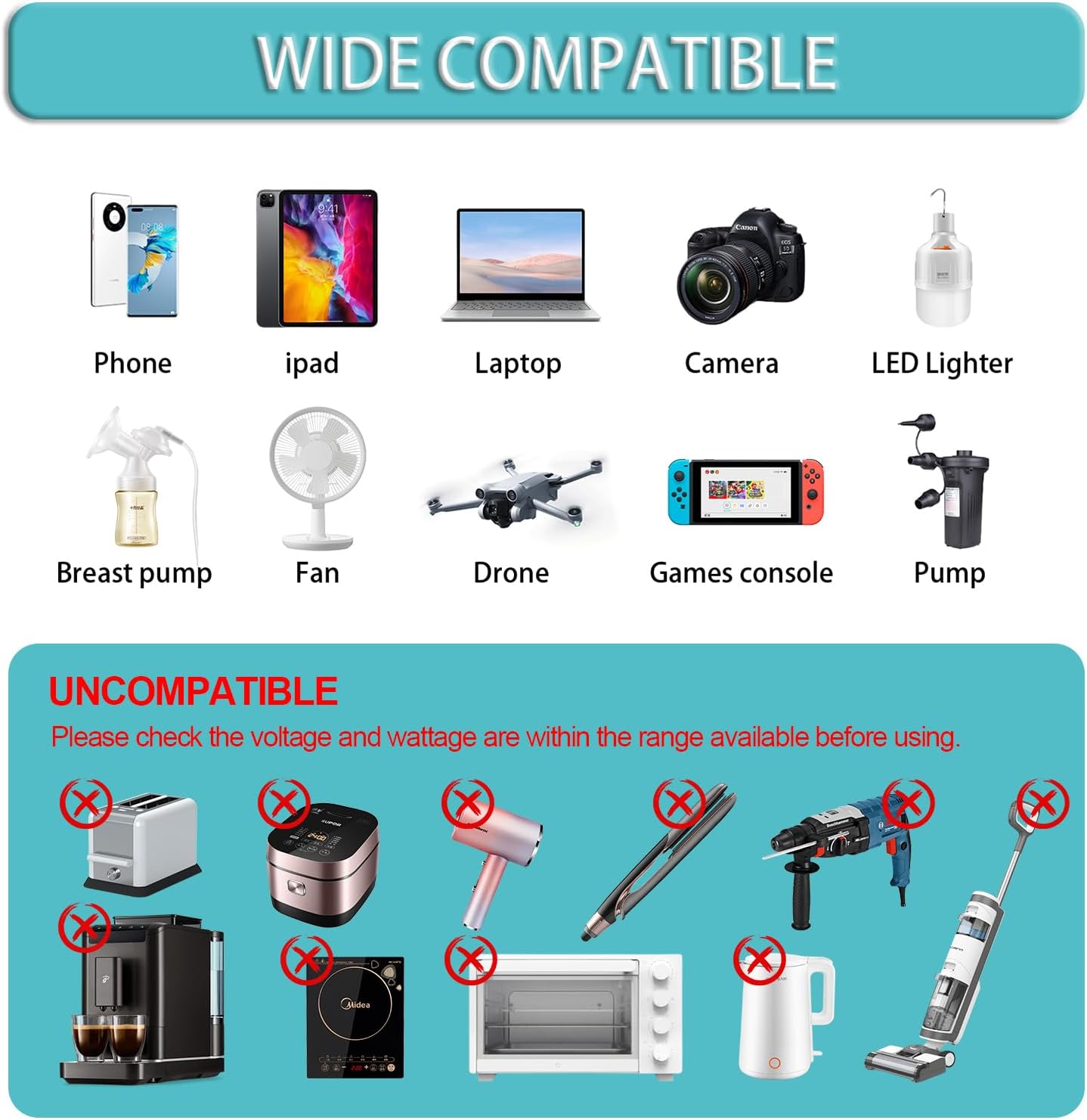
Image 3.1: A visual guide indicating compatible devices such as phones, laptops, and cameras, and incompatible high-wattage appliances like toasters and microwaves, for the PiSFAU 600W Power Inverter.
4. Setup
4.1 Connecting via Cigarette Lighter Socket (Up to 150W)
- Ensure the vehicle engine is running or the ignition is in the accessory position.
- Plug the cigarette lighter cable into the inverter's DC input port.
- Insert the cigarette lighter plug firmly into your vehicle's 12V cigarette lighter socket.
- Turn on the inverter using the power switch. The power indicator light will illuminate.
4.2 Connecting via Battery Clips (150W to 600W)
- Ensure the vehicle engine is running.
- Connect the red alligator clip cable to the positive (+) terminal of the inverter and the black alligator clip cable to the negative (-) terminal.
- Connect the red alligator clip to the positive (+) terminal of your vehicle's 12V battery.
- Connect the black alligator clip to the negative (-) terminal of your vehicle's 12V battery.
- Turn on the inverter using the power switch. The power indicator light will illuminate.

Image 4.1: The PiSFAU 600W Power Inverter connected in a vehicle, demonstrating both the cigarette lighter and battery clip connection methods for different power requirements.
Video 4.1: An official video from PiSFAU demonstrating the unboxing and basic setup of the 600W power inverter in a vehicle, including connecting to the cigarette lighter socket and using the AC outlets.
5. Operating Instructions
5.1 Using AC Outlets
Once the inverter is powered on, plug your 110V AC devices into the two standard AC outlets. Ensure the total wattage of connected devices does not exceed 600W. For cigarette lighter connections, limit total wattage to 150W.
5.2 Using USB Charging Ports
Connect your USB-compatible devices to the USB-C (65W) or USB-A (24W) ports for fast charging. These ports can be used simultaneously with the AC outlets, provided the total power draw remains within limits.

Image 5.1: The PiSFAU 600W Power Inverter actively charging multiple devices, including a laptop via USB-C and other electronics through its AC outlets, demonstrating its in-vehicle charging capabilities.

Image 5.2: A graphic illustrating the fast charging capabilities of the PiSFAU 600W Power Inverter, specifically showing a MacBook Pro 13 charging to 40% in 30 minutes and 100% in 1.8 hours via the USB-C PD 65W port.
6. Maintenance
Regular maintenance ensures the longevity and optimal performance of your inverter:
- Keep the inverter clean and free from dust and debris. Use a dry cloth for cleaning.
- Ensure the ventilation openings are not blocked to allow for proper airflow and cooling.
- Store the inverter in a cool, dry place when not in use.
- Periodically check cables and connections for any signs of wear or damage. Replace if necessary.

Image 6.1: An internal diagram of the PiSFAU 600W Power Inverter highlighting its cooling system, including the smart fan and aluminum alloy shell, which contribute to efficient heat dissipation.
7. Troubleshooting
If you encounter issues with your PiSFAU 600W Power Inverter, refer to the following common problems and solutions:
| Problem | Possible Cause | Solution |
|---|---|---|
| Inverter not turning on | Loose connection, low battery voltage, blown fuse. | Check all cable connections. Ensure vehicle battery is charged. Check and replace inverter fuse if necessary. |
| No power output from AC outlets | Overload, short circuit, overheat protection activated. | Reduce connected load. Disconnect and reconnect the inverter. Allow unit to cool down if overheated. |
| No power output from USB ports | Device incompatibility, cable issue. | Ensure device is USB compatible. Try a different USB cable. |
| Fan is noisy or constantly running | High load, high ambient temperature, blocked vents. | This is normal under heavy load. Ensure vents are clear. Reduce load if possible. |
8. Specifications
- Model Name: Updated Model DC to AC inverter 600 watts 12v to 110v/120v
- Wattage: 600 watts
- Power Source: Cigarette lighter power supply (12V DC)
- Input Voltage: 12V DC
- Output Voltage: 110V AC / 120V AC
- USB-C Output: 65W Power Delivery (PD)
- USB-A Output: 24W Quick Charge (QC)
- Product Dimensions: 6.3 x 3.9 x 2.15 inches
- Item Weight: 1.61 pounds
- Manufacturer: PiSFAU
9. Warranty and Support
The PiSFAU 600W Power Inverter comes with a standard manufacturer's warranty. For specific warranty details, technical support, or service inquiries, please refer to the contact information provided on the product packaging or visit the official PiSFAU website. Please retain your proof of purchase for warranty claims.